1. บทนำ
Thank you for choosing the Claiks 63" L Shaped Standing Desk. This electric height-adjustable desk is designed to enhance your workspace with its versatile L-shaped design, integrated LED lighting, and convenient power outlets. It features a dual-motor system for smooth and quiet height adjustments, along with memory presets for personalized comfort. This manual provides essential information for assembly, operation, maintenance, and troubleshooting to ensure optimal performance and longevity of your desk.

รูปที่ 1.1: เกินview of the Claiks L-shaped standing desk, showcasing its design with dual monitors, integrated LED lighting, and a visible power outlet on the side.

Figure 1.2: The Claiks L-shaped standing desk integrated into a modern home office environment, highlighting its spacious design and aesthetic appeal.
2. ข้อมูลด้านความปลอดภัยที่สำคัญ
โปรดอ่านคำแนะนำด้านความปลอดภัยทั้งหมดอย่างละเอียดก่อนประกอบและใช้งาน การไม่ปฏิบัติตามคำแนะนำเหล่านี้อาจส่งผลให้เกิดการบาดเจ็บหรือความเสียหายต่อผลิตภัณฑ์ได้
- ควรประกอบโต๊ะตามคำแนะนำที่ให้ไว้เสมอ
- Do not exceed the weight limit of 132 lbs (60 kg) for the desktop. Overloading can cause instability and damage.
- Ensure the desk is properly anchored to the floor if required, or that casters are locked, to prevent tipping, especially when adjusting height or moving.
- Keep the work area clear of obstacles to prevent accidents during height adjustment. Ensure no objects are under the desk that could obstruct its movement.
- Always use the desk with caution and follow all safety guidelines. Keep children and pets away from the desk during operation.
- ห้ามนั่งหรือยืนบนโต๊ะ
- ตัดการเชื่อมต่อไฟฟ้าก่อนทำความสะอาดหรือดำเนินการบำรุงรักษา
3. เนื้อหาบรรจุภัณฑ์
ก่อนเริ่มประกอบ โปรดตรวจสอบให้แน่ใจว่าชิ้นส่วนทั้งหมดที่ระบุไว้ด้านล่างครบถ้วนและไม่เสียหาย หากมีชิ้นส่วนใดขาดหายหรือเสียหาย โปรดติดต่อฝ่ายบริการลูกค้าทันที
- Desk Frame Components (Legs, Crossbars)
- Desktop Panels (L-shaped sections)
- Electric Motors and Control Box
- แผงควบคุมพร้อมการตั้งค่าหน่วยความจำ
- Power Outlet Unit
- แอสเซมบลีของลิ้นชัก
- ไฟเส้น LED
- Hooks (for headphones/bags)
- ขาปรับระดับได้ (x6)
- Lockable Swivel Casters (x6)
- Under-desk Storage Shelf
- Assembly Hardware (Screws, Wrenches, etc.)
- คู่มือการใช้งาน

Figure 3.1: Key components and features of the desk, including the integrated power outlet, adjustable feet for stability, lockable swivel casters for mobility, and a convenient under-desk storage solution.
4. ข้อมูลจำเพาะผลิตภัณฑ์
| คุณสมบัติ | ข้อมูลจำเพาะ |
|---|---|
| ยี่ห้อ | เคล็กส์ |
| แบบอย่าง | B0DRH15MJB |
| ขนาดสินค้า (ลึก x กว้าง x สูง) | ลึก 63 นิ้ว x กว้าง 55 นิ้ว x สูง 28.5 นิ้ว |
| ช่วงความสูงที่สามารถปรับได้ | 28.3" ถึง 47.2" |
| สี | ธรรมชาติ |
| สไตล์ | Modern, L-Shape Standing Desk |
| วัสดุฐาน | โลหะ |
| ประเภทวัสดุยอดนิยม | ไม้แปรรูป |
| น้ำหนักสินค้า | 98.1 ปอนด์ |
| ความจุน้ำหนักสูงสุด | 132 ปอนด์ (60 กก.) |
| ส่วนประกอบที่รวมอยู่ | Drawer, Hooks, LED Light, Power Outlet |
| จำนวนลิ้นชัก | 1 (Single, Open Shelf Drawer) |
| จำนวนชั้นวาง | 1 (Integrated Storage Shelf) |
| คุณสมบัติพิเศษ | Cord Rewind, 4 Memory Presets, Dual Motor, Quiet Operation |
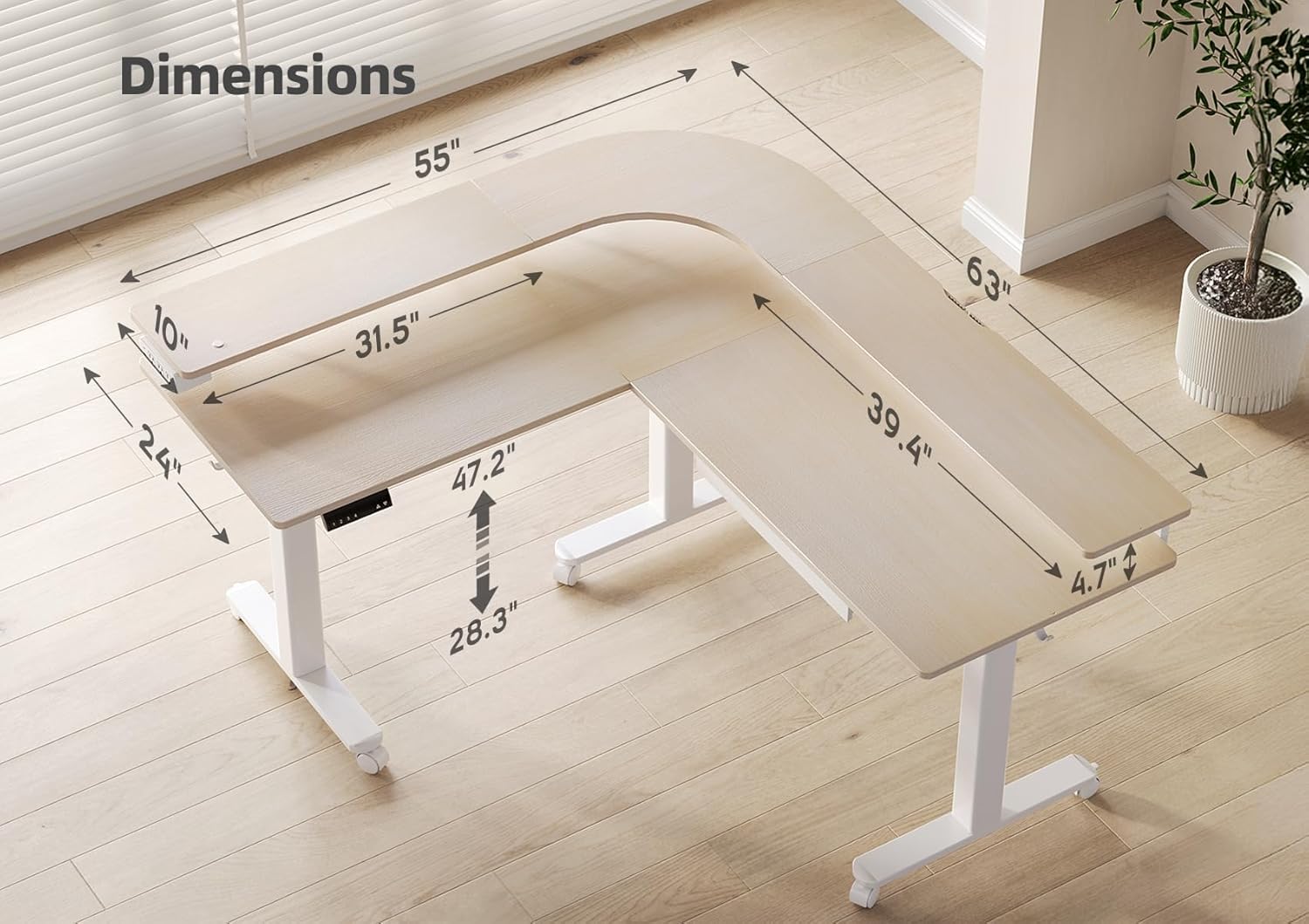
Figure 4.1: Detailed dimensions of the Claiks L-shaped standing desk, illustrating its length, width, and adjustable height range.
5. การติดตั้งและการประกอบ
Assembly of the Claiks L Shaped Standing Desk is required. Please follow the step-by-step instructions provided in the separate assembly guide included with your package. Ensure you have adequate space and assistance if needed, as the desk components can be heavy.
5.1 รายการตรวจสอบก่อนการประกอบ
- แกะส่วนประกอบทั้งหมดออกและตรวจสอบกับรายการเนื้อหาในแพ็คเกจ
- Clear a spacious area for assembly, preferably on a soft surface to prevent scratches.
- Gather necessary tools (usually included, but a Phillips head screwdriver may be helpful).
5.2 General Assembly Steps (Refer to dedicated Assembly Guide for details)
- Assemble the desk frame: Attach the legs to the crossbars.
- Install the electric motors and control box onto the frame.
- ยึดแผงเดสก์ท็อปเข้ากับโครงที่ประกอบแล้ว
- Install the control panel, power outlet, LED light strip, and drawer.
- Attach adjustable feet or lockable swivel casters as desired.
- Connect all electrical cables according to the wiring diagram in the assembly guide.
- Perform initial calibration as per the assembly guide instructions.
6. คู่มือการใช้งาน
6.1 การปรับความสูง
The desk features a dual-motor system for smooth and quiet height adjustment. The height can be adjusted from 28.3 inches (sitting height) to 47.2 inches (standing height).
- ปุ่มขึ้น/ลง: ใช้ ▲ (ขึ้น) และ ▼ (Down) buttons on the control panel to manually adjust the desk to your desired height.
- การทำงานที่เงียบ: The desk operates with a low noise level (approximately 45dB), ensuring minimal disruption.
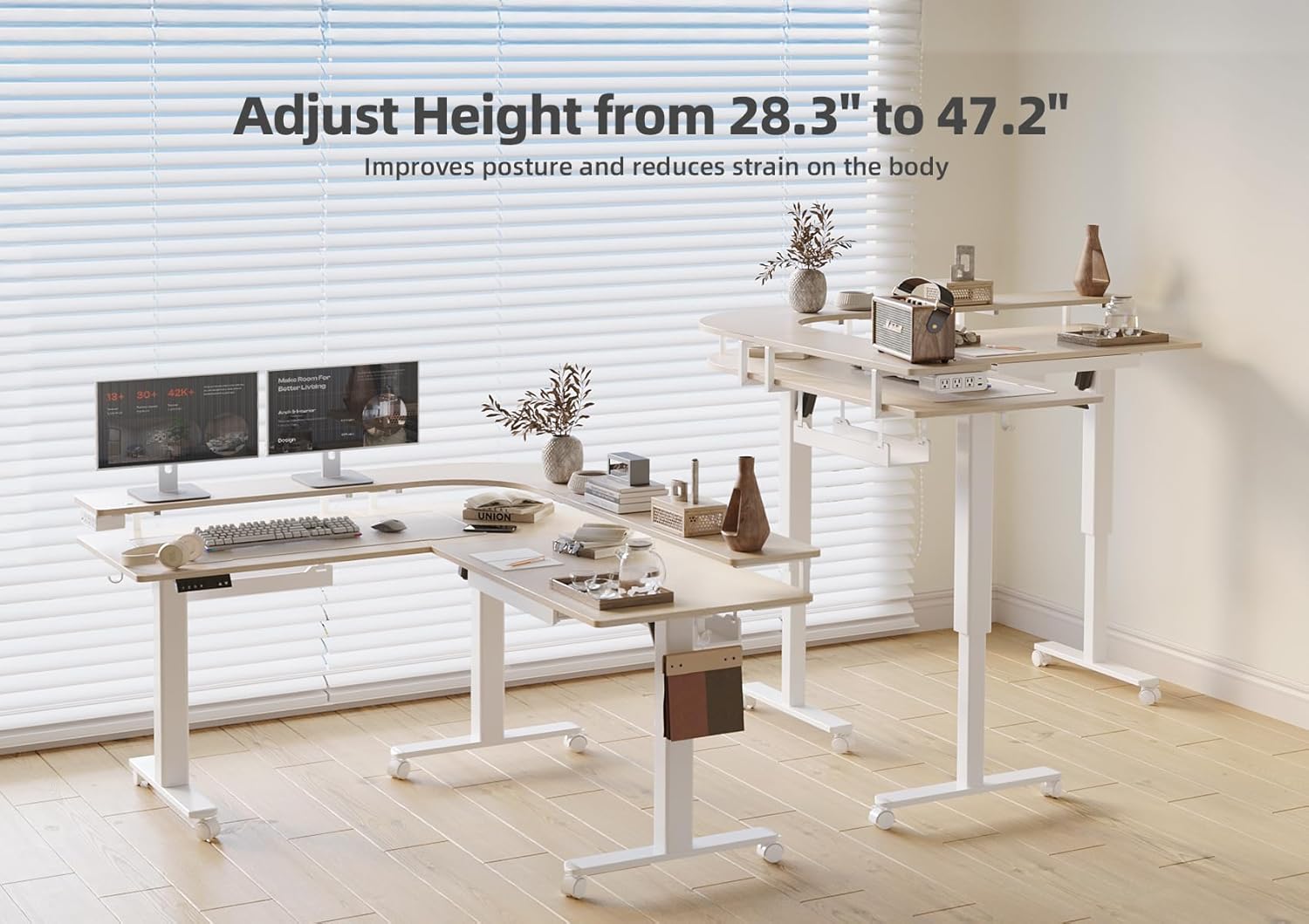
Figure 6.1: The desk's ability to adjust height, promoting better posture and reducing physical strain during work.
6.2 ค่าที่ตั้งไว้ล่วงหน้าของหน่วยความจำ
The control panel includes four memory preset buttons (1, 2, 3, 4) to save and recall your preferred sitting and standing heights.
- วิธีบันทึกความสูง: Adjust the desk to your desired height using the Up/Down buttons. Press and hold one of the memory preset buttons (1, 2, 3, or 4) until the display flashes or a beep is heard, indicating the height has been saved.
- วิธีจดจำความสูง: Simply press the corresponding memory preset button (1, 2, 3, or 4) once. The desk will automatically move to the saved height.
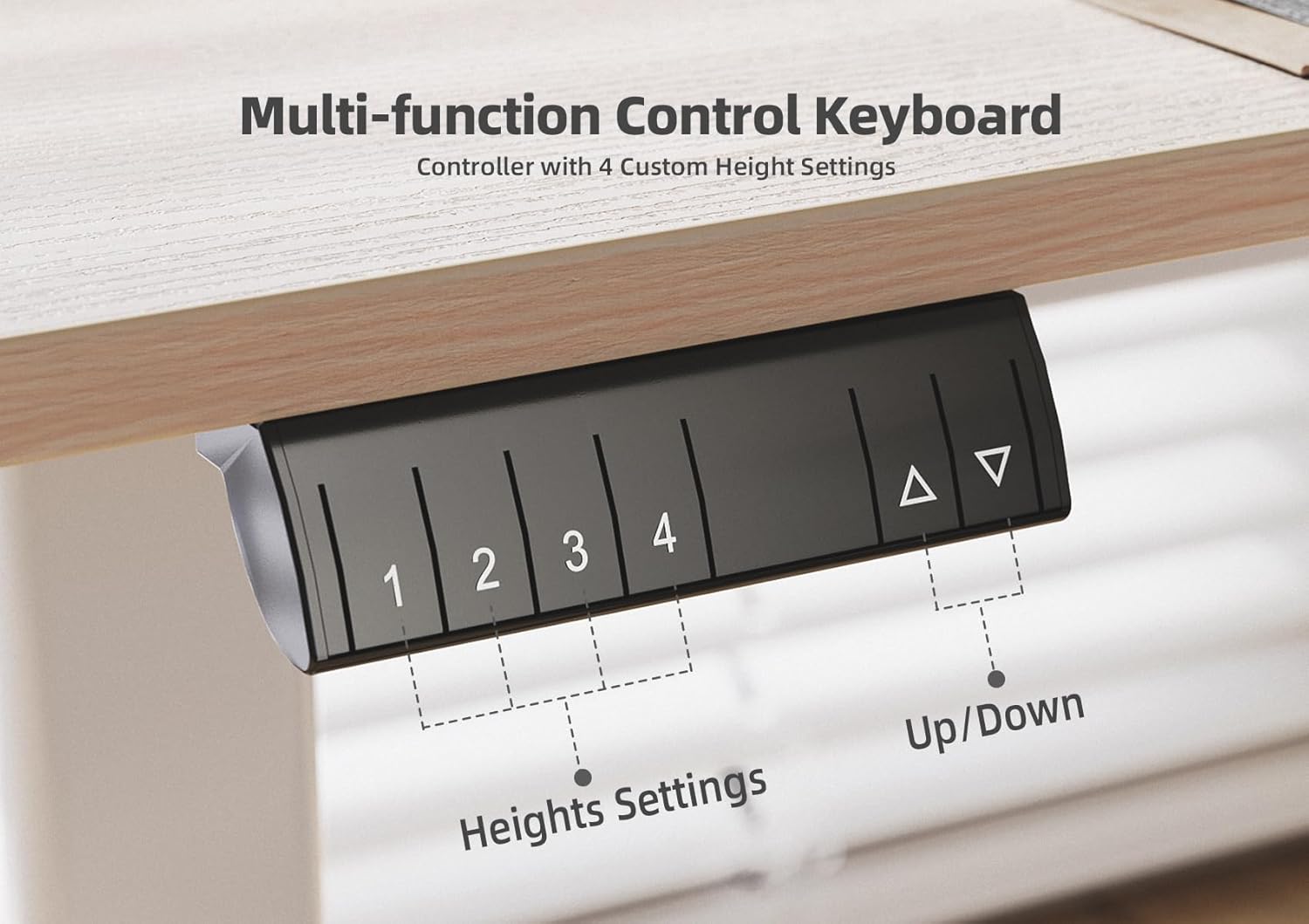
Figure 6.2: The multi-function control keyboard with four custom height settings, allowing users to save and recall their ideal desk positions.
ไฟ LED 6.3 ดวง
The desk is equipped with built-in LED lights to provide illumination and enhance the ambiance of your workspace.
- Refer to the assembly guide for specific instructions on activating and controlling the LED lights. Typically, there is a dedicated button or a combination of buttons on the control panel for light operation.
- The hidden light feature provides subtle and effective illumination.

Figure 6.3: The integrated LED lighting system, providing ambient light and enhancing the desk's functionality in low-light conditions.
6.4 Power Outlet
A side-mounted power outlet is integrated into the desk for convenient charging of your devices.
- Plug your devices directly into the power outlets.
- Ensure the desk is connected to a grounded power source.
- Do not overload the power outlet. Refer to the power outlet's specifications for maximum wattage.
7. การบำรุงรักษาและการดูแล
Regular maintenance will help prolong the life and appearance of your Claiks standing desk.
- การทำความสะอาด: เช็ดพื้นผิวโต๊ะด้วยผ้าเนื้อนุ่มและแห้งamp cloth. Avoid harsh chemicals or abrasive cleaners that could damage the finish. For the metal frame, a mild soap solution can be used.
- การจัดการสายเคเบิล: Periodically check and organize cables to prevent tangling or interference with the desk's movement. Utilize the built-in cable management features.
- Motor and Frame Inspection: Annually inspect the motor and frame for any loose screws or signs of wear. Tighten any loose fasteners.
- การหล่อลื่น: The lifting columns are generally maintenance-free. Do not attempt to lubricate internal components unless specifically instructed by Claiks customer support.
8 การแก้ไขปัญหา
If you encounter issues with your Claiks standing desk, refer to the common problems and solutions below. If the problem persists, contact Claiks customer support.
| ปัญหา | สาเหตุที่เป็นไปได้ | สารละลาย |
|---|---|---|
| โต๊ะไม่ขยับหรือไม่ตอบสนองต่อปุ่มควบคุม | Power disconnected, control box error, overload. |
|
| โต๊ะเคลื่อนไหวไม่สม่ำเสมอหรือมีเสียงผิดปกติ | Loose connections, uneven load, obstruction. |
|
| การตั้งค่าหน่วยความจำล่วงหน้าใช้งานไม่ได้ | Presets not saved correctly, power cycle needed. |
|
| ไฟ LED ไม่ทำงาน | Loose connection, light strip damage. |
|
9. การรับประกันและการสนับสนุนลูกค้า
9.1 ข้อมูลการรับประกัน
The Claiks 63" L Shaped Standing Desk comes with a การรับประกันแบบจำกัด. Please refer to the warranty card included with your product for specific terms, conditions, and duration of coverage. This warranty typically covers manufacturing defects and malfunctions under normal use.
9.2 การคืนสินค้าและการแลกเปลี่ยน
Claiks offers a คืนสินค้าได้ง่ายภายใน 30 วัน policy. If you are not satisfied with your purchase, you may return the product within 30 days of receipt. Please refer to the retailer's return policy or contact Claiks customer support for detailed instructions on returns and exchanges.
9.3 การสนับสนุนลูกค้า
For any questions, technical assistance, or warranty claims, please contact Claiks Customer Support. Have your product model number (B0DRH15MJB) and purchase date ready when contacting support.
You can typically find contact information on the Claiks official webหรือผ่านทางเว็บไซต์หรือร้านค้าปลีกที่คุณซื้อสินค้า สำหรับการซื้อสินค้าจาก Amazon คุณสามารถเข้าไปที่เว็บไซต์ได้ Claiks Store on Amazon.


