1. บทนำ
This manual provides essential information for the proper use and maintenance of your ALLDOCUBE iPlay60 Lite 11-inch Android 15 Tablet. Please read it thoroughly before operating the device to ensure optimal performance and longevity. Keep this manual for future reference.
2. สินค้าหมดview
2.1 เนื้อหาบรรจุภัณฑ์
ตรวจสอบว่ามีรายการทั้งหมดอยู่ในแพ็คเกจ:
- ALLDOCUBE iPlay60 Lite Tablet
- สายเคเบิล USB Type-C
- พินซิมการ์ด
- อะแดปเตอร์แปลงไฟ (5V/2A)
- คู่มือการใช้งาน

Image: Contents of the ALLDOCUBE iPlay60 Lite tablet package, including the tablet, USB-C cable, SIM ejector tool, power adapter, and user manual.
2.2 เค้าโครงอุปกรณ์
Familiarize yourself with the physical components of your tablet:
- กล้องหน้า: สำหรับวิดีโอคอลและเซลฟี่
- กล้องหลัง: กล้องหลักสำหรับถ่ายภาพและวิดีโอ
- สวิตช์ไฟ: เพื่อเปิด/ปิดอุปกรณ์ หรือล็อก/ปลดล็อกหน้าจอ
- ปุ่มปรับระดับเสียง: เพื่อปรับระดับเสียง
- พอร์ตชาร์จ (Type-C): สำหรับการชาร์จอุปกรณ์และถ่ายโอนข้อมูล
- ผู้บรรยาย: สำหรับเอาต์พุตเสียง
- ช่องเสียบการ์ด TF/ซิมการ์ด: For inserting microSD and SIM cards.

Image: Diagram illustrating the physical layout of the ALLDOCUBE iPlay60 Lite tablet, highlighting the front camera, rear cameras, power switch, volume buttons, charging port, speaker, and TF/SIM card slot.
3. การตั้งค่า
3.1 การใส่ซิมการ์ดและ MicroSD
- Locate the TF/SIM card slot on the side of the tablet.
- Insert the provided SIM card pin into the small hole next to the slot to eject the tray.
- Place your Nano-SIM card(s) and/or microSD card into the designated slots on the tray. Note that SIM2 shares a slot with the microSD card.
- ค่อยๆ ใส่ถาดกลับเข้าไปในแท็บเล็ตอย่างระมัดระวัง

ภาพ: ระยะใกล้ view of the SIM and microSD card tray, demonstrating how to insert the cards into the ALLDOCUBE iPlay60 Lite tablet.
3.2 การเปิดเครื่องครั้งแรกและการตั้งค่า Android
- กดปุ่มเปิด/ปิดค้างไว้จนกว่าโลโก้ ALLDOCUBE จะปรากฏขึ้น
- Follow the on-screen prompts to complete the initial Android 15 setup, including language selection, Wi-Fi connection, Google account login, and security settings.
- Ensure your tablet is sufficiently charged before starting the setup process.
4. คู่มือการใช้งาน
4.1 Display Features and Media Playback
The 11-inch in-cell display with 1280x800 resolution is suitable for video viewing, reading, and gaming. It supports Widevine L1 DRM, allowing for high-definition 1080P playback on streaming services like Netflix, Hulu, Prime Video, and Disney+ without quality loss.

Image: The 11-inch display of the ALLDOCUBE iPlay60 Lite, highlighting its 1280x800 resolution, in-cell technology, 10-point touch, 350 cd/m² brightness, and Widevine L1 support for streaming services.
Adjust display settings for comfort:
- โหมดป้องกันดวงตา: Reduces blue light to prevent eye strain.
- โหมดกลางคืน: Darkens the interface for comfortable viewในที่แสงน้อย
- โหมดการอ่าน: Optimizes the display for reading text.
- การปรับอุณหภูมิสี: Customize the screen's color balance.

Image: Screenshots demonstrating various display modes available on the ALLDOCUBE iPlay60 Lite, including eye protection, night mode, reading mode, and color temperature adjustment.
4.2 ประสิทธิภาพและการจัดเก็บ
The tablet is equipped with a T606 octa-core processor and Arm Mali G57 GPU, providing smooth multitasking and efficient power usage. It features 12GB RAM (4GB physical + 8GB virtual) and 128GB ROM, expandable up to 512GB with a microSD card, offering ampพื้นที่สำหรับแอพ รูปภาพ และวิดีโอ
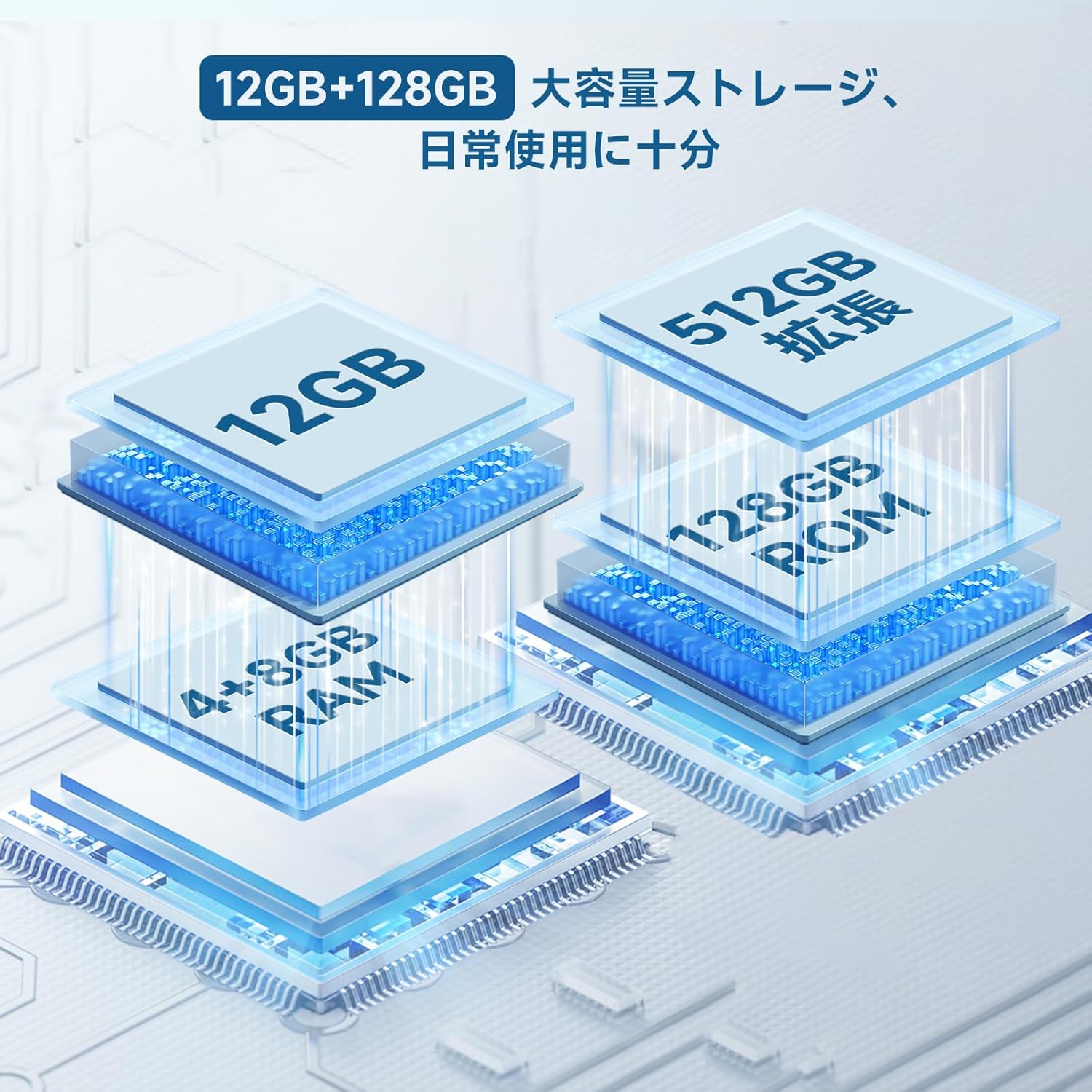
Image: Diagram illustrating the 12GB RAM (4GB + 8GB virtual) and 128GB ROM storage, expandable to 512GB, of the ALLDOCUBE iPlay60 Lite tablet.

Image: Graphic detailing the Unisoc T606 octa-core CPU and Arm Mali G57 GPU, highlighting its AnTuTu score of 290,000 points.
4.3 การเชื่อมต่อ
The iPlay60 Lite supports various connectivity options:
- 4G แอลทีอี: Dual SIM support for stable and high-speed mobile data and VoLTE calls.
- Wi-Fi ดูอัลแบนด์: Supports 2.4GHz and 5GHz for stable and fast internet connections.
- Bluetooth 5.0: For seamless connection with wireless accessories and file โอน.
- จีพีเอส: Integrated GPS (GPS/Beidou/Galileo/Glonass) for navigation.
Image: Visual representation of the ALLDOCUBE iPlay60 Lite's connectivity, including 4G LTE dual SIM, 2.4GHz/5GHz Wi-Fi, Bluetooth 5.0, and GPS, with examples of use cases like video calls, TV casting, and navigation.
4.4 อายุการใช้งานแบตเตอรี่
The 8000mAh battery provides extended usage times:
- สามารถเล่นวิดีโอต่อเนื่องได้นานสูงสุด 10 ชั่วโมง
- สามารถเล่นเพลงได้นานสูงสุด 32 ชั่วโมง
- มากถึง 16 ชั่วโมงของ web เรียกดู

Image: Graphic illustrating the 8000mAh battery capacity and estimated usage times for video playback (10 hours), music playback (32 hours), and reading/web browsing (16 hours).
4.5 คุณสมบัติของ Android 15
The tablet runs on Android 15, offering enhanced features for privacy, security, and data protection. It provides more control over app data usage and security functions, along with increased customization options.
- การปกป้องความเป็นส่วนตัว: เพิ่มประสิทธิภาพการควบคุมสิทธิ์การใช้งานแอปและการเข้าถึงข้อมูล
- การควบคุมโดยผู้ปกครอง: Manage screen time and app usage for children.
- หน้าจอแยก: Perform multiple tasks simultaneously by dividing the screen.
- การจับภาพหน้าจอด้วย 3 นิ้ว: Quickly capture screenshots with a simple gesture.

Image: Screenshots showcasing key features of Android 15 on the ALLDOCUBE iPlay60 Lite, including privacy settings, parental controls, split-screen functionality, and the 3-finger screenshot gesture.
5. การบำรุงรักษา
- การทำความสะอาด: ใช้ผ้านุ่มที่ไม่เป็นขุยทำความสะอาดหน้าจอและตัวเครื่อง หลีกเลี่ยงน้ำยาทำความสะอาดหรือตัวทำละลายที่มีฤทธิ์กัดกร่อน
- พื้นที่จัดเก็บ: เก็บยาเม็ดไว้ในที่แห้งและเย็น หลีกเลี่ยงแสงแดดโดยตรงและอุณหภูมิที่สูงหรือต่ำเกินไป
- การดูแลแบตเตอรี่ To prolong battery life, avoid fully discharging the battery frequently. Charge the device using the provided charger or a compatible 5V/2A or PD18W charger.
- การอัปเดตซอฟต์แวร์: ตรวจสอบและติดตั้งการอัปเดตระบบเป็นประจำเพื่อให้มั่นใจถึงประสิทธิภาพและความปลอดภัยที่เหมาะสมที่สุด
6 การแก้ไขปัญหา
6.1 Data Transfer Warning
หมายเหตุสำคัญ: If you purchased your tablet on or after April 20th, it comes with Android 15. Transferring data directly from another tablet to this device may cause errors. It is recommended to set up the new tablet as a fresh device and manually transfer data or use cloud services to avoid potential issues.
6.2 ปัญหาทั่วไป
- อุปกรณ์ไม่เปิดเครื่อง: ตรวจสอบให้แน่ใจว่าแบตเตอรี่ชาร์จเต็มแล้ว เสียบที่ชาร์จและรอสักครู่ก่อนลองเปิดเครื่องอีกครั้ง
- หน้าจอไม่ตอบสนอง: Try restarting the device by holding the power button. If unresponsive, force restart by holding the power button for an extended period (usually 10-15 seconds).
- ปัญหาการเชื่อมต่อ Wi-Fi/4G: Check if Wi-Fi is enabled and connected to the correct network. For 4G, ensure SIM cards are properly inserted and your plan is active. Try restarting the tablet and your router/modem.
- แอปขัดข้อง: Clear the cache of the problematic app or reinstall it. Ensure the tablet's software is up to date.
7. ข้อมูลจำเพาะ
| คุณสมบัติ | ข้อมูลจำเพาะ |
|---|---|
| ยี่ห้อ | ออลโดคิวบ์ |
| ชื่อรุ่น | iPlay 60 Lite |
| ระบบปฏิบัติการ | แอนดรอยด์ 15 |
| ขนาดจอแสดงผล | 11 นิ้ว |
| ความละเอียดการแสดงผล | 1280x800 พิกเซล |
| แบรนด์ CPU | MediaTek (T606 Octa-core) |
| ประเภทการ์ดจอ | Integrated (Arm Mali G57) |
| แรม | 12GB (4GB + 8GB Virtual) |
| ความจุของหน่วยความจำ | หน่วยความจำ 128GB (สามารถเพิ่มได้สูงสุด 512GB ผ่าน microSD) |
| การเชื่อมต่อ | Wi-Fi (802.11ac, 2.4/5GHz), Bluetooth 5.0, GPS (GPS/Beidou/Galileo/Glonass), 4G LTE |
| ความจุของแบตเตอรี่ | 8000mAh (3.8V, 30.4 Wh) |
| กล้องหลัง | 13MP (Autofocus) |
| กล้องหน้า | 5MP |
| น้ำหนักผลิตภัณฑ์ | 940 g (Package weight, device weight approx. 306g) |
8. การรับประกันและการสนับสนุน
สำหรับข้อมูลการรับประกันและการสนับสนุนทางเทคนิค โปรดดูที่ ALLDOCUBE อย่างเป็นทางการ website or contact their customer service directly. Details are typically provided with your purchase documentation or on the manufacturer's support pages.


