การแนะนำ
Thank you for choosing the MageGee V550 Wireless Gaming Keyboard and Mouse Combo. This manual provides detailed instructions on how to set up, operate, and maintain your new device. Please read this manual thoroughly before use to ensure optimal performance and longevity of your product.
มีอะไรอยู่ในกล่อง
เมื่อเปิดบรรจุภัณฑ์ โปรดตรวจสอบว่าประกอบด้วยสิ่งของต่อไปนี้ทั้งหมด:
- คีย์บอร์ดไร้สาย
- เมาส์ไร้สาย
- ตัวรับสัญญาณ USB
- สายชาร์จแบบ USB Type-C
- คู่มือการใช้งาน (เอกสารนี้)
สินค้าเกินview
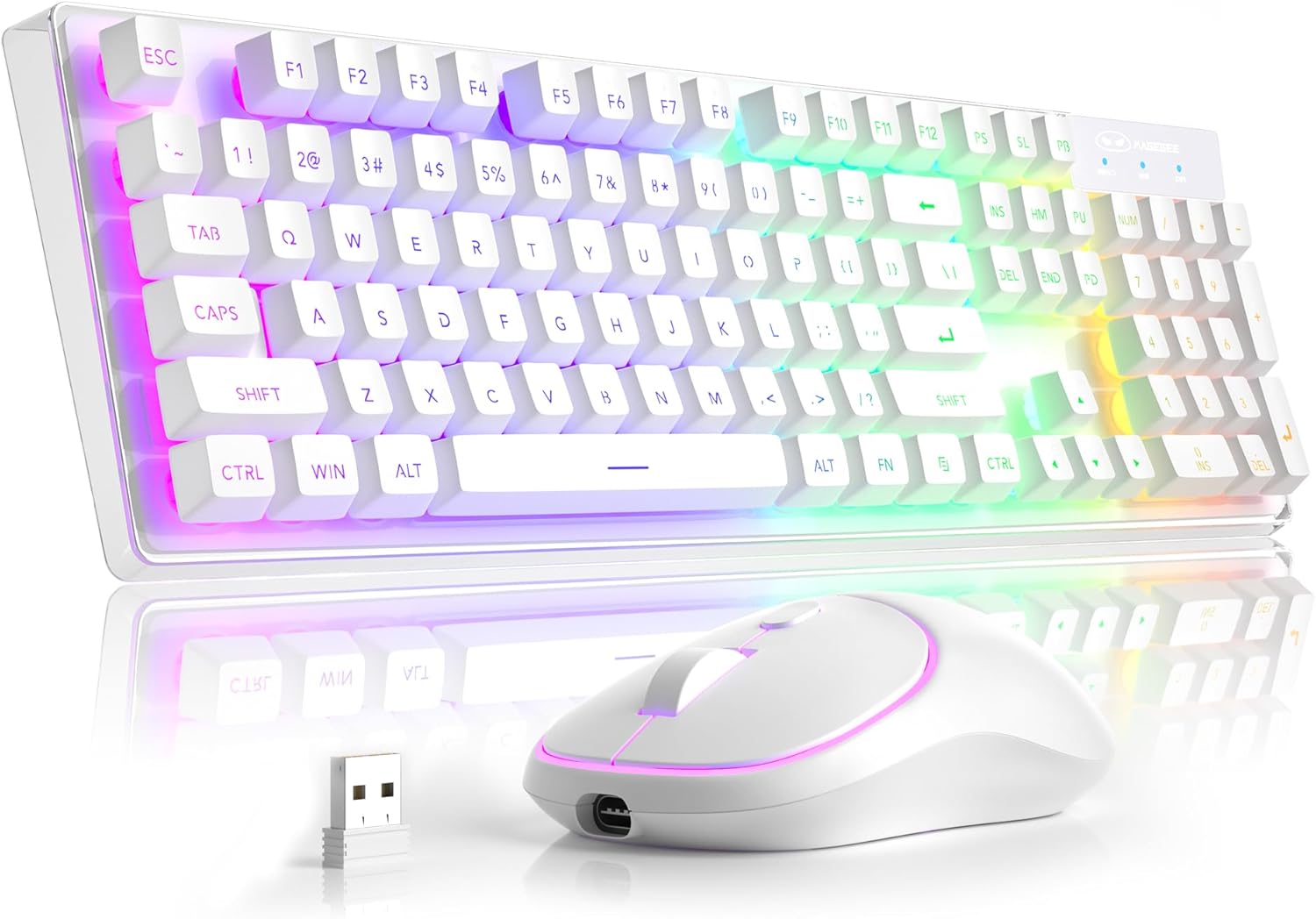
องค์ประกอบหลัก: The MageGee V550 combo includes a full-sized wireless keyboard and a wireless mouse, both designed for gaming and general computer use. The keyboard features a transparent base and RGB backlighting, while the mouse is compact and includes an RGB light strip.

ตัวรับสัญญาณ USB เดี่ยว: Both the keyboard and mouse connect wirelessly via a single 2.4G USB receiver. This receiver is conveniently stored in a slot on the bottom of the mouse for safekeeping and portability.

Transparent Housing: The keyboard features a unique transparent base, allowing the RGB backlighting to illuminate not only around the keys but also through the entire keyboard structure, enhancing its visual appeal.

ไฟแบ็คไลท์ RGB แบบไดนามิก: The keyboard offers multiple lighting settings, including 5 light modes, 7 solid color backlights, and 1 rainbow backlight. Brightness and speed are adjustable, and the backlight can be turned off as needed. The keys are shine-through for visibility in low-light conditions.

Wireless RGB Mouse: The accompanying mouse is lightweight and features a silent click design. It offers three adjustable tracking speed levels (1000-1200-1600 DPI) to suit various user preferences and tasks. An RGB light strip adds to its aesthetic.

USB-C ชาร์จใหม่ได้: Both the keyboard and mouse are rechargeable via the included USB Type-C cable, eliminating the need for frequent battery replacements. This design promotes convenience and environmental responsibility.

ขนาดสินค้า : The keyboard measures approximately 17.13 inches in length, 5.4 inches in width, and 1.34 inches in height. The mouse measures approximately 4.45 inches in length, 2.56 inches in width, and 1.42 inches in height.

Bottom Features: The bottom of both the keyboard and mouse feature on/off switches and anti-slip pads. The mouse also houses the USB receiver slot and its charging port. The keyboard has indicators for Win Lock, Num Lock, and Caps Lock.
คำแนะนำการตั้งค่า
- ค้นหาตัวรับ USB: ตัวรับสัญญาณ USB 2.4G ถูกเก็บไว้ในช่องเฉพาะที่ด้านล่างของเมาส์ไร้สาย โปรดนำออกมาอย่างระมัดระวัง
- เชื่อมต่อเครื่องรับ: Plug the USB receiver into an available USB port on your computer (PC, Laptop, Desktop, or Notebook).
- เปิดอุปกรณ์: Locate the power switches on the bottom of both the keyboard and the mouse. Turn both switches to the "ON" position.
- การเชื่อมต่ออัตโนมัติ: แป้นพิมพ์และเมาส์จะเชื่อมต่อกับคอมพิวเตอร์ของคุณโดยอัตโนมัติ ไม่จำเป็นต้องติดตั้งไดรเวอร์เพิ่มเติม
- ตรวจสอบการเชื่อมต่อ: Test the keyboard by typing and the mouse by moving the cursor to ensure they are functioning correctly.
คำแนะนำการใช้งาน
ฟังก์ชั่นคีย์บอร์ด
- เค้าโครงขนาดเต็ม: The keyboard features a standard 104-key layout, including a number pad.
- ทางลัดมัลติมีเดีย: Access 12 multimedia shortcuts for quick control of media playback, volume, and more. Refer to the key legends for specific functions.
- ป้องกันภาพซ้อน: The keyboard supports 19-key anti-ghosting, ensuring accurate input during fast typing or gaming.
- Win Lock Function: กด เอฟเอ็น + เอฟ12 เพื่อล็อกปุ่ม Windows ป้องกันการกดโดยไม่ตั้งใจขณะเล่นเกม
- WASD and Arrow Key Exchange: กด FN + ว to exchange the functions of the WASD keys with the arrow keys.
ฟังก์ชั่นเมาส์
- Tracking Speed Adjustment: The mouse offers 3 tracking speed levels: 1000, 1200, and 1600 DPI. Press the DPI button (usually located near the scroll wheel) to cycle through these settings.
- ดีไซน์แบบคลิกเงียบ: The mouse buttons are designed for quiet operation, minimizing disturbance.
RGB Backlight Control (Keyboard)
The keyboard's dynamic RGB backlight offers various customization options:
- โหมดแสง: Cycle through 5 different light modes.
- สีทึบ: Choose from 7 solid color backlights.
- ไฟแบ็คไลท์สีรุ้ง: Activate a vibrant rainbow lighting effect.
- ระดับความสว่าง: Adjust between 3 brightness levels to suit your environment.
- Light Speeds: Modify the speed of dynamic lighting effects (4 speeds available).
- Turn Off Backlight: The backlight can be turned off completely at any time.
Specific key combinations for backlight control are typically marked on the keyboard itself, often involving the FN key combined with other function keys (e.g., FN + Scroll Lock, FN + Page Up/Down). Please refer to your keyboard's keycap legends for precise controls.
การชาร์จและการประหยัดพลังงาน
- การชาร์จ: Use the included USB Type-C cable to charge both the keyboard and the mouse. Connect the cable to the charging port on each device and a USB power source (e.g., computer USB port, wall adapter).
- ตัวบ่งชี้แบตเตอรี่: The devices will typically have an indicator light to show charging status and when fully charged.
- โหมดพักอัตโนมัติ: To conserve battery life, both the keyboard and mouse feature an auto-sleep mode. If inactive for a period, they will enter a low-power state.
- Waking Up Devices: To wake up the keyboard or mouse from auto-sleep mode, simply click any key or button. This action will not register as an input on your computer screen.
- Separate Power Switches: Each device has its own power switch. Turning off one device will not affect the other. It is recommended to turn off the devices when not in use for extended periods to maximize battery life.
การแก้ไขปัญหา
| ปัญหา | สาเหตุที่เป็นไปได้ | สารละลาย |
|---|---|---|
| คีย์บอร์ด/เมาส์ไม่ตอบสนอง |
|
|
| ไฟแบ็คไลท์ไม่ทำงานหรือหรี่ลง |
|
|
| Mouse cursor erratic or slow |
|
|
| อายุการใช้งานแบตเตอรี่สั้น |
|
|
ข้อมูลจำเพาะ
| คุณสมบัติ | รายละเอียด |
|---|---|
| หมายเลขรุ่น | วี550 |
| ยี่ห้อ | เมจจี |
| เทคโนโลยีการเชื่อมต่อ | 2.4G ไร้สาย |
| เค้าโครงแป้นพิมพ์ | Full-sized 104-key |
| Backlight แป้นพิมพ์ | ไฟ RGB แบบไดนามิก (5 โหมด, 7 สีพื้นฐาน, 1 สีรุ้ง, 3 ระดับความสว่าง, 4 ระดับความเร็ว) |
| ระดับ DPI ของเมาส์ | 1000-1200-1600 DPI |
| พอร์ตชาร์จ | ยูเอสบี ไทป์ ซี |
| อุปกรณ์ที่รองรับ | Laptop, Personal Computer (PC, Desktop, Notebook) |
| ขนาดแป้นพิมพ์ (ยาว x กว้าง x สูง) | 17.13 x 5.4 x 1.34 นิ้ว |
| ขนาดเมาส์ (ยาว x กว้าง x สูง) | 4.45 x 2.56 x 1.42 นิ้ว |
| น้ำหนักสินค้า | 2.18 ปอนด์ (รวม) |
| คุณสมบัติพิเศษ | Backlit, Ergonomic, Rechargeable, Transparent Base, Silent Click Mouse, Auto-Sleep Mode |
การรับประกันและการสนับสนุน
MageGee products are designed for reliability and performance. For warranty information or technical support, please refer to the contact details provided with your purchase or visit the official MageGee webไซต์ โปรดเก็บหลักฐานการซื้อไว้เพื่อใช้ในการเรียกร้องการรับประกัน
For further assistance, you may contact MageGee Direct, the seller, through the Amazon platform or their official support channels.


