1. บทนำ
This manual provides comprehensive instructions for the setup, operation, and maintenance of your Anderic RRTR292A Remote Control. This remote is designed to enhance the functionality of compatible Harbor Breeze ceiling fans, offering precise control over fan speeds, direction, and lighting features.
2. ความเข้ากันได้
The Anderic RRTR292A remote control is specifically designed to work with Harbor Breeze ceiling fans that originally utilized the following remote control models:
- TR292A
- KUCJE10612
- TRD050G1M
- 2AQZU-18053
หมายเหตุสำคัญ: This remote will not function with any other models not listed above. Please confirm your existing remote's model number before attempting to pair.

รูปที่ 2.1: ด้านหลัง view of the remote control highlighting compatible model numbers for verification.
3. คุณสมบัติหลัก
The Anderic RRTR292A remote control offers a range of features for enhanced ceiling fan operation:
- 6-Speed DC Fan Control: Provides precise adjustment of fan speed for optimal comfort.
- จับคู่ง่าย: Simple learning key procedure for quick setup.
- ฟังก์ชั่นที่ครอบคลุม: Control fan speeds, set fan timers (2hr, 4hr, 8hr), adjust fan direction (forward/reverse), and utilize advanced features.
- คุณสมบัติขั้นสูง: Includes Light Walk Away feature, Home Away mode, Fan Breeze mode, and independent Light On/Off functions.
- การออกแบบที่สะดวกสบาย: Ergonomic design with included wall mount bracket for easy storage and accessibility.

รูปที่ 3.1 : ด้านหน้า view of two Anderic RRTR292A remote controls, illustrating the button layout.
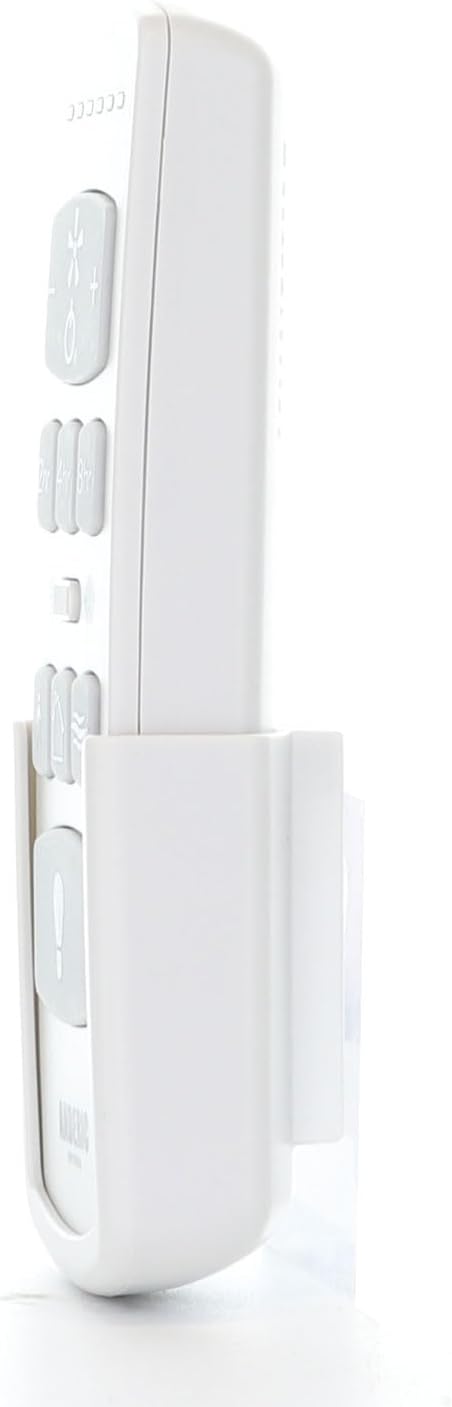
Figure 3.2: The Anderic RRTR292A remote control shown within its wall mount bracket.
4. Setup and Pairing Procedure
Follow these steps to set up and pair your Anderic RRTR292A remote control with your compatible ceiling fan receiver. The system uses a learning frequency function to prevent interference.
4.1. การติดตั้งแบตเตอรี่
- Open the battery cover located on the back of the remote control.
- Insert two (2) AAA batteries (not included) into the battery compartment, ensuring correct polarity (+/-).
- ปิดฝาครอบแบตเตอรี่ให้แน่น
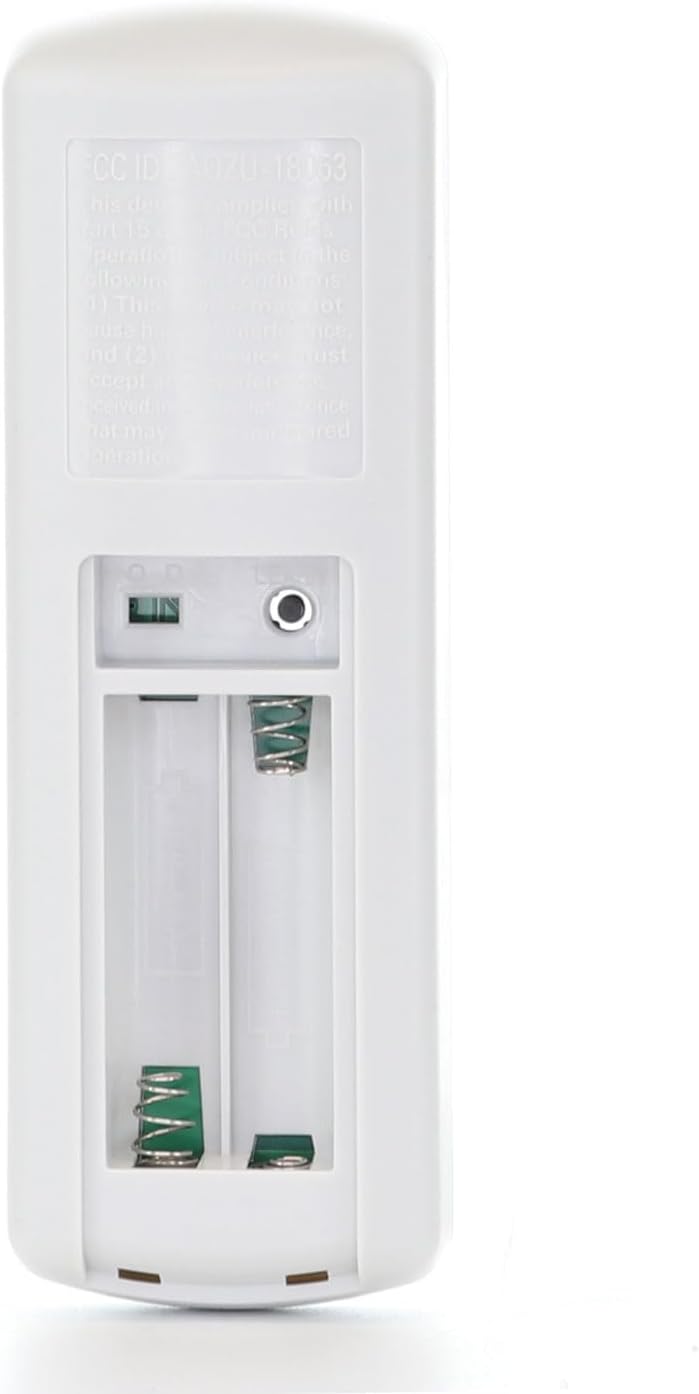
รูปที่ 4.1: ด้านหลัง view of the remote control with the battery compartment open, revealing the battery slots and the 'LEARN' button.
4.2. Learning Procedure (Pairing)
- Ensure the remote has fresh batteries installed (as per Section 4.1).
- Turn on the AC power to the ceiling fan receiver. This must be done within 30 seconds of starting the pairing process.
- Within 30 seconds of turning on the AC power, press and hold the "LEARN" key on the remote control for more than 5 seconds. The "LEARN" key is located inside the battery compartment.
- Once the receiver successfully detects the frequency, it will emit two "Bi Bi" sounds. This indicates that the remote has successfully learned the previously selected frequency from the transmitter.
สำคัญ: Do not press any other buttons on the remote control after turning on the AC power until the learning process is complete. Pressing other buttons may disrupt the pairing process.
After completing these steps, you should be able to control the ceiling fan and its light. If the fan does not respond to the remote, turn off the receiver's power and repeat steps 2 and 3 of the learning procedure.
5. คู่มือการใช้งาน
The Anderic RRTR292A remote control provides intuitive buttons for various fan and light functions:
| ปุ่ม/คุณสมบัติ | การทำงาน |
|---|---|
| Fan Speed Control (+/-) | Adjusts the fan speed up or down through 6 available speeds. |
| พัดลม เปิด/ปิด | Turns the ceiling fan on or off. |
| Timer (2hr, 4hr, 8hr) | Sets the fan to automatically turn off after 2, 4, or 8 hours. |
| Fan Direction (Summer/Winter) | Toggles the fan blade rotation direction for summer (downward airflow) or winter (upward airflow) modes. |
| ไฟเปิด/ปิด | Turns the integrated ceiling fan light on or off. |
| Light Walk Away Feature | Activates a mode where the light stays on for a short period after you leave the room, then automatically turns off. |
| โหมดอยู่บ้าน | จำลองสถานการณ์ที่มีคนอยู่ในห้องโดยการเปิดและปิดไฟแบบสุ่ม |
| Fan Breeze Mode | Varies the fan speed to simulate a natural breeze. |
6. การบำรุงรักษา
6.1. การเปลี่ยนแบตเตอรี่
When the remote control's performance diminishes or the indicator light does not illuminate, it is time to replace the batteries. Refer to Section 4.1 for battery installation instructions. Always use two fresh AAA batteries.
บันทึก: Remove the batteries if the remote will not be used for an extended period to prevent potential damage from battery leakage.
6.2. การทำความสะอาด
ในการทำความสะอาดรีโมทคอนโทรล ให้เช็ดเบาๆ ด้วยผ้าแห้งเนื้อนุ่ม ห้ามใช้สารทำความสะอาดที่มีฤทธิ์กัดกร่อน ตัวทำละลาย หรือสารเคมีรุนแรง เพราะอาจทำให้พื้นผิวหรือชิ้นส่วนภายในเสียหายได้
7 การแก้ไขปัญหา
| ปัญหา | สาเหตุที่เป็นไปได้ | สารละลาย |
|---|---|---|
| Fan does not respond to remote control. |
|
|
| ไฟไม่เปิด/ปิด. |
|
|
8. ข้อมูลจำเพาะ
- หมายเลขรุ่น: RRTR292A-2PACK
- ขนาดสินค้า : 6 x 2 x 1 นิ้ว
- น้ำหนักสินค้า: 6.4 ออนซ์
- แหล่งพลังงาน: แบตเตอรี่ AAA 2 ก้อน (ไม่รวม)
- สี: สีขาว
- คุณสมบัติพิเศษ: การออกแบบตามหลักสรีรศาสตร์
- จำนวนสูงสุดของอุปกรณ์ที่รองรับ: 2 (for the 2-pack)
- อุปกรณ์ที่รองรับ: พัดลมเพดาน
- ผู้ผลิต: บริษัท แดนส์ อิเล็กทรอนิกส์ อีทซี อิงค์
- วันที่เข้าใช้งานครั้งแรก: วันที่ 18 ธันวาคม 2024
9. การรับประกันและการสนับสนุน
For information regarding product warranty, please refer to the documentation provided with your purchase or contact Anderic customer support. For additional support, frequently asked questions, or to explore other products, please visit the official Anderic store:


