1. บทนำ
This manual provides comprehensive instructions for the installation, operation, maintenance, and troubleshooting of your Xigmatek Bano EN44250 computer case. Please read this manual thoroughly before beginning assembly to ensure proper setup and optimal performance.
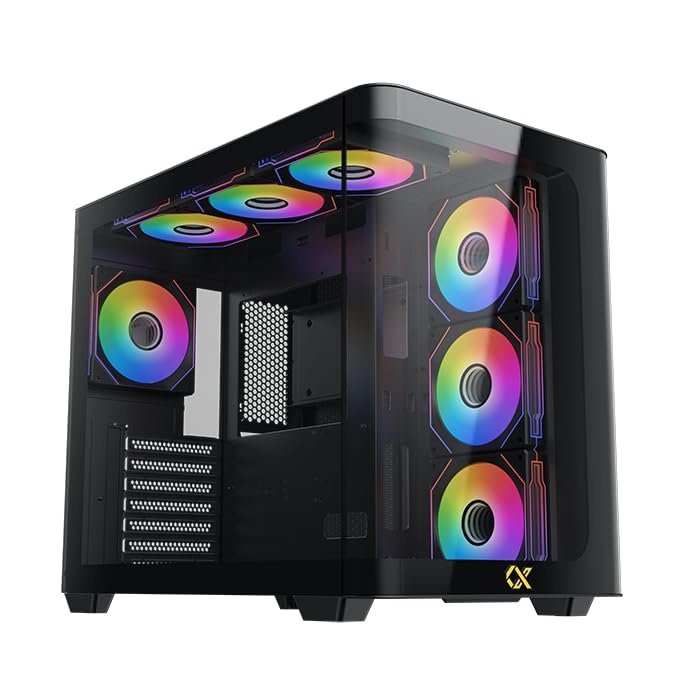
Figure 1: Xigmatek Bano EN44250 Computer Case (Exterior View)
2. คุณสมบัติ
- วัสดุ: Constructed from high-quality steel alloy for durability and long-term use.
- รองรับเมนบอร์ด: Compatible with E-ATX, ATX, Micro ATX, and Mini ITX motherboards.
- ระบบระบายความร้อน : Supports both air and liquid cooling solutions, with multiple fan and radiator mounting options.
- ช่องไดรฟ์: Features five internal drive bays compatible with both 2.5-inch and 3.5-inch hard drives/SSDs.
- แผง I/O: Equipped with one USB 3.0 port, two USB 2.0 ports, and HD audio jacks for seamless connectivity.
- ออกแบบ: Stylish black finish with a curved tempered glass panel for showcasing internal components and superior airflow.
- ช่องเสียบขยาย: Includes 7 expansion slots.
- PSU Mounting: Supports rear-mounted power supplies.

Figure 2: Internal Layout of the Case
3. คำแนะนำในการตั้งค่า
3.1 การเตรียมคดี
- แกะกล่องและนำวัสดุบรรจุภัณฑ์ทั้งหมดออก
- ถอดแผงกระจกนิรภัยด้านข้างออกอย่างระมัดระวังโดยคลายสกรูหัวแม่มือออก วางไว้บนพื้นผิวเรียบและอ่อนนุ่มเพื่อป้องกันรอยขีดข่วน
- Identify the accessory box inside the case, which contains screws, standoffs, and cable ties.
3.2 การติดตั้งเมนบอร์ด
- ติดตั้งแผ่นปิดพอร์ต I/O (หากยังไม่ได้ติดตั้งไว้ล่วงหน้า) เข้ากับช่องเปิดด้านหลังของเคส
- Align your motherboard with the pre-installed standoffs. If your motherboard form factor (E-ATX, ATX, Micro ATX, Mini ITX) requires additional standoffs, install them in the appropriate holes.
- วางเมนบอร์ดลงบนแท่นรองอย่างระมัดระวัง และยึดให้แน่นด้วยสกรูที่ให้มา
3.3 การติดตั้งหน่วยจ่ายไฟ (PSU)
- Mount the PSU into the designated rear compartment of the case.
- ยึดพาวเวอร์ซัพพลายด้วยสกรูจากด้านหลังของเคส
- Route the necessary power cables through the cable management cutouts to the motherboard and other components.
3.4 Storage Drive Installation (2.5"/3.5" HDDs/SSDs)
- Locate the internal drive bays. The case supports five drive bays compatible with 2.5-inch and 3.5-inch drives.
- For 3.5-inch drives, slide the drive into the tool-less tray (if applicable) or secure it with screws.
- For 2.5-inch drives, secure them to the designated mounting points or adapters.
- Connect SATA data and power cables to each installed drive.
3.5 การติดตั้งระบบระบายความร้อน (พัดลม/หม้อน้ำ)
The Xigmatek Bano EN44250 supports various fan and radiator configurations for optimal airflow. Refer to the diagrams below for compatible sizes and locations.

Figure 3: Fan and Radiator Mounting Options (Side View)

Figure 4: Fan and Radiator Mounting Options (Top View)
- Install case fans or liquid cooling radiators into the desired mounting positions using the appropriate screws.
- เชื่อมต่อสายไฟของพัดลมเข้ากับหัวต่อพัดลมบนเมนบอร์ดหรือตัวควบคุมพัดลม
3.6 การเชื่อมต่อแผง I/O ด้านหน้า
Connect the front I/O panel cables to the corresponding headers on your motherboard. These include:
- หัวต่อ USB 3.0
- หัวต่อ USB 2.0
- HD Audio header
- Power switch, reset switch, HDD LED, and power LED headers

Figure 5: Front I/O Panel
4. แนวทางการดำเนินงาน
Once all components are installed and connected, replace the side panel. Ensure all cables are neatly managed to avoid obstructing airflow. Power on your system using the front panel power button. Monitor temperatures and fan speeds to ensure optimal cooling performance.
5. การบำรุงรักษา
Regular maintenance helps prolong the life of your computer components and ensures efficient cooling.
- การทำความสะอาดฝุ่น: ทำความสะอาดแผ่นกรองฝุ่น (ถ้ามี) และชิ้นส่วนภายในเป็นระยะๆ โดยใช้ลมเป่าอัดแรงดันสูง ตรวจสอบให้แน่ใจว่าได้ปิดเครื่องและถอดปลั๊กออกก่อนทำความสะอาด
- การจัดการสายเคเบิล: Review cable routing periodically to ensure no cables are obstructing fan blades or airflow paths.
- การทำความสะอาดภายนอก: เช็ดพื้นผิวภายนอกด้วยผ้านุ่ม damp ผ้า หลีกเลี่ยงน้ำยาทำความสะอาดหรือตัวทำละลายที่มีฤทธิ์กัดกร่อน
6 การแก้ไขปัญหา
หากคุณพบปัญหาในระหว่างหรือหลังการประกอบ โปรดพิจารณาขั้นตอนการแก้ไขปัญหาทั่วไปต่อไปนี้:
- ระบบไม่เปิดเครื่อง:
- ตรวจสอบการเชื่อมต่อสายไฟทั้งหมด รวมถึงสายจากพาวเวอร์ซัพพลายไปยังเต้ารับที่ผนัง สายจากพาวเวอร์ซัพพลายไปยังเมนบอร์ด (24 พินและ 8 พินสำหรับซีพียู) และหัวต่อสวิตช์เปิดปิดที่แผงด้านหน้า
- ตรวจสอบให้แน่ใจว่าสวิตช์ของแหล่งจ่ายไฟ (PSU) อยู่ในตำแหน่ง 'เปิด'
- ไม่มีการแสดงผล:
- Verify that your monitor is connected to the graphics card (not the motherboard I/O if using a dedicated GPU).
- ติดตั้งการ์ดจอและโมดูล RAM ใหม่
- ปัญหาเรื่องความร้อนสูงเกินไป:
- Ensure all case fans are spinning and correctly oriented for optimal airflow (intake/exhaust).
- Check CPU cooler installation and thermal paste application.
- Clean any dust buildup from fans and radiators.
- พอร์ต USB/เสียงด้านหน้าใช้งานไม่ได้:
- ตรวจสอบให้แน่ใจว่าพอร์ต USB และพอร์ตเสียงด้านหน้าเชื่อมต่อกับเมนบอร์ดอย่างถูกต้องแล้ว
7. ข้อมูลจำเพาะ
| คุณสมบัติ | รายละเอียด |
|---|---|
| ผู้ผลิต | บริษัท ซิกมาเท็ก จำกัด |
| หมายเลขรุ่น | EN44250 |
| ขนาดสินค้า (กว้าง x ยาว x สูง) | 45 x 53.3 x 25.8 ซม. |
| น้ำหนัก | 9.44 กก. |
| ความเข้ากันได้ของเมนบอร์ด | E-ATX, ATX, ไมโคร ATX, มินิ ITX |
| ประเภทเคส | หอคอย |
| สี | สีดำ |
| วัสดุ | โลหะผสมเหล็ก |
| การติดตั้งพาวเวอร์ซัพพลาย | ด้านหลัง Mount |
| วิธีการทำความเย็น | อากาศ, น้ำ |
| การกวาดล้าง CPU Cooler | สูงถึง 16 ซม. |
| VGA Card Length Support | สูงถึง 41 ซม. |
| การรองรับความยาวของ PSU | สูงถึง 22 ซม. |
| ช่องเสียบขยาย | 7 |
| ช่องใส่ไดรฟ์ภายใน | 5 (compatible with 2.5" and 3.5" drives) |
| พอร์ต I / O ด้านหน้า | 1x USB 3.0, 2x USB 2.0, HD Audio |
8. การรับประกันและการสนับสนุน
สำหรับข้อมูลการรับประกันและการสนับสนุนทางเทคนิค โปรดดูที่เว็บไซต์อย่างเป็นทางการของ Xigmatek webหรือติดต่อตัวแทนจำหน่ายในพื้นที่ของคุณ เก็บหลักฐานการซื้อไว้เพื่อใช้ในการเคลมประกัน
แหล่งข้อมูลออนไลน์: www.xigmatek.com


