1. บทนำ
Thank you for choosing the ProtoArc EKM04 Ergonomic Keyboard Mouse Combo. This wireless combo is designed to enhance comfort and productivity for users of Windows desktop, PC, and laptop systems. Its split keyboard design, separate numeric keypad, and ergonomic mouse aim to provide a more natural and relaxed posture during extended use. This manual provides detailed instructions for setting up, operating, maintaining, and troubleshooting your new device.
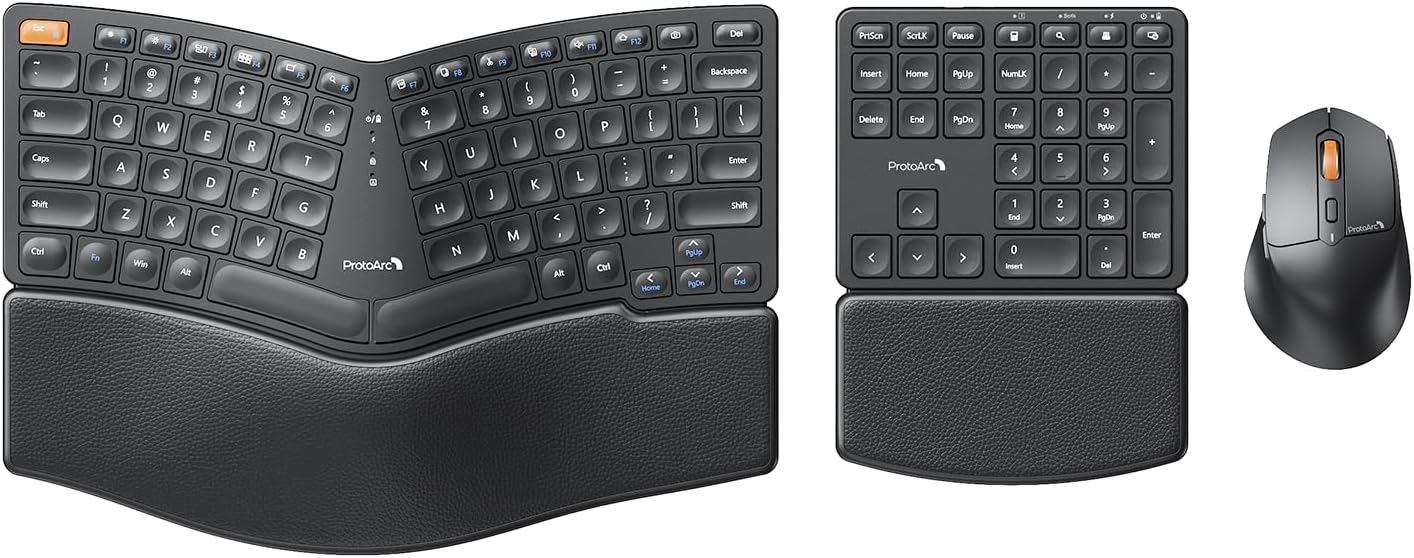
Image: The ProtoArc EKM04 ergonomic keyboard, separate numeric keypad, and ergonomic mouse, showcasinชุดคอมโบที่สมบูรณ์แบบ
2. เนื้อหาบรรจุภัณฑ์
โปรดตรวจสอบว่าสินค้าทั้งหมดมีอยู่ในแพ็คเกจของคุณ:
- ProtoArc Ergonomic Split Keyboard
- ProtoArc Separate Numeric Keypad
- เมาส์ไร้สาย ProtoArc ออกแบบตามหลักสรีรศาสตร์
- ตัวรับสัญญาณ USB (อยู่ภายในช่องใส่แบตเตอรี่ของเมาส์)
- สายชาร์จ USB-C
- คู่มือการใช้งาน

ภาพ: เหนือศีรษะ view of the ProtoArc EKM04 combo components laid out, including the keyboard, numeric keypad, mouse, charging cable, and user manual, alongside the product box.
3. คู่มือการติดตั้ง
3.1 การชาร์จเริ่มต้น
Before first use, it is recommended to fully charge the keyboard, numeric keypad, and mouse. Use the provided USB-C charging cable to connect each device to a USB power source (e.g., computer USB port, USB wall adapter). A full charge takes approximately 2 hours and provides up to 250 hours of standby time.
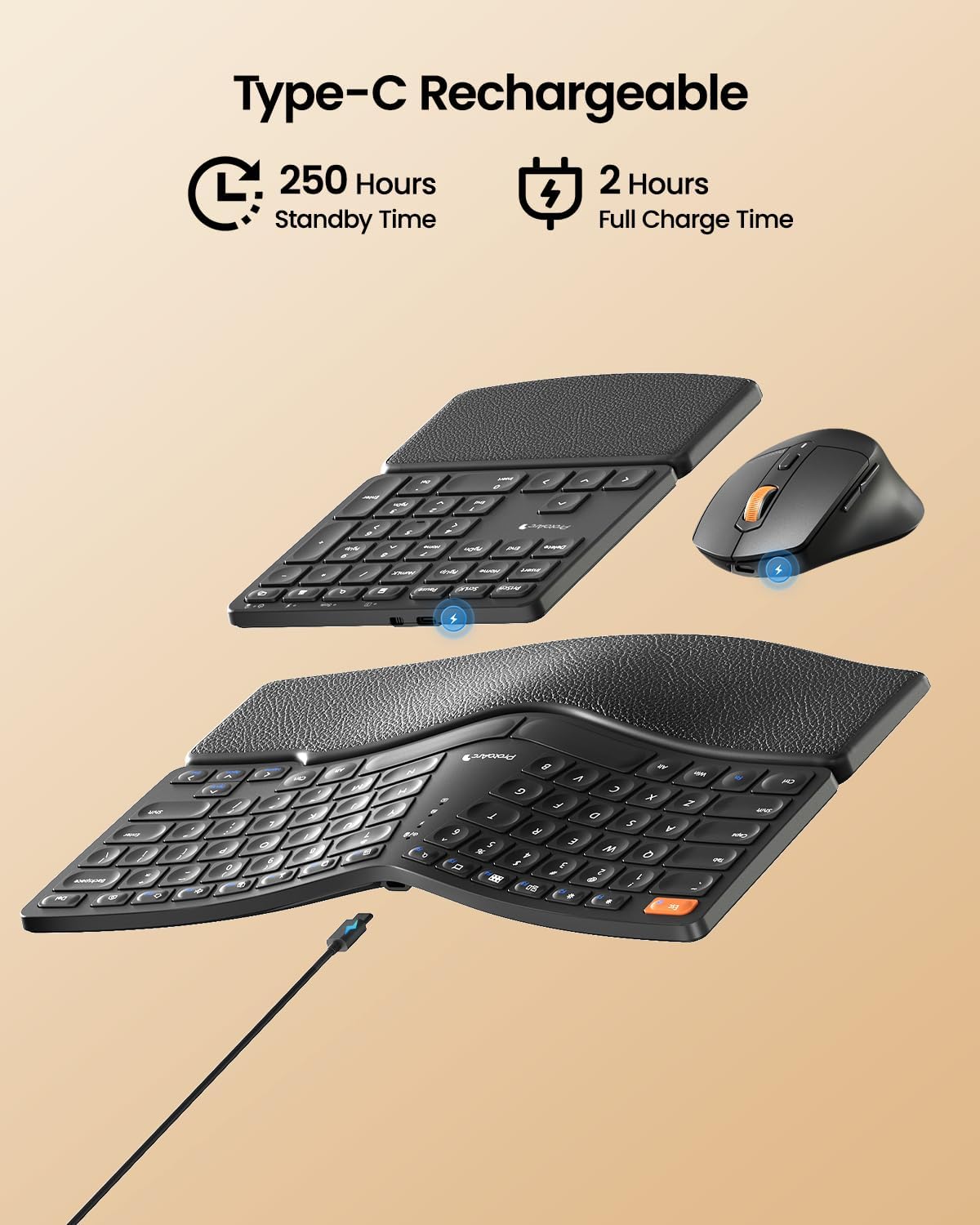
Image: The ProtoArc EKM04 keyboard, numeric keypad, and mouse are shown with USB-C charging cables connected, illustrating the charging process. Icons indicate 250 hours standby time and 2 hours full charge time.
3.2 Connecting the Devices (2.4GHz Wireless)
The ProtoArc EKM04 combo utilizes a 2.4GHz wireless connection via a single USB receiver. This system is compatible only with Windows operating systems (Windows Desktop, Windows Laptop, Windows Personal Computer).
- Locate the USB receiver: The USB receiver is conveniently stored in the battery compartment on the bottom of the mouse. Gently open the compartment to retrieve it.
- Plug and Play: Insert the USB receiver into an available USB port on your Windows computer.
- Power On: Ensure the keyboard, numeric keypad, and mouse are powered on. They will automatically connect to your computer. No additional drivers are required.
หมายเหตุ: This combo does not support Bluetooth connection and is not compatible with Mac OS.

Image: A laptop on a desk with the ProtoArc EKM04 keyboard, numeric keypad, and mouse positioned nearby, showing wireless connection signals emanating from the USB receiver plugged into the laptop.

Image: The underside of the ProtoArc EKM04 ergonomic keyboard and separate numeric keypad, showing their respective power switches and battery compartments.
4. คู่มือการใช้งาน
4.1 Ergonomic Design Benefits
The EKM04 combo is engineered for comfort and to promote a natural posture. The keyboard features a curved and split keyset design, which helps align your wrists and forearms in a more relaxed position. The scooped scissors-switch keys are shaped to fit your fingertips, providing responsive and comfortable typing.

Image: The ProtoArc EKM04 ergonomic keyboard and numeric keypad on a desk, emphasizing the curved and split design of the keyboard for natural typing posture. An inset shows a top-down view with arrows indicating the ergonomic curve.

ภาพ: ภาพขยาย view of a single key on the ProtoArc EKM04 keyboard, revealing the underlying scissor-switch mechanism for precise and quiet keystrokes.
4.2 Hard Palm Rest
The integrated, curved hard palm rest features a leather surface, providing durable and comfortable support for your wrists during extended typing sessions. This wrist rest is non-removable and is designed to be firm rather than soft-cushioned.

Image: The ProtoArc EKM04 keyboard and numeric keypad on a desk, highlighting the textured leather surface of their integrated palm rests, designed for wrist support and comfort.
4.3 ขาตั้งปรับระดับได้
The ergonomic keyboard is equipped with two adjustable tilt legs on its back. These legs allow you to lift the bottom of the keyboard, helping to maintain a relaxed typing posture, especially when standing. The numeric keypad does not have adjustable tilt legs.

Image: A user's hands are shown typing on the ProtoArc EKM04 keyboard, which is elevated by its adjustable tilt legs. An inset compares the keyboard's flat profile with its tilted profile when the legs are extended.

Image: Two side-by-side views of the ProtoArc EKM04 keyboard from the side, demonstrating the difference in angle when the adjustable tilt legs are retracted (flat) versus extended (tilted).
4.4 Separate Numeric Keypad
The independent numeric keypad offers enhanced flexibility for your workspace. You can position it wherever it's most convenient, optimizing your desk space and improving productivity, especially for data entry tasks.
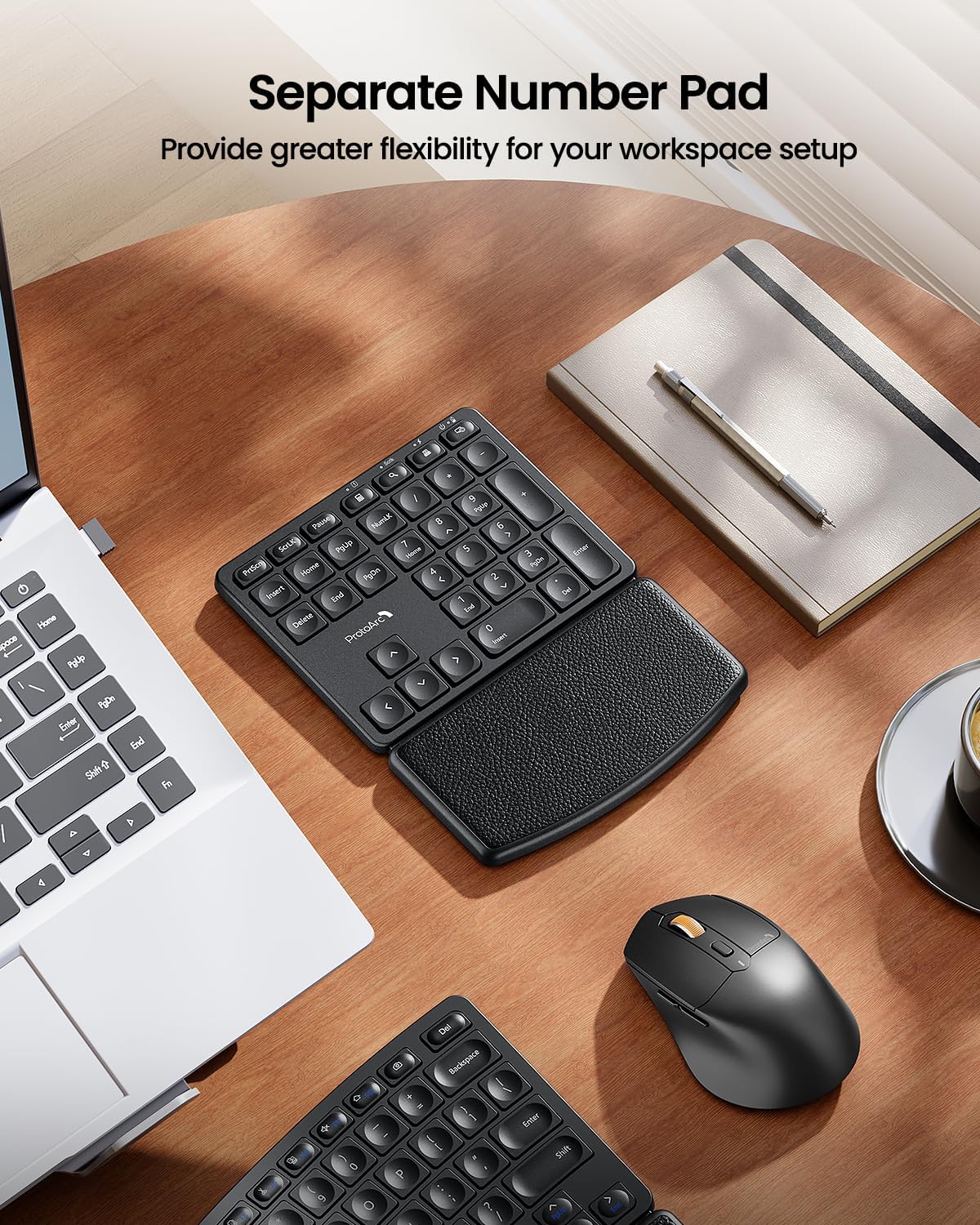
Image: The ProtoArc EKM04 separate numeric keypad positioned on a desk, illustrating its independent placement from the main keyboard, offering flexible workspace arrangement.
4.5 Ergonomic Sculpted Mouse
The wireless mouse is designed with an ergonomic sculpted shape to fit comfortably in your hand, reducing wrist strain and pain. It features adjustable DPI settings (up to 2400 DPI) for precise control and includes convenient forward and backward buttons for web เรียกดู

Image: A hand resting comfortably on the ProtoArc EKM04 ergonomic mouse, demonstrating its sculpted design for a natural grip.

Image: A close-up of the ProtoArc EKM04 ergonomic mouse, with labels indicating the adjustable DPI settings (800, 1200, 1600, 2400 DPI) and the DPI adjustment button.
5. การชาร์จและอายุการใช้งานแบตเตอรี่
The ProtoArc EKM04 keyboard, numeric keypad, and mouse are equipped with built-in rechargeable lithium batteries. To charge, connect the provided USB-C cable to the charging port on each device and a USB power source.
- เวลาในการชาร์จ: ประมาณ 2 ชั่วโมงสำหรับการชาร์จเต็ม
- เวลาสแตนด์บาย: ใช้งานได้นานสูงสุด 250 ชั่วโมงเมื่อชาร์จเต็ม
It is recommended to charge the devices when the battery indicator light (if present) signals low power or when you notice a delay in responsiveness.
6. การบำรุงรักษาและการดูแล
6.1 การทำความสะอาด
To maintain the performance and appearance of your ProtoArc EKM04 combo:
- Use a soft, dry, lint-free cloth to wipe down the surfaces of the keyboard, numeric keypad, and mouse.
- สำหรับสิ่งสกปรกฝังแน่น ให้เช็ดออกเล็กน้อยampชุบผ้าด้วยน้ำหรือน้ำยาทำความสะอาดอ่อนๆ ที่ไม่กัดกร่อน หลีกเลี่ยงความชื้นที่มากเกินไป
- Do not use harsh chemicals, abrasive cleaners, or solvents, as these can damage the surfaces.
- ใช้ลมอัดเพื่อกำจัดฝุ่นละอองและเศษต่างๆ ออกจากระหว่างปุ่ม
6.2 พื้นที่จัดเก็บ
When not in use for extended periods, store the devices in a cool, dry place away from direct sunlight and extreme temperatures. Ensure the devices are powered off to conserve battery life.
7 การแก้ไขปัญหา
หากคุณพบปัญหาใดๆ กับชุด ProtoArc EKM04 โปรดดูวิธีแก้ไขปัญหาทั่วไปต่อไปนี้:
| ปัญหา | สาเหตุที่เป็นไปได้ | สารละลาย |
|---|---|---|
| Devices not connecting or unresponsive | Low battery; USB receiver not properly inserted; devices not powered on; incorrect system compatibility. | 1. Ensure all devices are fully charged. 2. Verify the USB receiver is securely plugged into a working USB port on your Windows computer. 3. Confirm the power switches on the keyboard, numeric keypad, and mouse are in the 'ON' position. 4. Remember, this combo is only compatible with Windows systems and does not support Bluetooth. |
| การเชื่อมต่อล่าช้าหรือขาดๆ หายๆ | สัญญาณรบกวนจากอุปกรณ์ไร้สายอื่นๆ; ระยะห่างจากตัวรับสัญญาณ; แบตเตอรี่เหลือน้อย | 1. Move the USB receiver closer to the devices, or try a different USB port. 2. Ensure there are no large metal objects between the devices and the receiver. 3. Charge the devices fully. |
| Mouse cursor erratic or imprecise | Dirty sensor; unsuitable surface; incorrect DPI setting. | 1. Clean the mouse sensor with a soft cloth. 2. ใช้เมาส์บนพื้นผิวที่สะอาดและไม่สะท้อนแสง หรือบนแผ่นรองเมาส์ 3. Adjust the mouse DPI setting using the DPI button on the mouse. |
| Keyboard/Numpad keys not responding | แบตเตอรี่เหลือน้อย; ปัญหาการเชื่อมต่อ | 1. Charge the keyboard/numpad. 2. Re-establish the connection by unplugging and re-plugging the USB receiver. |
เคล็ดลับที่เป็นประโยชน์: Unlike traditional keyboards, adjusting to an ergonomic split keyboard layout may require an initial adaptation period as you become accustomed to its design and layout.
8. ข้อมูลจำเพาะ
| คุณสมบัติ | รายละเอียด |
|---|---|
| ยี่ห้อ | โปรโตอาร์ค |
| แบบอย่าง | อีเคเอ็ม04 |
| สี | สีดำ |
| เทคโนโลยีการเชื่อมต่อ | 2.4GHz USB Wireless |
| อุปกรณ์ที่รองรับ | Windows Desktop, Windows Laptop, Windows Personal Computer |
| คุณสมบัติพิเศษ | Ergonomic Split Design, Hard Wrist Rest, Rechargeable, Separate Number Pad |
| Keyboard Dimensions (L x W) | 13 นิ้ว x 9 นิ้ว |
| Numeric Keypad Dimensions (L x W) | 6 นิ้ว x 8 นิ้ว |
| Mouse Dimensions (L x W) | 4.3 นิ้ว x 2.8 นิ้ว |
| น้ำหนักสินค้า | 3.39 ปอนด์ (รวมแพ็คเกจ) |
| การตั้งค่า DPI ของเมาส์ | สูงถึง 2400 DPI |
| พอร์ตชาร์จ | ยูเอสบี-ซี |
| อายุการใช้งานแบตเตอรี่ | 250 hours standby time (after 2 hours full charge) |
| แสงไฟแบ็คไลท์ | ไม่ส่องแสงจากด้านหลัง |

Image: An overhead diagram illustrating the dimensions of the ProtoArc EKM04 ergonomic keyboard (13x9 inches), separate numeric keypad (6x8 inches), and mouse (4.3x2.8 inches).
9. การรับประกันและการสนับสนุน
9.1 ข้อมูลการรับประกัน
ProtoArc products are manufactured to high-quality standards. This product comes with a standard manufacturer's warranty against defects in materials and workmanship. Please refer to the warranty card included in your package or visit the official ProtoArc webเว็บไซต์สำหรับข้อกำหนดและเงื่อนไขการรับประกันโดยเฉพาะ
9.2 การสนับสนุนลูกค้า
For technical assistance, troubleshooting, or warranty claims, please contact ProtoArc customer support through the following channels:
- เป็นทางการ Webเว็บไซต์: เยี่ยมชม ร้าน ProtoArc บน Amazon for FAQs and support contact information.
- การสนับสนุนทางอีเมล์: Refer to your product packaging or the ProtoArc webไซต์สำหรับที่อยู่อีเมลสนับสนุนเฉพาะ
When contacting support, please have your product model (EKM04) and purchase details ready.


