การแนะนำ
ขอบคุณสำหรับการซื้อasing the ZEBRONICS Sound Feast 800 Portable Bluetooth Speaker. This manual provides essential information for the safe and efficient operation of your device. Please read it thoroughly before use and retain it for future reference.
คำแนะนำด้านความปลอดภัยที่สำคัญ
- ห้ามให้ลำโพงสัมผัสกับอุณหภูมิที่สูงหรือต่ำเกินไป แสงแดดโดยตรง หรือความชื้นสูง
- หลีกเลี่ยงการทำตกหรือให้ลำโพงได้รับแรงกระแทกรุนแรง
- Keep the speaker away from water and other liquids. While it is splash-proof, it is not fully waterproof and should not be submerged.
- อย่าพยายามถอดประกอบ ซ่อมแซม หรือดัดแปลงลำโพงด้วยตนเอง โปรดติดต่อช่างผู้ชำนาญเพื่อขอรับบริการ
- โปรดใช้เฉพาะสายชาร์จที่ให้มาหรือสายชาร์จที่ได้รับการรับรองเท่านั้น
- ตรวจสอบให้แน่ใจว่ามีการระบายอากาศที่เหมาะสมเมื่อใช้งานลำโพง
- ทำความสะอาดลำโพงด้วยผ้านุ่มและแห้ง ห้ามใช้น้ำยาทำความสะอาดหรือสารละลายที่มีฤทธิ์กัดกร่อน
- เก็บให้พ้นจากมือเด็ก
เนื้อหาแพ็คเกจ
กรุณาทำเครื่องหมายในช่องสำหรับรายการต่อไปนี้:
- ZEBRONICS Sound Feast 800 Speaker - 1 unit
- Wireless Microphone - 1 unit
- Charging Cable (Type-C) - 1 unit
- AUX Cable - 1 unit
- คู่มือการใช้คิวอาร์โค้ด - 1 ชุด

Image: The ZEBRONICS Sound Feast 800 speaker in black with a purple-lit grille, accompanied by its wireless microphone.
สินค้าเกินview
คุณสมบัติหลัก
- พลังไดนามิก: 55 Watts output for robust sound.
- ไดร์เวอร์ทรงพลัง: Equipped with a 16.51 cm (6.5 inch) driver for enhanced audio.
- การเชื่อมต่อหลายจุด: Supports Bluetooth v5.3, USB, mSD, AUX, and FM radio.
- เวลาเล่นที่ขยาย: Up to 6 hours of playback on a single charge (at 50% volume with LED off).
- ไฟ LED RGB: Multiple light modes to enhance ambiance.
- ฟังก์ชัน TWS: Connect two Sound Feast 800 speakers for a stereo experience.
- พร้อมคาราโอเกะ: Includes a 6.3mm mic input and a wireless microphone.
- Convenient Mobile Holder: Integrated holder for smartphones.
- การออกแบบป้องกันน้ำกระเซ็น: Offers protection against splashes.
การควบคุมและพอร์ต
โปรดทำความคุ้นเคยกับแผงควบคุมและพอร์ตเชื่อมต่อต่างๆ เพื่อการใช้งานอย่างมีประสิทธิภาพสูงสุด

ภาพ: รายละเอียด view of the speaker's control buttons (Power, Mode, Play/Pause, Volume/Track, RGB light control, Bass) and connectivity ports (6.3mm Mic In, USB, mSD, AUX In, Type-C Charging).
- ปุ่มเปิด/ปิด: กดค้างไว้เพื่อเปิด/ปิด
- ปุ่มโหมด (M): Short press to switch between Bluetooth, USB, mSD, AUX, and FM modes.
- ปุ่มเล่น/หยุดชั่วคราว: กดสั้นเพื่อเล่นหรือหยุดเสียงชั่วคราว
- ลดระดับเสียง/เพลงก่อนหน้า: กดสั้นๆ เพื่อเล่นเพลงก่อนหน้า กดค้างเพื่อลดระดับเสียง
- เพิ่มระดับเสียง / แทร็กถัดไป: กดสั้นๆ เพื่อเล่นเพลงถัดไป กดค้างเพื่อเพิ่มระดับเสียง
- การควบคุมแสง RGB: Button to cycle through different RGB light modes.
- ปุ่มเบส: เปิดใช้งานหรือปิดใช้งานระบบเพิ่มเสียงเบส
- ปุ่ม TWS: เริ่มต้นการจับคู่ True Wireless Stereo
- ช่องเสียบไมโครโฟน 6.3 มม.: สำหรับเชื่อมต่อไมโครโฟนแบบมีสาย
- พอร์ต USB: สำหรับการเล่นไดรฟ์ USB
- ช่องเสียบการ์ด microSD: For mSD card playback.
- อินพุต AUX: สำหรับเชื่อมต่ออุปกรณ์เสียงภายนอกผ่านสาย AUX
- พอร์ตชาร์จ Type-C: สำหรับชาร์จลำโพง
คู่มือการติดตั้ง
การชาร์จเบื้องต้น
- Before first use, fully charge the speaker. Connect the provided Type-C charging cable to the speaker's charging port and the other end to a USB power adapter (not included).
- The charging indicator will illuminate during charging and turn off once fully charged. A full charge takes approximately 4 hours.
การเปิด/ปิดเครื่อง
- หากต้องการเปิดเครื่อง ให้กดค้างไว้ ปุ่มเปิดปิด until the speaker activates.
- ในการปิดเครื่องให้กดปุ่ม ปุ่มเปิดปิด ทำซ้ำไปเรื่อยๆ จนกว่าลำโพงจะปิดลง
คำแนะนำการใช้งาน
โหมดบลูทู ธ
- Turn on the speaker. It will automatically enter Bluetooth mode, indicated by a prompt sound.
- Enable Bluetooth on your mobile device and search for "ZEB-SOUND FEAST 800" in the list of available devices.
- เลือกลำโพงที่จะจับคู่ เมื่อจับคู่แล้ว คุณจะได้ยินเสียงยืนยัน
- ตอนนี้คุณสามารถเล่นเสียงจากอุปกรณ์ของคุณผ่านลำโพงได้
USB / mSD Card Mode
- Insert a USB drive or mSD card (with audio fileเสียบสาย (s) เข้ากับพอร์ตที่เกี่ยวข้องบนลำโพง
- The speaker will automatically detect the storage device and begin playback. If not, press the ปุ่มโหมด (M) to switch to USB or mSD mode.
- ใช้ เพลงก่อนหน้า/ถัดไป buttons to navigate songs and เล่น/หยุดชั่วคราว เพื่อการควบคุมการเล่น
โหมด AUX
- Connect one end of the provided AUX cable to the speaker's AUX input and the other end to the audio output of your external device (e.g., smartphone, MP3 player).
- กดปุ่ม ปุ่มโหมด (M) เพื่อเปลี่ยนเป็นโหมด AUX
- ควบคุมการเล่นและระดับเสียงจากอุปกรณ์ที่เชื่อมต่อของคุณ
โหมดวิทยุ FM
- กดปุ่ม ปุ่มโหมด (M) เพื่อเปลี่ยนเป็นโหมดวิทยุ FM
- กดค้างไว้ ปุ่มเล่น/หยุดชั่วคราว to automatically scan and save available FM channels.
- ใช้ เพลงก่อนหน้า/ถัดไป buttons to switch between saved channels.
ฟังก์ชัน True Wireless Stereo (TWS)
The TWS function allows you to connect two ZEB-SOUND FEAST 800 speakers wirelessly for a stereo sound experience.
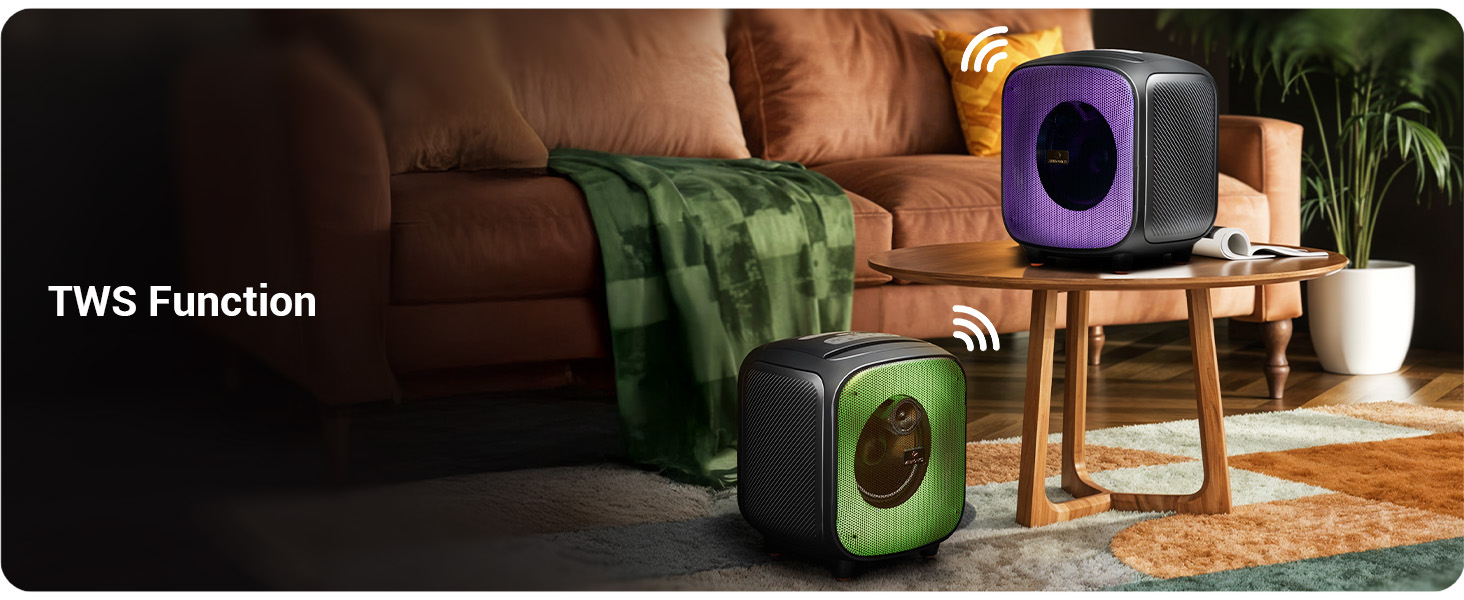
Image: Two Sound Feast 800 speakers positioned in a living room, illustrating the TWS connection.
- Ensure both ZEB-SOUND FEAST 800 speakers are powered on and in Bluetooth mode, but not connected to any device.
- บนลำโพงตัวใดตัวหนึ่ง (ซึ่งจะเป็นลำโพงหลัก) ให้กดปุ่มสั้นๆ ปุ่ม TWS. It will search for the secondary speaker.
- Once connected, you will hear a confirmation sound. The primary speaker's Bluetooth indicator will flash, and the secondary speaker's indicator will be solid.
- Now, connect your mobile device to the primary speaker via Bluetooth as described in the Bluetooth Mode section.
- เสียงจะเล่นในระบบสเตอริโอผ่านลำโพงทั้งสองข้าง
ฟังก์ชั่นคาราโอเกะ

Image: A woman holding the wireless microphone, demonstrating the karaoke function.
- Ensure the speaker is powered on and playing music (e.g., via Bluetooth, USB, or AUX).
- Turn on the provided wireless microphone. It will automatically connect to the speaker.
- Alternatively, connect a wired microphone to the 6.3mm Mic Input port.
- Adjust the microphone volume and echo effect (if available on the mic) for your desired karaoke experience.
ไฟ LED RGB
The speaker features dynamic RGB LED lights with various modes.
- กดสั้น ๆ RGB Light Control button to cycle through different light modes.
- Press and hold the button to turn the RGB lights off or on.
การซ่อมบำรุง
- การทำความสะอาด: ใช้ผ้าแห้งนุ่มๆ ที่ไม่มีขนเช็ดทำความสะอาดภายนอกลำโพง ห้ามใช้น้ำยาทำความสะอาด สเปรย์ หรือตัวทำละลาย
- พื้นที่จัดเก็บ: เมื่อไม่ได้ใช้งานเป็นเวลานาน ควรเก็บลำโพงไว้ในที่แห้งและเย็น หลีกเลี่ยงแสงแดดโดยตรงและอุณหภูมิที่สูงหรือต่ำเกินไป
- การดูแลแบตเตอรี่ To prolong battery life, avoid fully discharging the speaker frequently. Charge the speaker regularly, even if not in use, to maintain battery health.
- การสัมผัสน้ำ: While splash-proof, avoid direct exposure to heavy rain or submersion in water. Ensure all ports are dry before charging.
การแก้ไขปัญหา
| ปัญหา | สาเหตุที่เป็นไปได้ | สารละลาย |
|---|---|---|
| ลําโพงไม่เปิดขึ้น | แบตเตอรี่อ่อน | ชาร์จลำโพงให้เต็มโดยใช้สาย Type-C ที่ให้มา |
| ไม่มีเสียง. | ระดับเสียงต่ำเกินไป; โหมดไม่ถูกต้อง; อุปกรณ์ไม่ได้เชื่อมต่อ | Increase speaker and source device volume. Ensure correct input mode (BT, AUX, USB, mSD). Re-pair Bluetooth device. |
| การจับคู่บลูทูธล้มเหลว | ลำโพงไม่ได้อยู่ในโหมดจับคู่ อุปกรณ์อยู่ไกลเกินไป มีสัญญาณรบกวน | Ensure speaker is in Bluetooth mode and discoverable. Move device closer to speaker. Turn off other Bluetooth devices. |
| ไมโครโฟนไม่ทำงาน | Microphone off; battery low (wireless mic); incorrect connection. | Ensure wireless mic is powered on and charged. For wired mic, ensure it's fully inserted into the 6.3mm port. |
| การเชื่อมต่อ TWS ล้มเหลว | Speakers already paired to a device; speakers too far apart. | Ensure both speakers are disconnected from other devices. Place speakers within close proximity (e.g., 5 meters). |
| Speaker turns off frequently. | Low battery; overheating; unstable power supply. | Charge the speaker. Ensure adequate ventilation. If problem persists, contact customer support. |
ข้อมูลจำเพาะ

Image: Diagram showing the dimensions of the ZEBRONICS Sound Feast 800 speaker: 25.5cm Depth, 26.4cm Width, 30.2cm Height.
| คุณสมบัติ | รายละเอียด |
|---|---|
| ชื่อรุ่น | ZEB-SOUND FEAST 800 |
| ประเภทลำโพง | ลำโพงแบบพกพา |
| กำลังขับ | 55 วัตต์ |
| ขนาดไดร์เวอร์ | 16.51 ซม. (6.5 นิ้ว) |
| การเชื่อมต่อ | Bluetooth v5.3, USB, mSD, AUX, FM Radio |
| เทคโนโลยีการสื่อสารไร้สาย | บลูทูธ |
| แหล่งพลังงาน | ใช้พลังงานจากแบตเตอรี่ |
| อายุการใช้งานแบตเตอรี่โดยเฉลี่ย | Up to 6 Hours (at 50% volume, LED off) |
| เวลาในการชาร์จ | ประมาณ 4 ชั่วโมง |
| วิธีการควบคุม | ปุ่มกด |
| อัตราส่วนสัญญาณต่อเสียงรบกวน | 65 เดซิเบล |
| การตอบสนองความถี่ | 60 เฮิรตซ์ |
| ขนาดสินค้า (ลึก x กว้าง x สูง) | 25.5 x 26.4 x 30.2 เซนติเมตร |
| น้ำหนักสินค้า | 3.65 กก. |
| สี | สีดำ |
| คุณสมบัติพิเศษ | Wireless MIC, Karaoke Function, RGB LED Lights, TWS Function, Mobile Holder, Splash-proof |
การรับประกันและการสนับสนุน
The ZEBRONICS Sound Feast 800 comes with a การรับประกันแบบจำกัด. For detailed warranty terms and conditions, please refer to the QR Code Guide included in your package or visit the official ZEBRONICS webเว็บไซต์.
For technical support, service, or any queries regarding your product, please contact ZEBRONICS customer service. Contact information can typically be found on the official ZEBRONICS webไซต์หรือบนบรรจุภัณฑ์ผลิตภัณฑ์
Manufacturer: Zebronics India Private Limited, No.13/7, Smith Road, Royapettah, Chennai - 600 002.


