1. สินค้าหมดview
The Anpviz JB35X is a full metal ceiling mount junction box bracket designed for specific Anpviz IP PoE cameras. This bracket provides a secure and organized solution for camera installation, protecting network cables from environmental elements.
คุณสมบัติหลัก:
- Full metal construction with surface spray treatment for durability.
- Integrated cable holes for organized cable management and protection.
- Suitable for both indoor and outdoor ceiling mounting applications.
ความเข้ากันได้:
This junction box is compatible with the following Anpviz camera series:
- U-Series Cameras: IPC-D350W-S, IPC-D363WD-SA, IPC-D383WD-SA, IPC-D351WD-SL, IPC-D381WD-SL.
- H-Series Cameras: IPC-D3053WD-S, IPC-D3083WD-S, IPC-D383WD-S, IPC-D3653WD-SA, IPC-D3853WD-SA.

รูปที่ 1 : ด้านหน้า view of the Anpviz JB35X Ceiling Mount Junction Box Bracket. This image shows the white, circular metal housing designed to protect camera wiring.
2. เนื้อหาบรรจุภัณฑ์
โปรดตรวจสอบว่าสินค้าทั้งหมดมีอยู่ในแพ็คเกจ:
- Anpviz JB35X Junction Box Bracket
- สกรูยึด
- Other accessories as specified by the manufacturer (e.g., holes sticker, cable tie, foam pad, if applicable).

Figure 2: Diagram illustrating the Anpviz JB35X junction box, its compatibility with certain camera models, and a list of included accessories such as screws, cable tie, and foam pad.
3. คู่มือการติดตั้ง
Follow these steps for proper installation of the Anpviz JB35X junction box bracket.
- เตรียมพื้นผิวการติดตั้ง: Ensure the ceiling or wall surface is clean, flat, and capable of supporting the weight of the junction box and the camera.
- ทำเครื่องหมายจุดเจาะ: Use the junction box as a template to mark the drilling points for the mounting screws. Ensure proper alignment for cable entry. Refer to the dimension diagram for precise measurements.
- เจาะรู: Drill pilot holes at the marked locations. The size of the drill bit should be appropriate for the provided mounting screws and any wall anchors if necessary.
- สายเคเบิลเส้นทาง: If routing cables through the mounting surface, ensure the necessary holes are made for cable passage into the junction box.
- Mount the Junction Box: Secure the junction box to the prepared surface using the provided screws. Ensure it is firmly attached and stable.
- เชื่อมต่อสายไฟกล้อง: Route the camera's network and power cables through the designated cable holes in the junction box. Make all necessary connections inside the box.
- ติดกล้อง: Mount the compatible Anpviz camera onto the junction box bracket according to the camera's specific installation instructions. Ensure all connections are secure and weatherproofed if installed outdoors.
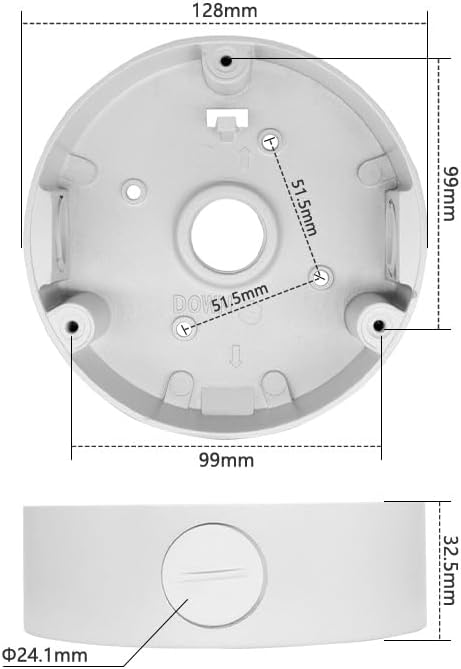
Figure 3: Technical diagram displaying the precise dimensions of the Anpviz JB35X junction box, including its diameter (128mm), height (32.5mm), and screw hole spacing (99mm and 51.5mm). This is crucial for accurate installation planning.
4. คู่มือการใช้งาน
The Anpviz JB35X junction box is a passive mounting accessory. Once installed correctly, its primary function is to provide a stable mounting platform and protect the camera's wiring connections. No active operation is required from the junction box itself.
Ensure that all cables are properly routed and secured within the junction box to prevent damage or interference.
5. การบำรุงรักษา
To ensure the longevity and optimal performance of your Anpviz JB35X junction box and the attached camera, consider the following maintenance guidelines:
- การตรวจสอบปกติ: Periodically inspect the junction box and its mounting for any signs of loosening, corrosion, or damage, especially in outdoor environments.
- การทำความสะอาด: If necessary, gently clean the exterior of the junction box with a soft, damp ผ้า. หลีกเลี่ยงการใช้สารเคมีที่รุนแรงหรือวัสดุที่มีฤทธิ์กัดกร่อนซึ่งอาจทำให้พื้นผิวเสียหายได้
- ความสมบูรณ์ของสายเคเบิล: Ensure that all cables entering and exiting the junction box remain intact and free from cuts or wear.
- ความต้านทานสนิม: While the product is designed to be rust-resistant, extreme conditions may still affect its finish over time. Address any signs of rust promptly to prevent further degradation.
6 การแก้ไขปัญหา
This section addresses common issues related to the installation and function of the junction box.
- Junction Box Not Mounting Securely:
- Verify that the mounting surface is appropriate and structurally sound.
- Ensure the correct drill bit size was used for pilot holes and that screws are fully tightened.
- If mounting to drywall or similar materials, use appropriate wall anchors (not included unless specified).
- Cables Not Fitting or Protected:
- Confirm that cable diameters are within the capacity of the junction box's cable entry points.
- Ensure cables are routed neatly to avoid pinching or excessive bending.
- Camera Not Attaching to Junction Box:
- Double-check the compatibility list in Section 1 to ensure your camera model is supported.
- Align the camera's mounting holes with those on the junction box.
7. ข้อมูลจำเพาะ
| คุณสมบัติ | รายละเอียด |
|---|---|
| ขนาดสินค้า | ขนาด 4.99 x 4.99 x 1.38 นิ้ว (ประมาณ 128 x 128 x 35 มม.) |
| น้ำหนักสินค้า | 10.7 ออนซ์ (0.30 กก.) |
| หมายเลขรุ่น | JB35X |
| วัสดุ | Full Metal Design |
| สี | สีขาว |
| คุณสมบัติพิเศษ | ทนสนิม |
| ประเภทการติดตั้ง | การติดตั้งบนเพดาน |
| อุปกรณ์ที่รองรับ | Anpviz U-Series and H-Series IP PoE Cameras |
8. ข้อมูลการรับประกัน
For detailed warranty information regarding the Anpviz JB35X Ceiling Mount Junction Box Bracket, please refer to the official Anpviz website or contact Anpviz customer support directly. Warranty terms and conditions may vary by region and purchase date.
9. การสนับสนุนลูกค้า
If you encounter any issues or have questions not covered in this manual, please visit the official Anpviz support page or contact their customer service team for assistance. Contact details are typically available on the Anpviz webเว็บไซต์.
Anpviz Official Webเว็บไซต์: www.anpviz.com (โปรดทราบ: นี่เป็นเพียงตัวอย่างชั่วคราว) URL. Refer to your product packaging or official Anpviz documentation for the correct support webเว็บไซต์.)


