1. บทนำ
Welcome to the user manual for your Nothing Phone (3a). This guide provides detailed instructions on setting up, operating, maintaining, and troubleshooting your device to ensure optimal performance and user experience.

Figure 1.1: The Nothing Phone (3a) showcasing its unique transparent back design and Glyph Interface.
2. การตั้งค่า
2.1. การแกะกล่องและการตรวจสอบเบื้องต้น
Upon receiving your Nothing Phone (3a), carefully open the packaging and inspect the contents. Ensure all items listed in the "What's in the Box" section are present and undamaged.
- Nothing Phone (3a) device
- สาย USB-C
- ตัวดันถาดซิม
- ฟิล์มกันรอยหน้าจอแบบติดมาแล้ว
2.2. การใส่ซิมการ์ด
- ค้นหาถาดใส่การ์ด SIM ที่ด้านข้างของโทรศัพท์
- ใส่เครื่องมือถอดถาดซิมเข้าไปในรูเล็ก ๆ ข้างถาดแล้วกดให้แน่นจนกว่าถาดจะดีดออกมา
- วางการ์ด Nano-SIM ของคุณลงในถาดโดยให้หน้าสัมผัสสีทองคว่ำลง
- ใส่ถาดซิมกลับเข้าไปในโทรศัพท์อย่างระมัดระวังจนกระทั่งล็อคเข้าที่
2.3. ตัวช่วยเปิดเครื่องและการตั้งค่าเบื้องต้น
Press and hold the power button on the right side of the phone until the Nothing logo appears. Follow the on-screen instructions to complete the initial setup, including language selection, Wi-Fi connection, Google account sign-in, and data transfer.
3. การใช้งานโทรศัพท์แบบไม่มีฟังก์ชั่น (3a)
3.1. Nothing OS 3.1 Overview
The Nothing Phone (3a) runs on Nothing OS 3.1, an intuitive and customizable Android-based operating system. It features functional adaptations for an optimized user experience.

Figure 3.1: Visual representation of Nothing OS 3.1's customizable interface.
3.2. ระบบกล้อง
The Nothing Phone (3a) is equipped with an advanced camera system designed to capture high-quality photos and videos.
- กล้องหลัก: 50-MP OIS (Optical Image Stabilization) main camera for detailed and stable shots.
- กล้องเทเลโฟโต้: 50-MP telephoto lens with up to 30x Ultra Zoom for capturing distant subjects.
- กล้องอัลตร้าไวด์: 8-MP ultra-wide-angle lens for expansive landscape and group shots.
- กล้องหน้า: 32-MP front camera for sharp selfies and video calls.

Figure 3.2: Detailed breakdown of the Phone (3a)'s Elite Camera System components.

Figure 3.3: Illustration of the telephoto zoom lens technology and its capability to capture distant scenes.
3.3. Essential Key and Essential Space
The Essential Key is a new physical button on the side of your device. A short press captures screen content, while a long press allows you to record voice notes, ideas, and inspirations. The Essential Space organizes your captures and provides personalized suggestions.

Figure 3.4: The Essential Key and its integration with the Essential Space for content organization.
3.4. อินเทอร์เฟซสัญลักษณ์
The Glyph Interface on the back of the phone provides unique LED light and sound notifications for calls, messages, and other alerts, offering a distinct visual and auditory experience.

Figure 3.5: The Glyph Interface on the rear of the Nothing Phone (3a), demonstrating its illuminated patterns.
4. การบำรุงรักษา
4.1. การจัดการแบตเตอรี่
The Nothing Phone (3a) features a 5,000 mAh battery with 50W fast charging. To maximize battery lifespan:
- หลีกเลี่ยงอุณหภูมิที่สูงหรือต่ำเกินไป
- ใช้สาย USB-C ที่ให้มาในการชาร์จ
- หลีกเลี่ยงการปล่อยแบตเตอรี่จนหมดบ่อยครั้ง

Figure 4.1: Visual representation of the 5,000 mAh battery capacity.
4.2. การทำความสะอาดอุปกรณ์ของคุณ
Use a soft, lint-free cloth to clean the screen and back of your phone. For stubborn smudges, slightly dampชุบผ้าด้วยน้ำ หลีกเลี่ยงการใช้สารเคมีรุนแรงหรือวัสดุที่มีฤทธิ์กัดกร่อน
4.3. การอัปเดตซอฟต์แวร์
ตรวจสอบและติดตั้งการอัปเดตซอฟต์แวร์เป็นประจำเพื่อให้แน่ใจว่าอุปกรณ์ของคุณมีฟีเจอร์ แพตช์ความปลอดภัย และการปรับปรุงประสิทธิภาพล่าสุด ไปที่ การตั้งค่า > ระบบ > อัปเดตซอฟต์แวร์ เพื่อตรวจสอบการอัปเดต
5 การแก้ไขปัญหา
5.1. ปัญหาทั่วไปและวิธีแก้ไข
| ปัญหา | สาเหตุที่เป็นไปได้ | สารละลาย |
|---|---|---|
| โทรศัพท์ไม่เปิด | แบตเตอรี่ต่ำ ซอฟต์แวร์ขัดข้อง | Charge the phone for at least 30 minutes. Perform a forced restart by holding the power button for 10-15 seconds. |
| แอปขัดข้องหรือค้าง | App bug, insufficient RAM, outdated software | Clear app cache/data. Close background apps. Update the app or phone software. |
| อายุการใช้งานแบตเตอรี่ต่ำ | High screen brightness, background apps, network issues | Adjust screen brightness. Close unused apps. Disable unnecessary features like GPS/Bluetooth. |
5.2. รีเซ็ตเป็นค่าโรงงาน
If issues persist, a factory reset may be necessary. This will erase all data on your phone, so ensure you have backed up important information. Navigate to การตั้งค่า > ระบบ > ตัวเลือกการรีเซ็ต > ลบข้อมูลทั้งหมด (รีเซ็ตเป็นค่าโรงงาน).
6. ข้อมูลจำเพาะ
Key technical specifications for the Nothing Phone (3a) (Model: A059).
| คุณสมบัติ | รายละเอียด |
|---|---|
| ชื่อรุ่น | โทรศัพท์ไม่มีอะไร (3a) |
| หมายเลขรุ่น | เอ059 |
| ระบบปฏิบัติการ | แอนดรอยด์ 15, ระบบปฏิบัติการ 3.1 |
| แสดง | 6.77-inch Flexible FHD+ AMOLED, 120 Hz, 1.07 billion colors |
| โปรเซสเซอร์ | Snapdragon 7s Gen 3 (2.5 GHz, 8-core) |
| แรม | หน่วยความจำ 12 GB (เพิ่มได้สูงสุด 20 GB ด้วยระบบบูสต์ RAM) |
| พื้นที่จัดเก็บ | 256GB |
| กล้องหลัก | 50-MP OIS |
| กล้องเทเลโฟโต้ | 50-MP (30x Ultra Zoom) |
| กล้องอัลตร้าไวด์ | 8 ล้านพิกเซล |
| กล้องหน้า | 32 ล้านพิกเซล |
| แบตเตอรี่ | 5,000 mAh (ชาร์จเร็ว 50W) |
| ขนาด | 7.75 x 0.83 x 16.35 ซม. |
| น้ำหนัก | 201 กรัม |
| กันน้ำ/กันฝุ่น | IP64 |
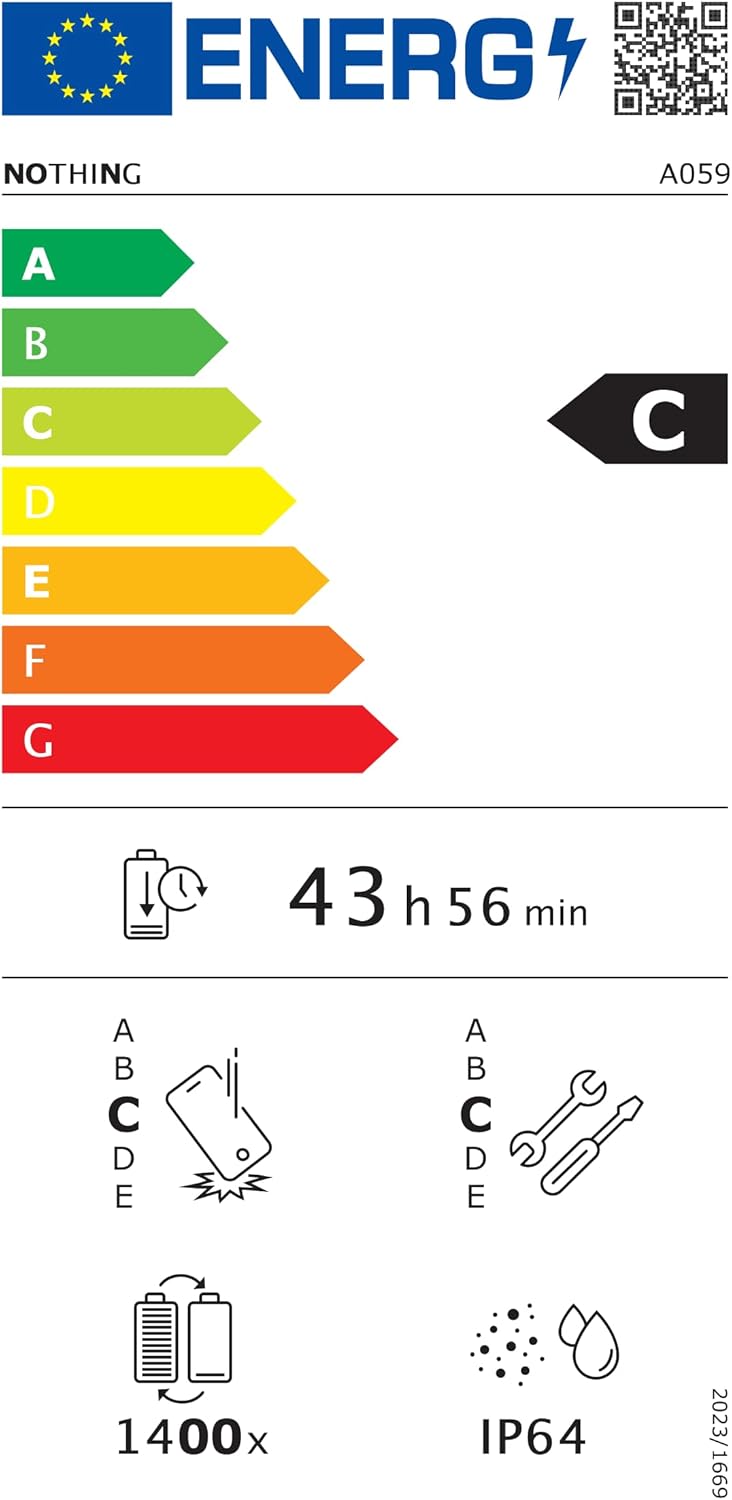
Figure 6.1: EU Energy Label for Nothing Phone (3a), indicating energy efficiency and IP64 rating. More details available at eprel.ec.europa.eu/qr/2179652.
7. การรับประกันและการสนับสนุน
Your Nothing Phone (3a) comes with a manufacturer's warranty. Please refer to the warranty card included in your product packaging for specific terms and conditions.
For further assistance, technical support, or warranty claims, please visit the official Nothing support webคุณสามารถค้นหาข้อมูลเพิ่มเติมได้ที่เว็บไซต์หรือติดต่อฝ่ายบริการลูกค้า คุณสามารถค้นหาข้อมูลเพิ่มเติมได้ที่ ไม่มีร้านค้าใดบน Amazon.


