1. บทนำและเรื่องอื่นๆview
The OPTIMA D1200+ 12V Performance Charger and Maintainer is designed for advanced battery care, charging, and maintenance. This device features quick-connect interchangeable cable assemblies, including the OPTIMA Li POWERLINK, battery clamps, and ring terminal cable assemblies, enhancing user convenience.
A wall organizer bracket is included to keep the D1200+ off the floor and store cable assemblies when not in use. The D1200+ supports four distinct performance battery type profiles for 12V OPTIMA LiFePO4, AGM, Auto/Marine lead-acid, and powersports lead-acid batteries. Its robust, weatherproof construction incorporates an integrated storage bin and a foldable carry handle for portability and durability.

ภาพที่ 1.1: ด้านหน้า view of the OPTIMA D1200+ Battery Charger and Maintainer. This image displays the main control panel and the overall compact design of the unit.
2. คำแนะนำในการตั้งค่า
- แกะกล่องอุปกรณ์: Carefully remove the OPTIMA D1200+ and all accessories from its packaging.
- ตรวจสอบความเสียหาย: Before use, inspect the charger and all cables for any signs of damage. Do not use if damaged.
- เลือกวิธีการเชื่อมต่อ: Select the appropriate quick-connect cable assembly for your battery:
- OPTIMA Li POWERLINK (for OPTIMA Lithium batteries)
- แบตเตอรี่Clamps (for temporary connections)
- Ring Terminal Cable Assemblies (for semi-permanent installations)
- เชื่อมต่อกับแบตเตอรี่: Ensure the charger is unplugged from the AC power outlet. Connect the chosen cable assembly to the 12V battery terminals, observing correct polarity (red to positive, black to negative).
- เชื่อมต่อกับไฟฟ้ากระแสสลับ: Once securely connected to the battery, plug the charger's AC power cord into a standard 120V AC electrical outlet.
- Wall Organizer Bracket: Utilize the provided wall organizer bracket to mount the D1200+ for convenient storage and to keep cables tidy when not in use.

ภาพที่ 2.1: มุม view of the OPTIMA D1200+ showing the foldable carry handle in an upright position, highlighting its portability.
3. คู่มือการใช้งาน
3.1 มัลติ-เอสtage การชาร์จไฟเกินview
The OPTIMA D1200+ employs a digital, multi-stage charging process to optimize battery performance and extend its lifespan. The charger automatically sequences through four stagใช่:
- Stage 1 - System Check and Battery Analyzing:
- The status bar will pulse blue.
- The D1200+ performs a self-test, analyzes the battery connection, and checks the battery's charging capability by outputting a small current.
- The "Connected" LED illuminates green, indicating a good connection.
- นี่คือtage takes approximately 1 minute. During this mode, the battery type can be changed.
- Stage 2 - Charging:
- The status bar will be solid red.
- The D1200+ applies its available charging amps (temperature-controlled) until the battery voltage reaches 14.4 VDC (for OPTIMA LiFePO4 battery setting).
- Stage 3 - Conditioning:
- The status bar will be solid amber.
- Batteries are held at 14.4 VDC (for OPTIMA LiFePO4 battery setting) to complete charging and condition the connected battery.
- Upon completion, the D1200+ transitions to Auto Maintain mode.
- Stage 4 - Auto Maintain (Energy Saver Mode):
- The status bar will be solid green.
- This indicates that Stage 2 การชาร์จและ Stage 3 conditioning are complete.
- The D1200+ monitors and maintains the battery only when necessary to ensure a full state of charge, reducing AC power consumption.
3.2 Selecting a Charging Profile
The OPTIMA D1200+ offers four selectable performance profiles to optimize charging for different 12V battery types:
- OPTIMA LiFePO4
- AGM (แผ่นดูดซับแก้ว)
- Auto/Marine Lead-Acid
- Powersports Lead-Acid
Refer to the device's display and controls to select the appropriate battery type during Stage 1 (System Check and Battery Analyzing) or as indicated in the full manual for specific button presses.
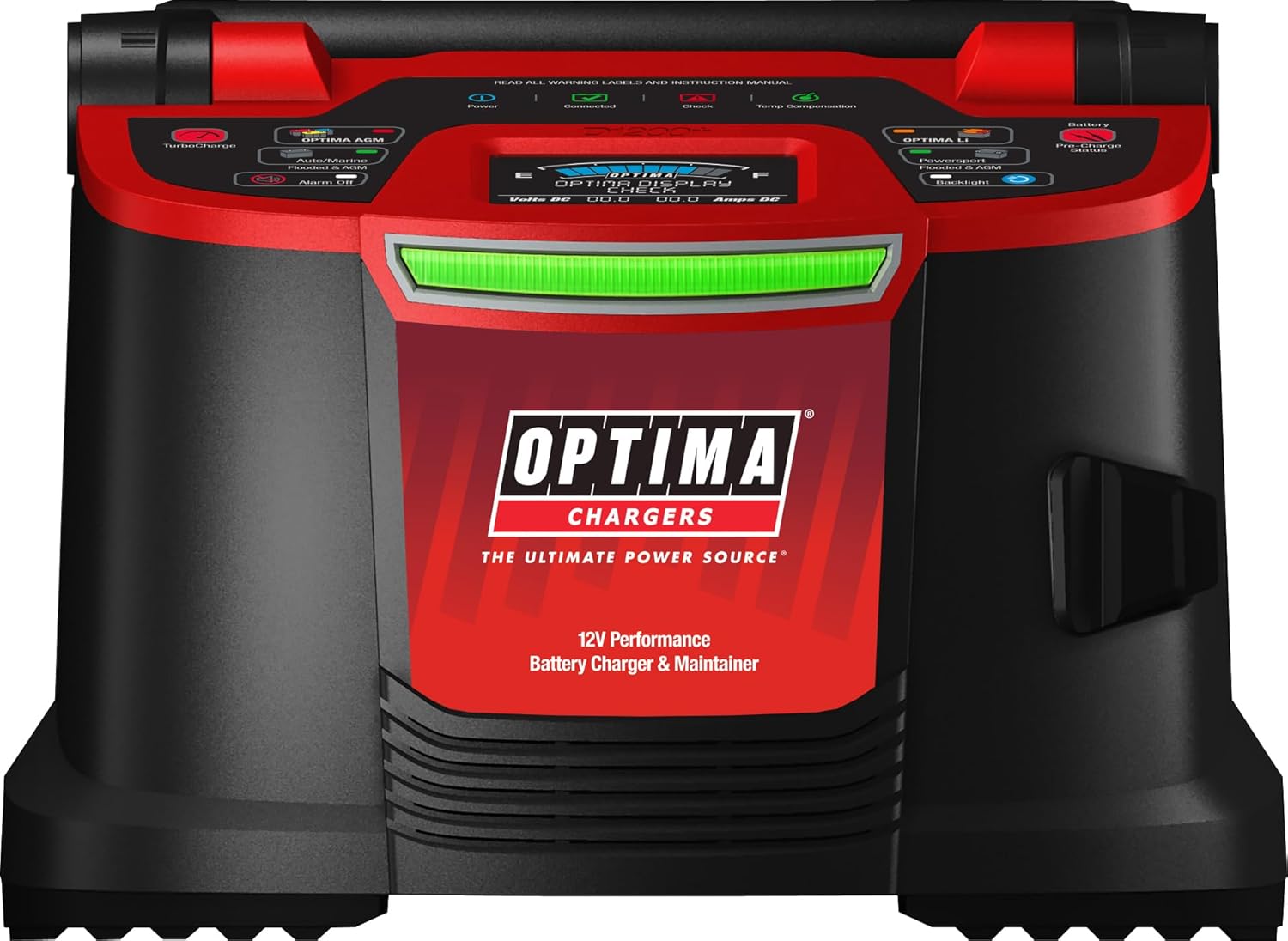
ภาพที่ 3.1: สูงสุด view of the OPTIMA D1200+ control panel, showing the various indicators and selection buttons for different battery types and charging modes.
4. คุณสมบัติด้านความปลอดภัย
The OPTIMA D1200+ incorporates several safety and operational features for user protection and reliable performance:
- เทคโนโลยีการเชื่อมต่อปราศจากประกายไฟ: Designed to prevent sparks during connection to the battery terminals.
- การป้องกันขั้วย้อนกลับ: Automatically detects and protects against incorrect battery terminal connections.
- การป้องกันอุณหภูมิเกิน: Monitors internal temperature and adjusts charging or shuts down to prevent overheating.
- At-a-Glance Charge Status Bar: Provides clear visual indication of the charging stage (blue, red, amber, green).
- Alphanumeric Display: Offers detailed battery state of charge and status messages.
- Battery Connected and Check Icons: Visual indicators for connection status and potential issues.
5. การบำรุงรักษา
To ensure optimal performance and longevity of your OPTIMA D1200+ charger:
- การทำความสะอาด: Periodically wipe the exterior of the charger with a soft, dry cloth. Do not use harsh chemicals or abrasive cleaners.
- การตรวจสอบสายเคเบิล: Regularly inspect all cables and connectors for wear, cuts, or damage. Replace any damaged components immediately.
- พื้นที่จัดเก็บ: Store the charger in a cool, dry place when not in use. Utilize the integrated cable management bin and wall organizer bracket for tidy storage.
- โหมดบำรุงรักษาอัตโนมัติ: The charger's Auto Maintain (Energy Saver) mode automatically monitors and maintains the battery's full state of charge, requiring minimal user intervention during long-term connection.
6 การแก้ไขปัญหา
6.1 Fault Mode Indications
If a fault condition occurs during any charging stage, the OPTIMA D1200+ will enter fault mode and cease outputting power. The following indicators will be observed:
- The status bar will turn OFF.
- The "Check" LED will illuminate red.
- The alphanumeric display will provide additional information regarding the specific fault.
Common fault conditions include:
- Bad Connection: Ensure all cable connections to the battery and AC outlet are secure.
- ขั้วย้อนกลับ: Verify that the positive (+) charger lead is connected to the positive (+) battery terminal and the negative (-) charger lead to the negative (-) battery terminal.
- ปริมาณแบตเตอรี่tage Out of Range: The charger will fault if the battery voltage is below 2.5VDC or above 15.5VDC.
- ปริมาณแบตเตอรี่ไม่ถูกต้องtage: If a 6V battery is connected instead of a 12V battery, the "Check" LED will pulse red.
The OPTIMA D1200+ will return to Stage 1 (System Check) once all fault conditions are cleared.
7. ข้อมูลจำเพาะ
| คุณสมบัติ | ข้อมูลจำเพาะ |
|---|---|
| หมายเลขรุ่น | ดี1200+ |
| ยี่ห้อ | ออพติม่า |
| ผู้ผลิต | Optima Batteries |
| ขนาดสินค้า | 7.5 x 8.5 x 10.25 นิ้ว |
| น้ำหนักสินค้า | 7.93 ปอนด์ |
| ปริมาณการส่งออกtage | 12 โวลต์ (กระแสตรง) |
| อินพุต Voltage | 120 โวลต์ |
| คะแนนปัจจุบัน | 15 Amps |
8. การรับประกันและการสนับสนุน
For warranty information, technical support, or service inquiries regarding your OPTIMA D1200+ Battery Charger and Maintainer, please contact Optima Batteries directly.
You can find more information and contact details by visiting the official OPTIMA store or support channels.
Official OPTIMA Store: Visit the OPTIMA Store on Amazon


