1. บทนำ
The MiBOXER TRI-C1WR is a versatile AC Triac Dimmer designed for controlling dimmable LED lighting systems. It offers multiple control options including WiFi, 2.4G RF, and traditional push-button functionality. This manual provides detailed instructions for installation, operation, and maintenance to ensure optimal performance and safety.
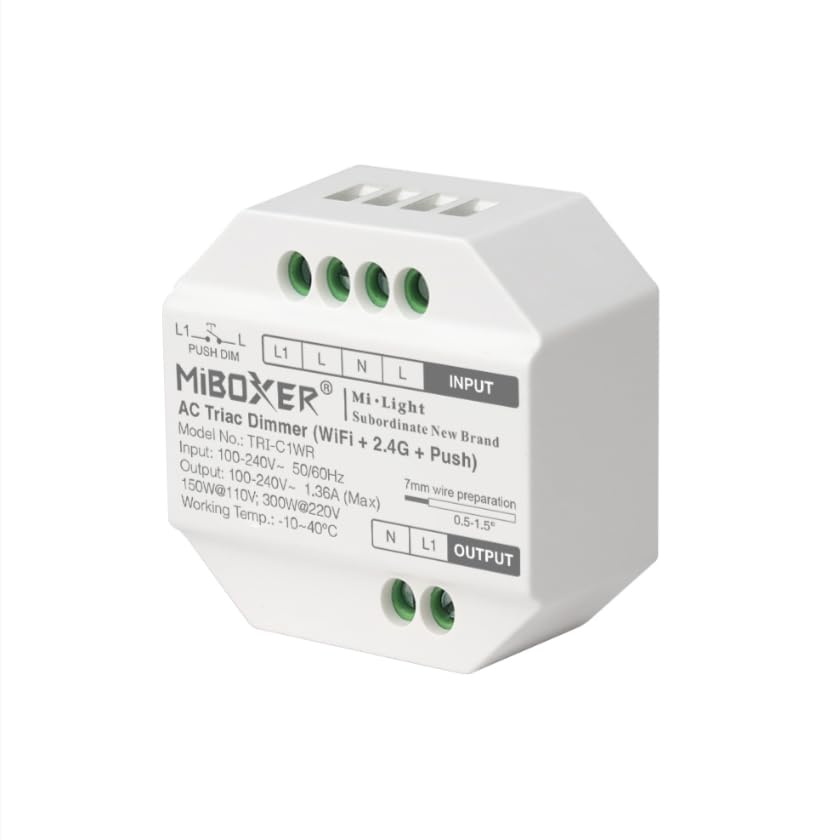
ภาพ: ด้านหน้า view of the MiBOXER TRI-C1WR AC Triac Dimmer, showing input/output terminals and model information.
2. คุณสมบัติหลัก
- Triac Dimming: Ensures smooth and flicker-free dimming for dimmable LED lights and other compatible fixtures.
- ตัวเลือกการควบคุมหลายรายการ: Operate via smartphone app for remote access and smart home integration (WiFi Control). Compatible with Miboxer remotes for wireless control up to 30 meters (2.4GHz RF Wireless). Manual control with a standard wall switch (Push-Button).
- ฉบับกว้างtagอี ช่วง: Supports 100-240V AC input for universal compatibility.
- บ้านอัจฉริยะพร้อมแล้ว: Works with Amazon Alexa and Google Assistant for voice-controlled lighting.
- การหรี่แสงที่แม่นยำ: Adjust brightness levels from 0-100% without flicker or delay.
- การออกแบบที่กะทัดรัด: Easy to install and suitable for various lighting environments.
- กำลังขับสูง: Supports up to 400W load, depending on the type of lighting.
- โครงสร้างทนทาน: Made from high-quality, fire-resistant materials for added safety.
- ประหยัดพลังงาน: Designed for optimal performance with minimal energy waste.
3. ข้อมูลจำเพาะ
| พารามิเตอร์ | ค่า |
|---|---|
| ขนาดสินค้า | 2 x 1 x 2 นิ้ว; 2.08 ออนซ์ |
| โหมดการทำงาน | เปิดปิด |
| คะแนนปัจจุบัน | 1.36 Amps |
| ปฏิบัติการฉบับที่tage | ไฟฟ้ากระแสสลับ 100-240 โวลต์ |
| ประเภทการติดต่อ | ปิดปกติ |
| ประเภทขั้วต่อ | เสียบปลั๊ก |
| เทอร์มินัล | รูทะลุ |
| ประเภทวงจร | 1 ทาง |
| วัสดุติดต่อ | โลหะ |
| ผู้ผลิต | มิบ็อกเซอร์ |
4. เนื้อหาบรรจุภัณฑ์
- 1 x MiBOXER TRI-C1WR AC Triac Dimmer
5. ข้อมูลด้านความปลอดภัย
- Always disconnect power at the circuit breaker before installing or servicing the dimmer.
- การติดตั้งควรดำเนินการโดยช่างไฟฟ้าที่มีคุณสมบัติหรือเป็นไปตามกฎหมายไฟฟ้าในท้องถิ่น
- ห้ามเกินพิกัดโหลดสูงสุด 400 วัตต์
- ตรวจสอบให้แน่ใจว่าการเชื่อมต่อสายไฟทั้งหมดมีความปลอดภัยและมีฉนวนหุ้มอย่างเหมาะสม
- อุปกรณ์นี้ได้รับการออกแบบสำหรับใช้ภายในอาคารเท่านั้น
- Do not use with non-dimmable light sources.

Image: Illustration of trailing edge (ELV) phase-cut technology and overheat/load protection features of the dimmer.
6. การติดตั้ง
6.1 แผนผังการเดินสายไฟ
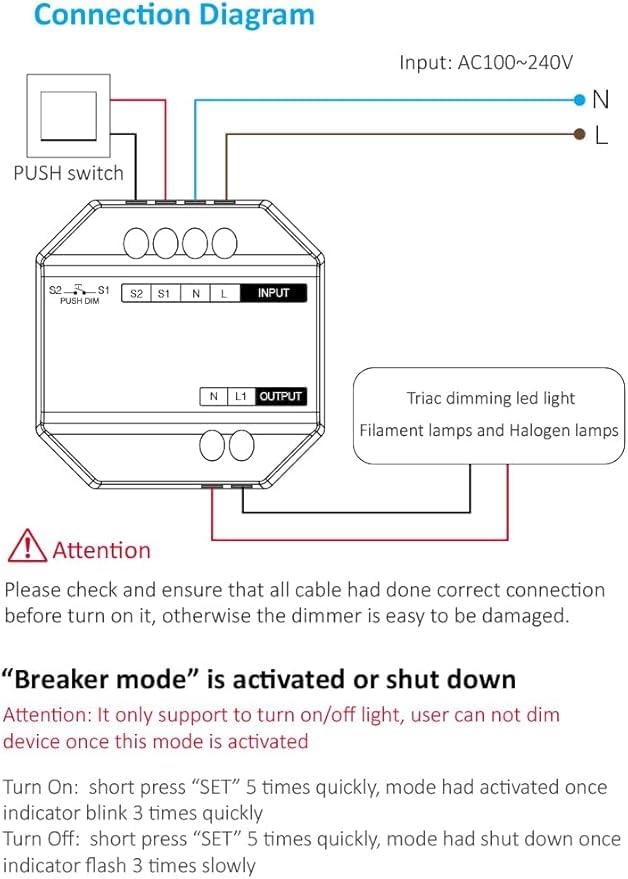
Image: Detailed connection diagram showing input (AC100~240V L and N), output (N and L1 to Triac dimming LED light), and push switch connections (S1, S2, L1, L).
6.2 คำแนะนำในการเดินสายไฟ
- หมดแรง: Before starting, ensure the main power supply to the circuit is turned off at the circuit breaker.
- การเชื่อมต่ออินพุต: Connect the AC 100-240V Live (L) and Neutral (N) wires to the corresponding "INPUT" terminals on the dimmer.
- การเชื่อมต่อเอาท์พุต: Connect the Neutral (N) and Live (L1) wires from the dimmer's "OUTPUT" terminals to your dimmable LED light or compatible fixture.
- Push Switch Connection (Optional): For push-button control, connect your push switch to the S1 and S2 terminals. The L1 and L terminals are also available for push dimming.
- การเชื่อมต่อที่ปลอดภัย: Ensure all wires are stripped approximately 7mm and securely fastened into their respective terminals.
- เปิดเครื่อง: Once all connections are verified and secure, restore power at the circuit breaker.
ความสนใจ: Please check and ensure that all cables are correctly connected before turning on the power. Incorrect wiring can damage the dimmer.
7. การดำเนินการ
7.1 วิธีการควบคุม
- การควบคุม WiFi: Use the MiBOXER or Tuya Smart app on your smartphone for remote control, scheduling, and smart home integration.
- 2.4GHz RF Wireless Control: Compatible with MiBOXER 2.4G RF remotes (sold separately) for wireless dimming and control within a range of up to 30 meters.
- การควบคุมแบบกดปุ่ม: A momentary push switch can be used for basic ON/OFF and dimming functions.

ภาพ: เหนือview of control options, including Tuya Smart app interface for brightness adjustment, stepless dimming via remote, and push dimming functionality.
7.2 Breaker Mode
The dimmer features a "Breaker Mode" which allows it to function purely as an ON/OFF switch, disabling dimming capabilities. This mode is useful for specific applications where only switching is required.
- Activate Breaker Mode: Short press the "SET" button 5 times quickly. The indicator will blink 3 times quickly to confirm activation.
- Deactivate Breaker Mode: Short press the "SET" button 5 times quickly again. The indicator will flash 3 times slowly to confirm deactivation.
ความสนใจ: In Breaker Mode, the device only supports turning the light ON/OFF. Dimming functionality is disabled.

Image: Visual representation of Breaker Mode, showing a light fixture and a smartphone interface with an ON/OFF toggle, indicating that dimming is not available in this mode.
8. การบำรุงรักษา
- Clean the dimmer with a soft, dry cloth. Do not use abrasive cleaners or solvents.
- Ensure proper ventilation around the dimmer to prevent overheating.
- Regularly check wiring connections for tightness, especially after initial installation.
- If the dimmer is not functioning correctly, refer to the troubleshooting section before attempting any repairs.
9 การแก้ไขปัญหา
| ปัญหา | สาเหตุที่เป็นไปได้ | สารละลาย |
|---|---|---|
| ไฟไม่เปิด | No power, incorrect wiring, faulty bulb, dimmer in Breaker Mode (OFF). | Check circuit breaker. Verify wiring connections. Replace bulb. Check Breaker Mode status. |
| แสงสว่างไม่หรี่ลง | Non-dimmable bulb, dimmer in Breaker Mode, incorrect dimmer settings, incompatible load. | Ensure dimmable bulbs are used. Deactivate Breaker Mode. Check app settings. Verify load compatibility. |
| ไฟกระพริบ | Incompatible bulb, minimum load not met, loose wiring. | Use compatible dimmable LED bulbs. Ensure total load meets minimum requirements. Check wiring. |
| Dimmer not responding to WiFi/RF. | Out of range, network issue, pairing issue. | Ensure dimmer is within WiFi/RF range. Check router/network. Re-pair the device with the app or remote. |
10. การรับประกันและการสนับสนุน
The MiBOXER TRI-C1WR AC Triac Dimmer comes with a standard manufacturer's warranty. For specific warranty details, please refer to the product packaging or contact MiBOXER customer support.
For technical assistance, troubleshooting, or further inquiries, please visit the official MiBOXER webเว็บไซต์หรือติดต่อฝ่ายบริการลูกค้าของพวกเขา
ผู้ผลิต: มิบ็อกเซอร์
วันที่เข้าใช้งานครั้งแรก: วันที่ 5 ธันวาคม 2024


