1. บทนำ
This manual provides detailed instructions for the safe and proper installation, operation, and maintenance of your Perlegear Long Arm Full Motion TV Wall Mount, Model PGXLF02. Please read all instructions carefully before beginning installation and keep this manual for future reference.

Image 1: Perlegear Long Arm Full Motion TV Wall Mount, Model PGXLF02.
2. ข้อมูลด้านความปลอดภัย
- ความจุน้ำหนัก: ห้ามเกินขีดจำกัดน้ำหนักสูงสุดที่สามารถรองรับได้ 150 ปอนด์ (68 กก.)
- ขนาดทีวี: This mount is designed for TVs between 42 and 90 inches.
- ประเภทผนัง: Install only on wood studs (8"/12"/16"/24" spacing), solid concrete, or brick walls. ห้ามติดตั้งบนผนังยิปซัมเพียงอย่างเดียว
- ความช่วยเหลือจากมืออาชีพ: หากคุณไม่แน่ใจเกี่ยวกับขั้นตอนการติดตั้งหรือประเภทของผนัง โปรดปรึกษาผู้เชี่ยวชาญที่มีคุณสมบัติเหมาะสม
- เครื่องมือ: Handle all tools with care to prevent injury.
- การประกอบ: แนะนำให้ใช้คนสองคนในการติดตั้งเพื่อความปลอดภัย โดยเฉพาะอย่างยิ่งเมื่อต้องยกทีวีขึ้น
3. การตั้งค่าและการติดตั้ง
3.1. เครื่องมือที่จำเป็น
The following tools are required for installation. Some are included, others are not.
- ไม่รวม: Electric Drill, Pencil, Phillips Screwdriver, Tape Measure, 1/2" (13mm) Socket Wrench.
- สำหรับผนังโครงไม้: Stud Finder, Awl, 7/32" (5.5mm) Wood Drill Bit.
- สำหรับคอนกรีต/อิฐตัน: Hammer, 3/8" (10mm) Concrete Drill Bit.
- รวมอยู่ด้วย: Bubble Level, Allen Key.
3.2. TV and Wall Compatibility
Ensure your TV and wall are compatible with this mount before proceeding.
- ขนาดทีวี: Compatible with most flat or curved 42"–90" TVs.
- ความจุน้ำหนัก: รองรับทีวีที่มีน้ำหนักสูงสุด 150 ปอนด์ (68 กิโลกรัม)
- รูปแบบ VESA: Supports VESA patterns from 200x100mm to 800x400mm.
- ประเภทผนัง: Suitable for 8"/12"/16"/24" wood studs, solid concrete, or brick walls. ห้ามติดตั้งบนผนังยิปซัมเพียงอย่างเดียว

Image 2: Compatibility details for wall types, TV sizes, and VESA patterns.

Image 3: Visual guide for checking TV and wall compatibility, including VESA patterns and wall plate dimensions.
3.3. การติดตั้งแบบทีละขั้นตอน
The Perlegear TV mount features a pre-assembled design for easier installation. Follow these general steps:
- Attach TV Brackets to the TV: Select the appropriate bolts and spacers for your TV type (flat back, curved back, or TVs with mounting restrictions). Secure the TV brackets to the back of your TV.
- Mount Arm Assembly / Wall Plate on the Wall: Locate your wall studs (for wood stud installation) or mark drill points (for solid concrete/brick). Use the provided drilling template and bubble level to ensure accurate placement. Drill pilot holes and securely fasten the wall plate to the wall using the appropriate lag bolts and washers. Verify the wall plate is securely attached by pulling down on it.
- ติดตั้งทีวี: Carefully lift the TV with the attached brackets and hook them onto the wall plate. Secure the TV to the mount using the safety locks.

ภาพที่ 4: จบแล้วview of the 3-step installation process: attach TV brackets, mount wall plate, and hang TV.
3.4. วิดีโอแนะนำการติดตั้ง
สำหรับคำแนะนำแบบภาพประกอบเกี่ยวกับขั้นตอนการติดตั้ง โปรดดูวิดีโออย่างเป็นทางการด้านล่าง:
Video 1: Perlegear Long Arm Full Motion TV Mount Installation Guide. This video demonstrates the complete installation process for the PGXLF02 series TV mount, including tool gathering, attaching TV brackets, mounting the wall plate, and securing the TV.
4. Operation & Adjustments
Your Perlegear TV mount offers various adjustments for optimal viewความสะดวกสบาย
4.1. การยืดและการหด
The long arm extends up to 40 inches (101.6 cm) for closer viewing and retracts to 3.55 inches (9 cm) to save space. This allows for flexible positioning and multi-zone viewการไอเอ็นจี

Image 5: Demonstrates the mount's extension capability, bringing the TV closer for viewing or retracting it to save space.
4.2. การปรับหมุน
The mount allows for a ±90° swivel, enabling you to adjust the TV's angle for viewing from different positions in a room, including corner installations.
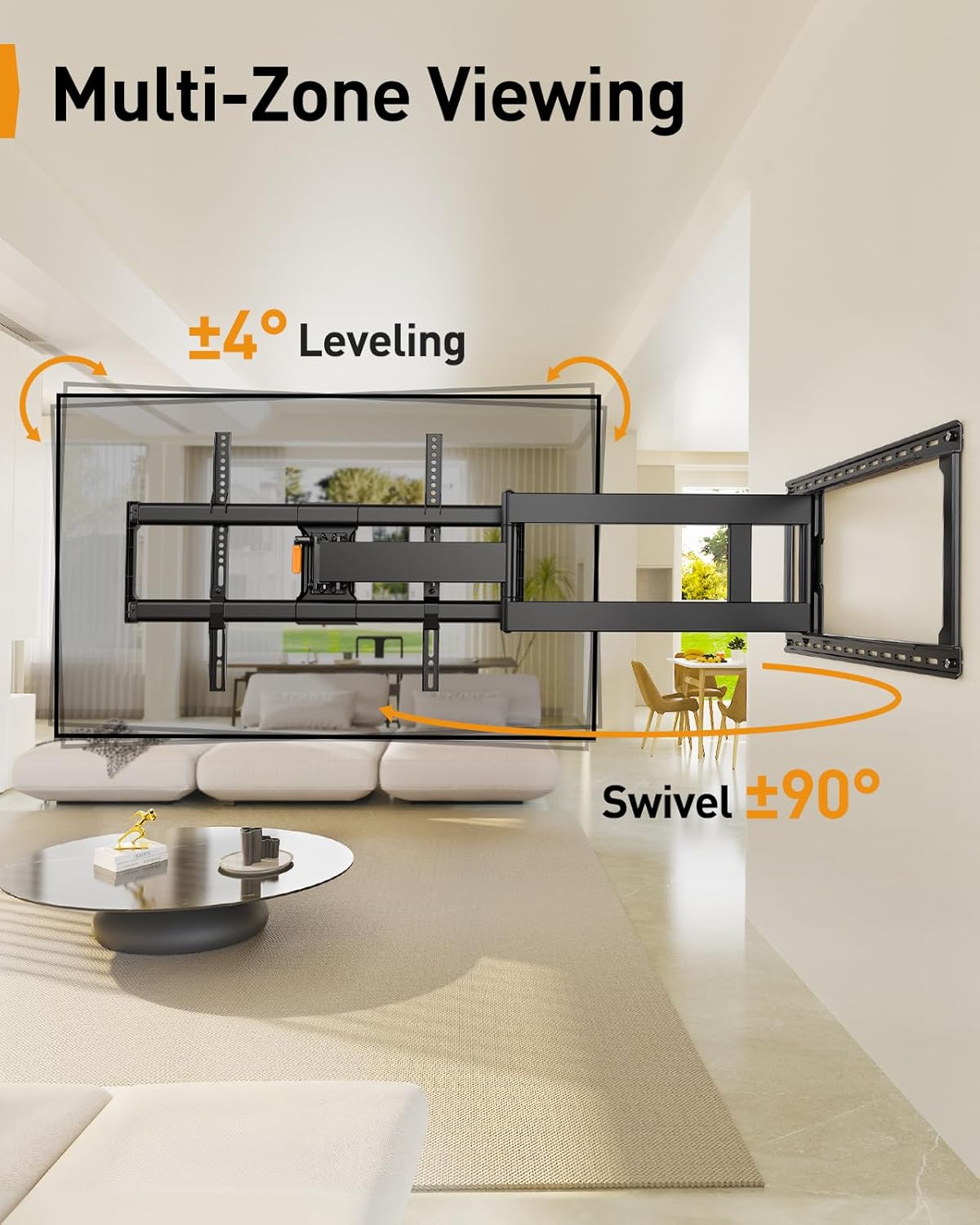
Image 6: Illustrates the multi-zone viewing capability with swivel and leveling adjustments.

Image 7: Shows the mount's suitability for corner installations, allowing for wide swivel angles.
4.3. การปรับเอียง
Adjust the TV tilt from +5° to -12° to reduce glare and achieve your preferred viewing angle. The mount features a tool-free tilt adjustment mechanism.

Image 8: Highlights the tool-free tilt adjustment feature for quick and easy angle changes.
4.4. การปรับระดับ
After installation, you can make a ±3° leveling adjustment to ensure your TV is perfectly horizontal.
4.5. การจัดการสายเคเบิล
Route your cables along the mount arms and secure them with the provided cable ties to maintain a neat and organized appearance.
4.6. Motion Demonstration Video
Observe the full range of motion and adjustment capabilities of the mount in the video below:
Video 2: Long Arm TV Mount for Cross-Zone Viewing Experience. This video showcases the mount's long extension, swivel, and tilt features, demonstrating how it enables flexible viewing from various angles and locations.
5. การบำรุงรักษา
การบำรุงรักษาอย่างสม่ำเสมอจะช่วยให้ขาตั้งทีวีของคุณใช้งานได้ยาวนานและปลอดภัย
- การทำความสะอาด: เช็ดฐานยึดด้วยผ้าแห้งเนื้อนุ่มเพื่อกำจัดฝุ่น หลีกเลี่ยงการใช้สารทำความสะอาดที่มีฤทธิ์กัดกร่อนหรือตัวทำละลาย
- การตรวจสอบตามระยะเวลา: ตรวจสอบสกรูและโบลต์ทั้งหมดเป็นระยะเพื่อให้แน่ใจว่าขันแน่นดี ขันให้แน่นอีกครั้งหากจำเป็น
- ชิ้นส่วนที่เคลื่อนไหว: The articulating arms are designed for smooth movement. If movement becomes stiff, ensure no cables are snagged and check for any obstructions. Do not apply lubricants unless specifically recommended by the manufacturer.
6 การแก้ไขปัญหา
If you encounter issues with your TV mount, refer to these common solutions:
- ทีวีไม่ได้ตั้งระดับ: Use the ±3° leveling adjustment feature. If still not level, slightly loosen the bolts on the leveling mechanism, adjust, and then retighten.
- ความยากในการเอียง: If the tilt is too stiff or won't hold, slightly loosen the bolt on one side of the tilt mechanism, adjust, and then retighten both bolts. If it won't hold, fully tighten the bolt on the other side.
- ฐานยึดดูหลวม: Re-check all wall plate lag bolts and TV bracket screws to ensure they are securely tightened.
- การเคลื่อนไหวจำกัด: Ensure no cables are obstructing the articulating arms. Check for any physical obstructions around the mount.
7. ข้อมูลจำเพาะ
| คุณสมบัติ | ข้อมูลจำเพาะ |
|---|---|
| ยี่ห้อ | เปอร์เลเกียร์ |
| แบบอย่าง | พีจีเอ็กซ์แอลเอฟ02 |
| ความเข้ากันได้ของขนาดทีวี | 42-90 นิ้ว |
| ความจุในการรับน้ำหนักสูงสุด | 150 ปอนด์ (68 กก.) |
| ความเข้ากันได้ของ VESA | 200x100มม. ถึง 800x400มม. |
| ขนาดแผ่นผนัง | ขนาด 14.6 นิ้ว (กว้าง) x 28.07 นิ้ว (ยาว) |
| ระยะห่างระหว่างเสาผนัง | 8"/12"/16"/24" |
| ส่วนต่อเติมจากผนัง | 3.55 นิ้ว (หด) ถึง 40 นิ้ว (ยืดออก) |
| มุมหมุน | ±90° |
| มุมเอียง | +5° / -12° |
| การปรับระดับ | ±3° |
| วัสดุ | เหล็กอัลลอยด์ |
| สี | สีดำ |
| น้ำหนักสินค้า | 29.3 ปอนด์ |

ภาพที่ 9: รายละเอียด view of the mount's construction, highlighting features for maximum stability and flexibility, such as thicker arms and an arm reinforcement bar.
8. การรับประกันและการสนับสนุน
This product is designed for durability and reliability. While specific warranty details are not provided in this manual, Perlegear typically offers product support for its customers.
For any questions, technical assistance, or to inquire about warranty information, please contact the Perlegear support team directly.
อีเมลสนับสนุน: support@perlegear.com


