การแนะนำ
This manual provides essential information for the setup, operation, and maintenance of your NIMO 15.6" FHD IPS Business Gaming Laptop. Designed for both productivity and light gaming, this laptop features an AMD Ryzen 5 6600H processor, 32GB DDR5 RAM, and a 1TB PCIe SSD, ensuring fast performance and ample storage. Please read this manual thoroughly to ensure proper use and longevity of your device.
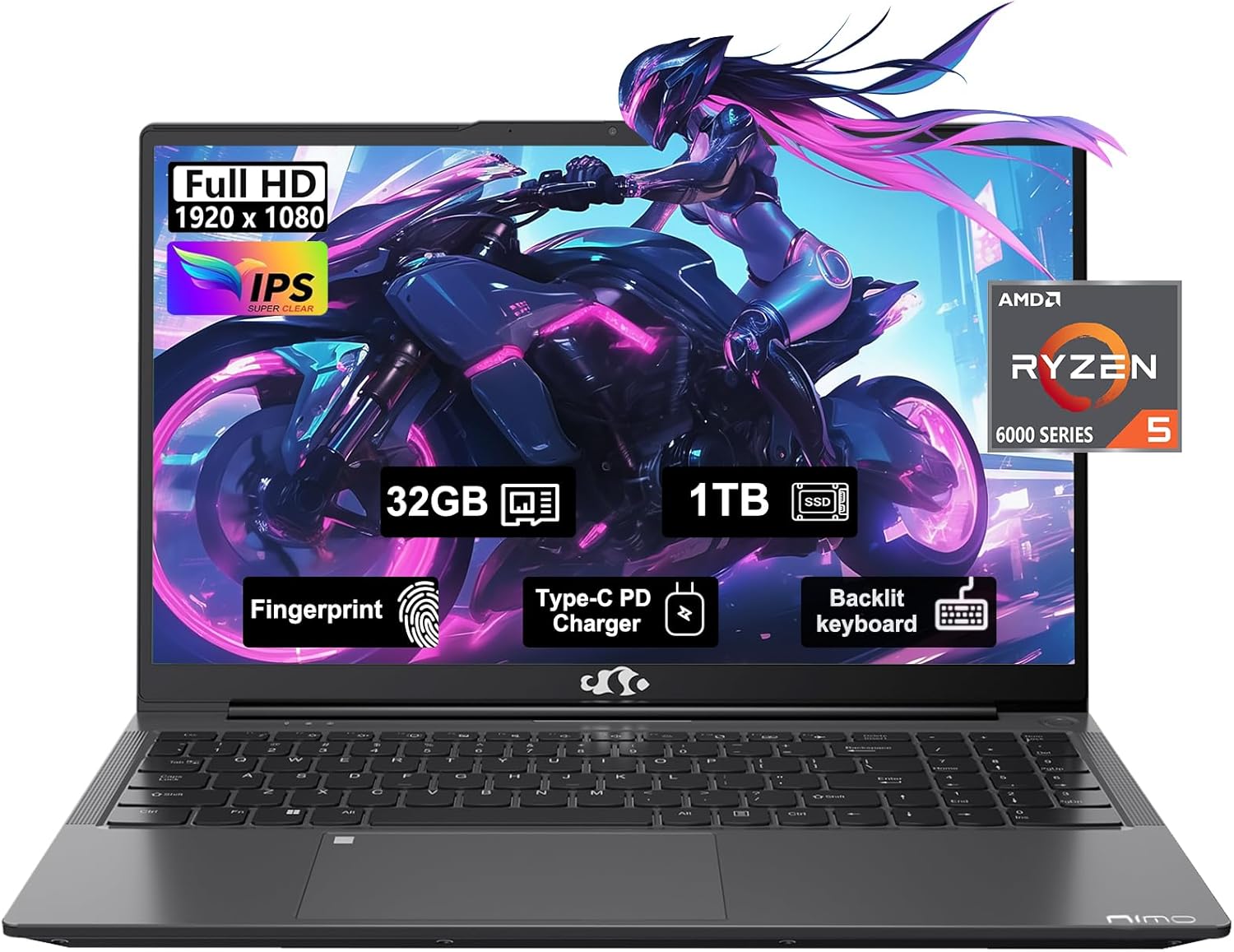
Figure 1: NIMO 15.6" FHD IPS Business Gaming Laptop overview.
การตั้งค่า
1. การแกะกล่องและการตรวจสอบเบื้องต้น
นำส่วนประกอบทั้งหมดออกจากบรรจุภัณฑ์อย่างระมัดระวัง กล่องควรบรรจุ:
- แล็ปท็อป Nimo N153 จำนวน 1 เครื่อง
- 1 x ที่ชาร์จเร็ว Type-C 100W PD
- 1 x คู่มือผู้ใช้
ตรวจสอบแล็ปท็อปและอุปกรณ์เสริมว่ามีร่องรอยความเสียหายหรือไม่ หากส่วนประกอบใดสูญหายหรือเสียหาย โปรดติดต่อฝ่ายสนับสนุนลูกค้าทันที
2. การเปิดเครื่องครั้งแรกและการชาร์จ
Before first use, it is recommended to fully charge the laptop.
- Connect the Type-C 100W PD Fast Charger to the laptop's Type-C port (Multifunction) and to a power outlet.
- The charge LED indicator will illuminate. Allow the laptop to charge until the LED indicates a full charge.
- กดปุ่มเพาเวอร์เพื่อเปิดแล็ปท็อป

Figure 2: Connecting the Type-C 100W PD Fast Charger.
3. Operating System Setup (Windows 11)
Follow the on-screen prompts to complete the initial setup of Windows 11. This typically includes:
- เลือกภูมิภาคและเค้าโครงแป้นพิมพ์ของคุณ
- การเชื่อมต่อกับเครือข่าย Wi-Fi
- การลงชื่อเข้าใช้หรือการสร้างบัญชี Microsoft
- การตั้งค่ารหัส PIN หรือรหัสผ่าน
- Configuring privacy settings.
การใช้งานแล็ปท็อปของคุณ
1. คีย์บอร์ดและทัชแพด
The NIMO laptop features a full-size backlit keyboard and a large touchpad for comfortable and efficient input.
- แป้นพิมพ์พร้อมไฟแบ็คไลท์: Use the function keys (Fn + F-key combination, typically F3 or F4) to adjust keyboard backlight brightness.
- ทัชแพด: รองรับการใช้งานท่าทางสัมผัสหลายนิ้วสำหรับการนำทาง โปรดดูการตั้งค่าของ Windows สำหรับการปรับแต่งเพิ่มเติม
- เครื่องอ่านลายนิ้วมือ: Located on the touchpad, allows for secure login via Windows Hello.

Figure 3: Laptop keyboard layout with backlit keys and integrated fingerprint reader.
2. พอร์ตและการเชื่อมต่อ
Your NIMO laptop is equipped with various ports for versatile connectivity:
- พอร์ต USB 2.0: 1 port for connecting peripherals.
- พอร์ต USB 3.0: พอร์ต 2 ช่องสำหรับการถ่ายโอนข้อมูลความเร็วสูง
- Type-C Ports (Multifunction): 2 ports supporting power delivery (PD) and data.
- พอร์ต HDMI: สำหรับเชื่อมต่อกับจอแสดงผลภายนอก
- แจ็คหูฟัง: สำหรับเอาต์พุตเสียง
- ช่องเสียบการ์ด Micro SD: For expanding storage or transferring data from memory cards.
- สล็อตล็อคเคนซิงตัน: เพื่อความปลอดภัยทางกายภาพ
- การเชื่อมต่อไร้สาย: Supports Wi-Fi 802.11a/b/g/n/ac and Bluetooth 5.2.

รูปที่ 4: เกินview of laptop ports for various connections.
3. การแสดงผล
The laptop features a 15.6" FHD IPS (1920x1080) Anti-Glare Display with an 85% screen-to-body ratio. This display is designed to provide clear visuals and reduce eye strain during extended use.

Figure 5: The 15.6-inch Full HD IPS display.
4. การปฏิบัติงาน
Powered by an AMD Ryzen 5 6600H processor (6 Cores, 12 Threads, up to 4.5 GHz) and 32GB DDR5 RAM, the laptop delivers robust performance for business tasks, content creation, and light gaming. The integrated AMD Radeon 660M GPU handles graphics processing efficiently.

Figure 6: AMD Ryzen 5 6600H processor, central to the laptop's performance.
The 1TB PCIe SSD provides fast boot times and rapid data access, enhancing overall system responsiveness.
การซ่อมบำรุง
1. การทำความสะอาดแล็ปท็อปของคุณ
- ใช้ผ้านุ่มไม่เป็นขุยเช็ดเล็กน้อยampชุบน้ำหรือน้ำยาทำความสะอาดหน้าจอเพื่อทำความสะอาดจอแสดงผล
- สำหรับแป้นพิมพ์และตัวเครื่อง ให้ใช้ผ้านุ่มๆ หลีกเลี่ยงสารเคมีรุนแรงหรือวัสดุที่มีฤทธิ์กัดกร่อน
- Use compressed air to clear dust from vents and ports periodically.
2. การอัปเดตซอฟต์แวร์
Regularly check for and install Windows updates and driver updates to ensure optimal performance and security.
- ไปที่ การตั้งค่า > Windows Update to check for OS updates.
- Visit the NIMO support webไซต์สำหรับการอัปเดตไดรเวอร์ล่าสุด
3. การจัดการการจัดเก็บข้อมูล
To maintain performance, regularly manage your 1TB SSD storage:
- ลบที่ไม่จำเป็น fileและแอปพลิเคชั่น
- ใช้ประโยชน์จากการจัดเก็บข้อมูลบนคลาวด์สำหรับข้อมูลขนาดใหญ่ files.
- Periodically run Disk Cleanup (built-in Windows tool).
4. การดูแลแบตเตอรี่
เพื่อยืดอายุการใช้งานแบตเตอรี่ให้สูงสุด:
- หลีกเลี่ยงอุณหภูมิที่สูงหรือต่ำเกินไป
- อย่าเสียบปลั๊กแล็ปท็อปทิ้งไว้โดยที่ชาร์จเต็ม 100% เป็นเวลานานหากไม่ได้ใช้งาน
- Calibrate the battery occasionally by fully discharging and recharging it.
5. Memory and Storage Upgrades
The NIMO laptop supports dual-channel memory upgrades (up to 2 x 16GB DDR5 RAM) and features an upgradable PCIe SSD. Consult a qualified technician for hardware upgrades to avoid voiding your warranty.
การแก้ไขปัญหา
หัวข้อนี้จะกล่าวถึงปัญหาทั่วไปที่คุณอาจพบเจอ
แล็ปท็อปเปิดไม่ติด
- Ensure the charger is securely connected to both the laptop and a working power outlet.
- ตรวจสอบว่าเต้ารับไฟฟ้าใช้งานได้โดยเสียบอุปกรณ์อื่น
- ลองกดปุ่มเปิด/ปิดค้างไว้ 15-20 วินาทีเพื่อทำการฮาร์ดรีเซ็ต
- หากแบตเตอรี่หมด ให้ชาร์จอย่างน้อย 30 นาทีก่อนลองเปิดเครื่อง
Screen Remains Blank
- Check if the laptop is powered on (listen for fan noise or look for indicator lights).
- Connect an external monitor via the HDMI port to check if the display output works.
- รีสตาร์ทแล็ปท็อป
ประสิทธิภาพการทำงานช้า
- ปิดแอปพลิเคชันที่ไม่จำเป็นซึ่งทำงานอยู่เบื้องหลัง
- ตรวจสอบและติดตั้งการอัปเดต Windows ที่รอดำเนินการอยู่
- ตรวจสอบให้แน่ใจว่ามีพื้นที่ว่างบน SSD ของคุณเพียงพอ
- รันการสแกนไวรัส
ปัญหาการเชื่อมต่อ Wi-Fi
- ตรวจสอบให้แน่ใจว่าได้เปิดใช้งาน Wi-Fi ในการตั้งค่า Windows
- รีสตาร์ทเราเตอร์และโมเด็มของคุณ
- อัปเดตไดร์เวอร์อะแดปเตอร์เครือข่ายไร้สายของคุณ
- ลืมเครือข่ายและเชื่อมต่อใหม่อีกครั้ง
สำหรับปัญหาที่ไม่ได้กล่าวถึงในที่นี้ โปรดดูข้อมูลการติดต่อในส่วนการรับประกันและการสนับสนุน
ข้อมูลจำเพาะ
| คุณสมบัติ | รายละเอียด |
|---|---|
| ยี่ห้อ | นีโม |
| ชื่อรุ่น | Nimo N153G |
| ขนาดหน้าจอ | 15.6 นิ้ว |
| ความละเอียดหน้าจอ | 1920 x 1080 pixels (FHD IPS Anti-Glare) |
| โปรเซสเซอร์ | AMD Ryzen 5 6600H (6 Cores, 12 Threads, up to 4.5 GHz) |
| แรม | 32GB DDR5 (Dual-channel, upgradable to 2x16GB) |
| ฮาร์ดไดรฟ์ | 1TB PCIe SSD |
| โคโปรเซสเซอร์กราฟิก | AMD Integrated graphics (Radeon 660M GPU) |
| ระบบปฏิบัติการ | วินโดวส์ 11 |
| ประเภทไร้สาย | 802.11a/b/g/n/ac (Wi-Fi 5), บลูทูธ 5.2 |
| พอร์ต | 1x USB 2.0, 2x USB 3.0, 2x Type-C (Multifunction), 1x HDMI, 1x Headphone Jack, 1x Micro SD Slot |
| คุณสมบัติพิเศษ | Fingerprint Reader, HD Audio, Backlit Keyboard, Numeric Keypad |
| แหล่งพลังงาน | Battery Powered, Type-C 100W PD Fast Charger |
| อายุการใช้งานแบตเตอรี่โดยเฉลี่ย | 5 ชั่วโมง |
| น้ำหนักสินค้า | 6 ปอนด์ |
| ขนาดสินค้า | 14.07 x 8.98 x 0.76 นิ้ว |
| สี | สีเทาสเปซเกรย์ |
การรับประกันและการสนับสนุน
การรับประกันของผู้ผลิต
Your NIMO laptop is covered by a comprehensive การรับประกันจากผู้ผลิต 2 ปี offered by Nimo Direct Inc. This warranty covers defects in materials and workmanship under normal use.
Additionally, Nimo Direct Inc. offers 90-Day Hassle-Free Returns. If you encounter any concerns or issues with your product within this period, please contact customer support for assistance with resolution or replacement.
ติดต่อฝ่ายสนับสนุน
For technical assistance, warranty claims, or return inquiries, please contact NIMO customer support. Refer to the contact information provided on the official NIMO webไซต์หรือเอกสารที่รวมอยู่กับผลิตภัณฑ์ของคุณ
Please have your product model number (Nimo N153) and purchase details ready when contacting support.


