การแนะนำ
This manual provides essential information for the setup, operation, maintenance, and troubleshooting of your Google Pixel Watch 2. Designed for seamless integration with Android devices, the Pixel Watch 2 offers advanced health and fitness tracking, smart notifications, and safety features.
มีอะไรอยู่ในกล่อง
- Google Pixel Watch 2 Body
- สายชาร์จ
- Active Band (Obsidian)

Image: The Google Pixel Watch 2, featuring a matt black aluminum case and an obsidian active band, shown with its display active.
การตั้งค่า
1. การชาร์จครั้งแรก
Before first use, fully charge your Pixel Watch 2. Connect the charging cable to the watch's magnetic charging port and a compatible USB power adapter. A full charge takes approximately 75 minutes.
2. การจับคู่กับโทรศัพท์ของคุณ
- Ensure your Android phone is running the latest version of Android and has Bluetooth enabled.
- Download and open the Google Pixel Watch app from the Google Play Store.
- Follow the on-screen instructions in the app to pair your watch. This typically involves scanning a QR code displayed on the watch or manually selecting your watch from a list of nearby devices.
- Complete the setup process, including signing into your Google account and granting necessary permissions.
3. Adjusting the Band
The active band is designed for comfort and secure fit. Adjust the band to ensure the watch sits snugly on your wrist, allowing the sensors to maintain proper contact with your skin for accurate readings.
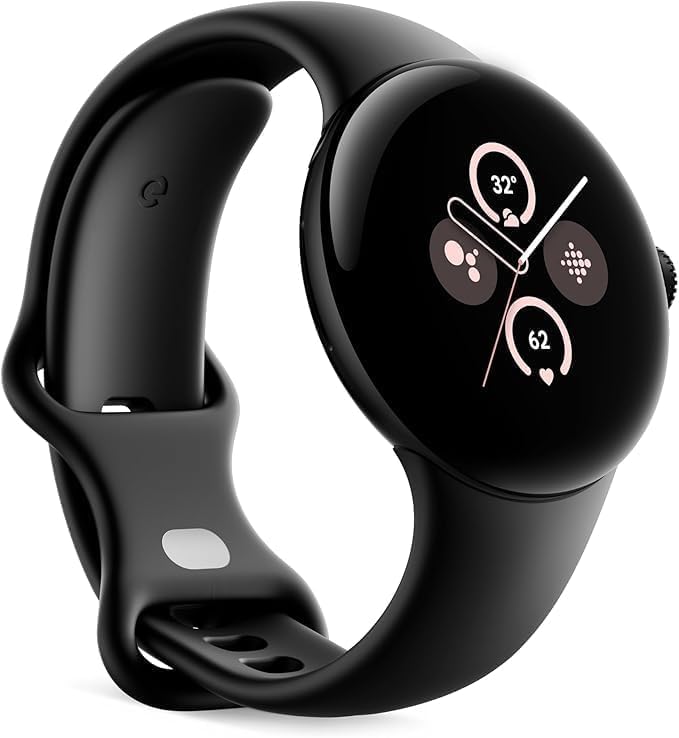
ภาพ: ด้านหนึ่ง view of the Google Pixel Watch 2, highlighting the design of the active band and the crown on the right side of the watch face.
วิธีใช้งาน Pixel Watch 2 ของคุณ
การนำทางและการควบคุม
- หน้าจอสัมผัส: Swipe left, right, up, or down to navigate through tiles, notifications, and quick settings. Tap to select items.
- มงกุฎ: Rotate the crown to scroll through lists or adjust volume. Press the crown to return to the watch face or open the app launcher.
- ปุ่มด้านข้าง: Press the side button to access recent apps or activate Google Assistant.
คุณสมบัติหลัก
- การติดตามอัตราการเต้นของหัวใจ: The all-new heart rate sensor provides accurate heart rate data for fitness and health monitoring.
- การจัดการความเครียด: Utilize Fitbit's body-response feature to identify and manage potential signs of stress.
- การติดตามการนอนหลับ: ตรวจสอบการนอนหลับtages, skin temperature variations, and blood oxygen levels to understand sleep patterns.
- คุณสมบัติด้านความปลอดภัย:
- ความช่วยเหลือฉุกเฉิน SOS: Quickly alert emergency services or trusted contacts.
- การตรวจจับการตก: Automatically detects hard falls and can initiate an emergency call if you are unresponsive.
- การตรวจสอบความปลอดภัย: Alerts close contacts if you do not respond to a set check-in timer.
- อายุการใช้งานแบตเตอรี่: The enhanced battery provides up to 24 hours of use with the always-on display enabled.
การซ่อมบำรุง
การทำความสะอาดนาฬิกาของคุณ
Regularly clean your Pixel Watch 2 to ensure optimal performance and hygiene. Use a soft, lint-free cloth slightly dampened with water. Avoid using harsh chemicals or abrasive materials. Pay attention to the sensors on the back of the watch and the band.
การดูแลแบตเตอรี่
To prolong battery lifespan, avoid extreme temperatures. Charge the watch using only the provided charging cable. While the watch supports fast charging, avoid frequently draining the battery completely before recharging.
การอัพเดตซอฟต์แวร์
Keep your Pixel Watch 2's software updated to ensure access to the latest features, security enhancements, and performance improvements. Updates are typically managed through the Google Pixel Watch app on your paired phone.
การแก้ไขปัญหา
| ปัญหา | วิธีแก้ปัญหาที่เป็นไปได้ |
|---|---|
| นาฬิกาไม่ชาร์จ | Ensure the charging cable is properly aligned with the magnetic charging port on the watch. Check the USB power adapter and power source. Try a different USB port or adapter. |
| นาฬิกาไม่จับคู่กับโทรศัพท์ | Verify Bluetooth is enabled on your phone. Restart both the watch and the phone. Ensure the Google Pixel Watch app is updated. Reset network settings on your phone if necessary. |
| การอ่านอัตราการเต้นของหัวใจไม่แม่นยำ | Ensure the watch is worn snugly on your wrist, not too loose or too tight. Clean the sensors on the back of the watch. Avoid excessive movement during readings. |
| อายุการใช้งานแบตเตอรี่สั้น | Disable always-on display if not needed. Reduce screen brightness. Limit background app refresh. Turn off unnecessary notifications. Ensure software is updated. |
For further assistance, refer to the official Google Pixel Watch support website or contact Google support.
ข้อมูลจำเพาะ
- แบบอย่าง: พิกเซลวอทช์ 2
- ขนาด : 1.77 x 1.5 x 0.55 นิ้ว
- น้ำหนัก: 4.2 ออนซ์
- ขนาดหน้าจอ: 41 Millimeters (Round AMOLED display)
- พื้นที่เก็บข้อมูลหน่วยความจำ: 32GB
- ระบบปฏิบัติการ: Android (Wear OS 4)
- ความจุแบตเตอรี่: 306 มิลลิวินาทีamp Hours (up to 24 hours with always-on display)
- การเชื่อมต่อ: บลูทูธ, GPS ในตัว
- เซ็นเซอร์: Heart Rate Monitor, Accelerometer, Body Temperature Monitor, ECG, Stress Tracking (cEDA)
- วัสดุเคส: 100% recycled light aluminum
การรับประกันและการสนับสนุน
This Google Pixel Watch 2 is a renewed product. Please refer to the specific warranty terms provided by the seller or renewed program. Typically, renewed products come with a limited warranty. For detailed warranty information and support, please contact the vendor from whom you purchased this renewed device.
For general product information, software updates, and advanced troubleshooting guides, visit the official Google Pixel Watch support webเว็บไซต์: support.google.com/pixelwatch


