1. บทนำ
This instruction manual provides detailed guidance for the setup, operation, and maintenance of your ZdalaMit NF606UD replacement remote control. This remote is designed to be compatible with various Emerson LCD TV models, offering a direct replacement without the need for complex programming.
2. เนื้อหาบรรจุภัณฑ์
- 1x ZdalaMit NF606UD Replacement Remote Control
- Note: Batteries and additional manuals are not included.
3. การตั้งค่า
3.1 การติดตั้งแบตเตอรี่
- ค้นหาช่องใส่แบตเตอรี่ที่ด้านหลังของรีโมทคอนโทรล
- เลื่อนฝาปิดช่องใส่แบตเตอรี่ลงหรือตามทิศทางที่ระบุด้วยลูกศรเพื่อเปิด
- Insert two (2) 1.5V AAA alkaline batteries, ensuring the positive (+) and negative (-) terminals align correctly with the markings inside the compartment.
- ปิดฝาช่องใส่แบตเตอรี่โดยเลื่อนกลับเข้าที่จนกระทั่งได้ยินเสียงคลิกและแน่นสนิท
สำคัญ: This remote control is pre-programmed and does not require additional setup or coding for compatible Emerson LCD TV models. Once batteries are installed, it is ready for immediate use.

รูปที่ 1 : ด้านหน้า view of the ZdalaMit NF606UD remote control, showing all buttons and layout.
4. การใช้งานรีโมทคอนโทรล
The NF606UD remote control provides full functionality for your compatible Emerson LCD TV. Point the remote directly at the TV's infrared sensor for optimal performance.
4.1 ฟังก์ชันหลักเหนือview
- POWER (ปุ่มสีแดง): เปิดหรือปิดทีวี
- ปุ่มตัวเลข (0-9): เลือกช่องรายการได้โดยตรง
- CH (เปลี่ยนช่องขึ้น/ลง): Navigates through channels sequentially.
- VOL (เพิ่ม/ลดระดับเสียง): ปรับระดับเสียง
- ใบ้: ปิดเสียงหรือเปิดเสียงทีวีอีกครั้ง
- เลือกอินพุต: Cycles through available input sources (HDMI, AV, Component, etc.).
- เมนู: เข้าถึงเมนูหลักของทีวี
- ปุ่มนำทาง (ขึ้น, ลง, ซ้าย, ขวา, ENTER): ใช้สำหรับนำทางเมนูและยืนยันการเลือก
- เมนูยอดนิยม: Accesses the top-level menu.
- ภาพ: Adjusts picture settings.
- เสียง: ปรับการตั้งค่าเสียง
- นอน: ตั้งเวลาปิดเครื่องสำหรับทีวี
- เส้นทาง: Changes picture or sound modes.
- กลับ: กลับไปที่เมนูหรือช่องก่อนหน้า
- Media Control Buttons (PLAY, PAUSE, STOP, REW, FF): Controls media playback if supported by the TV.

รูปที่ 2: มุม view of the remote control, highlighting the ergonomic design and button placement.
5. การบำรุงรักษา
5.1 การเปลี่ยนแบตเตอรี่
Replace batteries when the remote's response becomes sluggish or stops working. Always replace both batteries simultaneously with new 1.5V AAA alkaline batteries. Do not mix old and new batteries, or different types of batteries.
5.2 การทำความสะอาด
ในการทำความสะอาดรีโมทคอนโทรล ให้เช็ดพื้นผิวเบาๆ ด้วยผ้าแห้งเนื้อนุ่ม สำหรับคราบสกปรกที่ติดแน่น ให้เช็ดออกเบาๆampen the cloth with water or a mild, non-abrasive cleaner. Avoid using harsh chemicals or excessive moisture, which can damage the remote.
5.3 พื้นที่จัดเก็บ
Store the remote control in a cool, dry place away from direct sunlight, extreme temperatures, and high humidity. If the remote will not be used for an extended period, it is advisable to remove the batteries to prevent leakage and potential damage.
6 การแก้ไขปัญหา
| ปัญหา | สาเหตุที่เป็นไปได้ | สารละลาย |
|---|---|---|
| รีโมทคอนโทรลไม่ทำงาน. |
|
|
| ปุ่มไม่ตอบสนองหรือตอบสนองช้า |
|
|
| Remote controls some functions but not others. |
|
|
7. ข้อมูลจำเพาะ
- แบบอย่าง: NF606UD
- ยี่ห้อ: ซดาลามิต
- แหล่งจ่ายไฟ: แบตเตอรี่อัลคาไลน์ AAA 2 x 1.5V (ไม่รวม)
- ขนาดสินค้า : 7.94 x 2.18 x 0.55 นิ้ว (โดยประมาณ)
- น้ำหนักสินค้า: 1.41 ounces (approximately, without batteries)
- สี: สีดำ
- คุณสมบัติพิเศษ: Pre-Programmed (no setup required)
- อุปกรณ์ที่รองรับ: โทรทัศน์
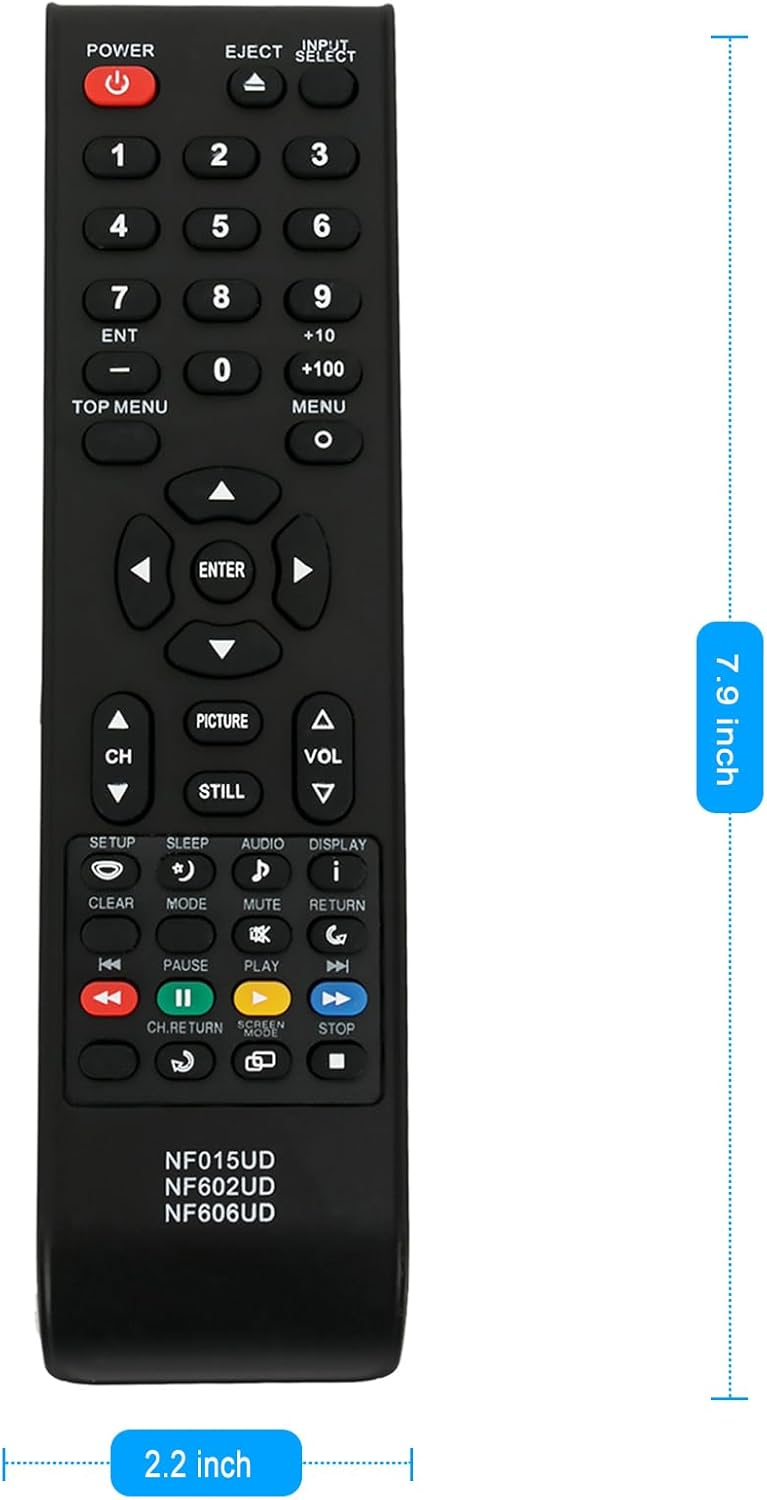
Figure 3: Dimensions of the ZdalaMit NF606UD remote control.
8. Compatible Emerson LCD TV Models
This ZdalaMit NF606UD replacement remote control is compatible with the following Emerson LCD TV models:
- LC195EM9
- LC195EM9B
- ELC320EM9
- LC195EM92
- BLC320EM9
- BLC320EM9A
- BLC320EM9B
- LC195EM9E
- LE40M600
9. การรับประกันและการสนับสนุน
For information regarding warranty coverage or technical support, please refer to the original purchase documentation or contact the seller directly. As this is a replacement remote control, specific warranty terms may be provided by the retailer or the ZdalaMit brand.


