การแนะนำ
The MiBOXER PW5 5-in-1 LED Controller is designed for precise and convenient management of various LED lighting systems. It supports multiple LED types and offers dual wireless connectivity for seamless integration and control.
This manual provides essential information for the safe and efficient installation, operation, and maintenance of your PW5 LED Controller.
คุณสมบัติหลัก
- ความเข้ากันได้แบบ 5-in-1: Supports Single Color, Dual White (CCT), RGB, RGBW, and RGB+CCT LED setups.
- การเชื่อมต่อไร้สายแบบคู่: Features WiFi and 2.4GHz technology for stable operation and smart app integration.
- กำลังการผลิตสูง: Handles up to 20A output, suitable for high-power LED installations.
- การควบคุมอัจฉริยะ: Compatible with "Tuya Smart" app and third-party voice control systems like Alexa and Google Assistant.
- Color and Dimming Control: Offers 16 million colors, adjustable color temperature, brightness, and saturation.
- รองรับการหรี่ไฟแบบ PUSH: Allows for flexible dimming control.
- ฟังก์ชั่นหน่วยความจำ: Retains the last-used settings.
- ฉบับกว้างtagอี ช่วง: Operates on DC12-24V.
เนื้อหาแพ็คเกจ
- MiBOXER PW5 5-in-1 LED Controller
- คู่มือการใช้งาน

Image: The MiBOXER PW5 LED Controller shown alongside its retail packaging and a small instruction manual.
การติดตั้งและการตั้งค่า
ข้อควรระวังเพื่อความปลอดภัย
- ตรวจสอบให้แน่ใจว่าได้ตัดการเชื่อมต่อไฟฟ้าก่อนการติดตั้ง
- Install in a dry environment, away from moisture and extreme temperatures.
- ตรวจสอบเล่มที่ถูกต้องtage (DC12-24V) and current ratings for your LED strips and power supply.
- ห้ามใช้กระแสไฟขาออกเกินค่าสูงสุด 20A
แผนผังการเดินสายไฟ
Connect your LED strips and power supply to the controller as shown in the diagram below. Ensure correct polarity for all connections.

Image: Detailed wiring diagram of the MiBOXER PW5 controller. It shows the V+ and V- input terminals, GND and PUSH dimming terminals, and output terminals labeled V+, W, WW, CW, R, G, B for various LED strip types. An indicator output mode table is also visible, showing White for Single Color, Yellow for Dual White, Red for RGB, Green for RGBW, and Blue for RGB+CCT.
- Connect the DC12-24V power supply to the INPUT V+ และ V- ขั้วต่อ
- Connect your LED strip(s) to the corresponding เอาท์พุต terminals based on your LED type:
- สีเดียว: Connect to V+ and W (White)
- Dual White (CCT): Connect to V+, WW (Warm White), and CW (Cool White)
- อาร์จีบี: Connect to V+, R (Red), G (Green), and B (Blue)
- RGBW: Connect to V+, R, G, B, and W (White)
- RGB+CCT: Connect to V+, R, G, B, WW, and CW
- For PUSH dimming functionality, connect a compatible PUSH switch to the ก.ย.ด. และ ดัน ขั้วต่อ
การติดตั้ง
The controller is designed for tabletop mounting. Ensure it is placed on a stable, flat surface with adequate ventilation.

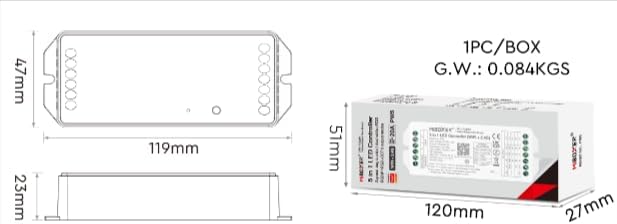
Image: Two diagrams illustrating the physical dimensions of the MiBOXER PW5 controller. The first shows a top-down view with a length of 119mm and width of 47mm. The second shows a side view with a height of 23mm, and also includes package dimensions of 120mm x 51mm x 27mm.
การดำเนินการ
Switching Output Modes
The PW5 controller supports 5 different output modes. To switch between these modes:
- กดปุ่ม "ชุด" button once to cycle through the output modes.
- The indicator light on the controller will change color to reflect the current mode:
- สีขาว: สีเดียว
- สีเหลือง: สีขาวคู่
- สีแดง: RGB
- สีเขียว: RGBW
- สีน้ำเงิน: RGB+CCT
รีโมทคอนโทรล RF 2.4G
The controller can be linked to a compatible 2.4G RF remote control (sold separately).
- To link: Power on the controller. Within 3 seconds, press the "ON" button on the remote control 3 times. The LED strip will flash to confirm successful linking.
- To unlink: Power on the controller. Within 3 seconds, press the "ON" button on the remote control 5 times. The LED strip will flash to confirm unlinking.
WiFi and App Control (Tuya Smart)
The PW5 controller integrates with the "Tuya Smart" app for advanced control via WiFi.
- Download the "Tuya Smart" app from your device's app store.
- ลงทะเบียนหรือเข้าสู่ระบบบัญชี Tuya Smart ของคุณ
- To activate WiFi pairing mode: Long press the "ชุด" button for 3 seconds until the indicator flashes quickly.
- In the Tuya Smart app, follow the instructions to add a new device. Select the appropriate lighting device type.
- Once connected, you can control brightness, color, color temperature, saturation, and set up group/multi-zone control.
- The app also supports music rhythm functions.
Voice Control (Alexa, Google Assistant)
After successful integration with the Tuya Smart app, you can link your account to voice assistants like Amazon Alexa or Google Assistant for hands-free control.
- เปิดแอป Alexa หรือ Google Home
- ไปที่ส่วน "ทักษะ" หรือ "ทำงานร่วมกับ Google"
- ค้นหา and enable the "Tuya Smart" skill/service.
- เชื่อมต่อบัญชี Tuya Smart ของคุณเมื่อได้รับแจ้ง
- Discover devices. Your MiBOXER PW5 controller should appear.
- ตอนนี้คุณสามารถใช้คำสั่งเสียงได้แล้ว เช่น:
- "อเล็กซ่า เปิดไฟห้องนั่งเล่นหน่อย"
- "เฮ้ Google ตั้งไฟในครัวเป็นสีฟ้า"
- "อเล็กซ่า ลดแสงไฟในห้องนอนลงเหลือ 50%"
การซ่อมบำรุง
- รักษาตัวควบคุมให้สะอาดและปราศจากฝุ่น ใช้ผ้าแห้งนุ่มๆ ในการทำความสะอาด
- อย่าใช้สารเคมีรุนแรงหรือน้ำยาทำความสะอาดที่มีฤทธิ์กัดกร่อน
- ตรวจสอบให้แน่ใจว่ามีการระบายอากาศที่เหมาะสมรอบๆ อุปกรณ์เพื่อป้องกันความร้อนสูงเกินไป
- Regularly check wiring connections for security and integrity.
การแก้ไขปัญหา
| ปัญหา | สาเหตุที่เป็นไปได้ | สารละลาย |
|---|---|---|
| ไฟ LED ไม่ติด | No power to controller; incorrect wiring; faulty LED strip. | Check power supply connection; verify input/output wiring polarity; test LED strip with another power source. |
| รีโมตคอนโทรลไม่ทำงาน | Remote not linked; remote battery low; interference. | Re-link the remote control; replace remote battery; reduce interference sources. |
| การควบคุมแอปไม่ทำงาน | Controller not connected to WiFi; incorrect app settings; WiFi signal weak. | Ensure controller is in WiFi pairing mode and connected to your network; check app settings; move controller closer to WiFi router. |
| Incorrect colors or dimming | Wrong output mode selected; incorrect wiring for LED type. | Press "SET" button to cycle to the correct output mode; verify LED strip wiring matches the selected mode. |
ข้อมูลจำเพาะ
| หมายเลขรุ่น | PW5 |
| อินพุต Voltage | กระแสตรง12-24โวลต์ |
| กระแสไฟขาออก | สูงสุด 20A |
| จำนวนช่องสัญญาณ | 5 |
| การเชื่อมต่อ | WiFi, 2.4GHz RF |
| Control Distance (2.4G) | 30ม. |
| อุณหภูมิในการทำงาน | -10°C ถึง 40°C |
| ขนาด | 119 มม. x 47 มม. x 23 มม. (ประมาณ 4.68 x 1.85 x 0.9 นิ้ว) |
| น้ำหนักสินค้า | 3.2 ออนซ์ (ประมาณ 90 กรัม) |
| ผู้ผลิต | มิบ็อกเซอร์ |
การรับประกันและการสนับสนุน
สำหรับข้อมูลการรับประกันและการสนับสนุนทางเทคนิค โปรดดูที่เว็บไซต์อย่างเป็นทางการของ MiBOXER webหรือติดต่อผู้ค้าปลีกของคุณ เก็บใบเสร็จรับเงินไว้เพื่อใช้ในการเคลมประกัน
หากต้องการความช่วยเหลือเพิ่มเติม คุณสามารถไปที่ MiBOXER Store on Amazon.


