การแนะนำ
This manual provides detailed instructions for the assembly, operation, and maintenance of your FLEXISPOT E6 Electric Height Adjustable Standing Desk. Please read this manual thoroughly before assembly and use to ensure proper function and safety. Keep this manual for future reference.

Image: The FLEXISPOT E6 standing desk in a home office setting.
ข้อมูลด้านความปลอดภัย
To prevent injury or damage to the desk, please observe the following safety guidelines:
- Always ensure the desk is properly assembled and stable before use.
- ห้ามน้ำหนักเกินขีดจำกัดสูงสุด 220 ปอนด์ (100 กก.)
- Keep the work area clear of obstacles to prevent accidents during height adjustment.
- Always use both hands when adjusting the desk height to maintain stability.
- Never leave children unattended near the desk.
- Ensure all cables are properly managed to avoid entanglement during movement.
- หลีกเลี่ยงการวางของเหลวลงบนแผงควบคุมโดยตรง หรือใกล้กับชิ้นส่วนอิเล็กทรอนิกส์

Image: Anti-collision system diagram.
การติดตั้งและการประกอบ
Follow these steps to assemble your FLEXISPOT E6 standing desk. It is recommended to have assistance for certain steps due to the weight of components.
1. แกะส่วนประกอบออก
แกะชิ้นส่วนทั้งหมดออกจากบรรจุภัณฑ์อย่างระมัดระวัง และตรวจสอบกับรายการชิ้นส่วนที่ให้มาในบรรจุภัณฑ์ ตรวจสอบให้แน่ใจว่าชิ้นส่วนทั้งหมดครบถ้วนและไม่เสียหาย
2. Assemble the Frame
Begin by assembling the crossbeams and pedestals. Ensure screws are aligned with square holes in the cross member and pressed tightly. Pre-tighten all screws for installing the cross beams, then tighten them simultaneously.
Video: FLEXISPOT E6 Essential Standing Desk Installation Guide. This video demonstrates the step-by-step assembly process for the desk frame and desktop attachment.
3. Attach the Desktop
Carefully place the desktop upside down on a soft, clean surface. Position the assembled frame onto the desktop, ensuring proper alignment. The distance between the supporting bracket and the edge of the tabletop should not exceed 200mm. Secure the frame to the desktop using the provided screws. Use a drill for efficiency, but ensure not to overtighten.

Image: The assembled desk with a light wood top and white frame.
4. Install Keypad and Cable Management
Attach the intelligent keypad to the underside of the desktop. Ensure the keypad is on the same side as the adapter bracket and its curved edge is flush with the edge of the table top. Connect all necessary cables (AC power cable, power adaptor, extension cord) to the control box and motors. Utilize the cable clips for organized cable management.
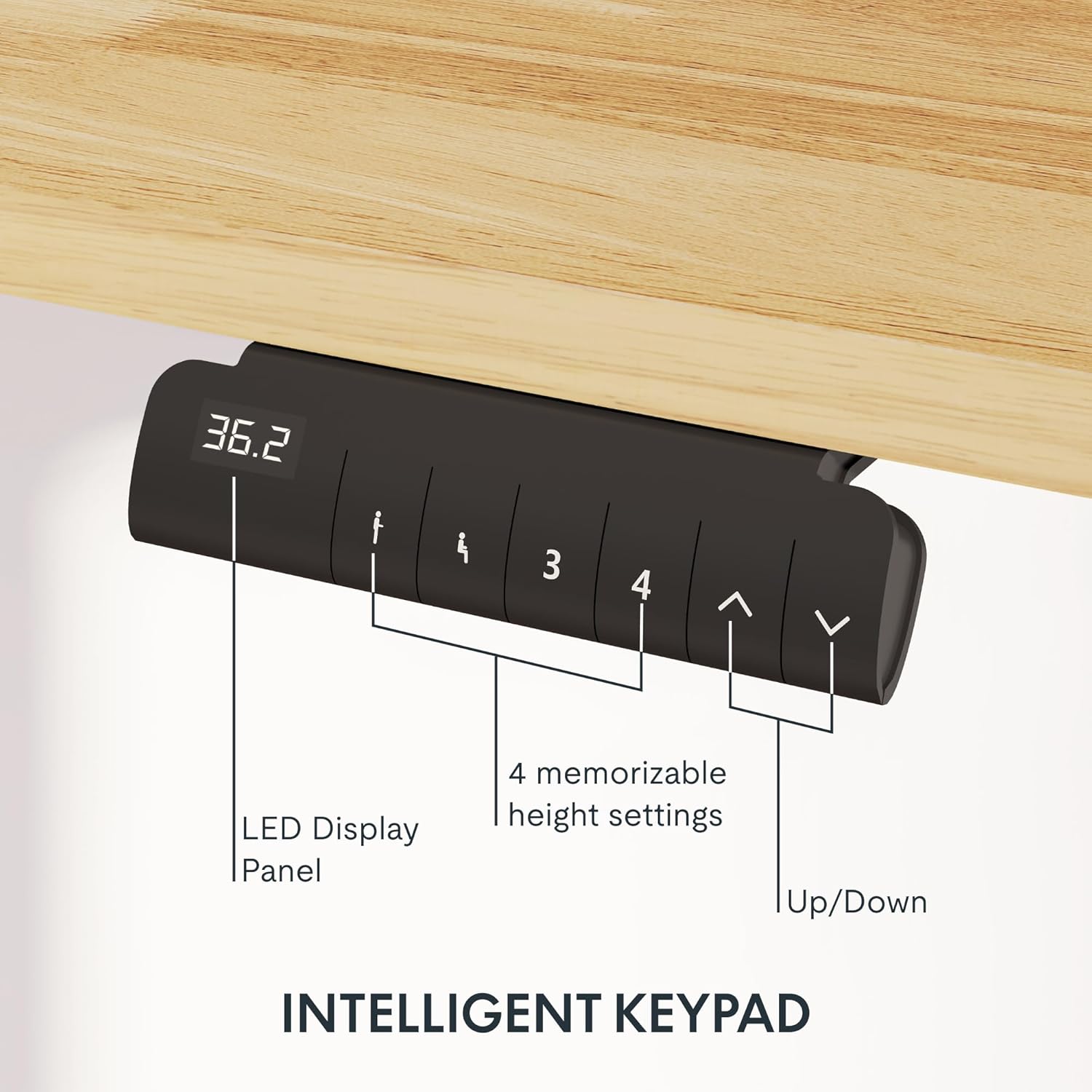
Image: Close-up of the intelligent keypad for height adjustment.
คำแนะนำการใช้งาน
Your FLEXISPOT E6 desk features a dual-motor system for smooth and quiet height adjustments.
การปรับความสูง
- ใช้ Up และ ลง arrows on the keypad to manually adjust the desk height.
- The LED display panel will show the current height.
หน่วยความจำที่ตั้งไว้ล่วงหน้า
The keypad includes four memorizable height settings for convenience:
- ปรับความสูงของโต๊ะตามต้องการโดยใช้ปุ่มลูกศรขึ้น/ลง
- กดปุ่ม M button (or similar memory set button) followed by a number button (1, 2, 3, or 4) to save the current height to that preset.
- หากต้องการเรียกดูความสูงที่บันทึกไว้ เพียงกดปุ่มหมายเลขที่เกี่ยวข้อง

ภาพ: ภาพประกอบแสดงช่วงการปรับความสูงของโต๊ะทำงาน
การซ่อมบำรุง
Regular maintenance ensures the longevity and optimal performance of your standing desk.
- การทำความสะอาด: เช็ดพื้นเดสก์ท็อปและกรอบด้วยผ้าเนื้อนุ่มamp ผ้า หลีกเลี่ยงน้ำยาทำความสะอาดที่มีฤทธิ์กัดกร่อนหรือสารเคมีรุนแรงที่อาจทำลายพื้นผิวได้
- การจัดการสายเคเบิล: Periodically check and reorganize cables to prevent tangling or damage, especially after moving the desk.
- ความแน่นของสกรู: Occasionally check all screws and bolts to ensure they are securely tightened. Retighten if necessary.
- การกระจายน้ำหนัก: Distribute weight evenly across the desktop to prevent strain on the motors and frame.
การแก้ไขปัญหา
If you encounter issues with your FLEXISPOT E6 desk, refer to the following common solutions:
- โต๊ะไม่เคลื่อนไหว: Check all power connections. Ensure the power adapter is securely plugged into both the wall outlet and the control box.
- การเคลื่อนไหวที่ไม่สม่ำเสมอ: Perform a reset procedure (refer to the specific reset instructions in your packaged manual, as procedures can vary). Ensure no obstacles are impeding movement.
- รหัสข้อผิดพลาด: If an error code appears on the LED display, consult the full product manual for specific code meanings and solutions.
- เสียงรบกวนระหว่างการทำงาน: A slight hum is normal for dual motors. Excessive or unusual noise may indicate loose components; check all connections and screws.
หากปัญหายังคงอยู่ โปรดติดต่อฝ่ายบริการลูกค้าของ FLEXISPOT
ข้อมูลจำเพาะ
Key specifications for the FLEXISPOT E6 Electric Height Adjustable Standing Desk:
| คุณสมบัติ | รายละเอียด |
|---|---|
| ยี่ห้อ | เฟล็กซิสพอท |
| หมายเลขรุ่น | E6 |
| วัสดุเดสก์ท็อป | Rubber Solid Wood (FSC-Certified) |
| วัสดุกรอบ | โลหะ |
| ขนาดสินค้า (ลึก x กว้าง x สูง) | 55.1" x 23.6" x 23.6" (at minimum height) |
| ขนาดเดสก์ท็อป | 55"x24" (Whole-piece) |
| ความสูงขั้นต่ำ | 23.6 นิ้ว |
| ความสูงสูงสุด | 48.8 นิ้ว |
| ความจุน้ำหนักสูงสุด | 220 ปอนด์ |
| ประเภทมอเตอร์ | มอเตอร์คู่ |
| ระดับเสียง | น้อยกว่า 45dB |
| แผงควบคุม | Intelligent Keypad with LED Display and 4 Memory Presets |
| คุณสมบัติพิเศษ | Anti-collision system, Finger Joint Design |
| จำเป็นต้องประกอบ | ใช่ |
| เครื่องมือที่แนะนำสำหรับการประกอบ | ไขควง |
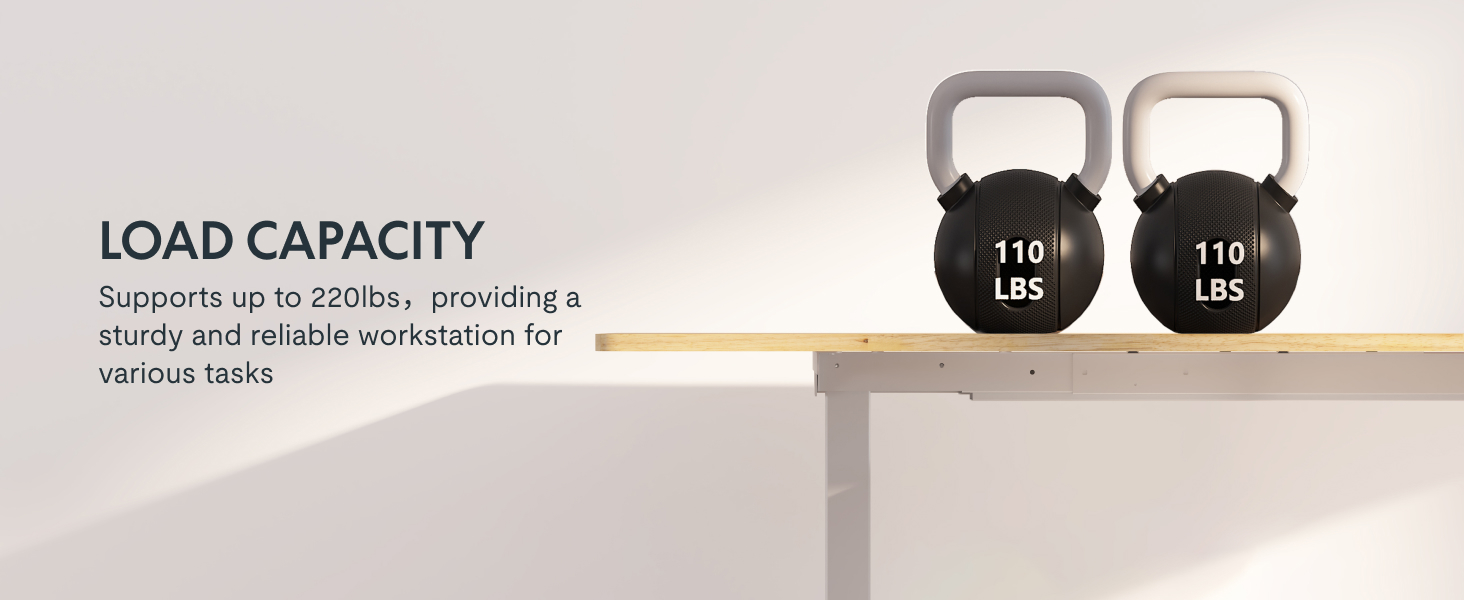
Image: Desk illustrating its 220 lbs maximum load capacity.
การรับประกันและการสนับสนุน
FLEXISPOT provides comprehensive warranty coverage for your peace of mind:
- ความคุ้มครอง 5 ปี: Applies to the desk frame and motors.
- ความคุ้มครอง 2 ปี: ใช้ได้กับแผงควบคุมและอุปกรณ์อิเล็กทรอนิกส์
For any assistance, warranty claims, or product inquiries, please contact FLEXISPOT customer support. You can find contact information on the official FLEXISPOT webเว็บไซต์หรือผ่านแพลตฟอร์มการซื้อของคุณ
Returnable until January 31, 2026.


