การแนะนำ
This manual provides detailed instructions for the safe and effective use of your Ourlife 5K30FPS WiFi Action Camera. Please read this manual thoroughly before operating the device to ensure optimal performance and longevity.
โอurlife M40TR is a versatile action camera designed to capture high-quality video and photos in various environments, including underwater, thanks to its robust waterproof casing. It features 5K 30fps video recording, a dual-screen display, a 170-degree wide-angle lens, and Wi-Fi connectivity.
มีอะไรอยู่ในกล่อง
เมื่อแกะกล่องโปรดตรวจสอบว่ามีส่วนประกอบทั้งหมดอยู่ครบ:
- Ourlife M40TR Action Camera
- เคสกันน้ำ
- อุปกรณ์ติดตั้ง
- สายชาร์จ USB
- คู่มือการใช้งาน (เอกสารนี้)
- รีโมตคอนโทรล (หากมีรวมอยู่ในแพ็คเกจเฉพาะ)

Image: The Ourlife M40TR Action Camera shown with its waterproof housing and a small remote control. This image illustrates the primary components included with the camera.
สินค้าเกินview
Familiarize yourself with the camera's main components and interfaces.
- หน้าจอด้านหน้า: 1.3-inch display for quick status checks.
- หน้าจอหลัง: 2.0-inch IPS touch screen for menu navigation and playback.
- เลนส์: เลนส์มุมกว้าง 170 องศา
- ปุ่มเปิด / ปิดโหมด: ใช้สำหรับเปิด/ปิดเครื่องและสลับโหมดการทำงาน
- ปุ่มชัตเตอร์/ตกลง: Used to start/stop recording or take photos, and confirm selections.
- พอร์ตไมโครโฟน: สำหรับเชื่อมต่อไมโครโฟนภายนอก
- พอร์ต USB: สำหรับการชาร์จและถ่ายโอนข้อมูล
- ช่องเสียบการ์ด MicroSD: สำหรับการใส่การ์ดหน่วยความจำ
- ช่องใส่แบตเตอรี่: For battery insertion.

ภาพ: ภาพระยะใกล้ view ของ Ourlife Action Camera highlighting its 2-inch responsive touch screen. This screen is used for controlling camera functions and reviewอิงฟูtage.
การตั้งค่า
1. การชาร์จแบตเตอรี่
Before first use, fully charge the camera battery. Connect the camera to a USB power source (e.g., computer, wall adapter) using the provided USB cable. The charging indicator light will illuminate during charging and turn off when complete.
2. การใส่การ์ด MicroSD
A MicroSD card (not included) is required for recording. Use a Class 10 or higher MicroSD card, up to 128GB. Insert the card into the MicroSD card slot with the contacts facing the correct direction until it clicks into place.
บันทึก: For optimal performance, format the MicroSD card within the camera before first use and periodically thereafter.
3. การติดตั้งเคสกันน้ำ
The camera comes with a waterproof case for underwater use and protection against impacts. Ensure the camera is securely placed inside the case and the latch is firmly closed before submerging or exposing to harsh conditions.
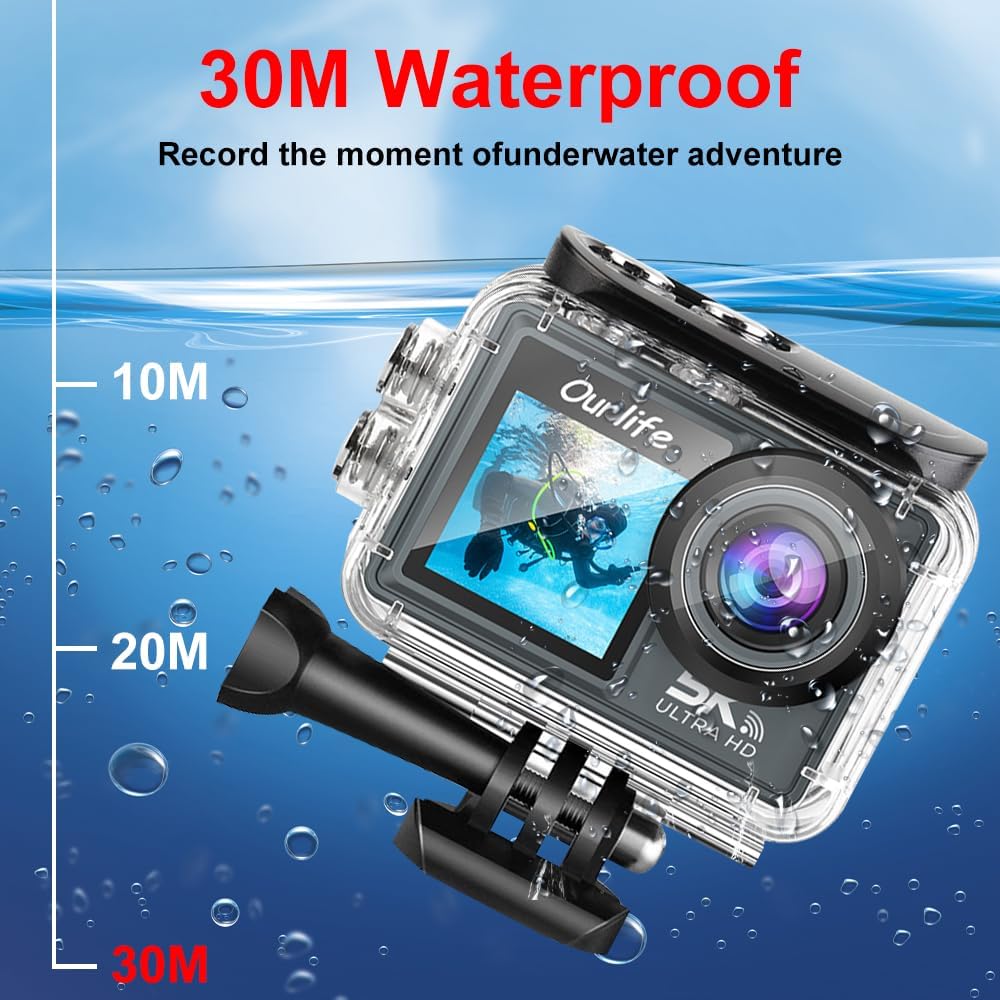
Image: The Ourlife Action Camera enclosed in its waterproof case, depicted underwater with depth markers indicating its 30-meter waterproof capability. This highlights the camera's suitability for aquatic activities.
4. การเปิด/ปิดเครื่อง
To power on, press and hold the Power/Mode button for a few seconds. To power off, press and hold the Power/Mode button again until the screen turns off.
การใช้งานกล้อง
1. การควบคุมและการนำทางพื้นฐาน
Use the Power/Mode button to cycle through different shooting modes (Video, Photo, Playback, Settings). Use the touch screen for menu navigation and selecting options. The Shutter/OK button initiates recording or takes a photo in the respective modes.
2. การบันทึกวิดีโอ
In Video mode, press the Shutter/OK button to start recording. Press it again to stop. The camera supports resolutions up to 5K at 30 frames per second (fps), as well as 4K, 2.7K, 1080P, and 720P options. Adjust resolution in the settings menu.
3. การจับภาพ
In Photo mode, press the Shutter/OK button to take a single photo. The camera offers various photo modes including single shot, automatic shooting, burst mode, and timed photography.
4. Wi-Fi and App Connectivity
Enable Wi-Fi in the camera's settings. Download the official Ourlife app on your smartphone or tablet. Connect your device to the camera's Wi-Fi network. The app allows for remote control, live preview, playback, and sharing of your footage.
5. รองรับไมโครโฟนภายนอก
For enhanced audio quality, connect a compatible external microphone to the camera's microphone port. Ensure the microphone is securely connected before recording.
6. Enhanced Image Stabilization (EIS)
The camera features Electronic Image Stabilization (EIS) to reduce blur and shake in your videos, especially during action-packed activities. This feature can be toggled On or Off in the camera settings.

Image: A side-by-side comparison demonstrating the effect of Enhanced Image Stabilization (EIS). The left image shows a clear, stable shot with EIS enabled, while the right image shows a blurred shot with EIS disabled, illustrating the benefit of the feature.
7. เลนส์มุมกว้าง
เลนส์มุมกว้าง 170 องศา สามารถเก็บภาพได้ในมุมมองที่กว้าง view, ideal for landscapes, group shots, and immersive action footage. Be aware that wide-angle lenses may exhibit some distortion at the edges of the frame.

รูปภาพ: ภาพประกอบแสดงasing the 170-degree ultra wide-angle capability of the Ourlife Action Camera, demonstrating how it captures a significantly broader scene compared to narrower angles, ideal for expansive views.
การซ่อมบำรุง
- การทำความสะอาด: Use a soft, lint-free cloth to clean the camera lens and screens. For the waterproof case, rinse with fresh water after saltwater use and allow to air dry.
- พื้นที่จัดเก็บ: เก็บกล้องไว้ในที่แห้งและเย็น หลีกเลี่ยงแสงแดดโดยตรงและอุณหภูมิที่สูงหรือต่ำเกินไป ถอดแบตเตอรี่ออกหากเก็บเป็นเวลานาน
- การดูแลแบตเตอรี่ ควรหลีกเลี่ยงการปล่อยให้แบตเตอรี่หมดจนเกลี้ยงบ่อยๆ ควรชาร์จแบตเตอรี่เป็นประจำ แม้ว่าจะไม่ได้ใช้งาน เพื่อยืดอายุการใช้งานของแบตเตอรี่
การแก้ไขปัญหา
| ปัญหา | วิธีแก้ปัญหาที่เป็นไปได้ |
|---|---|
| กล้องไม่สามารถเปิดได้ | Ensure the battery is charged. Reinsert the battery. |
| ไม่สามารถบันทึกวีดีโอ/ถ่ายภาพได้ | Check if a MicroSD card is inserted and formatted. Ensure sufficient storage space. |
| คุณภาพวิดีโอ/ภาพถ่ายต่ำ | ทำความสะอาดเลนส์ ตรวจสอบการตั้งค่าความละเอียด ตรวจสอบให้แน่ใจว่ามีแสงสว่างเพียงพอ |
| ปัญหาการเชื่อมต่อ Wi-Fi | Ensure Wi-Fi is enabled on the camera and your device. Restart both devices. Check app permissions. |
| กล้องหยุดนิ่งหรือไม่ตอบสนอง | ถอดและใส่แบตเตอรี่กลับเข้าไปใหม่เพื่อทำการรีเซ็ตแบบฮาร์ดรีเซ็ต |
ข้อมูลจำเพาะ
| คุณสมบัติ | รายละเอียด |
|---|---|
| หมายเลขรุ่น | M40TR |
| ความละเอียดวิดีโอ | Up to 5K 30fps (also 4K, 2.7K, 1080P, 720P) |
| ความลึกของน้ำ | กันน้ำได้ลึกถึง 30 เมตร (เมื่อใช้ร่วมกับเคสกันน้ำ) |
| ขนาดหน้าจอหลัก | จอ IPS ขนาด 2.0 นิ้ว |
| Secondary Screen Size | 1.3 นิ้ว |
| มุมเลนส์ | 170-degree Wide-Angle |
| การเชื่อมต่อ | ไวไฟ, ยูเอสบี |
| พื้นที่จัดเก็บ | MicroSD Card (Class 10 or higher, up to 128GB) |
| External Microphone Support | ใช่ |
| ระบบป้องกันภาพสั่นไหว | ลดการสั่นไหวของภาพอิเล็กทรอนิกส์ (EIS) |
| สี | สีดำ |
การรับประกันและการสนับสนุน
For warranty information and technical support, please refer to the official Ourlชีวิต webหรือติดต่อฝ่ายบริการลูกค้าโดยตรง โปรดเก็บใบเสร็จรับเงินไว้เป็นหลักฐานการซื้อสำหรับการเรียกร้องการรับประกัน
Official Ourlife Store: Visit the Ourlife Store on Amazon


