การแนะนำ
This manual provides essential information for the safe and efficient use of your Itel A50 Dual SIM smartphone. Please read this manual carefully before using the device to ensure optimal performance and to prevent damage.

Figure 1: Itel A50 Dual SIM Smartphone (Cyan Blue)
The image displays the Itel A50 smartphone in cyan blue, showcasing both its front screen and the textured back panel with the triple camera module and flash. The phone has a sleek design with rounded corners.
การตั้งค่า
1. การใส่ซิมการ์ดและเมมโมรี่การ์ด
The Itel A50 supports dual SIM cards and an external memory card (up to 2TB). Ensure the device is powered off before inserting or removing cards.
- ค้นหาถาดใส่การ์ด SIM ที่ด้านข้างของอุปกรณ์
- ใช้เครื่องมือถอดซิมที่ให้มาเพื่อเปิดถาด
- Carefully place your Nano-SIM cards and microSD card into the designated slots on the tray. Ensure the gold contacts face downwards.
- ค่อยๆ ดันถาดกลับเข้าไปในอุปกรณ์จนกระทั่งคลิกเข้าที่
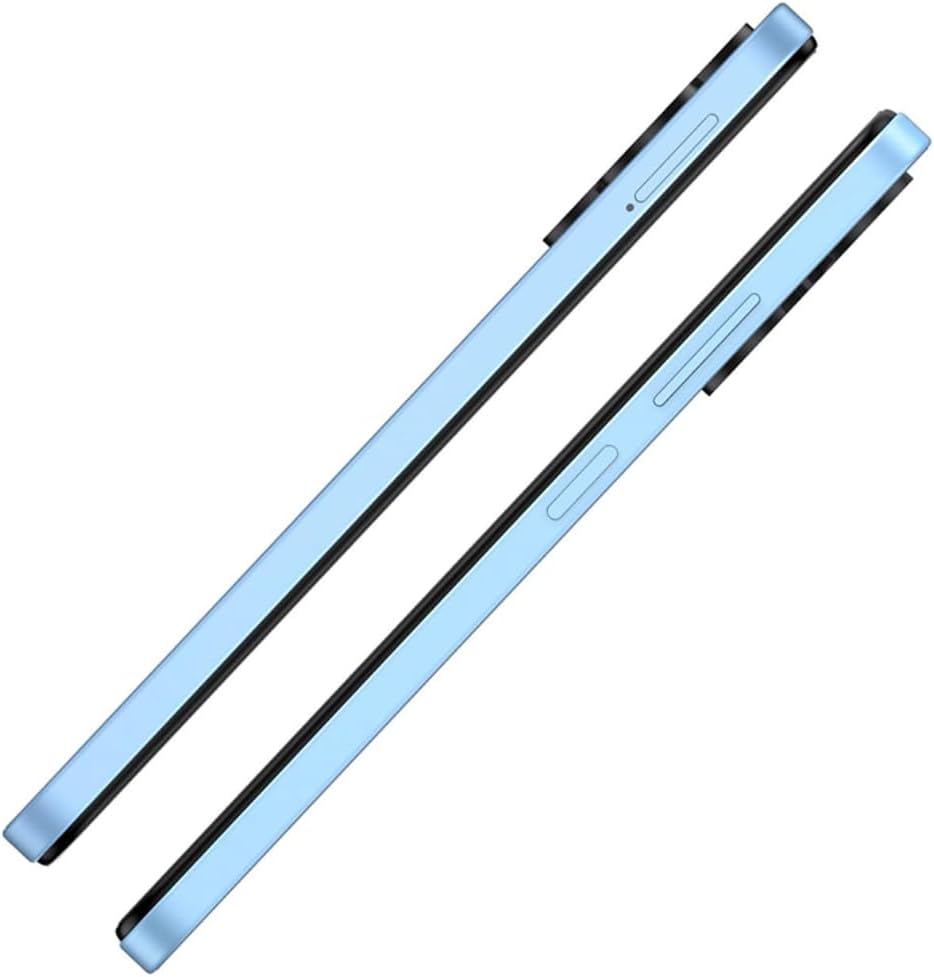
รูปที่ 2: ด้านข้าง View พร้อมถาดซิม
This image shows the right side of the Itel A50 smartphone, highlighting the elongated volume rocker and the power button below it. The SIM card tray slot is visible above the volume buttons.
2. การชาร์จแบตเตอรี่
Before first use, fully charge the device battery. The Itel A50 comes with a 5000mAh battery.
- เชื่อมต่อสาย USB Type-C เข้ากับพอร์ตชาร์จที่ด้านล่างของโทรศัพท์
- เชื่อมต่อปลายสายอีกด้านหนึ่งเข้ากับอะแดปเตอร์ไฟฟ้าและเสียบเข้ากับเต้ารับที่ผนัง
- ไฟแสดงสถานะการชาร์จจะปรากฏบนหน้าจอ

รูปที่ 3: พอร์ตชาร์จ
The image shows the bottom edge of the Itel A50 smartphone with a white USB-C charging cable plugged into the central port. To the left of the charging port, a 3.5mm headphone jack is visible, and to the right, a speaker grille.
คำแนะนำการใช้งาน
1. เปิด/ปิดเครื่อง
- การเปิดเครื่อง: Press and hold the Power button (located on the right side) until the Itel logo appears.
- วิธีปิดเครื่อง: กดปุ่มเปิด/ปิดค้างไว้จนกว่าเมนูตัวเลือกพลังงานจะปรากฏขึ้น จากนั้นเลือก "ปิดเครื่อง"
- ในการรีสตาร์ท: กดปุ่มเปิด/ปิดค้างไว้จนกว่าเมนูตัวเลือกพลังงานจะปรากฏขึ้น จากนั้นเลือก "รีสตาร์ท"

Figure 4: Front Display
This image displays the front of the Itel A50 smartphone, showing its large screen with a waterdrop notch at the top for the front camera. The display shows a vibrant, abstract wallpaper.
2. การนำทางพื้นฐาน
- หน้าจอสัมผัส: Tap, swipe, pinch-to-zoom to interact with the interface.
- หน้าจอหลัก: หน้าจอหลักที่คุณสามารถเข้าถึงแอพและวิดเจ็ตได้
- การแจ้งเตือน: ปัดลงจากด้านบนของหน้าจอไปที่ view notifications and quick settings. The integrated Dynamic Bar provides essential notifications more seamlessly.
3. การใช้กล้อง
The Itel A50 features a rear camera system for capturing photos and videos.
- เปิดแอปกล้องจากหน้าจอหลักหรือลิ้นชักแอปของคุณ
- เลือกโหมดที่คุณต้องการ (ภาพถ่าย, วิดีโอ, ภาพบุคคล ฯลฯ)
- แตะปุ่มชัตเตอร์เพื่อถ่ายภาพหรือเริ่ม/หยุดบันทึกวิดีโอ

รูปที่ 5: โมดูลกล้องหลัง
This image shows the back of the Itel A50 smartphone, highlighting the prominent camera island in the upper left corner. The island contains three circular lenses and a flash, with "AI CAMERA" text visible. The back panel has a subtle textured pattern.
การบำรุงรักษาและการดูแล
- การทำความสะอาด: ใช้ผ้านุ่มที่ไม่เป็นขุยทำความสะอาดหน้าจอและตัวเครื่อง หลีกเลี่ยงน้ำยาทำความสะอาดหรือตัวทำละลายที่มีฤทธิ์กัดกร่อน
- อุณหภูมิ: อย่าวางอุปกรณ์ไว้ในที่ที่มีอุณหภูมิสูงหรือต่ำเกินไป
- ความต้านทานน้ำ: The Itel A50 is not water-resistant. Avoid contact with liquids.
- อายุการใช้งานแบตเตอรี่: To prolong battery life, avoid fully discharging the battery frequently. Optimize power consumption using the built-in power-saving solutions.
- การอัปเดตซอฟต์แวร์: โปรดอัปเดตซอฟต์แวร์ของอุปกรณ์ของคุณอยู่เสมอ เพื่อให้มั่นใจได้ถึงประสิทธิภาพและความปลอดภัยสูงสุด
การแก้ไขปัญหา
| ปัญหา | วิธีแก้ปัญหาที่เป็นไปได้ |
|---|---|
| อุปกรณ์ไม่เปิดเครื่อง | ตรวจสอบให้แน่ใจว่าแบตเตอรี่ชาร์จเต็มแล้ว เสียบสายชาร์จและรอสักครู่ก่อนลองเปิดเครื่องอีกครั้ง |
| หน้าจอไม่ตอบสนอง | ทำการรีสตาร์ทเครื่องแบบบังคับโดยกดปุ่มเปิด/ปิดค้างไว้ประมาณ 10-15 วินาที |
| สัญญาณเครือข่ายไม่ดี | ตรวจสอบการใส่ซิมการ์ด ย้ายไปยังพื้นที่ที่มีสัญญาณครอบคลุมดีกว่า รีสตาร์ทอุปกรณ์ |
| แอปทำงานช้าหรือขัดข้อง | Close background apps. Clear app cache. Ensure sufficient storage space. Restart the device. The device is designed for smooth and efficient operations, optimizing performance for specific scenarios. |
| แบตเตอรี่หมดเร็วมาก | Reduce screen brightness. Disable unnecessary features (Wi-Fi, Bluetooth, GPS) when not in use. Use power-saving modes. |
ข้อมูลจำเพาะ
| คุณสมบัติ | รายละเอียด |
|---|---|
| ชื่อรุ่น | T603 (Item model number: A667LP) |
| ยี่ห้อ | อิเทล |
| ระบบปฏิบัติการ | โอเอส 14 |
| ขนาดหน่วยความจำ RAM ที่ติดตั้ง | 8 GB (3+5GB RAM) |
| ความจุของหน่วยความจำ | 128 GB (Supports up to 2TB external memory) |
| รุ่นซีพียู | 1.2GHz Cortex A8 Processor |
| ความเร็วซีพียู | 2 กิกะเฮิรตซ์ |
| ขนาดหน้าจอ | 6.6 นิ้ว (เส้นทแยงมุมหน้าจอที่มองเห็นได้: 7 นิ้ว / 17 ซม.) |
| ผู้ให้บริการไร้สาย | ปลดล็อคแล้ว |
| เทคโนโลยีเซลลูล่าร์ | 4G |
| แบตเตอรี่ | ต้องใช้แบตเตอรี่ลิเธียมไอออน 1 ก้อน (มีให้ในชุด) ความจุ 5000 mAh |
| ขนาดแพ็คเกจ | 18 x 9 x 4.5 ซม.; 187 กรัม |
| วันที่พร้อมใช้งานครั้งแรก | 25 กันยายน 2024 |
| ผู้ผลิต | ไอเทล |
การรับประกันและการสนับสนุน
For warranty information and technical support, please refer to the warranty card included in your product packaging or visit the official Itel webไซต์นี้ โปรดเก็บหลักฐานการซื้อไว้เพื่อใช้ยืนยันการรับประกัน
For further assistance, you may contact Itel customer service through their official channels.


