Retro Fighters BattlerGC Pro Series Controller User Manual
Model: BattlerGC Pro

คู่มือการใช้งานอย่างเป็นทางการ
1. บทนำ
The Retro Fighters BattlerGC Pro Series Controller is a versatile wireless gamepad designed for use with GameCube, Nintendo Switch, and PC systems. It features advanced Hall Effect sensors for precise, drift-free control and dual wireless technology (2.4 GHz and Bluetooth) for broad compatibility. This manual provides essential information for setting up, operating, maintaining, and troubleshooting your controller.
2. เนื้อหาบรรจุภัณฑ์
- Retro Fighters BattlerGC Pro Series Controller
- สายชาร์จ USB-C
- 2.4 GHz USB Wireless Dongle
- GameCube Wireless Adapter
- คู่มือการใช้งาน (เอกสารนี้)
3. การตั้งค่าและการเชื่อมต่อ
3.1 การชาร์จคอนโทรลเลอร์
Before initial use, fully charge the controller using the provided USB-C cable. Connect the USB-C end to the controller's port and the USB-A end to a compatible power source (e.g., computer USB port, USB wall adapter). The controller features a 10-hour battery life on a full charge.
3.2 Wireless Modes and Pairing
The BattlerGC Pro supports two wireless modes: Bluetooth (BT) and 2.4 GHz (2.4G). A switch on the back of the controller allows you to select the desired mode.

ภาพ: ด้านหลัง view of the BattlerGC Pro controller, highlighting the BT/2.4G mode switch and P1/P2 back buttons.
3.2.1 Bluetooth Mode (for Nintendo Switch / PC)
- Set the switch on the back of the controller to 'BT'.
- Press and hold the 'Home' button on the controller for approximately 5 seconds until the LED indicators begin flashing, indicating pairing mode.
- On your Nintendo Switch: Go to 'System Settings' > 'Controllers and Sensors' > 'Change Grip/Order'. The controller should appear and connect.
- On your PC: Go to 'Bluetooth & other devices' settings and add a new Bluetooth device. Select the controller when it appears.
3.2.2 2.4 GHz Wireless Mode (for GameCube / Wii / Wii U / PC)
- Set the switch on the back of the controller to '2.4G'.
- For GameCube / Wii / Wii U: Insert the GameCube Wireless Adapter into a GameCube controller port on your console.
- สำหรับพีซี: Insert the 2.4 GHz USB Wireless Dongle into an available USB port on your computer.
- Press the 'Home' button on the controller. The controller will automatically connect to the adapter/dongle. Subsequent pairings should be automatic.
Video: Demonstration of the BattlerGC Pro Series controller's features and connectivity options, including pairing with GameCube and Switch.
4. การใช้งานคอนโทรลเลอร์
4.1 Button Layout and Features
The BattlerGC Pro features a classic GameCube-inspired layout with modern enhancements:
- แท่งอนาล็อก: Equipped with Hall Effect sensors for precision and to prevent stick drift. The main analog stick and C-stick feature octagonal gates for consistent directional input.
- ปุ่มหน้า (A, B, X, Y): Rounded and responsive, providing a tactile feel similar to the original GameCube controller.
- ดี-แพด: Large, slightly rounded, with a good pivot and clicky Kail switches for accurate directional input.
- ปุ่ม L/R: Standard shoulder buttons.
- ตัวกระตุ้น ZL/ZR: ดูอัล-เอสtage Hall Effect triggers with a similar travel distance to original GameCube triggers. They offer an analog pull with a distinct digital click at the end, utilizing Kail switches.
- P1/P2 Back Buttons: Two programmable back buttons for custom assignments.
- ปุ่มโฮม: Used for pairing and system functions.
- ปุ่มบวก/ลบ: Standard input buttons.
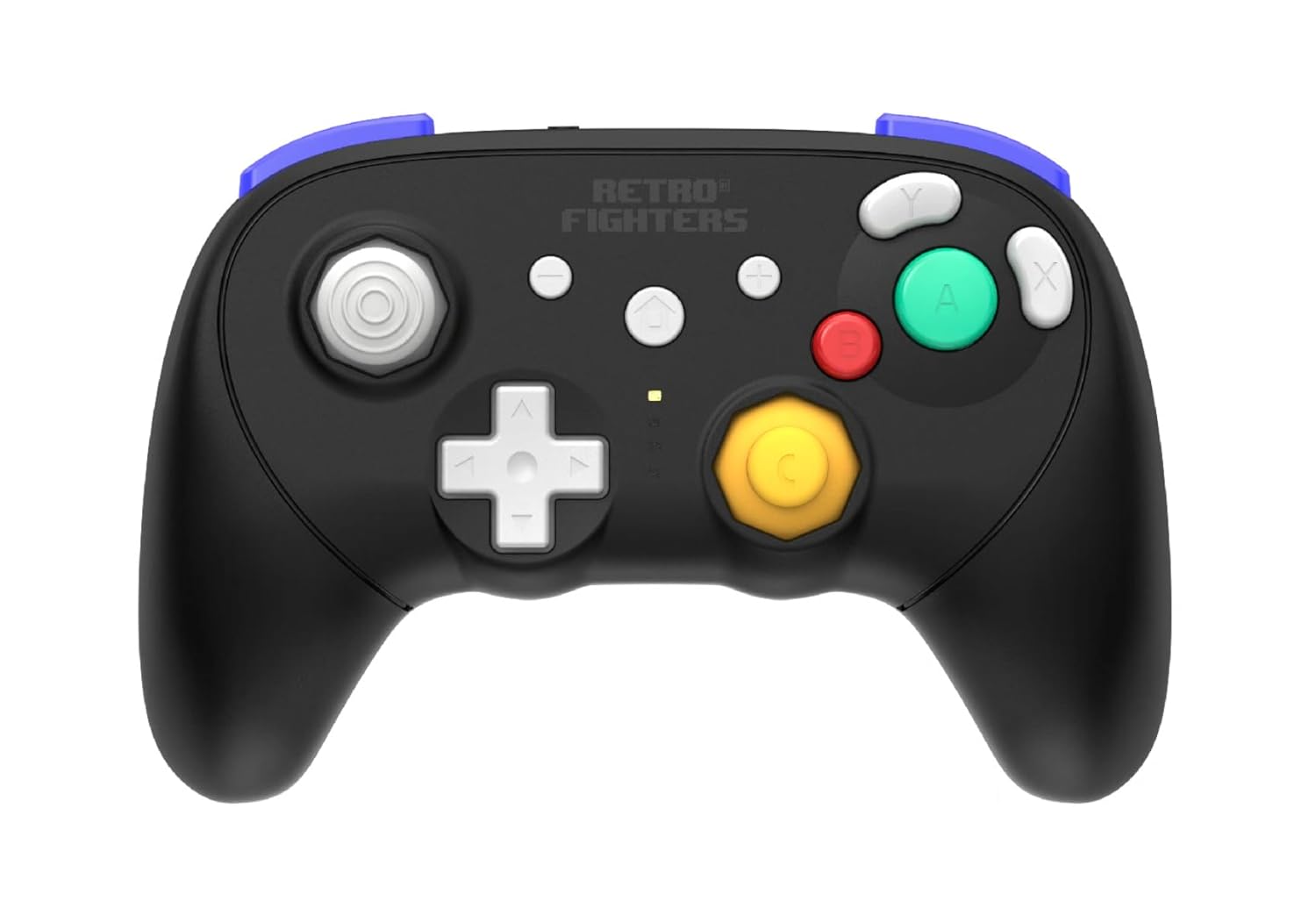
ภาพ: ด้านหน้า view of the BattlerGC Pro controller, showcasing the button layout and analog sticks.
คุณสมบัติขั้นสูง 4.2 ประการ
- ปรับระดับเสียงกริ่งได้: The controller features an adjustable rumble function. Refer to the quick start guide for specific instructions on increasinกรัมหรือลดลงasing rumble strength.
- Xinput to Dinput Mode Swap: The controller supports switching between Xinput and Dinput modes. Once connected to a device, hold the '+' and '-' buttons for 5 seconds to swap modes. The LED indicator will flash to confirm the change.
- การควบคุมการเคลื่อนไหว: The controller provides accurate motion controls, particularly useful for compatible Nintendo Switch games.
5. การบำรุงรักษา
- การทำความสะอาด: ใช้ผ้าแห้งนุ่มๆ เช็ดทำความสะอาดพื้นผิวของตัวควบคุม สำหรับคราบสกปรกที่ติดแน่น ให้ใช้ผ้าชุบน้ำหมาดๆ เช็ดเบาๆamp สามารถใช้ผ้าชุบน้ำสบู่ชนิดอ่อนๆ เช็ดได้ โดยให้แน่ใจว่าไม่มีของเหลวเข้าไปในช่องเปิด
- การดูแลแบตเตอรี่ To prolong battery life, avoid fully discharging the controller frequently. Store the controller in a cool, dry place when not in use for extended periods.
- พื้นที่จัดเก็บ: Keep the controller away from extreme temperatures, direct sunlight, and high humidity.
6 การแก้ไขปัญหา
- ตัวควบคุมไม่จับคู่: Ensure the mode switch (BT/2.4G) on the back is set correctly for your intended device. Confirm the controller is charged. For Bluetooth, ensure your device's Bluetooth is enabled and in pairing mode. For 2.4 GHz, ensure the dongle/adapter is securely inserted.
- ความล่าช้าของอินพุตหรือการตัดการเชื่อมต่อ: Ensure the controller is within the 30-foot wireless range of your console/PC. Minimize interference from other wireless devices.
- Stick Drift or Inaccurate Inputs: While Hall Effect sensors are designed to prevent drift, if you experience issues, check the Retro Fighters official website for any available firmware updates or recalibration tools.
- Triggers Not Registering on PC: If triggers are not working as expected on PC, check the Retro Fighters official website for firmware updates that may address PC trigger mapping issues.
- Controller Times Out Quickly: The controller is designed to enter sleep mode after a short period of inactivity to conserve battery. Press the 'Home' button once to reactivate and reconnect.
7. ข้อมูลจำเพาะ
- แบบอย่าง: BattlerGC Pro Series Wireless Gamepad
- ยี่ห้อ: Retro Fighters
- การเชื่อมต่อ: บลูทูธ, ระบบไร้สาย 2.4 GHz
- ความเข้ากันได้: GameCube, Nintendo Switch, PC, Wii, Wii U
- แท่งอนาล็อก: Hall Effect Sensors with Octagonal Gates
- ทริกเกอร์: ดูอัล-เอสtage Hall Effect with Kail Switches
- ดี-แพด: Kail Switches
- ปุ่มย้อนกลับ: 2 Programmable (P1/P2)
- แบตเตอรี่: 1 Lithium Ion (included), 10-hour life (approx.)
- พอร์ตชาร์จ: ยูเอสบี-ซี
- ระยะสัญญาณไร้สาย: สูงถึง 30 ฟุต
- ขนาด : 5 x 3 x 1 นิ้ว
- น้ำหนัก: 10 ออนซ์
8. การรับประกันและการสนับสนุน
For warranty information, product support, firmware updates, and additional resources, please visit the official Retro Fighters website. Contact information for customer service can typically be found on the brand's webบรรจุภัณฑ์ไซต์หรือผลิตภัณฑ์


