1. บทนำ
Thank you for choosing the Primevolve Portable Oscillating Standing Fan. This manual provides essential information for the safe and efficient use of your new fan. Please read it thoroughly before operation and retain it for future reference.
This versatile fan is designed for both indoor and outdoor use, featuring a rechargeable battery, USB-C power option, adjustable height, oscillation, and remote control for convenience.

ภาพที่ 1.1: จบแล้วview of the fan's key features including portability, foldability, remote control, rechargeable battery, multiple speeds, and low noise operation.
2. คำแนะนำด้านความปลอดภัย
- อ่านคำแนะนำทั้งหมดก่อนใช้พัดลม
- ห้ามสอดนิ้วหรือวัตถุใดๆ เข้าไปในตะแกรงพัดลมขณะที่พัดลมกำลังทำงาน
- Keep the fan away from water or other liquids to avoid electric shock.
- Do not use the fan in excessively humid or dusty environments.
- ตรวจสอบให้แน่ใจว่าพัดลมวางอยู่บนพื้นผิวที่มั่นคงและเรียบเพื่อป้องกันการพลิกคว่ำ
- ถอดปลั๊กพัดลมก่อนทำความสะอาดหรือดำเนินการบำรุงรักษาใดๆ
- เก็บให้พ้นจากมือเด็กและสัตว์เลี้ยง
- ใช้สาย USB-C ที่ให้มาเท่านั้นสำหรับการชาร์จ
- Do not attempt to disassemble or repair the fan yourself. Contact customer support for assistance.
3. เนื้อหาบรรจุภัณฑ์
กรุณาตรวจสอบแพ็คเกจสำหรับรายการต่อไปนี้:
- พัดลมตั้งพื้นแบบส่ายได้พกพา Primevolve 1 ตัว
- 1 x รีโมทคอนโทรล
- สายชาร์จ 1 x USB-C
- 1 x คู่มือผู้ใช้ (เอกสารนี้)

Image 3.1: Illustration of the items included in the product package.
4. สินค้าหมดview
The Primevolve Portable Oscillating Standing Fan features a compact, foldable design that allows it to transform from a small desk fan to a full-sized standing fan. It includes a fan head, an adjustable telescopic rod, and a stable base housing the controls and battery.

Image 4.1: The fan displayed in its various adjustable forms: standing, table-top, and folded.
5. การติดตั้งและการประกอบ
5.1 Unfolding the Fan
- วางฐานพัดลมบนพื้นผิวที่เรียบและมั่นคง
- Locate the 'OPEN' position indicator on the base. Gently twist the top part of the base counter-clockwise to unlock.
- Carefully pull the telescopic rod upwards from the base until it reaches the desired height.
- Adjust the angle of the fan head as needed. The fan head can tilt up to 180 degrees.

Image 5.1: Step-by-step visual guide for expanding the fan from its folded state.
5.2 การปรับความสูงและมุม
- The fan's height can be adjusted from 3.93 inches (folded) to 39.3 inches (fully extended).
- สามารถปรับมุมของหัวพัดลมได้ด้วยมือสูงสุดถึง 180 องศา เพื่อกำหนดทิศทางการไหลของอากาศ

Image 5.2: The fan's adjustable height and foldaway design for versatile placement.
6. คู่มือการใช้งาน
6.1 การเปิด/ปิดเครื่องและการตั้งค่าความเร็ว
The fan can be controlled via the touch buttons on the base or the included remote control.
- ปุ่มเปิด/ปิด: Press once to turn on the fan. Press and hold to turn off.
- ปุ่มความเร็ว: Press repeatedly to cycle through 4 speed settings: Low, Mid, High, and Natural mode.

Image 6.1: The fan operating with an indication of its four speed settings and corresponding battery life.
6.2 ฟังก์ชันการแกว่ง
The fan features a 90° auto-oscillation function to distribute airflow across a wider area.
- ปุ่มสั่น: Press to activate or deactivate the 90° automatic oscillation.
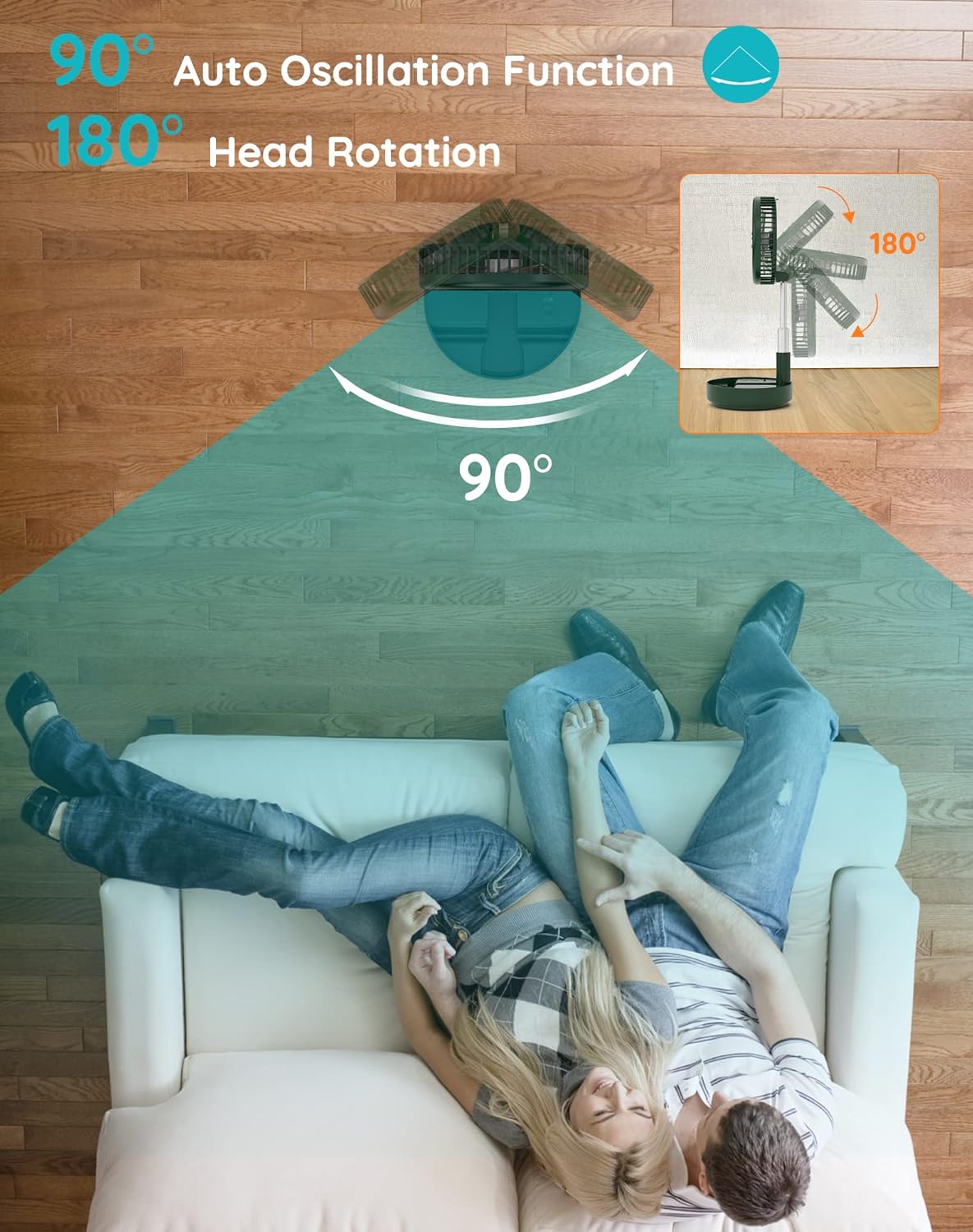
Image 6.2: Visual representation of the fan's 90-degree auto oscillation and 180-degree manual head rotation.
6.3 การทำงานของรีโมทคอนโทรล
The infrared remote control allows you to operate all fan features from up to 13 feet away.
- The remote has buttons for Power, Speed, and Oscillation, mirroring the functions on the fan base.
- Ensure the remote control has a working AAAA battery (included).

Image 6.3: Details of the fan's control methods, including the remote and integrated buttons.
7. ข้อมูลเกี่ยวกับการชาร์จและแบตเตอรี่
The fan is equipped with a large rechargeable battery and is powered by USB-C (5V/2A).
- การใช้ครั้งแรก: Please fully charge the fan before its first use.
- เวลาในการชาร์จ: โดยทั่วไปการชาร์จเต็มจะใช้เวลาประมาณ 5 ชั่วโมง
- อายุการใช้งานแบตเตอรี่: Provides 6 to 21 wireless working hours, depending on the speed setting and oscillation usage.
- ความเข้ากันได้: Compatible with PC/laptop, power bank, AC adapter, car charger, and other USB-enabled power sources.

Image 7.1: The fan's USB-C charging port and examples of compatible power sources.
8. การบำรุงรักษา
8.1 การทำความสะอาดพัดลม
- ตรวจสอบให้แน่ใจว่าได้ปิดพัดลมและถอดปลั๊กก่อนทำความสะอาด
- The front fan hood is detachable for easy cleaning. Gently twist and remove the front grille.
- Wipe the fan blades and grille with a soft, damp ผ้า ห้ามใช้สารทำความสะอาดที่มีฤทธิ์กัดกร่อนหรือตัวทำละลาย
- Ensure all parts are completely dry before reassembling and using the fan.

Image 8.1: Instructions for detaching the fan hood for cleaning and information on the aromatherapy feature.
8.2 คุณสมบัติการบำบัดด้วยกลิ่นหอม
The fan includes a special scent box. You can place your favorite aromatherapy in this box to diffuse a pleasant fragrance while the fan operates.
9 การแก้ไขปัญหา
| ปัญหา | สาเหตุที่เป็นไปได้ | สารละลาย |
|---|---|---|
| พัดลมไม่เปิด | แบตเตอรี่หมด Not properly plugged in (if wired) | Charge the fan using the USB-C cable Ensure the USB-C cable is securely connected to a power source and the fan. |
| การไหลเวียนของอากาศที่อ่อนแอ | การตั้งค่าความเร็วต่ำ Fan blades are dirty | เพิ่มการตั้งค่าความเร็ว Clean the fan blades and grille (refer to Maintenance section) |
| การสั่นไม่ทำงาน | Oscillation function is off | Press the oscillation button on the fan or remote to activate. |
| รีโมตคอนโทรลไม่ทำงาน | แบตเตอรี่หมด Obstruction between remote and fan | Replace the AAAA battery in the remote ตรวจสอบให้แน่ใจว่ามองเห็นตัวรับสัญญาณของแฟนเพลงได้อย่างชัดเจน |
| พัดลมมีเสียงดังผิดปกติ | การอุดตันในใบพัดลม Fan not on a stable surface | Turn off and unplug the fan, then check for and remove any obstructions วางพัดลมบนพื้นผิวที่เรียบและมั่นคง |
10. ข้อมูลจำเพาะ
| คุณสมบัติ | รายละเอียด |
|---|---|
| ยี่ห้อ | ไพรม์วอลฟ์ |
| หมายเลขรุ่น | TM-520 (PF11S) |
| สี | สีเขียว |
| แหล่งพลังงาน | Battery Powered, USB-C (5V/2A) |
| ขนาดสินค้า (พับ) | ลึก 9.06 นิ้ว x กว้าง 4.33 นิ้ว x สูง 9.06 นิ้ว |
| ปรับความสูงได้ | 3.93" ถึง 39.3" |
| หัวพัดลมเอียง | 180 degrees (manual) |
| การสั่น | 90 degrees (auto) |
| การตั้งค่าความเร็ว | 4 (Low, Mid, High, Natural) |
| ระดับเสียง | 30-40 เดซิเบล (ที่ความเร็วสูงสุด) |
| จำนวนใบมีด | 5 |
| วิธีการควบคุม | รีโมท, สัมผัส |
| น้ำหนักสินค้า | 2.75 ปอนด์ |
| แบตเตอรี่จากระยะไกล | 1 AAAA battery (included) |
| การใช้งานภายใน/ภายนอกอาคาร | ใช่ |
11. การรับประกันและการสนับสนุน
This Primevolve fan comes with a One-Year After-sales Service.
If you have any questions, concerns, or require assistance with your product, please do not hesitate to contact Primevolve customer support. We are committed to resolving your inquiries within 24 hours.
หากต้องการความช่วยเหลือ โปรดดูข้อมูลติดต่อที่ระบุไว้บนบรรจุภัณฑ์ของผลิตภัณฑ์หรือเว็บไซต์อย่างเป็นทางการของ Primevolve webเว็บไซต์.


