การแนะนำ
Thank you for choosing the Vormooi V71 Digital Voice Recorder. This device is designed for high-fidelity audio recording, offering advanced features such as voice activation, noise reduction, and extensive storage capacity. This manual provides detailed instructions to help you set up, operate, and maintain your recorder, ensuring optimal performance and longevity.
มีอะไรอยู่ในกล่อง
เมื่อเปิดบรรจุภัณฑ์ โปรดตรวจสอบว่าประกอบด้วยสิ่งของต่อไปนี้ทั้งหมด:
- 1 x เครื่องบันทึกเสียงดิจิทัล Vormooi V71
- ไมโครโฟนภายนอก 3.5 มม. จำนวน 1 ตัว
- สายเคเบิลข้อมูล USB-C 1 เส้น
- การ์ดหน่วยความจำ TF ขนาด 64GB จำนวน 1 ใบ (ติดตั้งมาแล้วหรือซื้อแยกต่างหาก)
- สายเคเบิลถอดเสียงขนาด 3.5 มม. จำนวน 1 เส้น
- 1 x สายคล้องคอ
- 1 x คู่มือผู้ใช้ (เอกสารนี้)

ภาพ: The Vormooi V71 Digital Voice Recorder and its included accessories, such as the external microphone, USB-C cable, 64GB TF card, transcription cable, and lanyard.
สินค้าเกินview
Familiarize yourself with the physical components and controls of your Vormooi V71 recorder.

ภาพ: The Vormooi V71 Digital Voice Recorder, highlighting its compact design, color screen, and main control buttons. An external microphone and a 64GB memory card are also shown.
การจัดวางอุปกรณ์และการควบคุม
- หน้าจอสีขนาด 2.15 นิ้ว: แสดงเมนู สถานะการบันทึก และ file ข้อมูล.
- ไมโครโฟนในตัว: Located at the top of the device for omni-directional recording.
- ลำโพงในตัว: Located at the bottom front for audio playback.
- Record/Save Switch: A red slider on the right side for quick recording and saving.
- ปุ่มปรับระดับเสียง (+/-): On the right side, below the record switch, to adjust volume.
- พอร์ต USB-C: สำหรับชาร์จไฟและเชื่อมต่อกับคอมพิวเตอร์
- 3.5mm Headphone/Mic Jack: For connecting headphones or the external microphone.
- ช่องเสียบการ์ด TF: For inserting the 64GB TF (microSD) memory card.
- ปุ่มเปิด/ปิด: Central button for powering on/off, playing, and pausing.
- ปุ่มเมนู (M): Accesses device settings and options.
- Prev/Next Buttons: For navigation and fast-forward/rewind during playback.
- ปุ่ม DL/BACK: สำหรับการลบ files or returning to the previous screen.
การตั้งค่า
1. การชาร์จครั้งแรก
ก่อนใช้งานครั้งแรก ควรชาร์จอุปกรณ์ให้เต็ม
- Connect the supplied USB-C cable to the recorder's USB-C port.
- เชื่อมต่อปลายสายอีกด้านหนึ่งเข้ากับอะแดปเตอร์ไฟ USB (ไม่รวมอยู่ด้วย) หรือพอร์ต USB ของคอมพิวเตอร์
- ตัวแสดงสถานะแบตเตอรี่บนหน้าจอจะแสดงสถานะการชาร์จ การชาร์จเต็มใช้เวลาประมาณ 2 ชั่วโมง

ภาพ: The Vormooi V71 Digital Voice Recorder displaying its battery charging status, indicating a 1100mAh battery and up to 110 hours of continuous recording.
2. Inserting the TF (MicroSD) Card
The recorder comes with a 64GB TF card, providing ample storage in addition to the built-in 32GB memory.
- Locate the TF card slot on the side of the recorder.
- Gently insert the 64GB TF card into the slot until it clicks into place. Ensure the card's gold contacts face downwards.
- To remove, push the card inwards until it clicks, then release to eject.
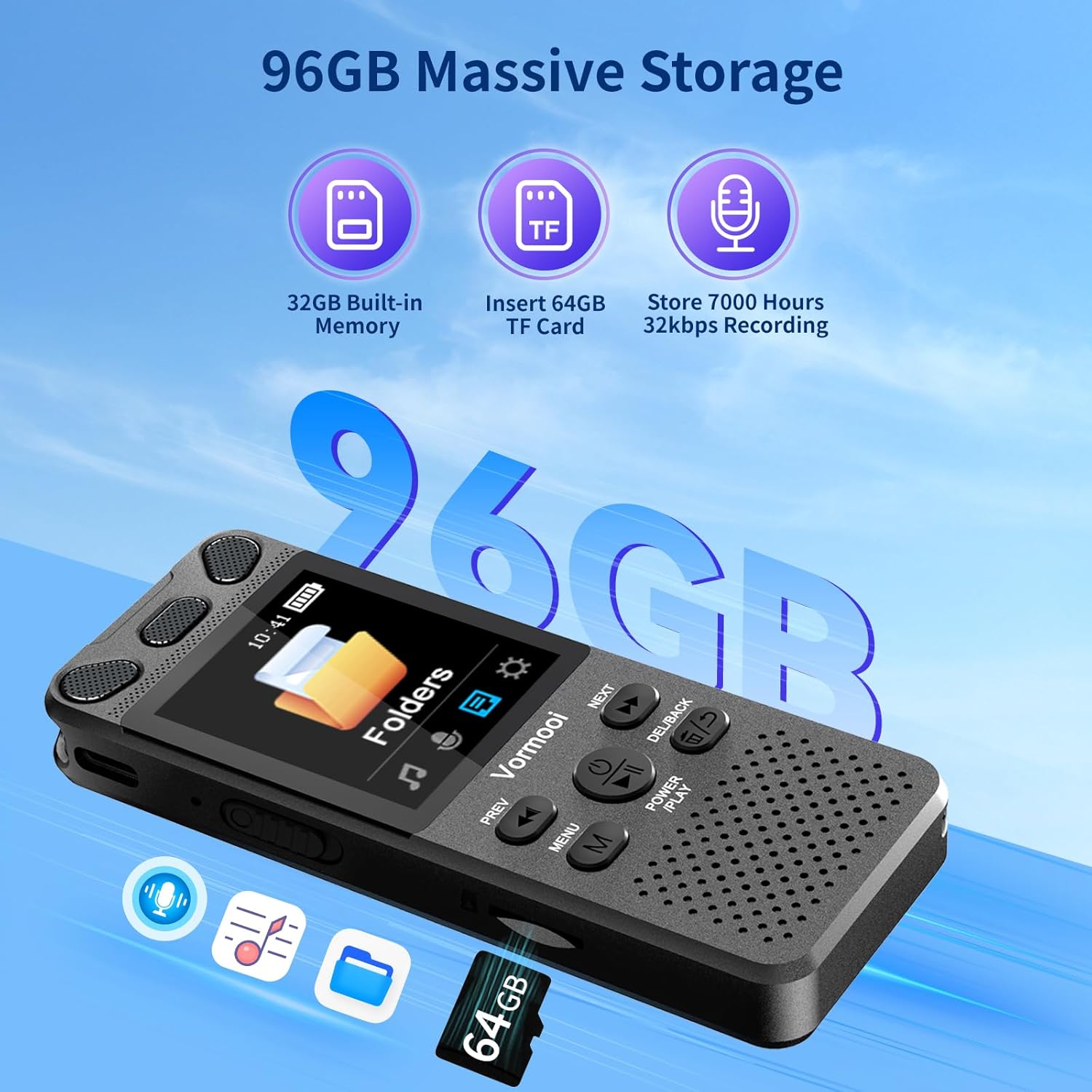
ภาพ: The Vormooi V71 Digital Voice Recorder highlighting its 96GB massive storage capacity, composed of 32GB built-in memory and an additional 64GB TF card, capable of storing up to 7000 hours of 32kbps recordings.
3. การเปิด/ปิดเครื่อง
- การเปิดเครื่อง: Press and hold the central POWER/PLAY button for approximately 2 seconds until the screen lights up.
- วิธีปิดเครื่อง: Press and hold the central POWER/PLAY button for approximately 2 seconds until the screen turns off.
การทำงานพื้นฐาน
1. การบันทึก
The V71 offers multiple recording methods for various situations.
- One-Touch Recording (Internal Microphone):
- To start recording, slide the red RECORD/SAVE switch on the right side of the device upwards. The recording will begin automatically.
- To save the recording and stop, slide the RECORD/SAVE switch downwards. The file จะถูกบันทึกโดยอัตโนมัติ
- Using the External Microphone:
- Connect the supplied 3.5mm external microphone to the recorder's 3.5mm jack.
- Once connected, the recorder will automatically switch to external microphone input. Proceed with recording as described above.
- การบันทึกเสียงผ่านสาย Line-in:
- Use the 3.5mm transcription cable to connect the recorder's 3.5mm jack to the audio output of another device (e.g., smartphone, computer, MP3 player).
- Ensure the audio output level of the source device is appropriate to avoid distortion.
- เริ่มบันทึกโดยใช้ RECORD/SAVE สวิตช์.

ภาพ: The Vormooi V71 Digital Voice Recorder demonstrating its 360-degree omni-directional recording capability with 1536Kbps clear sound quality, powered by a 2159 intelligent noise cancellation chip. The one-touch record/save slider is also highlighted.
2. การเล่น
- การเข้าถึงการบันทึก: From the main menu, navigate to "Recordings" or "Folders" to browse your saved files.
- กำลังเล่น File: เลือก file การใช้ ก่อนหน้า/ถัดไป buttons and press the central POWER/PLAY ปุ่มเพื่อเริ่มเล่น
- การหยุดชั่วคราว/การเล่นต่อ: กดปุ่ม POWER/PLAY ปุ่มระหว่างการเล่น
- การปรับระดับเสียง: ใช้ - buttons on the right side of the device.
- กรอไปข้างหน้า / ย้อนกลับ: กดปุ่มค้างไว้ ก่อนหน้า/ถัดไป กดปุ่มต่างๆ ระหว่างการเล่น
- การลบ Files: เลือก file และกดปุ่ม เดล/แบ็ค button. Confirm deletion when prompted.
คุณสมบัติขั้นสูง
The Vormooi V71 includes several advanced functions to enhance your recording experience. Access these features through the เมนู ปุ่ม.

ภาพ: The Vormooi V71 Digital Voice Recorder showcasing its versatile features, including Voice Activation, Variable Speed Playback, Line-in Microphone Recording, Password Protection, Built-in Speaker, and A-B Repeat functionality.
- ระบบบันทึกเสียงอัตโนมัติ (VOR):
- Enable VOR in the settings menu. The recorder will automatically start recording when sound is detected and pause when there is no sound, saving memory and battery.
- Adjust VOR sensitivity levels to suit your environment.
- Noise Reduction (DSP Technology):
- The V71 utilizes an advanced 2159 professional recording chip and DSP noise reduction technology to filter background noise and enhance recording clarity. This feature is typically active by default.
- การป้องกันด้วยรหัสผ่าน:
- Set a 6-digit password in the settings to protect your recordings and privacy. Only users with the correct password can access the device's content.
- AB ซ้ำ:
- ระหว่างการเล่นให้กดปุ่ม เมนู button to set the start point (A) and end point (B) of a section you wish to repeat. This is useful for transcribing or studying specific audio segments.
- การเล่นความเร็วตัวแปร:
- Adjust the playback speed of recordings in the settings menu. This feature helps in reviewing content faster or slower for better comprehension.
การเชื่อมต่อกับคอมพิวเตอร์
คุณสามารถถ่ายโอนบันทึกได้อย่างง่ายดาย fileไปที่คอมพิวเตอร์ของคุณ
- Connect the Vormooi V71 recorder to your computer using the supplied USB-C data cable.
- The recorder will be recognized as a removable disk drive.
- Navigate to the appropriate folder (e.g., "RECORD") to access your audio files (MP3 or WAV format).
- You can copy, paste, or delete files as you would with any other external storage device.
การซ่อมบำรุง
การดูแลแบตเตอรี่
- เพื่อยืดอายุการใช้งานแบตเตอรี่ ควรหลีกเลี่ยงการปล่อยแบตเตอรี่จนหมดบ่อยครั้ง
- ชาร์จอุปกรณ์เป็นประจำ แม้จะไม่ได้ใช้งานเป็นเวลานานก็ตาม
- เก็บอุปกรณ์ไว้ในที่แห้งและเย็นเมื่อไม่ใช้งาน
การทำความสะอาด
- ใช้ผ้าแห้งนุ่มๆ เช็ดทำความสะอาดภายนอกอุปกรณ์
- ห้ามใช้น้ำยาทำความสะอาดหรือวัสดุที่มีฤทธิ์กัดกร่อน เพราะอาจทำให้เครื่องเสียหายได้
การแก้ไขปัญหา
| ปัญหา | สาเหตุที่เป็นไปได้ | สารละลาย |
|---|---|---|
| อุปกรณ์เปิดไม่ติด | แบตเตอรี่อ่อน อุปกรณ์ค้าง | Charge the device for at least 30 minutes. If still unresponsive, press and hold the Power/Play button for 10-15 seconds to force a restart. |
| คุณภาพการบันทึกไม่ดี | Microphone obstructed; high background noise; incorrect settings. | Ensure microphones are clear. Use the external microphone if needed. Check noise reduction settings. Record in a quieter environment. |
| ไม่สามารถโอนได้ fileไปที่คอมพิวเตอร์ | Faulty USB cable; incorrect connection; driver issue. | Try a different USB-C cable. Ensure the cable is securely connected to both the recorder and the computer. Try a different USB port on your computer. |
| หน้าจอไม่ตอบสนอง | Device frozen. | Force restart the device by holding the Power/Play button for 10-15 seconds. |
ข้อมูลจำเพาะ
| คุณสมบัติ | รายละเอียด |
|---|---|
| ยี่ห้อ | วอร์มน้อย |
| หมายเลขรุ่น | วี71 |
| ความจุหน่วยความจำ | 96 GB (32 GB Built-in + 64 GB TF Card) |
| ขนาดหน้าจอ | 2.15 นิ้ว |
| ประเภทแบตเตอรี่ | ลิเธียมไอออน (1100 mAh) |
| เวลาในการบันทึกต่อเนื่อง | Up to 110 hours (at 512 kbps) |
| ขนาด (กว้าง x ยาว x สูง) | 100 x 39 x 13 มม. (3.94 x 1.54 x 0.50 นิ้ว) |
| น้ำหนัก | 98 กรัม (3.46 ออนซ์) |
| รูปแบบเสียง | MP3, WAV |
| บิตเรตการบันทึก | 32-1536 Kbps (PCM) |
| ประเภทไมโครโฟน | Built-in Dual Microphones, supports External 3.5mm Microphone |
| การเชื่อมต่อ | USB Type-C, แจ็คหูฟัง 3.5 มม. |
| อุปกรณ์ที่รองรับ | Personal Computer, MP3 Player, Smartphone |
การรับประกันและการสนับสนุน
The Vormooi V71 Digital Voice Recorder comes with a การรับประกันจากผู้ผลิต 2 ปี.
If you encounter any issues with your device that are not covered in the troubleshooting section, or if you require further assistance, please contact Vormooi customer support. You can typically reach them via the internal messaging system on the platform where you purchased the product or through their official after-sales email address. Please refer to your purchase documentation for specific contact details.
Vormooi is committed to providing high-quality products and services. Your satisfaction is important.


