1. บทนำ
Thank you for choosing the Vormooi 96GB Voice Recorder. This device is designed for high-quality audio recording with extensive storage and user-friendly features. Please read this manual carefully to ensure proper use and to maximize the potential of your new voice recorder.

Figure 1: Vormooi 96GB Voice Recorder and accessories.
2. การเริ่มต้นใช้งาน (การตั้งค่า)
2.1 อะไรอยู่ในกล่อง
Upon unboxing your Vormooi Voice Recorder, please verify that all components are present:
- 1 x Vormooi 96GB Digital Voice Recorder (32GB built-in memory)
- 1 x 64GB TF Memory Card (pre-installed)
- ไมโครโฟนภายนอก 3.5 มม. จำนวน 1 ตัว
- สาย Line-in ขนาด 3.5 มม. จำนวน 1 เส้น
- 1 x สาย USB C ถึง USB C
- 1 x USB C Cable (for charging/data transfer)
- 1 x สายคล้องคอ
- 1 x คู่มือผู้ใช้ (เอกสารนี้)
- คู่มือเริ่มต้นอย่างรวดเร็ว 1 ชุด

รูปที่ 2: รายการทั้งหมดที่รวมอยู่ในแพ็คเกจผลิตภัณฑ์
2.2 การชาร์จอุปกรณ์
The Vormooi Voice Recorder is equipped with an 1100mAh battery, providing up to 110 hours of continuous recording on a full charge. It takes approximately 2 hours to fully charge the device.
- Connect the provided USB-C cable to the USB-C port on the recorder.
- ต่อปลายอีกด้านของสาย USB-C เข้ากับอะแดปเตอร์แปลงไฟ USB (ไม่ได้รวมอยู่ในชุด) หรือพอร์ต USB ของคอมพิวเตอร์
- ไอคอนแบตเตอรี่บนหน้าจอจะแสดงสถานะการชาร์จ
Video 1: Demonstrates how to charge the Vormooi V71 Voice Recorder using the USB-C port. The video shows connecting the device to a power strip and a laptop for charging, highlighting the charging indicator on the screen.

Figure 3: The recorder's USB-C port supports two charging methods, allowing for full charge in 2 hours for 110 hours of continuous recording.
2.3 เปิด/ปิดเครื่อง
To power on or off the device, long press the central Power/Play button.
Video 2: Demonstrates powering the device on and off by long-pressing the Power/Play button. The screen displays "WELCOME" upon startup.
2.4 ปุ่มล็อค/ปลดล็อค
To prevent accidental operations during recording or transport, use the physical lock switch on the side of the device.
- Push the switch up to lock all buttons. A lock icon will appear on the screen.
- Push the switch ลง to unlock the buttons. The lock icon will disappear.

Figure 4: The dedicated lock switch prevents unintended button presses.
2.5 การตั้งค่าภาษา
To change the device language:
- จากเมนูหลักไปที่ การตั้งค่าระบบ.
- เลือก ภาษา.
- Choose your desired language from the list.
Video 3: Guide on how to set the language on the Vormooi V71 Voice Recorder. It shows navigating through the system settings to the language option and selecting from available languages.
2.6 Setting Date & Time
Ensure the correct date and time are set for accurate file องค์กร:
- จาก การตั้งค่าระบบ, เลือก วันที่และเวลา.
- เลือก การตั้งค่าวันที่ to set the year, month, and day. Use the volume buttons (+/-) to adjust values.
- เลือก การตั้งเวลา to set the hour and minute. Use the volume buttons (+/-) to adjust values.
Video 4: Instructions on setting the date and time on the Vormooi V71 Voice Recorder. It demonstrates navigating to the date and time settings and adjusting the values.
2.7 Memory and SD Card
The recorder comes with 32GB of built-in memory and an additional 64GB TF card, providing a total of 96GB storage, capable of saving over 7000 hours of 32kbps recordings.
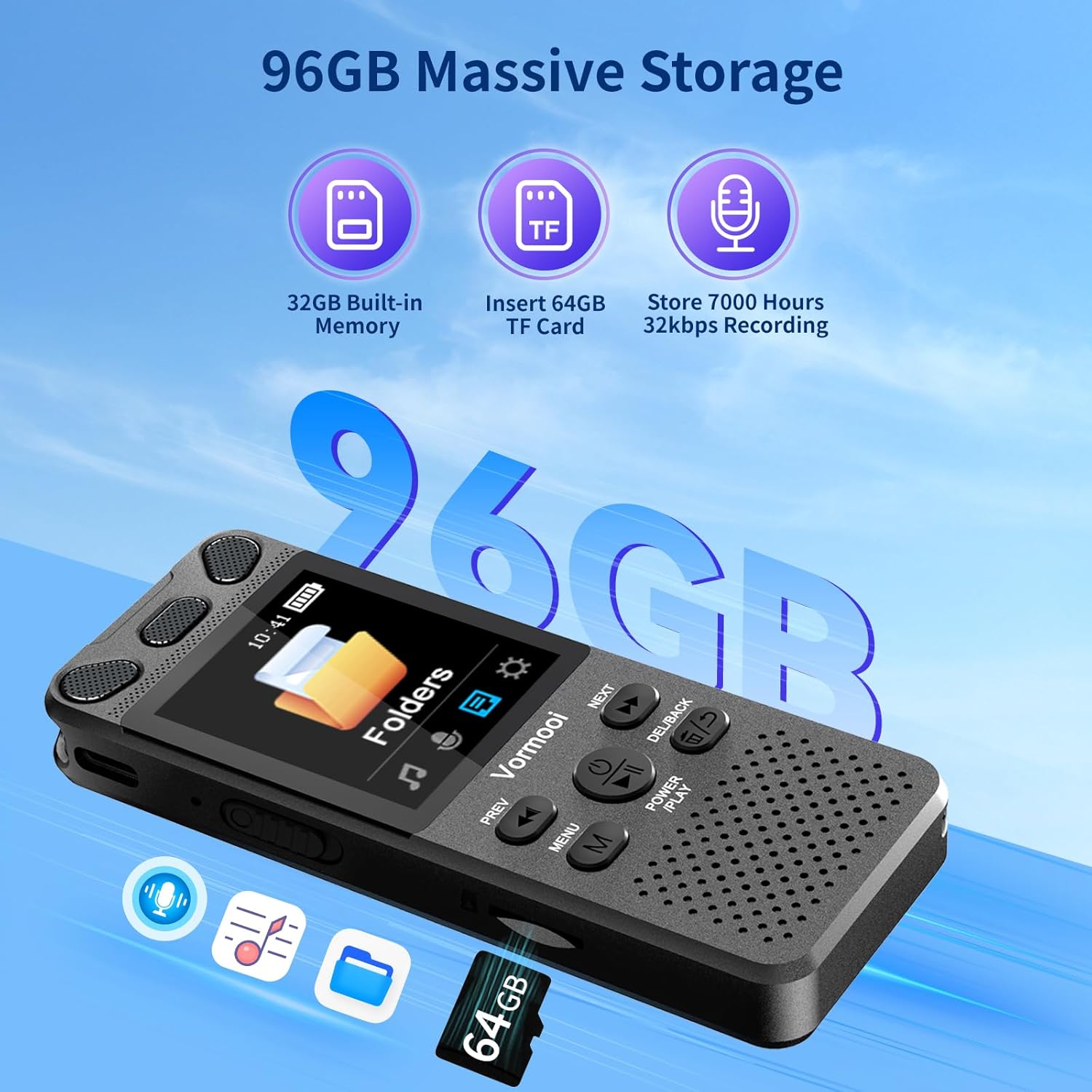
รูปที่ 5: เกินview of the recorder's substantial storage capacity.

Figure 6: The device supports memory card expansion for increased storage.
3. การใช้งานเครื่องบันทึก
3.1 การบันทึกด้วยการแตะเพียงครั้งเดียว
The Vormooi Voice Recorder features a convenient one-touch recording function:
- หากต้องการเริ่มบันทึก เพียงแค่เลื่อน... บันทึก button upwards. The recording will begin automatically.
- เพื่อบันทึกการบันทึก ให้เลื่อน บันทึก button downwards. The recording will be saved.

Figure 7: One-touch record/save functionality for quick and easy operation.
Video 5: Demonstrates the one-touch recording feature, showing how to start and save recordings by sliding the REC button. It also shows the recording information displayed on the screen.
3.2. การบันทึกด้วยไมโครโฟน
The recorder supports multiple recording modes, including its built-in omni-directional microphone and an external microphone.
- ไมโครโฟนภายใน: The built-in microphone offers 360° omni-directional recording with 1536Kbps HD sound quality and advanced noise reduction.
- ไมโครโฟนภายนอก: For enhanced clarity, especially in interviews or specific scenarios, connect the included 3.5mm external microphone.
Note: Before using the external microphone, go to [Recording settings] -> [Recording from] and change to [External microphone].

Figure 8: Using the external microphone for clear and real sound quality.
Video 6: Demonstrates recording with the external microphone, showing how to connect it and clip it to clothing for optimal sound capture.
3.3 การเล่นซ้ำ
To play back your recordings:
- From the Recordings Library, select the desired file.
- กดสั้น ๆ พลัง/เล่น ปุ่มเพื่อเริ่มหรือหยุดการเล่นชั่วคราว
Video 7: Shows how to play and pause recordings using the Power/Play button. The video also demonstrates fast forward and rewind functions.
3.4 Fast Forward/Rewind
During playback, you can quickly navigate through your recordings:
- กดค้างไว้ ต่อไป ปุ่มเพื่อกรอไปข้างหน้า
- กดค้างไว้ ก่อนหน้า ปุ่มเพื่อย้อนกลับ
3.5 AB ซ้ำ
The A-B Repeat function allows you to loop a specific segment of an audio file:
- During playback, short press the MENU (M) button to set the start point (A).
- กดสั้น ๆ MENU (M) button again to set the end point (B).
- The device will automatically play the audio within the A-B range repeatedly.
Video 8: Demonstrates the A-B repeat function, showing how to set start and end points for looping audio segments.
3.6 Voice Activated Recording (VOR)
The voice-activated recording feature allows the device to start recording automatically when sound is detected and pause when silence occurs, saving storage space.
- Access VOR settings through the menu to enable or disable this feature and adjust sensitivity levels.

Figure 9: Voice Activation is one of the key features for efficient recording.
3.7 การเชื่อมต่อกับคอมพิวเตอร์
You can easily transfer or backup your recorded files by connecting the recorder to a computer:
- Use the provided USB-C cable to connect the recorder to your computer.
- เครื่องบันทึกจะปรากฏเป็นไดรฟ์แบบถอดได้บนคอมพิวเตอร์ของคุณ
- You can then drag and drop fileเพื่อถ่ายโอนพวกเขา
Video 9: Demonstrates connecting the Vormooi V71 Voice Recorder to a laptop for backing up and transferring files. The video shows the device appearing as a drive on the computer.
4. การบำรุงรักษา
4.1 Formatting Device Memory/SD Card
To clear all data from the internal memory or the SD card:
- จาก การตั้งค่าระบบ, นำทางไปที่ ฟอร์แมตอุปกรณ์.
- You will have options to format internal memory or the SD card.
- ยืนยันการเลือกของคุณ Warning: All data will be permanently deleted. Proceed with caution.
Video 10: Demonstrates how to format the device's internal memory or the SD card. It shows navigating through the system settings to the format option and confirming the deletion of all data.
4.2 การดูแลทั่วไป
- เก็บอุปกรณ์ให้แห้งและห่างจากอุณหภูมิที่สูงหรือต่ำเกินไป
- หลีกเลี่ยงการทำอุปกรณ์หล่นหรือกระแทกอย่างรุนแรง
- ทำความสะอาดอุปกรณ์ด้วยผ้านุ่มและแห้ง ห้ามใช้สารเคมีรุนแรงหรือน้ำยาทำความสะอาดที่มีฤทธิ์กัดกร่อน
- เก็บอุปกรณ์ไว้ในที่ปลอดภัยเมื่อไม่ได้ใช้งาน
5 การแก้ไขปัญหา
| ปัญหา | สาเหตุที่เป็นไปได้ | สารละลาย |
|---|---|---|
| อุปกรณ์ไม่เปิดเครื่อง | แบตเตอรี่อ่อน อุปกรณ์ค้าง | Charge the device fully. If frozen, long press the Power/Play button for 10 seconds to force restart. |
| บันทึกไม่ได้ | Memory full; device locked; incorrect microphone setting. | ลบอันเก่า files or format memory. Unlock the device. Check recording settings for microphone selection. |
| คุณภาพการบันทึกไม่ดี | Distance from source; high background noise; incorrect settings. | Move closer to the sound source. Adjust noise reduction settings. Use external microphone if needed. |
| ไม่สามารถเชื่อมต่อกับคอมพิวเตอร์ | Faulty cable; driver issue; incorrect connection mode. | Try a different USB-C cable. Ensure the device is powered on. Try a different USB port on your computer. |
| Playback issues (no sound, distorted). | Low volume; corrupted file; speaker/headphone issue. | Increase volume. Try playing another file. Test with headphones. |
6. ข้อมูลจำเพาะ
- ยี่ห้อ: วอร์มน้อย
- แบบอย่าง: วี71
- ความจุหน่วยความจำ: 96 GB (32GB internal + 64GB TF card)
- อายุการใช้งานแบตเตอรี่โดยเฉลี่ย: 110 ชั่วโมง
- ส่วนประกอบเซลล์แบตเตอรี่: ลิเธียมไอออน
- เวลาในการชาร์จ: ประมาณ 2 ชั่วโมง
- คุณภาพเสียง: 1536Kbps HD
- Microphone Format: Built-In (Omni-directional) & External 3.5mm
- อินเทอร์เฟซฮาร์ดแวร์: USB ประเภท C
- อุปกรณ์ที่รองรับ: MP3 Player, Personal Computer, Smartphone
- รูปแบบสื่อ: ไฟล์เสียง MP3, WAV
- ขนาดหน้าจอยืน: 2.15 นิ้ว
- ขนาดสินค้า : 10 x 3.9 x 1.26 ซม.
- น้ำหนักสินค้า: 98 กรัม
7. การรับประกันและการสนับสนุน
Vormooi มุ่งมั่นที่จะมอบการบริการลูกค้าและการสนับสนุนผลิตภัณฑ์ที่ยอดเยี่ยม
- การสนับสนุนทางเทคนิคตลอดอายุการใช้งาน: Our dedicated support team is available to assist you with any technical queries or issues you may encounter.
- 2 Years Replacement Service: Enjoy peace of mind with our 2-year replacement service for eligible product defects.
- 24 Hours Rapid Response: The Vormooi support team aims to respond and resolve your problems within 24 hours on weekdays.
For support, please refer to the contact information provided in your Quick Start Guide or visit the official Vormooi store on Amazon.

Figure 10: Vormooi's commitment to customer support.


