คู่มือผู้ใช้ KOOSMILE Mini PC KT-M9
Model: KT-M9
1. บทนำ
Thank you for choosing the KOOSMILE Mini PC KT-M9. This compact yet powerful desktop computer is designed for a wide range of applications, from demanding professional tasks to immersive home entertainment. Equipped with an Intel Core i9-12900HK processor, ample memory, and high-speed storage, it delivers exceptional performance in a small form factor. This manual provides essential information for setting up, operating, maintaining, and troubleshooting your Mini PC.
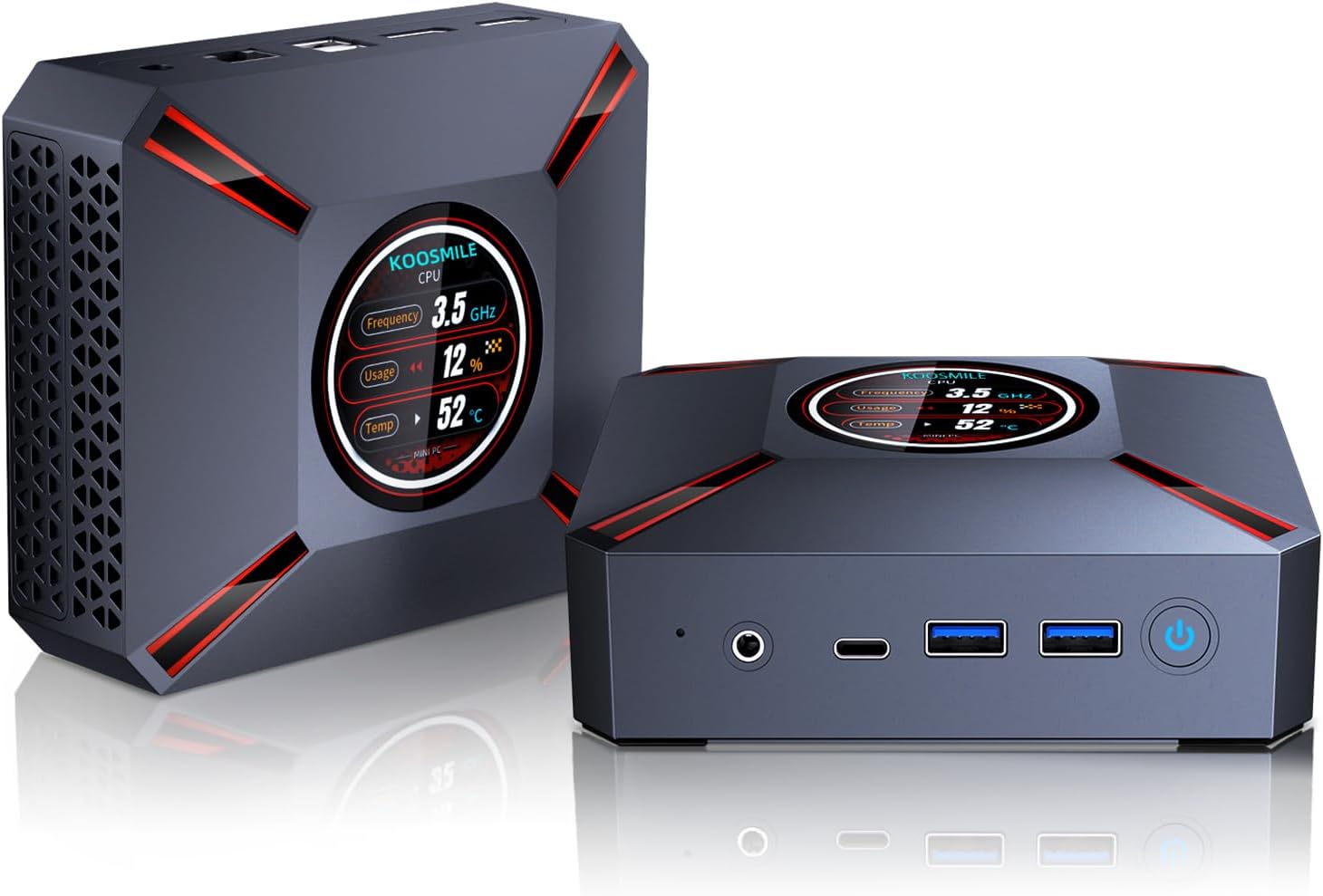
Figure 1.1: The KOOSMILE Mini PC KT-M9, showcasing its compact design and smart display.

รูปที่ 1.2: เกินview of the Mini PC's core features, including its powerful processor, memory, storage, and connectivity options.
2. เนื้อหาบรรจุภัณฑ์
โปรดตรวจสอบว่าสินค้าทุกชิ้นครบถ้วนและอยู่ในสภาพดีเมื่อเปิดบรรจุภัณฑ์ หากมีสินค้าชิ้นใดขาดหายหรือเสียหาย โปรดติดต่อฝ่ายบริการลูกค้า
- 1 x KOOSMILE Mini PC KT-M9
- สาย HDMI 1 เส้น
- อะแดปเตอร์ไฟฟ้า 1 ตัว
- สาย DisplayPort (DP) จำนวน 1 เส้น
- 1 x USB Hub
- 1 x Metal Sheet Bracket (for mounting)
- 1 x คู่มือผู้ใช้ (เอกสารนี้)
3. สินค้าหมดview
The KOOSMILE Mini PC KT-M9 is designed for efficiency and versatility. Its compact chassis houses high-performance components and a variety of ports for extensive connectivity.
3.1. มิติทางกายภาพ
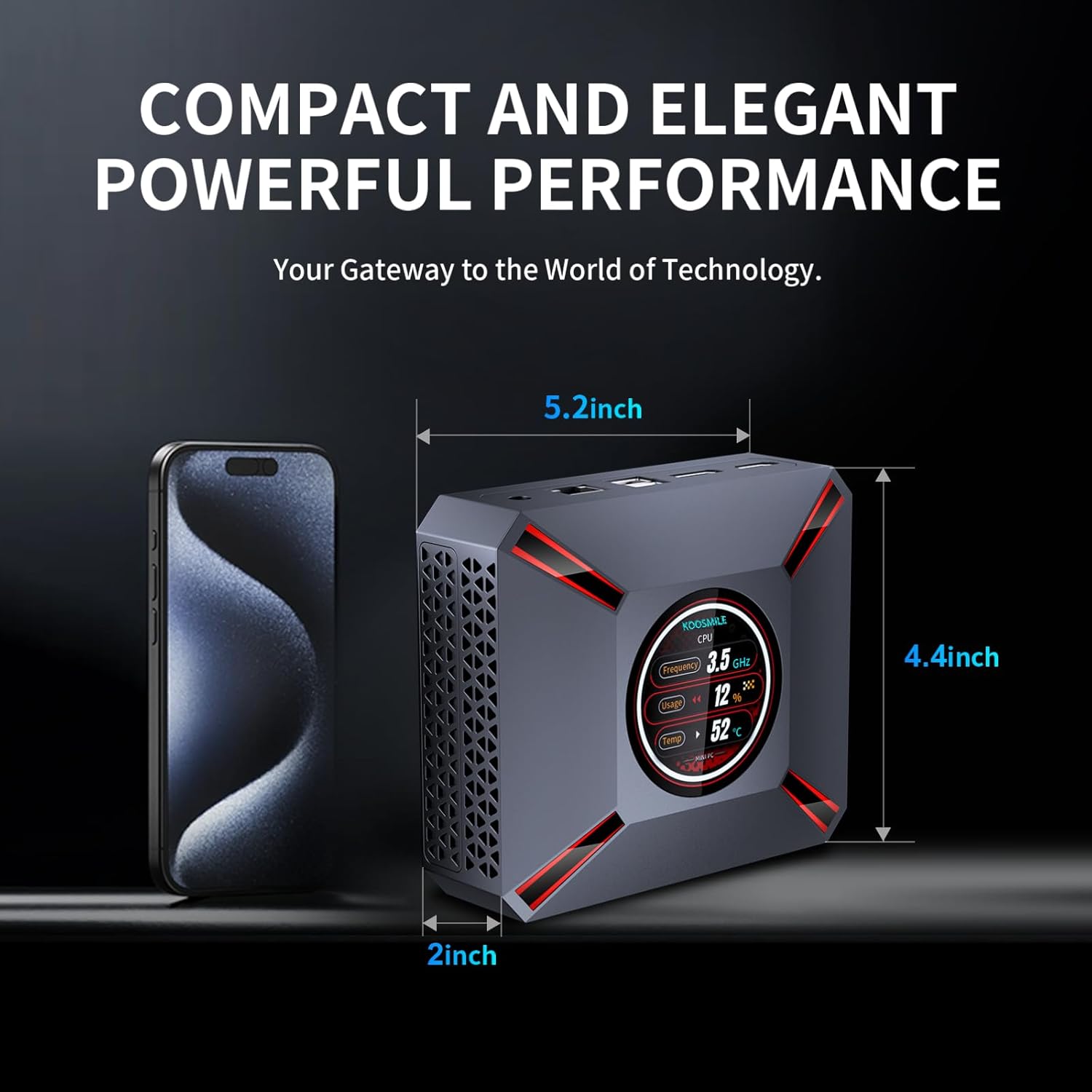
Figure 3.1: The compact size of the Mini PC, approximately 5.2 inches in length, 4.4 inches in width, and 2 inches in height, shown next to a smartphone for scale.
3.2. พอร์ตและขั้วต่อ
Familiarize yourself with the various input/output ports on your Mini PC:

Figure 3.2: Detailed diagram of the Mini PC's front and rear ports, including power, video outputs, USB, and audio connections.
- แผงด้านหน้า:
- 3.5mm Audio/Mic Jack
- USB Type-C Port (Full-feature)
- พอร์ต USB 2 จำนวน 3.0 พอร์ต
- ปุ่มเปิดปิด
- CMOS Reset Pinhole
- แผงด้านหลัง:
- แจ็ค DC-IN (อินพุตไฟฟ้า)
- พอร์ตอีเธอร์เน็ต (RJ-45)
- พอร์ต USB 2 จำนวน 2.0 พอร์ต
- DisplayPort (DP 1.4a)
- เอาต์พุต HDMI 2.1
3.3. Smart Display Monitoring
The Mini PC features a built-in smart display on the lid that provides real-time system information. This display allows you to quickly monitor key performance metrics without needing additional software.

Figure 3.3: The smart display interface, showing real-time data such as CPU frequency, usage, temperature, network upload/download speeds, and disk usage.
ข้อมูลที่แสดงประกอบด้วย:
- ความถี่ซีพียู
- CPU Usage Percentage
- อุณหภูมิซีพียู (°C)
- Network Upload/Download Speeds
- การใช้หน่วยความจำ
4. คู่มือการติดตั้ง
Follow these steps to set up your KOOSMILE Mini PC for the first time.
4.1. การเชื่อมต่อฮาร์ดแวร์เบื้องต้น
- เชื่อมต่ออุปกรณ์ต่อพ่วง: Plug in your USB keyboard and mouse to the available USB ports (USB 3.0 ports are recommended for faster response).
- เชื่อมต่อจอแสดงผล: Connect your monitor(s) to the Mini PC using the provided HDMI cable, DisplayPort cable, or a USB-C to display cable. Important: Ensure the display device is connected before turning on the computer. Use the included HDMI cable and avoid other adapter cables for the HDMI interface to prevent compatibility issues.
- เชื่อมต่อพลังงาน: Insert the power adapter cable into the DC-IN jack on the rear panel of the Mini PC, then plug the power adapter into a wall outlet.
- การเชื่อมต่อเครือข่าย (ทางเลือก): For a wired connection, connect an Ethernet cable from your router or modem to the RJ-45 port on the Mini PC. For wireless connection, Wi-Fi 6 is enabled by default.
4.2. การบูตครั้งแรกและการตั้งค่า Windows 11 Pro
- เปิดเครื่อง: Press the Power Button on the front panel of the Mini PC. The smart display will illuminate, and the system will begin to boot.
- การตั้งค่า Windows 11 Pro: The Mini PC comes pre-installed with Windows 11 Pro. On the first boot, you will be guided through the Windows Out-Of-Box Experience (OOBE) to configure language, region, network, and user accounts. Follow the on-screen prompts to complete the setup.
- การติดตั้งไดร์เวอร์: All necessary drivers are pre-installed. Please avoid installing third-party drivers unless specifically instructed by KOOSMILE support to prevent compatibility issues.
4.3. การกำหนดค่าจอแสดงผลสามจอ
The Mini PC supports up to three displays simultaneously via HDMI 2.1, DisplayPort 1.4a, and the full-feature USB Type-C port. This allows for an extended workspace or multi-monitor setups for productivity or entertainment.
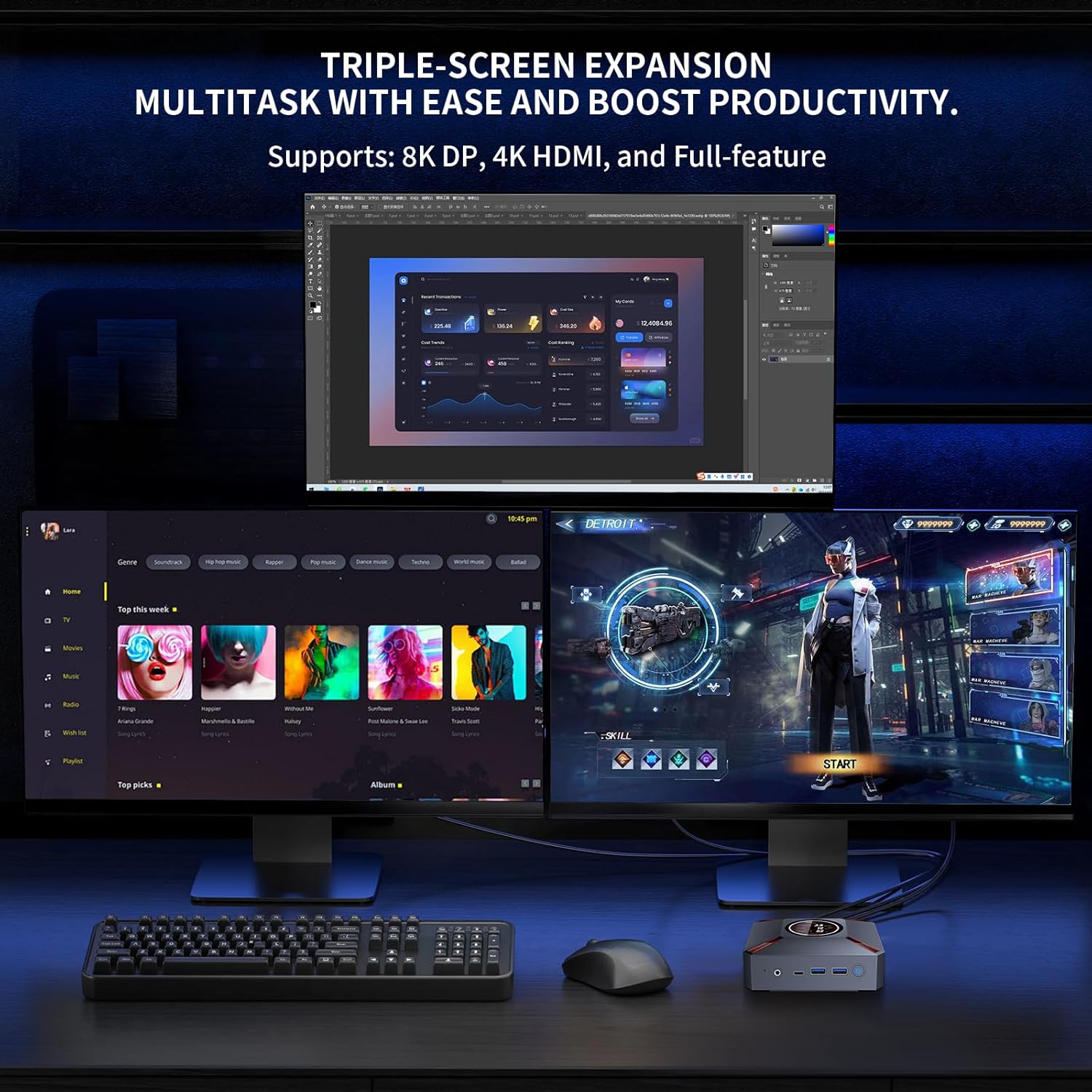
รูปที่ 4.1: อดีตample of a triple-monitor setup connected to the Mini PC, demonstrating its multi-display capability.
วิธีการตั้งค่าจอแสดงผลหลายจอใน Windows 11:
- Ensure all monitors are physically connected to the Mini PC and powered on.
- Right-click on an empty area of your desktop and select "Display settings."
- In the Display settings window, Windows should detect all connected displays. You can arrange them by dragging and dropping the display icons.
- Under "Multiple displays," choose how you want to use your displays (e.g., "Extend these displays," "Duplicate these displays").
- Adjust resolution, orientation, and scaling for each display as needed.
5. คู่มือการใช้งาน
This section covers basic operation and utilization of your Mini PC.
5.1. เปิด/ปิดเครื่องและรีสตาร์ท
- เปิดเครื่อง: กดปุ่มเปิด/ปิดที่ด้านหน้าของมินิพีซี
- ปิดระบบ: คลิกปุ่มเริ่มใน Windows จากนั้นเลือกเปิด/ปิดเครื่อง > ปิดเครื่อง
- เริ่มต้นใหม่อีกครั้ง: คลิกปุ่มเริ่มใน Windows จากนั้นเลือกเปิด/ปิดเครื่อง > เริ่มระบบใหม่
- นอน: คลิกปุ่มเริ่มใน Windows จากนั้นเลือกเปิด/ปิดเครื่อง > โหมดสลีป
5.2. การใช้งานจอแสดงผลอัจฉริยะ
The smart display on the lid provides real-time system metrics. It operates automatically and requires no user input. Monitor these values to understand your system's current load and health.
5.3. การเชื่อมต่อเครือข่าย
- ไวไฟ 6: To connect to a wireless network, click the Wi-Fi icon in the Windows taskbar, select your desired network, enter the password, and click Connect.
- อีเธอร์เน็ต: If an Ethernet cable is connected, the Mini PC will automatically establish a wired network connection.
5.4. การจัดการการจัดเก็บข้อมูล
Your Mini PC comes with a 1TB NVMe SSD. You can manage disk partitions through Windows Disk Management. If you wish to adjust the hard disk partition structure, please refer to online resources or contact KOOSMILE customer support for guidance.
6. การบำรุงรักษา
การบำรุงรักษาอย่างถูกวิธีจะช่วยให้มินิพีซีของคุณมีอายุการใช้งานยาวนานและทำงานได้อย่างมีประสิทธิภาพสูงสุด
6.1. การทำความสะอาด
- ภายนอก: Use a soft, dry, lint-free cloth to wipe the exterior of the Mini PC. For stubborn marks, slightly dampชุบผ้าด้วยน้ำ หลีกเลี่ยงสารเคมีรุนแรงหรือน้ำยาทำความสะอาดที่มีฤทธิ์กัดกร่อน
- ช่องระบายอากาศ: Periodically use compressed air to clear dust from the ventilation grilles to ensure proper airflow.
6.2. ระบบระบายความร้อน
The Mini PC features an advanced copper cooling fan and multiple vents for efficient heat dissipation. This system is designed to keep your PC running smoothly even under intense tasks.

รูปที่ 6.1: ภายใน view highlighting the efficient cooling system with its copper fan, designed to maintain optimal operating temperatures.
Ensure the Mini PC is placed in a well-ventilated area and that the vents are not obstructed. A slight heating of the metal housing during operation is normal and indicates effective heat dissipation.
6.3. การอัปเดตซอฟต์แวร์
ตรวจสอบและติดตั้งการอัปเดต Windows เป็นประจำเพื่อให้มั่นใจถึงความเสถียร ความปลอดภัย และประสิทธิภาพของระบบ ไปที่ การตั้งค่า > Windows Update เพื่อตรวจสอบการอัปเดต
7 การแก้ไขปัญหา
ส่วนนี้จะกล่าวถึงปัญหาทั่วไปที่คุณอาจพบเจอขณะใช้งานมินิพีซี
7.1. ไม่มีการแสดงผล
- Ensure the monitor is powered on and correctly connected to the Mini PC's HDMI, DisplayPort, or USB-C video output.
- Verify that the correct input source is selected on your monitor.
- สำคัญ: Always connect the display device before powering on the Mini PC.
- Try using a different video cable or monitor to rule out faulty peripherals.
7.2. ระบบไม่เปิดเครื่อง
- Check that the power adapter is securely connected to both the Mini PC and a working power outlet.
- ตรวจสอบให้แน่ใจว่าเต้ารับไฟฟ้าทำงานได้โดยการทดสอบกับอุปกรณ์อื่น
7.3. Buzzing Sound
- A slight buzzing sound might occur. Try restarting the computer. If the sound persists or is unusually loud, contact customer support.
7.4 ปัญหาการเชื่อมต่อ (Wi-Fi/บลูทูธ)
- ไวไฟ : Ensure Wi-Fi is enabled in Windows settings. Restart your router/modem. Check for interference from other devices.
- บลูทูธ: Ensure Bluetooth is enabled in Windows settings. Try re-pairing your Bluetooth device.
7.5. ปัญหาด้านประสิทธิภาพโดยทั่วไป
- ปิดแอปพลิเคชันที่ไม่จำเป็นซึ่งทำงานอยู่เบื้องหลัง
- ตรวจสอบให้แน่ใจว่า Windows และไดรเวอร์ได้รับการอัปเดตแล้ว
- Check the smart display for high CPU usage or temperature, which might indicate a heavy workload or cooling issue.
8. ข้อมูลจำเพาะ
Detailed technical specifications for the KOOSMILE Mini PC KT-M9.

Figure 8.1: Key specifications of the Intel Core i9-12900HK processor, highlighting its core count, threads, cache, and maximum turbo frequency.

Figure 8.2: Information on the high-speed DDR4 memory and PCIe 3.0 SSD, crucial for fast data processing and quick loading times.

Figure 8.3: Comparison of wireless and wired connectivity speeds, highlighting the advantages of Wi-Fi 6 and USB 3.0.
| ส่วนประกอบ | ข้อมูลจำเพาะ |
|---|---|
| โปรเซสเซอร์ | Intel Core i9-12900HK (14 Cores, 20 Threads, up to 5.0GHz, 24MB Cache) |
| ระบบปฏิบัติการ | วินโดวส์ 11 โปร |
| แรม | แรม 32GB DDR4 3200MHz |
| พื้นที่จัดเก็บ | SSD PCIe 3.0 NVMe ขนาด 1TB |
| กราฟฟิก | กราฟิก Intel Iris Xe (รวม) |
| เอาท์พุตวิดีโอ | HDMI 2.1 (4K @ 60Hz), DisplayPort 1.4a (8K @ 60Hz), USB Type-C (Full-feature) |
| การเชื่อมต่อแบบไร้สาย | Wi-Fi 6 (802.11ax), บลูทูธ 5.2 |
| การเชื่อมต่อแบบมีสาย | 1000M RJ45 Ethernet |
| พอร์ต USB | 2 x USB 3.0, 2 x USB 2.0, 1 x USB Type-C (Full-feature) |
| เสียง | 3.5mm Audio/Mic Jack |
| ระบบระบายความร้อน | Advanced Copper Cooling Fan with Multiple Vents |
| จอแสดงผลอัจฉริยะ | Real-time CPU Frequency, Usage, Temperature, Network, Memory |
| ขนาด | ประมาณ 5.2 x 4.4 x 2 นิ้ว (13.2 x 11.2 x 5.1 ซม.) |
| น้ำหนัก | ประมาณ 2.57 ปอนด์ (1.17 กก.) |
9. การรับประกันและการสนับสนุน
KOOSMILE is committed to providing high-quality products and excellent customer service.
9.1. ข้อมูลการรับประกัน
Your KOOSMILE Mini PC KT-M9 comes with a รับประกันฟรี 1 ปี from the date of purchase. This warranty covers manufacturing defects and hardware malfunctions under normal use. It does not cover damage caused by misuse, accidents, unauthorized modifications, or natural disasters.
9.2. การสนับสนุนด้านเทคนิค
For any technical assistance, troubleshooting, or warranty claims, please contact our customer service team via email. Provide your product model (KT-M9), purchase date, and a detailed description of the issue to receive prompt support.
อีเมล: [Insert Customer Support Email Here - e.g., support@koosmile.com]
Our team is dedicated to helping you resolve any issues and ensure your satisfaction with your KOOSMILE Mini PC.


