1. บทนำ
The FSP VITA GM 850W Power Supply is designed to provide stable and efficient power for your computer system. Featuring 80 PLUS Gold certification, a fully modular design, and advanced protection features, it is suitable for a wide range of applications, including gaming and professional workstations. This manual provides essential information for the proper installation, operation, and maintenance of your power supply unit.

ภาพที่ 1.1: จากบนลงล่าง view of the FSP VITA GM 850W Power Supply, showcasinด้วยดีไซน์ที่กะทัดรัดและตะแกรงพัดลม
2. ข้อมูลด้านความปลอดภัย
Please read and understand all safety instructions before installing or operating the power supply. Failure to do so may result in personal injury or damage to your equipment.
- ห้ามเปิดแหล่งจ่ายไฟ casing. ปริมาณสูงtages are present inside, even when the unit is unplugged. There are no user-serviceable parts inside. Opening the casinจีจะทำให้การรับประกันเป็นโมฆะ
- ติดตั้งแหล่งจ่ายไฟในบริเวณที่มีการระบายอากาศที่ดี ห่างจากแหล่งความร้อน แสงแดดโดยตรง และความชื้น
- ตรวจสอบให้แน่ใจว่าได้เชื่อมต่อแหล่งจ่ายไฟเข้ากับเต้ารับไฟฟ้าที่มีสายดิน
- ใช้เฉพาะสายเคเบิลโมดูลาร์ที่มาพร้อมกับแหล่งจ่ายไฟนี้เท่านั้น การใช้สายเคเบิลที่เข้ากันไม่ได้อาจทำให้ PSU และส่วนประกอบที่เชื่อมต่อเสียหายได้
- Before installation or maintenance, always disconnect the AC power cord from the wall outlet.
- Avoid placing objects on top of the power supply or blocking its ventilation openings.
3. เนื้อหาบรรจุภัณฑ์
ตรวจสอบว่ามีรายการทั้งหมดอยู่ในแพ็คเกจของคุณ:
- FSP VITA GM 850W Power Supply Unit
- Modular Cable Set (including 12V-2x6 PCIe cable)
- สายไฟ AC
- สกรูยึด
- คู่มือการใช้งาน (เอกสารนี้)
4. สินค้าหมดview
The FSP VITA GM 850W features a fully modular design, allowing for clean cable management and improved airflow within your PC case. Key components include the main power unit, a 120mm hydraulic bearing fan for cooling, and various modular connectors for system components.
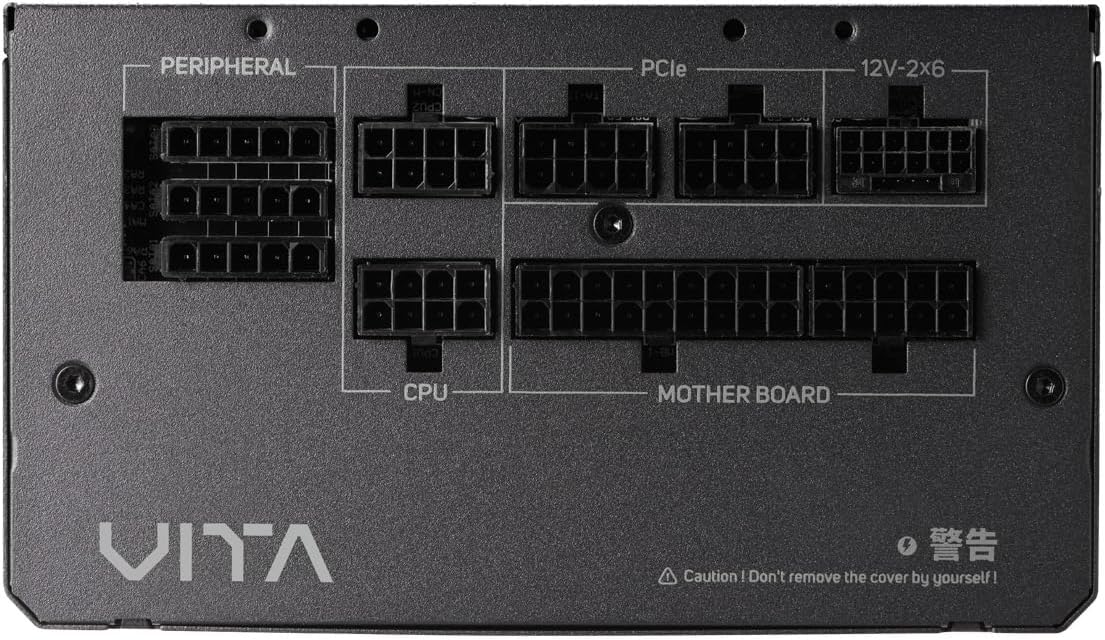
ภาพที่ 4.1: ภาพระยะใกล้ view of the modular connector panel on the FSP VITA GM 850W Power Supply, showing labeled ports for Motherboard, CPU, PCIe, Peripheral, and 12V-2x6.
4.1. Modular Connectors
The power supply features clearly labeled ports for connecting various components:
- เมนบอร์ด : Main 24-pin ATX connector.
- ซีพียู: 8-pin (4+4 pin) EPS connectors for CPU power.
- พีซีไออี: 8-pin (6+2 pin) connectors for graphics cards.
- 12V-2x6: Dedicated 12V-2x6 connector for high-power PCIe 5.1 graphics cards.
- อุปกรณ์ต่อพ่วง: Connectors for SATA and Molex devices.
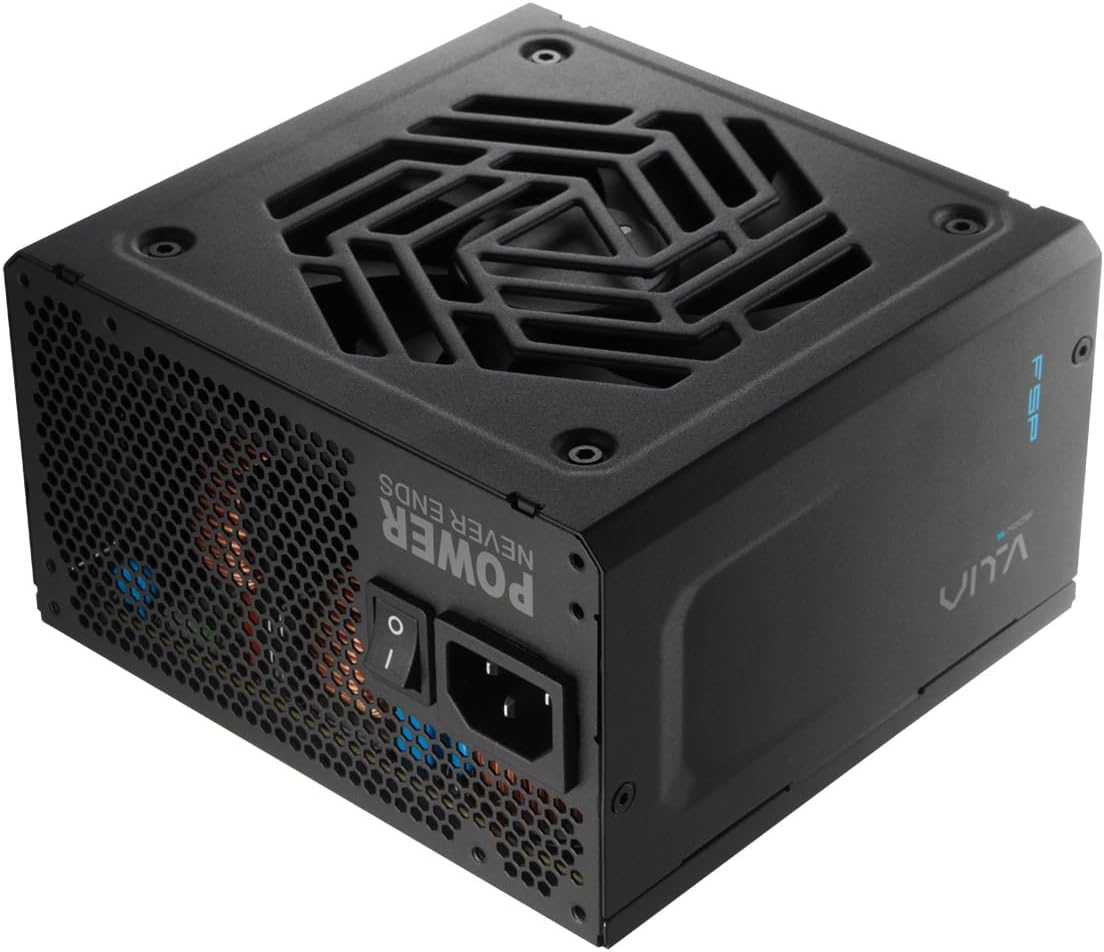
ภาพที่ 4.2: ด้านหลัง view of the FSP VITA GM 850W Power Supply, showing the AC power inlet, power switch, and ventilation grille.
5. การตั้งค่าและการติดตั้ง
Follow these steps to properly install your FSP VITA GM 850W Power Supply into your computer system.
5.1. การติดตั้งทางกายภาพ
- ตรวจสอบให้แน่ใจว่าคอมพิวเตอร์ของคุณปิดอยู่และถอดปลั๊กออกจากเต้าเสียบที่ผนัง
- เปิดเคสคอมพิวเตอร์ของคุณเพื่อเข้าถึงพื้นที่ติดตั้งแหล่งจ่ายไฟ
- Carefully place the FSP VITA GM 850W Power Supply into the designated bay, ensuring the fan faces the correct direction for optimal airflow (typically facing downwards if there's a bottom vent, or inwards if mounted at the top).
- ยึดแหล่งจ่ายไฟเข้ากับเคสโดยใช้สกรูยึดที่ให้มา
5.2. การเชื่อมต่อสายเคเบิล
Connect the necessary modular cables to your power supply and system components. Only connect the cables you need to minimize clutter and improve airflow.

Image 5.1: Diagram illustrating the various modular cables included with the FSP VITA GM 850W Power Supply, including Motherboard, CPU, PCIe 6+2 Pin, PCIe 12V-2x6, SATA, and SATA/Molex cables, along with their approximate lengths in millimeters.
- Connect the 24-pin ATX cable from the power supply to the motherboard.
- Connect the 8-pin (4+4 pin) EPS cable(s) from the power supply to the CPU power connector(s) on the motherboard.
- For graphics cards, connect the appropriate 8-pin (6+2 pin) PCIe cables or the 12V-2x6 cable (for compatible PCIe 5.1 GPUs) from the power supply to the graphics card(s).
- เชื่อมต่อสายไฟ SATA เข้ากับอุปกรณ์จัดเก็บข้อมูล (HDD, SSD) และอุปกรณ์อื่นๆ ที่ใช้พลังงานจาก SATA
- Connect Molex cables to any peripheral devices that require them.
- Ensure all cable connections are secure and properly seated.
- ปิดเคสคอมพิวเตอร์ของคุณ
- เชื่อมต่อสายไฟ AC เข้ากับแหล่งจ่ายไฟ แล้วจึงเสียบเข้ากับเต้ารับติดผนังที่มีสายดิน
6. คู่มือการใช้งาน
Once installed, operating your FSP VITA GM 850W Power Supply is straightforward.
6.1. การเปิด/ปิดเครื่อง
- Ensure the power switch on the rear of the power supply is in the 'ON' (I) position.
- กดปุ่มเปิด/ปิดบนเคสคอมพิวเตอร์ของคุณเพื่อเริ่มระบบ
- To power off, shut down your operating system normally. For complete power disconnection, switch the power supply to the 'OFF' (O) position and unplug the AC cord.
6.2. Efficiency and Fan Operation
The VITA GM 850W is 80 PLUS Gold certified, meaning it operates with over 90% efficiency at typical loads. This reduces wasted energy, heat generation, and noise. The integrated 120mm HYB fan is designed for quiet and efficient cooling, adjusting its speed based on the power supply's temperature and load to maintain optimal performance and acoustics.

Image 6.1: Graph illustrating the fan speed (RPM) and acoustic noise (dBA) of the 120mm HYB fan in the FSP VITA GM 850W Power Supply across different load percentages, demonstrating quiet operation at lower loads.
7. การบำรุงรักษา
การบำรุงรักษาอย่างถูกต้องจะช่วยให้แหล่งจ่ายไฟของคุณมีอายุการใช้งานยาวนานและประสิทธิภาพการทำงานเหมาะสมที่สุด
- การทำความสะอาด: Periodically clean the exterior of the power supply and its fan grille to prevent dust buildup. Use a soft, dry cloth or compressed air. Ensure the power supply is unplugged before cleaning.
- การไหลเวียนของอากาศ: Ensure that the power supply's intake and exhaust vents are not obstructed. Good airflow is crucial for efficient cooling.
- การจัดการสายเคเบิล: Maintain tidy cable management within your PC case to promote better airflow and prevent cables from interfering with the power supply fan.
8 การแก้ไขปัญหา
If you encounter issues with your FSP VITA GM 850W Power Supply, refer to the following common problems and solutions.
8.1. ปัญหาทั่วไป
- ไม่มีไฟฟ้า:
- ตรวจสอบว่าสายไฟ AC เชื่อมต่อกับแหล่งจ่ายไฟและเต้ารับที่ผนังอย่างแน่นหนาหรือไม่
- Ensure the power switch on the PSU is in the 'ON' (I) position.
- ตรวจสอบว่าเต้ารับไฟฟ้าที่ผนังใช้งานได้โดยเสียบอุปกรณ์อื่น
- Check all modular cable connections to the motherboard and components.
- ระบบไม่เสถียร/ปิดเครื่องเองโดยไม่ทราบสาเหตุ:
- This could indicate an overloaded system or a component issue. Ensure your system's power requirements do not exceed 850W.
- Check for proper ventilation and ensure the power supply fan is spinning. Overheating can trigger protection mechanisms.
- ตรวจสอบให้แน่ใจว่าการเชื่อมต่อสายเคเบิลทั้งหมดแน่นหนาดีแล้ว
- เสียงพัดลมดัง:
- Ensure the power supply's fan intake/exhaust is not obstructed.
- Clean any dust buildup on the fan blades or grille.
- High system load will naturally increase fan speed. If noise is excessive at low loads, contact support.
8.2. คุณสมบัติการป้องกัน
The FSP VITA GM 850W Power Supply includes several protection features to safeguard your system:
- OVP (โอเวอร์โวลtagอี การป้องกัน): Shuts down the PSU if output voltages exceed a safe level.
- OCP (การป้องกันกระแสเกิน): Shuts down the PSU if current on a single rail exceeds a safe level.
- OPP (Overpower Protection): Shuts down the PSU if the total power draw exceeds its maximum wattage.
- UVP (อันเดอร์โวลtagอี การป้องกัน): Shuts down the PSU if output voltages drop below a safe level.
- SCP (ระบบป้องกันการลัดวงจร): Shuts down the PSU in case of a short circuit on any output rail.
- OTP (Overtemperature Protection): ปิด PSU หากอุณหภูมิภายในสูงเกินไป

Image 8.1: Diagram illustrating the comprehensive protection features of the FSP VITA GM 850W Power Supply, including OVP, OCP, OPP, NLO, OTP, SCP, UVP, and SIP.
If any of these protections are triggered, the power supply will shut down. Disconnect the AC power, check your system for faults, and then reconnect power to attempt a restart.
9. ข้อมูลจำเพาะ
Detailed technical specifications for the FSP VITA GM 850W Power Supply:
| คุณสมบัติ | ข้อมูลจำเพาะ |
|---|---|
| ชื่อรุ่น | VITA-850GM |
| ยี่ห้อ | FSP |
| เอาท์พุต วัดtage | 850 วัตต์ |
| ใบรับรอง 80 PLUS | ทอง |
| ฟอร์มแฟกเตอร์ | เอทีเอ็กซ์ |
| ขนาด (กว้าง x ยาว x สูง) | 140 x 150 x 86 มม. (5.5 x 5.9 x 3.4 นิ้ว) |
| น้ำหนักสินค้า | 3.1 กิโลกรัม (6.82 ปอนด์) |
| วิธีการทำความเย็น | พัดลม (HYB 120 มม.) |
| ตัวเก็บประจุ | 105°C Japanese Bulk Capacitors |
| ประเภทขั้วต่อ | ATX, PCI Express (Full Modular) |
| อุปกรณ์ที่รองรับ | Computer, Gaming Console |
| คุณสมบัติการป้องกัน | OVP, OCP, SCP, OPP, UVP, OTP, NLO, SIP |
10. การรับประกัน
The FSP VITA GM 850W Power Supply comes with a รับประกัน 10 ปี from the date of purchase. This warranty covers defects in materials and workmanship under normal use. Please retain your proof of purchase for warranty claims. The warranty does not cover damage caused by improper installation, accident, abuse, misuse, natural disaster, insufficient or excessive electrical supply, abnormal mechanical or environmental conditions, or any unauthorized disassembly, repair, or modification.
11. การสนับสนุน
For technical assistance, troubleshooting beyond this manual, or warranty inquiries, please visit the official FSP website or contact FSP customer support. You can often find FAQs, driver downloads, and contact information on the manufacturer's support pages.
หากต้องการข้อมูลเพิ่มเติม โปรดเยี่ยมชม: FSP Official Store on Amazon


