การแนะนำ
This instruction manual provides essential information for the proper setup and operation of your GODIYMODULES 15-48V Phantom Power Electret Condenser Microphone Amplifier Board. This board is designed to amplify electret microphones, enabling their use with 15-48V phantom power sources for various audio applications.
คุณสมบัติ
- Designed for 15-48V phantom power operation.
- Compatible with universal and single-point electret microphones.
- Suitable for applications such as karaoke, recording, and conference speech.
- Optimized for low noise performance when paired with a low-noise electret microphone.
ข้อมูลจำเพาะ
| พารามิเตอร์ | ค่า |
|---|---|
| ประเภทไมโครโฟน | ไมโครโฟนอิเล็คเตรต |
| แหล่งจ่ายไฟ | 15-48V Phantom Power |
| อิมพีแดนซ์เอาต์พุต | 250 โอห์ม |
| ระดับความดันเสียง (SPL) | 125 เดซิเบล |
| อัตราส่วนสัญญาณต่อเสียงรบกวน (SNR) | 60 เดซิเบล |
| กระแสไฟฟ้าทำงาน | ประมาณ 3.2 mA |
| ขนาดกระดาน | 45mm x 15.82mm (excluding cannon head part) |
| น้ำหนักสินค้า | 1.06 ออนซ์ |
| ขนาดแพ็คเกจ | 3.94 x 1.97 x 0.79 นิ้ว |
เนื้อหาแพ็คเกจ
- 1 x Electret Condenser Microphone Amplifier คณะกรรมการ
การตั้งค่าและการเชื่อมต่อ
นี้ amplifier board requires an electret microphone and a phantom power source (15-48V) for operation. The board converts the phantom power into the necessary bias voltage for the electret microphone and amplifies its signal.
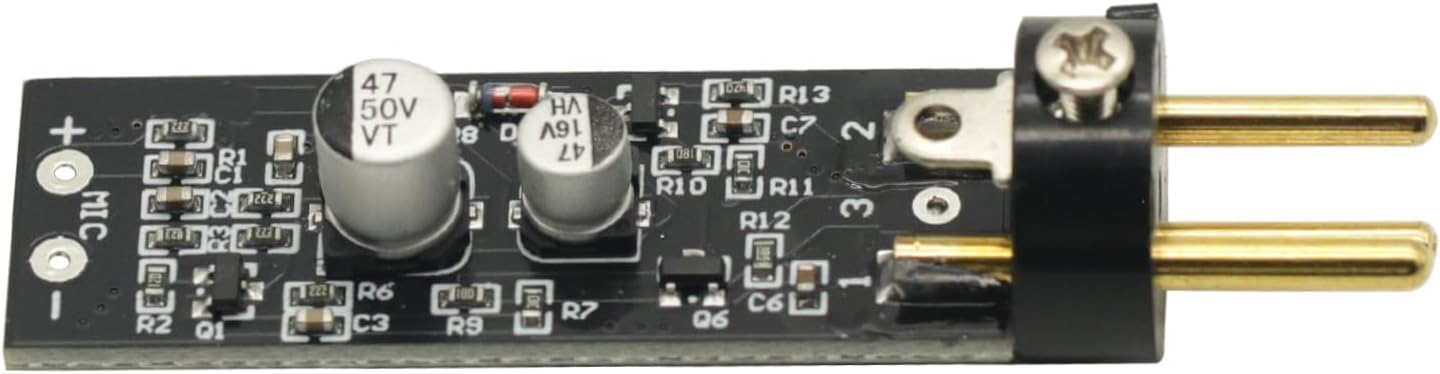
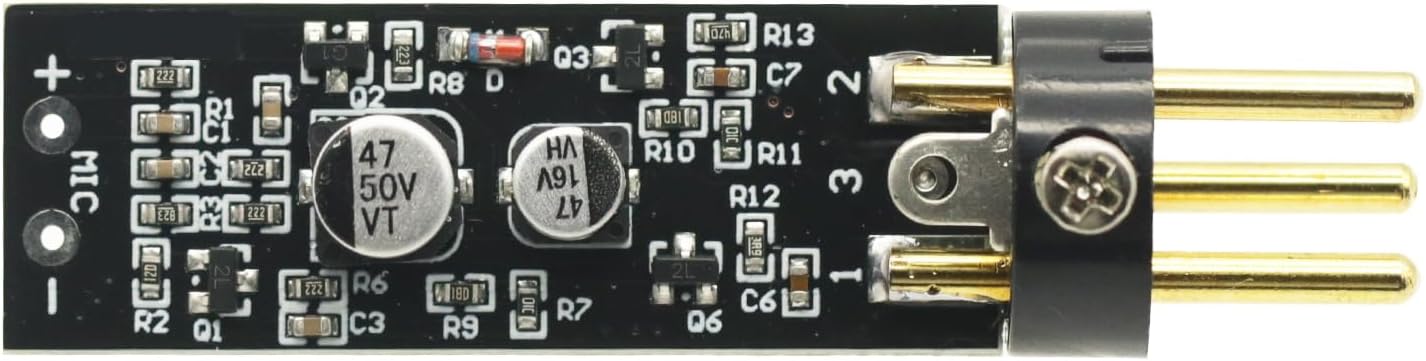
- Connect the Electret Microphone: Solder or connect your electret microphone to the designated 'MIC +' and 'MIC -' pads on the ampแผงวงจรขยายสัญญาณ ตรวจสอบให้แน่ใจว่าขั้วถูกต้อง
- Connect to Phantom Power Source: The output pins of the amplifier board are designed to connect to an XLR input that provides 15-48V phantom power. This connection will supply power to the board and the microphone, and carry the ampสัญญาณเสียงที่สว่างขึ้น
- เชื่อมต่อกับอุปกรณ์เสียง: The XLR output from your phantom power source (or directly from the board if integrated) should then be connected to your mixer, audio interface, or other recording/sound equipment.
สำคัญ: The overall noise performance of the system is significantly influenced by the quality of the electret microphone used. For optimal results, it is recommended to use a low-noise electret microphone.
การดำเนินการ
Once properly connected, the amplifier board operates automatically when phantom power is supplied. It boosts the low-level signal from the electret microphone to a line-level signal suitable for professional audio equipment.
- ตรวจสอบให้แน่ใจว่าการเชื่อมต่อทั้งหมดแน่นหนาดีก่อนจะจ่ายไฟ
- Activate the phantom power on your mixer or audio interface.
- Monitor audio levels on your connected equipment to prevent clipping or distortion. Adjust gain settings on your mixer/interface as needed.
การซ่อมบำรุง
การ amplifier board requires minimal maintenance. Keep the board clean and free from dust and moisture. Avoid exposing it to extreme temperatures or direct sunlight. Do not attempt to disassemble the board beyond necessary connections, as this may void any potential warranty.
การแก้ไขปัญหา
- ไม่มีเสียงออก:
- Verify that phantom power (15-48V) is active on your connected audio equipment.
- Check all cable connections for proper seating and continuity.
- Ensure the electret microphone is correctly wired to the board with correct polarity.
- Test with a different electret microphone or cable if available.
- เสียงดัง/เสียงฮัมมากเกินไป:
- Ensure proper grounding of all audio equipment.
- Use shielded cables for all connections.
- Verify that the electret microphone itself is low-noise.
- Check for nearby electronic devices that might cause interference.
- Low Output Level:
- Confirm that the phantom power voltage อยู่ในช่วง 15-48V
- Adjust the gain settings on your mixer or audio interface.
สื่อช่วยสอน



วิดีโอสินค้า
1 วิดีโอ: วิดีโอนี้ให้ภาพที่ชัดเจนview of the Electret Microphone Amplifier Boards, showing their packaging and physical appearance. It demonstrates the compact size and how the electret microphone capsule connects to the board.
การรับประกันและการสนับสนุน
For warranty information or technical support, please refer to the seller's policies on the platform where the product was purchased. Keep your purchase receipt as proof of purchase.


