การแนะนำ
The Beatfoxx CDB-1016U Boombox is a versatile audio system designed for both home and portable use. It combines classic audio formats with modern connectivity options, offering a comprehensive listening experience. This manual provides detailed instructions for setting up, operating, and maintaining your device.

รูปที่ 1 : ด้านหน้า view of the Beatfoxx CDB-1016U BK Boombox, showing the speakers, control panel, and carrying handle.
การตั้งค่า
การจ่ายไฟให้กับอุปกรณ์
The Beatfoxx CDB-1016U Boombox can be powered using the included AC power cable or by batteries for portable use.
- ไฟฟ้ากระแสสลับ: Insert the AC power cable into the AC IN jack on the back of the unit and plug the other end into a standard wall outlet (AC 230V ~ 50Hz).
- พลังงานแบตเตอรี่: For portable operation, open the battery compartment on the bottom of the unit. Insert six (6) Type C (UM-2) batteries, ensuring correct polarity (+/-). Close the battery compartment securely.

Figure 2: The boombox operating on AC power, with an illustration of the required Type C batteries for portable use.
คำแนะนำการใช้งาน
ควบคุมมากกว่าview
Familiarize yourself with the main controls located on the top and front of the boombox.

รูปที่ 3: รายละเอียด view of the boombox's control panel, cassette compartment, carrying handle, and CD compartment.
- ปุ่มเพาเวอร์: เปิด/ปิดเครื่อง
- ปุ่มโหมด: Switches between CD, USB, Bluetooth, Radio (FM/AM), and AUX modes.
- ปุ่มปรับระดับเสียง: ปรับระดับเอาต์พุตเสียง
- ปุ่มปรับจูน: Used for manual tuning in Radio mode.
- ปุ่มเล่น/หยุดชั่วคราว: เริ่มหรือหยุดเล่นชั่วคราว
- STOP/EJECT Button: Stops playback and opens the CD compartment or ejects cassette.
- ปุ่มข้าม/ค้นหา (<< / >>): ข้ามเพลงหรือกรอไปข้างหน้า/กรอกลับ
- REPEAT/PROG Button: Repeats current track/all tracks or programs CD/USB playback order.
- FOLDER Button: Navigates through folders on USB.
- ปุ่ม REC: Initiates recording to cassette.
Selecting Playback Sources
The boombox supports multiple audio sources. Use the โหมด button to cycle through them.

Figure 4: Visual representation of the seven available playback sources on the boombox.
การเล่นซีดี
- กดปุ่ม โหมด ปุ่มเพื่อเลือกโหมดซีดี
- กดปุ่ม หยุด/นำออก ปุ่มสำหรับเปิดช่องใส่ซีดี
- Place a CD (CD, CD-R, CD-RW, MP3 CD) onto the spindle with the label side facing up.
- Close the CD compartment. The display will show "READING" and then the total number of tracks.
- กดปุ่ม เล่น/หยุดชั่วคราว ปุ่มเพื่อเริ่มเล่น
- ใช้ ข้าม/ค้นหา ปุ่มสำหรับนำทางระหว่างแทร็ก
- กด ทำซ้ำ เพื่อเล่นซ้ำเพลงปัจจุบันหรือเพลงทั้งหมด
การเล่นและการบันทึกเทปคาสเซ็ต
The boombox features a built-in cassette player and recorder.

Figure 5: The cassette compartment of the boombox shown open, ready for tape insertion.
การเล่นซ้ำ:
- เปิดช่องใส่ตลับเทป
- ใส่เทปคาสเซ็ท
- ปิดช่อง.
- กดปุ่ม เล่น กดปุ่มบนแผงควบคุมของเครื่องเล่นเทปเพื่อเริ่มเล่น
- ใช้ ข้างหน้า or รว. สำหรับกรอไปข้างหน้าหรือกรอถอยหลัง
- กด หยุด/นำออก เพื่อหยุดการเล่นและนำเทปออก
การบันทึก:
You can record from CD, USB, Radio, or AUX input to a cassette tape.
- Insert a blank or recordable cassette tape into the compartment.
- Select the desired source (CD, USB, Radio, or AUX) using the โหมด ปุ่ม.
- เริ่มเล่นจากแหล่งที่มา (เช่น เล่นซีดี หรือฟังสถานีวิทยุ)
- กดปุ่ม บันทึก button on the cassette controls. The unit will automatically start recording the audio from the selected source onto the cassette.
- กด หยุด on the cassette controls to end recording.
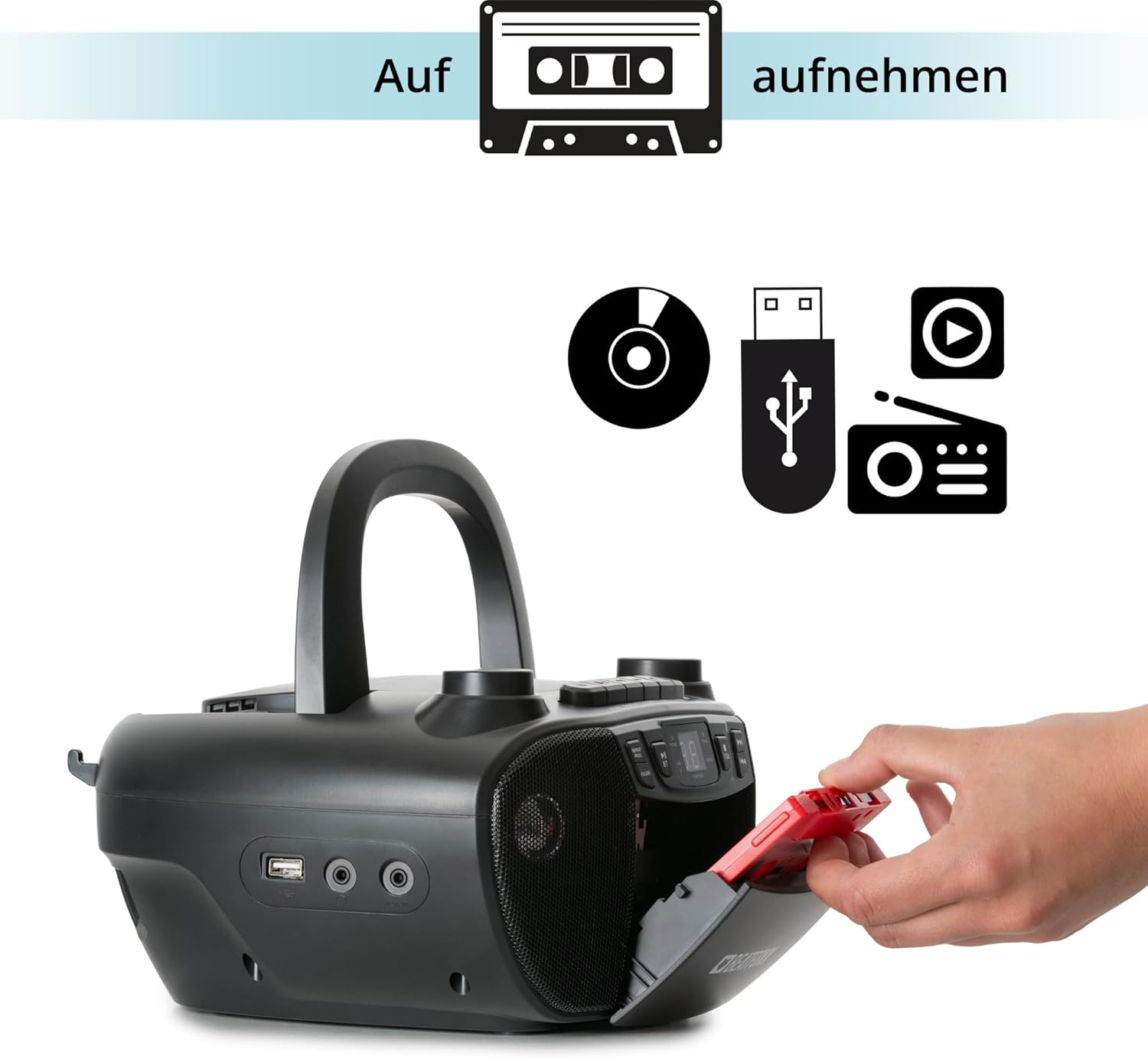
Figure 6: Illustration of the boombox's recording capability, showing a cassette tape being inserted for recording from CD, USB, or radio.
Radio (FM/AM)
- Extend the telescopic antenna for better FM reception.
- กดปุ่ม โหมด button to select Radio mode (FM or AM).
- ใช้ การปรับแต่ง knob to manually tune to your desired radio station.
การเชื่อมต่อบลูทูธ
- กดปุ่ม โหมด button to select Bluetooth mode. The display will show "BT" and flash, indicating it's in pairing mode.
- บนอุปกรณ์ที่รองรับบลูทูธ (สมาร์ทโฟน แท็บเล็ต) ให้เปิดใช้งานบลูทูธและค้นหาอุปกรณ์ที่ใช้งานได้
- Select "Beatfoxx CDB-1016U" from the list of devices.
- Once paired, the "BT" indicator on the boombox will stop flashing and remain solid.
- ตอนนี้คุณสามารถสตรีมเสียงแบบไร้สายจากอุปกรณ์ของคุณไปยังลำโพงพกพาได้แล้ว
การเล่นผ่าน USB
- ใส่แฟลชไดรฟ์ USB ที่มีไฟล์เสียง MP3 fileลงในพอร์ต USB
- กดปุ่ม โหมด button to select USB mode. The unit will automatically start playing the first track.
- ใช้ ข้าม/ค้นหา ปุ่มสำหรับนำทางระหว่างแทร็ก
- ใช้ โฟลเดอร์ button to navigate through folders on the USB drive.

รูปที่ 7: รายละเอียด view of the boombox's connectivity options, including the USB port, headphone output, and AUX input.
อินพุต AUX
Connect external audio devices (e.g., MP3 players, smartphones without Bluetooth) to the boombox using a 3.5mm audio cable (not included).
- Connect one end of the 3.5mm audio cable to the AUX IN jack on the boombox.
- ต่อปลายอีกด้านหนึ่งเข้ากับช่องเสียบหูฟังหรือช่องสัญญาณเสียงออกของอุปกรณ์ภายนอกของคุณ
- กดปุ่ม โหมด ปุ่มเพื่อเลือกโหมด AUX
- เล่นเสียงจากอุปกรณ์ภายนอกของคุณ เสียงจะออกทางลำโพงบูมบ็อกซ์
เอาท์พุตหูฟัง
For private listening, connect standard 3.5mm headphones to the HEADPHONE jack. Audio will automatically mute from the speakers when headphones are connected.
การซ่อมบำรุง
การทำความสะอาด
- ถอดปลั๊กเครื่องออกจากแหล่งจ่ายไฟทุกครั้งก่อนทำความสะอาด
- ใช้ผ้าแห้งนุ่มๆ เช็ดทำความสะอาดพื้นผิวภายนอก
- ห้ามใช้สารทำความสะอาดที่มีฤทธิ์กัดกร่อน ขี้ผึ้ง หรือตัวทำละลาย เพราะอาจทำให้พื้นผิวเสียหายได้
- สำหรับเลนส์ CD ให้ใช้ผลิตภัณฑ์ทำความสะอาดเลนส์ CD โดยเฉพาะ
- For the cassette head, use a cassette head cleaning kit.
การดูแลแบตเตอรี่
- ถอดแบตเตอรี่ออกหากจะไม่ได้ใช้งานเครื่องเป็นเวลานานเพื่อป้องกันการรั่วไหล
- อย่าใช้แบตเตอรี่เก่าและใหม่ผสมกัน หรือแบตเตอรี่ประเภทต่างๆ
- ทิ้งแบตเตอรี่ที่ใช้แล้วอย่างรับผิดชอบตามข้อบังคับท้องถิ่น
การแก้ไขปัญหา
| ปัญหา | สาเหตุที่เป็นไปได้ | สารละลาย |
|---|---|---|
| ไม่มีไฟฟ้า | ไม่ได้เชื่อมต่อสายไฟ แบตเตอรี่หมดหรือใส่ไม่ถูกต้อง | Ensure AC cable is securely plugged in. Check battery polarity and replace if necessary. |
| ไม่มีเสียง | ระดับเสียงต่ำเกินไป เลือกโหมดไม่ถูกต้อง เชื่อมต่อหูฟังแล้ว | Increase volume. Press MODE button to select correct source. Disconnect headphones. |
| แผ่นซีดีสะดุดหรือเล่นไม่ได้ | CD is dirty or scratched; CD inserted incorrectly. | Clean CD with a soft cloth. Re-insert CD correctly. Try another CD. |
| บลูทูธไม่จับคู่ | เครื่องเล่นเพลงไม่อยู่ในโหมดจับคู่ อุปกรณ์อยู่ไกลเกินไป หรือปิดใช้งานบลูทูธบนอุปกรณ์ | Ensure boombox is in BT mode and "BT" is flashing. Move device closer. Enable Bluetooth on your device. |
| การรับสัญญาณวิทยุไม่ดี | เสาอากาศไม่ยืดออก สัญญาณอ่อน | Fully extend the telescopic antenna. Adjust antenna position. Try tuning to a stronger station. |
ข้อมูลจำเพาะ
| คุณสมบัติ | รายละเอียด |
|---|---|
| ยี่ห้อ | บีทฟ็อกซ์ |
| หมายเลขรุ่น | CDB-1016U (Manufacturer Ref: 00104749) |
| สี | สีดำ |
| เทคโนโลยีการเชื่อมต่อ | อุปกรณ์เสริม, USB, บลูทูธ |
| อุปกรณ์ที่รองรับ | Portable audio devices, MP3 players, Smartphones, Tablets |
| ประเภทลำโพง | สเตอริโอ |
| แหล่งพลังงาน | AC Power Cable, 6 x Type C Batteries |
| กำลังขับเสียง | 2 x 1.2 วัตต์ |
| รูปแบบที่รองรับ | CD, MP3, CD-R, CD-RW, Cassette, FM/AM Radio, Bluetooth, USB |
| น้ำหนักสินค้า | 1.6 กิโลกรัม |
| ขนาด (กว้าง x สูง x ลึก) | 24 x 13 x 22.5 ซม. (โดยประมาณ) |
การรับประกันและการสนับสนุน
This Beatfoxx product comes with a standard manufacturer's warranty. Please refer to the warranty card included in your product packaging for specific terms and conditions.
For technical support, troubleshooting assistance, or warranty claims, please contact Beatfoxx customer service through their official webตรวจสอบกับเว็บไซต์หรือร้านค้าที่คุณซื้อสินค้า เก็บหลักฐานการซื้อไว้เพื่อใช้ในการตรวจสอบสิทธิ์การรับประกัน


