1. บทนำ
ขอบคุณสำหรับการซื้อasing the Voyager Bluey 12V Electric Go Kart. This manual provides essential information for the safe assembly, operation, and maintenance of your new ride-on toy. Please read all instructions carefully before use and retain this manual for future reference. This product is designed for children aged 3 to 6 years.
2. ข้อมูลด้านความปลอดภัย
WARNING: Use as Directed. Adult supervision is required at all times.
- Always ensure the child wears a helmet and appropriate safety gear.
- Operate the go-kart only on flat, dry surfaces away from traffic, swimming pools, or steep inclines.
- Ensure the seat belt is securely fastened before each use.
- ไม่อนุญาตให้มีผู้โดยสารมากกว่าหนึ่งคนในเวลาเดียวกัน
- ให้มือ ผม และเสื้อผ้าอยู่ห่างจากชิ้นส่วนที่กำลังเคลื่อนไหว
- Never modify the electrical system or components of the go-kart.

Image 2.1: The Voyager Bluey 12V Electric Go Kart, ready for use.
3. เนื้อหาบรรจุภัณฑ์
โปรดตรวจสอบสิ่งของในบรรจุภัณฑ์เพื่อให้แน่ใจว่ามีชิ้นส่วนครบทุกชิ้น:
- Bluey 12V Electric Go Kart body
- พวงมาลัย
- ล้อ (4)
- Axles and Fasteners
- แบตเตอรี่แบบชาร์จไฟ 12V
- เครื่องชาร์จแบตเตอรี่
- คู่มือการใช้งาน
- Australian Flag accessory
4. การประกอบและการติดตั้ง
Assembly typically requires a Phillips head screwdriver and takes approximately 30-60 minutes. Follow these general steps:
- ติดล้อ: Securely attach all four wheels to the axles using the provided fasteners.
- ติดตั้งพวงมาลัย: Connect the steering wheel to the steering column, ensuring it clicks into place or is fastened according to specific instructions.
- เชื่อมต่อแบตเตอรี่: Locate the battery compartment, typically under the seat. Connect the battery terminals (red to red, black to black).
- Attach Flag: Insert the Australian flag accessory into its designated slot at the rear of the go-kart.

ภาพที่ 4.1: ด้านหน้า view of the go-kart highlighting key features like the 12V rechargeable battery, 4 mph max speed, rear drift wheels, and recommended age range of 3-7 years.
5. การชาร์จแบตเตอรี่
The go-kart is powered by a 12V rechargeable battery. For optimal performance and battery life, follow these charging instructions:
- ค่าใช้จ่ายเริ่มต้น: Before first use, charge the battery for a full 10-12 hours. Do not overcharge for more than 18 hours.
- การชาร์จปกติ: After each use, recharge the battery for 8-10 hours.
- พอร์ตชาร์จ: Locate the charging port, usually near the battery compartment or on the dashboard. Plug the charger into the port and then into a standard wall outlet.
- ตัวบ่งชี้ : เครื่องชาร์จอาจมีไฟแสดงสถานะการชาร์จ (เช่น สีแดงหมายถึงกำลังชาร์จ สีเขียวหมายถึงชาร์จเต็มแล้ว)
- ความปลอดภัย: Always charge the battery in a dry, well-ventilated area. Do not allow children to handle the charger or battery.
6. คู่มือการใช้งาน
Familiarize yourself with the controls before allowing a child to operate the go-kart.
6.1. การควบคุม
- สวิตช์ไฟ: Located on the dashboard, this switch turns the go-kart on or off.
- สวิตช์เดินหน้า/ถอยหลัง: Allows the go-kart to move forward or backward.
- เหยียบเท้า: เหยียบแป้นเหยียบเพื่อเร่งความเร็ว ปล่อยเพื่อเบรก
- ไฟ: The go-kart is equipped with vibrant lights for enhanced visibility and fun.
- แจ็ค MP3: Connect an external audio device to play music through the go-kart's speakers.
- Musical Steering Wheel: Features integrated musical functions for added entertainment.

Image 6.1: Detail of the Forward/Reverse switch and power button for intuitive control.
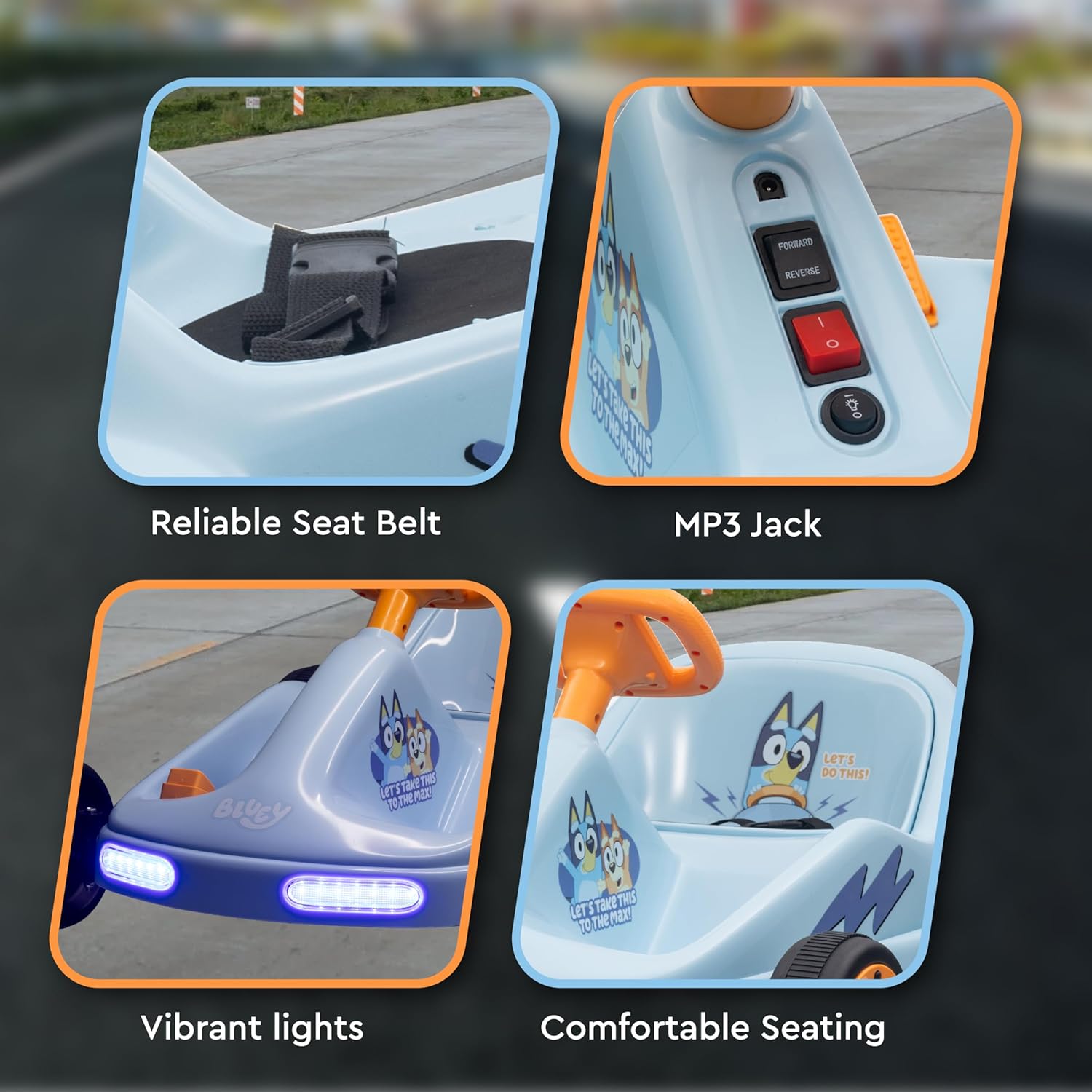
ภาพที่ 6.2: รายละเอียด view of the reliable seat belt, MP3 jack, vibrant front lights, and comfortable seating area.
6.2. Driving the Go Kart
- Ensure the child is seated properly and the seat belt is fastened.
- เปิดสวิตช์ไฟ
- Select 'Forward' or 'Reverse' using the switch.
- Press the foot pedal to move. Release the pedal to stop.
- Steer using the steering wheel.

Image 6.3: The go-kart is suitable for operation on various surfaces including concrete, tile, asphalt roads, and wood floors.
7. การบำรุงรักษา
Regular maintenance ensures the longevity and safe operation of your go-kart.
- การทำความสะอาด: Wipe the go-kart with a soft, damp ผ้า ห้ามใช้สารทำความสะอาดที่มีฤทธิ์กัดกร่อนหรือตัวทำละลาย
- การดูแลแบตเตอรี่ Always recharge the battery after each use. If storing for extended periods, charge the battery once a month to prevent deep discharge.
- พื้นที่จัดเก็บ: Store the go-kart in a dry, cool place away from direct sunlight and moisture.
- การตรวจสอบ: Periodically check all screws, nuts, and connections to ensure they are tight. Inspect wheels and tires for wear.
8 การแก้ไขปัญหา
If you encounter issues, refer to this section before contacting support.
| ปัญหา | สาเหตุที่เป็นไปได้ | สารละลาย |
|---|---|---|
| Go-kart does not move | Battery is low or not connected; Power switch is off; Forward/Reverse switch is in neutral position; Loose wire connection. | Charge the battery; Turn on the power switch; Select Forward or Reverse; Check all wire connections. |
| Go-kart moves slowly | Battery is low; Overloaded; Operating on an uneven surface. | Recharge the battery; Reduce weight; Move to a flat, smooth surface. |
| ไฟไม่ทำงาน | Loose wire connection; Damaged bulb/LED. | Check wire connections to the lights; Contact customer support if damaged. |
9. ข้อมูลจำเพาะ
- หมายเลขรุ่น: A12VGCLU241
- ขนาดสินค้า : 24.2 x 16.5 x 28 นิ้ว
- น้ำหนักสินค้า: 27.1 ปอนด์
- แบตเตอรี่: 12V ชาร์จใหม่ได้
- ความเร็วสูงสุด: ประมาณ 4 ไมล์ต่อชั่วโมง
- อายุที่แนะนำ: 3 years and up (typically 3-6 years)
- วัสดุก่อสร้าง: Durable PVC and Iron
- ผู้ผลิต: สาคร อินเตอร์เนชั่นแนล
10. การรับประกันและการสนับสนุน
For warranty information or technical support, please refer to the warranty card included with your product or contact the manufacturer, Sakar International, directly. Keep your proof of purchase for any warranty claims.
หากต้องการความช่วยเหลือเพิ่มเติม คุณสามารถไปที่ Voyager Store on Amazon.


