การแนะนำ
This manual provides comprehensive instructions for the setup, operation, maintenance, and troubleshooting of your Bloody AT98 Alpha Optical Switch Performance Keyboard. Please read this manual thoroughly before using the product to ensure proper function and longevity.
การตั้งค่า
เนื้อหาแพ็คเกจ
- Bloody AT98 Alpha Optical Switch Performance Keyboard
- สาย USB-C
- ตัวดึงกุญแจ
- ผ้าคลุมป้องกันฝุ่น
- Additional Keycaps (for customization)
การเชื่อมต่อคีย์บอร์ด
- Locate the USB-C port on the back of the keyboard. The port is recessed for cable management.
- เชื่อมต่อสาย USB-C ที่ให้มาเข้ากับพอร์ต USB-C ของแป้นพิมพ์
- Route the cable through the integrated cable management channels on the underside of the keyboard (left, right, or center) as desired.
- Connect the other end of the USB-C cable (USB-A) to an available USB port on your computer.
- แป้นพิมพ์จะถูกจดจำโดยระบบปฏิบัติการของคุณโดยอัตโนมัติ

Image: The Bloody AT98 keyboard with its USB-C cable connected, showcasing the cable management options on the underside.
Adjusting Keyboard Height
The keyboard features dual-height adjustable feet on the underside. Flip out the feet to achieve your preferred typing angle and ergonomic comfort.

ภาพ: ด้านล่าง view of the Bloody AT98 keyboard, illustrating the dual-height adjustable feet for ergonomic positioning.
การดำเนินการ
Alpha Optical Switches
The Bloody AT98 keyboard is equipped with Alpha Optical Switches, which offer a fast response and high durability (up to 100 million keystrokes). These linear switches have a total travel distance of 3.8 mm ± 0.2 mm and an initial force of 48 ± 3 cN.

Image: Detailed diagram illustrating the specifications of the Alpha Optical Switch, including switch type, durability, initial force, total travel distance, and actuation point customization range.
Customizable Actuation Points
The keyboard allows for customization of actuation points, ranging from 0.8mm to 3.0mm. This feature enables users to fine-tune key responsiveness to their preference. There are 4 customizable variable speed profileมีให้เลือกใช้ได้
To adjust actuation points, use the dedicated function keys (often marked 'LT' or similar, refer to keyboard layout) in combination with other keys as specified in the software or quick guide.

Image: Visual representation of the customizable actuation points and the eXact Reset System, detailing downward key travel, Z-Force Rapid Trigger, and X-Force Rapid Trigger.
eXact Reset System
The eXact Reset System provides enhanced key reset functionality:
- Hyper Z-Force Mode: Ultra-fast reset at 0.3mm for peak precision.
- Extreme X-Force Mode: Enhanced reset at 0.8mm for superior control.
- โหมดคลาสสิก: Cancels out the eXact Reset and reverts to the default key reset point for a traditional response.
ไฟแบ็คไลท์ RGB
The keyboard features 7 preset RGB backlit effects. These can be adjusted using function key combinations. Refer to the keyboard's quick start guide or software for specific key combinations to change lighting patterns and brightness.
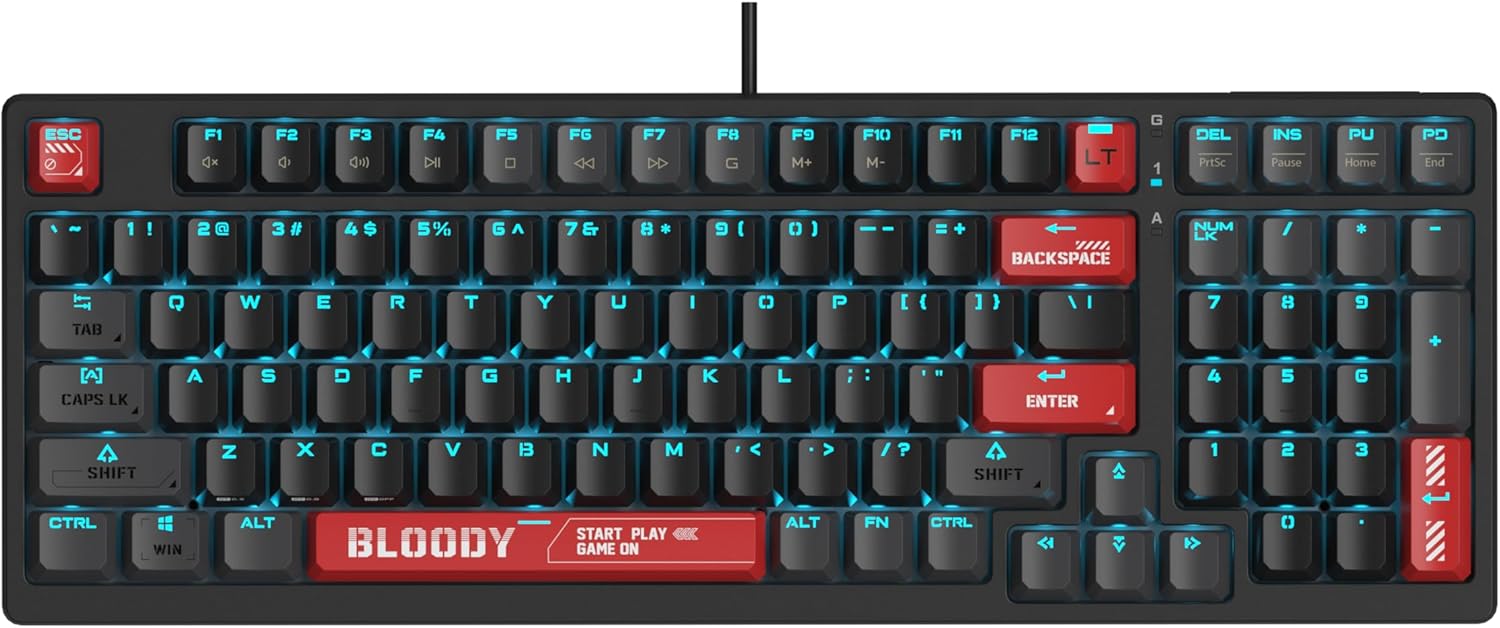
Image: The Bloody AT98 keyboard illuminated with its RGB backlighting, showcasinก. การจัดวางและออกแบบปุ่ม
ฟังก์ชั่นมัลติมีเดีย
Secondary multimedia functions are integrated into the F-key row. These functions are typically activated by pressing the FN key in combination with the corresponding F-key (e.g., FN + F1 for volume down, FN + F2 for volume up, FN + F3 for mute). Specific key assignments may vary; consult the keyboard's quick start guide for details.
การซ่อมบำรุง
ทำความสะอาดคีย์บอร์ด
- ถอดแป้นพิมพ์ออกจากคอมพิวเตอร์ของคุณก่อนทำความสะอาด
- ใช้ผ้านุ่มไม่เป็นขุยเช็ดเล็กน้อยampชุบน้ำหรือน้ำยาทำความสะอาดอ่อนๆ เพื่อเช็ดปุ่มและพื้นผิว
- สำหรับฝุ่นละอองและเศษต่างๆ ระหว่างคีย์ ให้ใช้ลมอัด
- หลีกเลี่ยงการฉีดของเหลวลงบนแป้นพิมพ์โดยตรง
- อย่าใช้สารเคมีที่รุนแรงหรือวัสดุที่มีฤทธิ์กัดกร่อน
การเปลี่ยนปุ่มกด
The Bloody AT98 comes with additional keycaps and a keycap puller for customization. To replace keycaps:
- Gently attach the keycap puller to the keycap you wish to remove.
- Pull upwards with steady, even pressure until the keycap detaches from the switch.
- วางปุ่มกดใหม่ให้ตรงกับแกนสวิตช์ แล้วกดลงไปให้แน่นจนกว่าจะมีเสียงคลิกเข้าที่
The PBT keycaps are designed for durability and a quick bounce-back feel.

ภาพ: ระยะใกล้ view of the Bloody AT98 keyboard highlighting the PBT keycaps, emphasizing their material and design.
Dust Cover Usage
Utilize the provided dust cover when the keyboard is not in use to protect it from dust and debris, which can affect performance and longevity.
การแก้ไขปัญหา
แป้นพิมพ์ไม่ตอบสนอง
- ตรวจสอบให้แน่ใจว่าสาย USB-C เชื่อมต่อกับคีย์บอร์ดและคอมพิวเตอร์อย่างแน่นหนา
- ลองเชื่อมต่อคีย์บอร์ดกับพอร์ต USB อื่นบนคอมพิวเตอร์ของคุณ
- ทดสอบแป้นพิมพ์บนคอมพิวเตอร์เครื่องอื่นเพื่อตัดปัญหาเฉพาะคอมพิวเตอร์เครื่องนั้นออกไป
- รีสตาร์ทเครื่องคอมพิวเตอร์ของคุณ
Backlighting Not Working or Incorrect
- Check if the backlighting is turned off. Use the designated FN key combinations to cycle through lighting effects and adjust brightness.
- Ensure any keyboard software is up to date and correctly configured.
คีย์ไม่ลงทะเบียนหรือพิมพ์ซ้ำ
- Clean the affected key(s) using compressed air to remove any debris.
- Verify that the keycap is properly seated on the switch.
- If using custom actuation points, try resetting them to default settings.
ปัญหาด้านซอฟต์แวร์
- Download the latest software and drivers from the official Bloody webเว็บไซต์.
- ตรวจสอบให้แน่ใจว่าระบบปฏิบัติการของคุณเป็นเวอร์ชันล่าสุด
ข้อมูลจำเพาะ
| ชื่อรุ่น | AT98-BloodyRed |
| ยี่ห้อ | เลือดสาด |
| คำอธิบายแป้นพิมพ์ | Alpha Optical Switch |
| ประเภทสวิตซ์ | Linear Optical Switch |
| จำนวนคีย์ | 98 คีย์ |
| การปรับแต่งจุดการทำงาน | 0.8mm - 3.0mm (23 options) |
| แรงเริ่มต้น | 48 ± 3 กิโลนิวตันเมตร |
| รวมระยะทางในการเดินทาง | 3.8 มม. ± 0.2 มม. |
| ความทนทาน | รองรับการกดแป้นพิมพ์สูงสุด 100 ล้านครั้ง |
| เทคโนโลยีการเชื่อมต่อ | ยูเอสบี-ซี |
| อุปกรณ์ที่รองรับ | PC |
| ขนาดสินค้า | 5.43 x 15.16 x 1.61 นิ้ว (13.79 x 38.51 x 4.09 ซม.) |
| น้ำหนักสินค้า | 1.65 ปอนด์ (0.75 กก.) |
| คุณสมบัติพิเศษ | eXact Reset System, RGB Backlit, PBT Keycaps, Dual-Height Feet |
การรับประกันและการสนับสนุน
ข้อมูลการรับประกัน
For detailed warranty information, please refer to the warranty card included with your product or visit the official Bloody webไซต์นี้ โปรดเก็บหลักฐานการซื้อไว้เพื่อใช้ยืนยันการรับประกัน
การสนับสนุนลูกค้า
If you encounter any issues not covered in this manual or require further assistance, please contact Bloody customer support through their official webไซต์หรือข้อมูลการติดต่อที่ให้ไว้ในบรรจุภัณฑ์ผลิตภัณฑ์ของคุณ
เลือดอย่างเป็นทางการ Webเว็บไซต์: www.bloody.com


