1. บทนำ
The NEDIS WIFICI12CWT SmartLife Indoor Wi-Fi Camera is designed for home surveillance, offering 3MP 1296p Full HD video quality. It features infrared night vision, intelligent motion detection, and two-way audio communication. This camera is compatible with Onvif standards and integrates seamlessly with the SmartLife application for remote access and control. Video recordings can be stored on a microSD card (up to 128 GB) or via an optional cloud storage service. This manual provides essential information for the proper installation, operation, and maintenance of your camera.
2. อะไรอยู่ในกล่อง
- 1x NEDIS WIFICI12CWT Camera
- อะแดปเตอร์ไฟฟ้า 1x
- สาย USB Type-C 1x
- 1x คู่มือการใช้งาน
3. สินค้าหมดview
Familiarize yourself with the components of your NEDIS WIFICI12CWT camera.

This image displays the front of the NEDIS WIFICI12CWT camera, highlighting its key functionalities such as Wi-Fi connectivity, control via a mobile application, voice control compatibility, infrared night vision, and 3MP Full HD resolution for clear video.
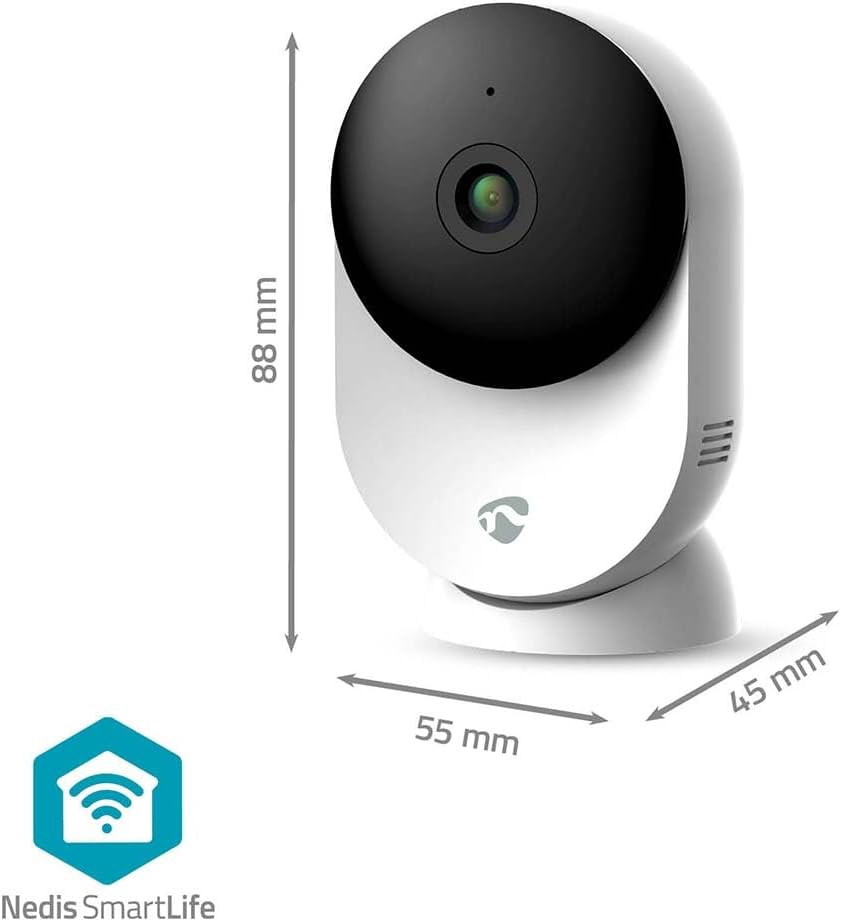
ภาพนี้แสดงให้เห็นชัดเจน view of the NEDIS WIFICI12CWT camera along with its physical dimensions: 88 mm in height, 55 mm in width, and 45 mm in depth, aiding in placement planning.

ด้านหลัง view of the camera is shown, highlighting the speaker grille for two-way audio and the 'PUSH' button, which typically serves as a reset or pairing button.
ส่วนประกอบหลัก:
- เลนส์กล้อง: จับภาพวิดีโอ footage.
- ไฟแสดงสถานะ LED: Shows camera status (e.g., power, connection).
- ไมโครโฟน: สำหรับรับสัญญาณเสียงและการสื่อสารสองทาง
- ผู้บรรยาย: สำหรับส่งสัญญาณเสียงและการสื่อสารสองทาง
- Power Port (USB Type-C): เชื่อมต่อกับอะแดปเตอร์ไฟ
- ปุ่มรีเซ็ต: ใช้สำหรับรีเซ็ตเป็นค่าเริ่มต้นจากโรงงานหรือโหมดจับคู่
- ช่องเสียบการ์ด MicroSD: สำหรับการจัดเก็บวิดีโอในเครื่อง
4. การตั้งค่า
Follow these steps to set up your NEDIS WIFICI12CWT camera:
- ดาวน์โหลดแอป SmartLife: ค้นหา "SmartLife" in your mobile device's app store (iOS or Android) and install it.
- สร้างบัญชี: Open the SmartLife app and register for a new account or log in if you already have one.
- เปิดกล้อง: Connect the USB Type-C cable to the camera's power port and plug the power adapter into an electrical outlet. The camera will power on, and the LED indicator will typically blink, indicating it's ready for pairing.
- เพิ่มอุปกรณ์: In the SmartLife app, tap the "+" icon (usually in the top right corner) to add a new device. Select "Security & Video Surveillance" then "Smart Camera (Wi-Fi)" or similar.
- เชื่อมต่อกับ Wi-Fi: Follow the on-screen instructions in the app. Ensure your mobile device is connected to a 2.4 GHz Wi-Fi network. The camera does not support 5 GHz Wi-Fi. You may need to scan a QR code displayed on your phone with the camera lens.
- ตั้งค่าให้เสร็จสมบูรณ์: Once the camera connects successfully, you can name it and begin using it.

A user is shown interacting with the NEDIS WIFICI12CWT camera through the SmartLife mobile application on a smartphone, illustrating the remote viewing capability and ease of control.
5. การใช้งานกล้อง
สด View:
Open the SmartLife app and select your camera from the device list to access the live video feed. You can view your space in real-time from anywhere.
การตรวจจับการเคลื่อนไหว:
The camera features intelligent motion detection. When motion is detected, the camera can send instant notifications to your smartphone via the SmartLife app. You can adjust sensitivity settings within the app.
การมองเห็นตอนกลางคืน:
Equipped with infrared LEDs, the camera automatically switches to night vision mode in low-light conditions, providing clear black-and-white video up to 10 meters.
เสียงสองทาง:
Use the built-in microphone and speaker for two-way communication. Tap the microphone icon in the app to speak, and listen through the camera's speaker.

A couple is depicted using a tablet to monitor a baby, showcasing the camera's ability to provide live video feed and two-way audio communication, useful for calming a child or general baby surveillance.
การบันทึกและการจัดเก็บ:
- การ์ด MicroSD: Insert a microSD card (up to 128 GB, not included) into the designated slot for local storage of recordings. The camera supports continuous recording or event-triggered recording.
- การเก็บข้อมูลบนคลาวด์: Optional cloud storage services may be available through the SmartLife app for secure off-site storage of your video footage.
ฟังก์ชันการหมุน/เอียง:
The camera features motorized pan and tilt capabilities, allowing for 360° horizontal and vertical tracking. Control the camera's viewing direction directly from the SmartLife app to cover a wider area.

This image shows the camera placed in a room, with graphical overlays emphasizing its 110-degree viewing angle, intelligent movement detection, and dual-band 2.4/5 GHz Wi-Fi connectivity for flexible placement.
6. การบำรุงรักษา
การทำความสะอาด:
To clean the camera, gently wipe the exterior with a soft, dry cloth. Do not use liquid cleaners or aerosols, as they may damage the device.
อัพเดตเฟิร์มแวร์:
Periodically check the SmartLife app for available firmware updates. Keeping your camera's firmware up-to-date ensures optimal performance and security.
7 การแก้ไขปัญหา
- กล้องไม่เปิด: ตรวจสอบให้แน่ใจว่าได้เสียบอะแดปเตอร์แปลงไฟเข้ากับกล้องและเต้ารับไฟฟ้าที่ใช้งานได้สนิทแล้ว
- ไม่สามารถเชื่อมต่อ Wi-Fi ได้:
- ตรวจสอบให้แน่ใจว่าเครือข่าย Wi-Fi ของคุณเป็น 2.4 GHz กล้องไม่รองรับเครือข่าย 5 GHz
- ตรวจสอบรหัสผ่าน Wi-Fi ของคุณเพื่อความถูกต้อง
- ตรวจสอบให้แน่ใจว่ากล้องอยู่ในระยะของเราเตอร์ Wi-Fi ของคุณ
- Try resetting the camera by pressing and holding the reset button for several seconds until the LED indicator changes.
- No recording to microSD card:
- โปรดตรวจสอบให้แน่ใจว่าได้เสียบการ์ด microSD อย่างถูกต้องแล้ว
- Check if the microSD card is formatted correctly (usually FAT32). You may need to format it via the app.
- Verify that recording settings are enabled in the SmartLife app.
- คุณภาพของภาพไม่ดี:
- ทำความสะอาดเลนส์กล้องด้วยผ้าแห้งเนื้อนุ่ม
- Ensure adequate lighting in the environment, or that night vision is functioning correctly in dark conditions.
- Check your internet connection speed, as a slow connection can affect streaming quality.
8. ข้อมูลจำเพาะ
| คุณสมบัติ | ข้อมูลจำเพาะ |
|---|---|
| ชื่อรุ่น | WIFICI12CWT |
| ความละเอียดในการบันทึกวิดีโอ | 1296p (3MP) |
| เทคโนโลยีการสื่อสารไร้สาย | Wi-Fi (2.4 GHz) |
| Viewอิงแองเกิล | 110 องศา |
| ช่วงการมองเห็นตอนกลางคืน | 10 เมตร |
| กำลังไฟเข้า | 5 โวลต์ |
| การใช้พลังงาน | 4.5 วัตต์-ชั่วโมง |
| ขนาด (กว้าง x ยาว x สูง) | 45 x 55 x 88 มม. |
| น้ำหนัก | 161 กรัม |
| วัสดุ | อะคริโลไนไตรล์ บิวทาไดอีน สไตรีน (ABS) |
| คุณสมบัติพิเศษ | Two-way audio, Motion detector, Cry detection, Sound-triggered recording, HD resolution, Night vision |
| สภาพแวดล้อมการใช้งาน | ในร่ม |
| อุปกรณ์ที่รองรับ | สมาร์ทโฟน, แท็บเล็ต |
| ประเภทตัวควบคุม | แอนดรอยด์, ไอโอเอส |
9. ข้อมูลด้านความปลอดภัย
- This product is designed for indoor use only. Do not expose it to rain or moisture.
- Use only the provided power adapter to prevent damage to the device.
- ควรเก็บกล้องให้ห่างจากแสงแดดโดยตรง แหล่งความร้อน และสนามแม่เหล็กแรงสูง
- อย่าพยายามถอดประกอบหรือซ่อมกล้องด้วยตนเอง โปรดติดต่อช่างผู้ชำนาญการเพื่อขอความช่วยเหลือ
- เก็บให้พ้นจากมือเด็กและสัตว์เลี้ยง
10. การรับประกันและการสนับสนุน
For warranty information and technical support, please refer to the documentation included with your product or visit the official NEDIS website. You can also contact NEDIS customer service for further assistance.


