การแนะนำ
This manual provides instructions for the assembly, operation, and maintenance of your FLEXISPOT MT137 32-inch Height Adjustable Standing Desk Converter. This product is designed to transform your existing desk into an ergonomic sit-to-stand workstation, promoting a healthier work routine.
ข้อมูลด้านความปลอดภัย
- ปฏิบัติตามคำแนะนำในการประกอบอย่างเคร่งครัดเสมอ
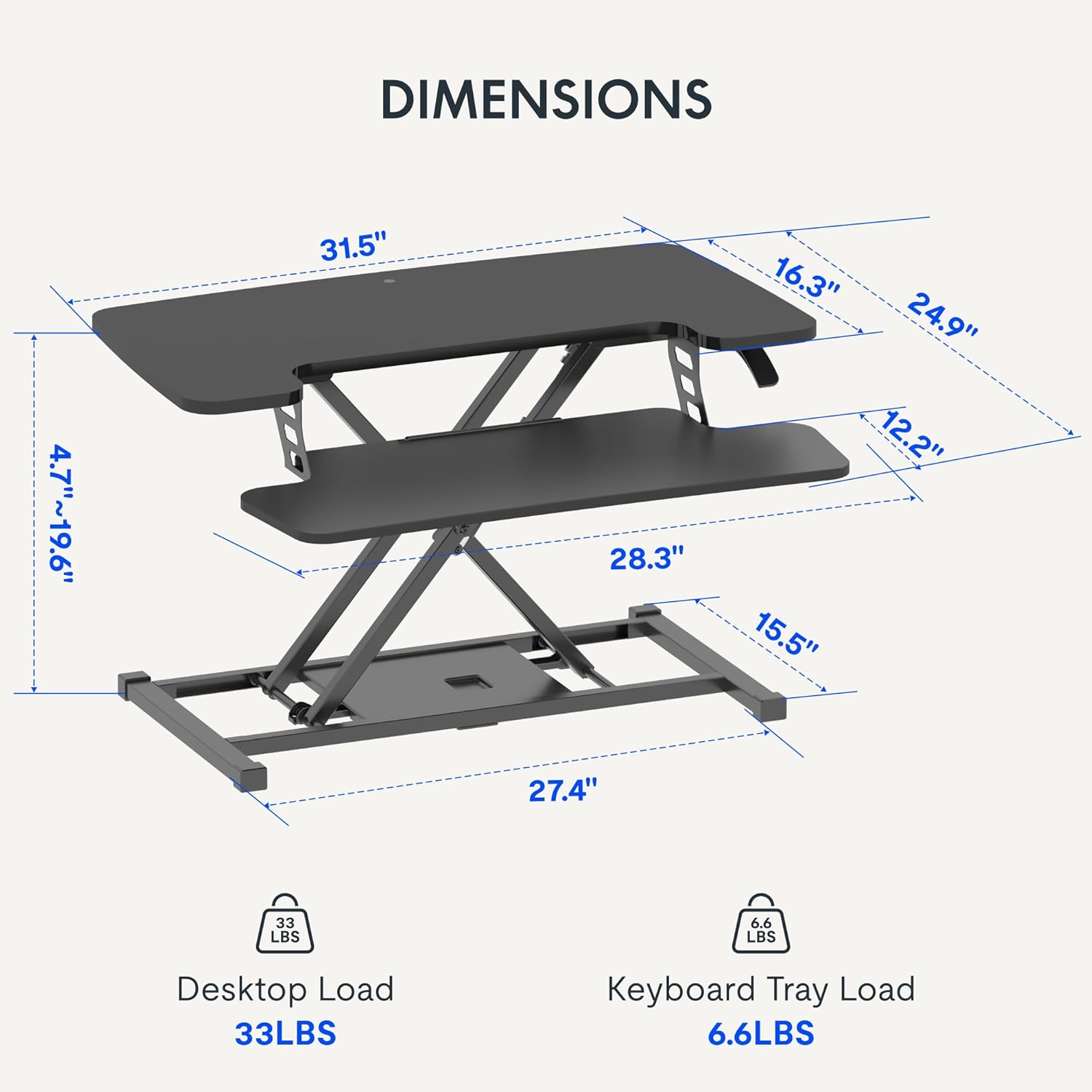
- Do not exceed the weight limit of 33 lbs (15 kg) on the upper desktop.
- Do not exceed the weight limit of 6.6 lbs (3 kg) on the keyboard tray.
- Ensure the desk converter is placed on a stable, flat surface.
- ให้มือและนิ้วอยู่ห่างจากชิ้นส่วนที่กำลังเคลื่อนไหวขณะปรับความสูง
เนื้อหาแพ็คเกจ
- Pre-assembled Desk Converter Unit
- ถาดวางคีย์บอร์ด
- Mounting Screws for Keyboard Tray
- คู่มือการใช้งาน (เอกสารนี้)
การติดตั้งและการประกอบ
- การแกะกล่อง: นำส่วนประกอบทั้งหมดออกจากบรรจุภัณฑ์อย่างระมัดระวัง
- Keyboard Tray Attachment: Position the keyboard tray beneath the main desktop. Align the pre-drilled holes on the keyboard tray with the mounting points on the converter's frame. Secure the keyboard tray using the provided screws.
- การจัดวาง: Place the assembled desk converter on a stable, flat desk surface.

The desk converter is largely pre-assembled, requiring only the attachment of the keyboard tray for immediate use.
คำแนะนำการใช้งาน
- ปรับความสูง: To adjust the height, locate the adjustment lever on the side of the upper desktop.
- Raising the Desk: Squeeze the lever and gently lift the desktop to your desired standing height. Release the lever to lock it in place. The gas spring mechanism assists in smooth elevation.
- Lowering the Desk: Squeeze the lever and apply gentle downward pressure to lower the desktop to your desired sitting height. Release the lever to lock it in place.
- ความจุน้ำหนัก: The upper desktop supports up to 33 pounds (15 kg). The keyboard tray supports up to 6.6 pounds (3 kg). Do not exceed these limits.


คุณสมบัติ
- การออกแบบตามหลักสรีรศาสตร์: Seamlessly transition between sitting and standing positions to promote a healthy work posture. The streamlined edges are designed to reduce wrist discomfort.
- Spacious Two-Tier Workstation: The upper desktop provides ample space for monitors or laptops, while the lower keyboard tray accommodates your keyboard and mouse. A U-shaped cutout on the upper deck allows for laptop placement directly on the tray, optimizing space.
- Sturdy X-Frame Construction: Built with a robust X-frame, ensuring stability and smooth, effortless height adjustments.
- Versatile Height Range: Offers a height adjustment range from 4.7 inches (12 cm) to 19.6 inches (50 cm), accommodating various user heights and work preferences.


การซ่อมบำรุง
- การทำความสะอาด: เช็ดพื้นผิวด้วย d . ที่อ่อนนุ่มamp ผ้า. หลีกเลี่ยงน้ำยาทำความสะอาดที่มีฤทธิ์กัดกร่อน
- การตรวจสอบ: ตรวจสอบสกรูและจุดเชื่อมต่อทั้งหมดเป็นระยะ เพื่อให้แน่ใจว่าแน่นหนาดีแล้ว
การแก้ไขปัญหา
- ความยากในการปรับความสูง: Ensure no objects are obstructing the lifting mechanism. Verify that the weight on the desk does not exceed the specified limits.
- โยกเยก: Confirm the desk converter is placed on a flat, stable surface. Check all assembly screws for tightness.
ข้อมูลจำเพาะ
| ยี่ห้อ | เฟล็กซิสพอท |
| ชื่อรุ่น | MT137 |
| ขนาดสินค้า | ลึก 24 นิ้ว x กว้าง 32 นิ้ว x สูง 19.7 นิ้ว (ลึก 61 ซม. x กว้าง 81 ซม. x สูง 50 ซม.) |
| สี | สีดำ |
| วัสดุฐาน | โลหะ |
| ประเภทวัสดุยอดนิยม | ไม้ |
| น้ำหนักสินค้า | 24 ปอนด์ (10.9 กก.) |
| Maximum Upper Desktop Load | 33 ปอนด์ (15 กก.) |
| Maximum Keyboard Tray Load | 6.6 ปอนด์ (3 กก.) |
| ช่วงการปรับความสูง | 4.7 นิ้ว (12 ซม.) ถึง 19.6 นิ้ว (50 ซม.) |
| จำเป็นต้องประกอบ | ใช่ (ขั้นต่ำ) |
| เครื่องมือที่แนะนำสำหรับการประกอบ | ไขควง |
| ยูพีซี | 810072862501 |
การรับประกันและการสนับสนุน
ประเภทการรับประกัน: This product comes with a Full Warranty.
For further assistance, warranty claims, or technical support, please contact FLEXISPOT customer service. Refer to the official FLEXISPOT webเว็บไซต์นี้ใช้สำหรับตรวจสอบรายละเอียดการติดต่อล่าสุด


