1. คำแนะนำด้านความปลอดภัยที่สำคัญ
โปรดอ่านคำแนะนำทั้งหมดอย่างละเอียดก่อนใช้งานเครื่องใช้ไฟฟ้าและเก็บไว้เพื่อใช้อ้างอิงในอนาคต การไม่ปฏิบัติตามคำแนะนำเหล่านี้อาจส่งผลให้เกิดไฟฟ้าช็อต ไฟไหม้ หรือบาดเจ็บสาหัสได้
- ความปลอดภัยทางไฟฟ้า: ให้แน่ใจว่าปริมาตรtage ที่ระบุบนเครื่องสอดคล้องกับปริมาณไฟหลักในพื้นที่ของคุณtage before connecting. Do not immerse the cord, plug, or appliance in water or other liquids. Do not operate the appliance with a damaged cord or plug.
- พื้นผิวที่ร้อน: Surfaces become hot during use. Always use oven mitts when handling hot components. Do not touch hot surfaces directly.
- การระบายอากาศ : Do not block any ventilation openings. Allow at least 10 cm of free space on the back and sides, and 10 cm above the appliance.
- การจัดวาง: Place the appliance on a stable, heat-resistant surface, away from walls and other heat-sensitive materials.
- เด็ก: อุปกรณ์นี้ไม่ได้มีไว้สำหรับเด็ก จำเป็นต้องมีการดูแลอย่างใกล้ชิดเมื่อใช้อุปกรณ์ใดๆ ใกล้กับเด็ก
- การใช้งาน: Do not use the appliance for purposes other than those described in this manual. Do not leave the appliance unattended during operation.
- การซ่อมบำรุง: Unplug the appliance from the outlet when not in use and before cleaning. Allow it to cool down completely before handling or cleaning.
2. สินค้าหมดview
The LEHMANN 9L XXL Dual Basket Air Fryer is designed for efficient and healthy cooking. It features two independent cooking zones, a powerful 2400W heating system, 12 preset programs, and WiFi connectivity for smart control.

รูปที่ 2.1 : ด้านหน้า view of the LEHMANN Dual Basket Air Fryer with included paper liners.
2.1 คุณสมบัติหลัก
- Dual Independent Baskets: Cook two different foods at different temperatures and times simultaneously.
- 9L XXL Capacity: Large total capacity suitable for family-sized meals.
- กำลังไฟ 2400 วัตต์: รับประกันความร้อนรวดเร็วและปรุงอาหารได้อย่างมีประสิทธิภาพ
- โปรแกรมที่ตั้งไว้ล่วงหน้า 12 โปรแกรม: One-touch cooking for popular dishes.
- อุณหภูมิที่ปรับได้: Range from 80°C to 200°C.
- การควบคุมหน้าจอสัมผัส: Intuitive digital display for easy operation.
- การเชื่อมต่อ WiFi: Control and monitor cooking via a smartphone app.
2.2 แผงควบคุมโอเวอร์view

รูปที่ 2.2: รายละเอียด view of the control panel with key functions highlighted.
- Time/Temperature Adjustment: Use '+' and '-' buttons to set cooking time and temperature.
- โปรแกรมที่ตั้งไว้ล่วงหน้า: Icons representing various food types for quick selection.
- ปุ่มเปิด/ปิด: เปิด/ปิดเครื่อง
- ตัวบ่งชี้ WiFi: แสดงสถานะการเชื่อมต่อ
- ปุ่มไฟ: Activates the internal basket light.
- คำเตือนการเขย่า: Icon indicates when to shake the basket for even cooking.
- SYNC Function: Synchronizes the finish time of both baskets.
- DUAL COOK Function: Applies the settings of one basket to the other.
- ปุ่มเริ่ม/หยุด: เริ่มหรือหยุดกระบวนการปรุงอาหาร
3. ก่อนใช้งานครั้งแรก
3.1 การแกะกล่องและการทำความสะอาดเบื้องต้น
- ถอดวัสดุบรรจุภัณฑ์ สติ๊กเกอร์ และฉลากทั้งหมดออกจากเครื่องใช้
- Wash the baskets and crisper plates thoroughly with hot water, dish soap, and a non-abrasive sponge. Rinse and dry completely.
- เช็ดภายในและภายนอกเครื่องด้วยผ้านุ่มamp ผ้า. อย่าจุ่มตัวเครื่องลงในน้ำ
- Ensure all parts are dry before plugging in the appliance.
3.2 การจัดวาง
- วางหม้อทอดอากาศบนพื้นผิวที่มั่นคง ราบเรียบ และทนความร้อน
- Ensure there is adequate air circulation around the appliance (at least 10 cm clearance on all sides).
- ห้ามวางเครื่องไว้ใกล้วัสดุไวไฟหรือแหล่งความร้อน
4. คู่มือการใช้งาน
4.1 การทำงานพื้นฐาน
- Place the crisper plate into the basket and then insert the basket into the main unit.
- Add your ingredients to the basket. Do not overfill.
- Plug the power cord into a grounded wall outlet. The appliance will beep, and the display will illuminate.
- กดปุ่ม Power (3) เพื่อเปิดใช้งานหม้อทอดไร้น้ำมัน
- Select the desired basket (1 or 2) if not already selected.
- Adjust the temperature using the '+' and '-' buttons for temperature.
- Adjust the cooking time using the '+' and '-' buttons for time.
- กดปุ่ม Start/Stop เพื่อเริ่มทำอาหาร
4.2 การใช้โปรแกรมที่ตั้งไว้ล่วงหน้า

Figure 4.1: The control panel showing various preset cooking program icons.
The air fryer comes with 12 preset programs for common foods. To use a preset program:
- After turning on the appliance, select the desired basket.
- Tap the icon corresponding to your desired food (e.g., fries, chicken, fish). The display will show the default time and temperature for that program.
- You can adjust the time and temperature manually if needed.
- กดปุ่ม Start/Stop เพื่อเริ่มทำอาหาร
4.3 Dual Zone Cooking
The dual basket design allows for versatile cooking. You can cook two different foods or larger quantities of one food.
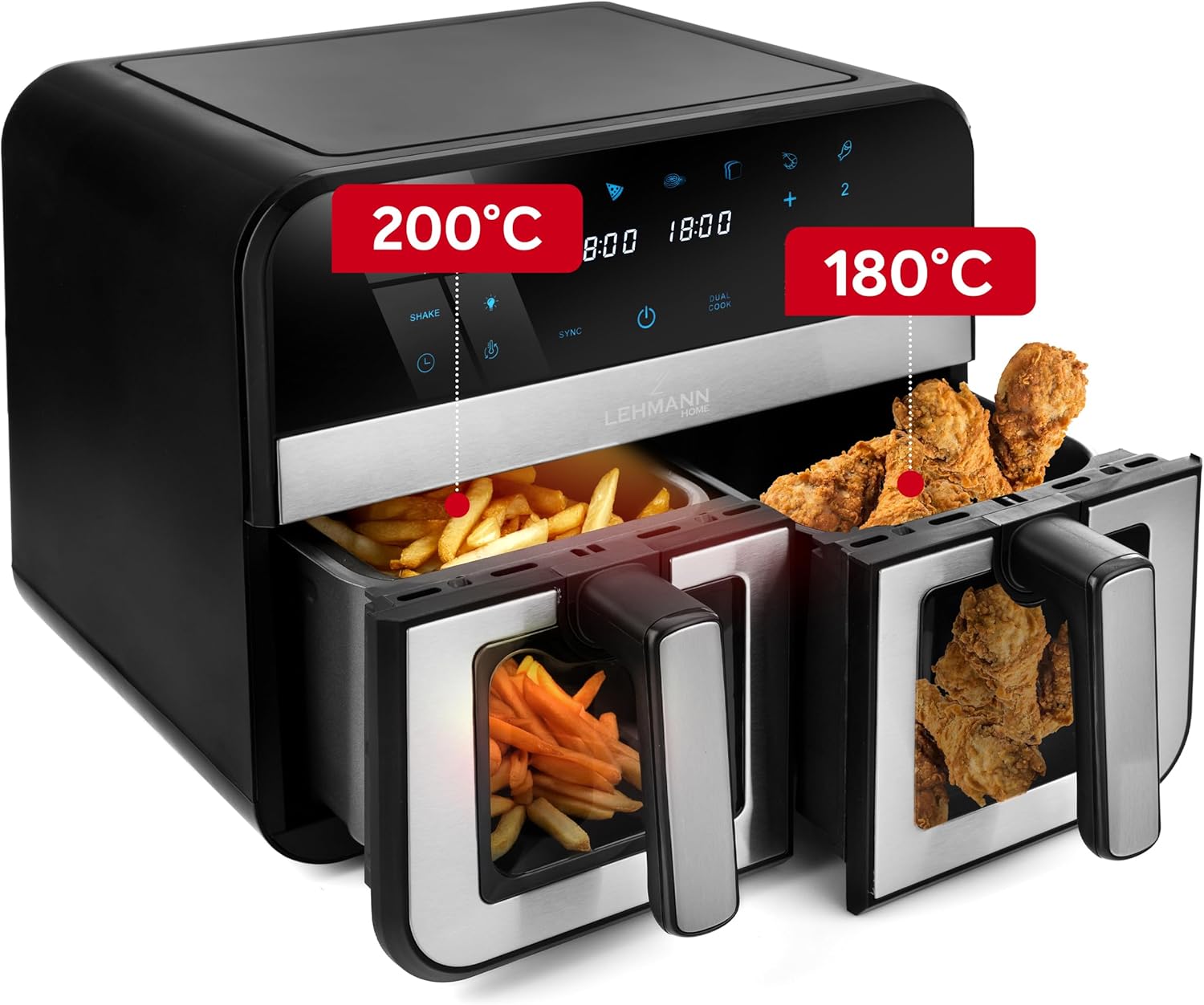
รูปที่ 4.2: อดีตample of dual zone cooking with different foods and temperature settings.
- SYNC Function: To ensure both baskets finish cooking at the same time, set the cooking parameters for each basket. Then, press the SYNC button. The air fryer will automatically adjust the cooking times to synchronize completion.
- DUAL COOK Function: If you want to cook the same food in both baskets with identical settings, set the parameters for one basket, then press the DUAL COOK button. This will copy the settings to the second basket.
4.4 การเชื่อมต่อ WiFi
Control your air fryer remotely using the dedicated smartphone app.

Figure 4.3: Controlling the air fryer via the smartphone application.
- Download the LEHMANN Home app from your smartphone's app store.
- Follow the in-app instructions to pair your air fryer with your device. Ensure your air fryer is powered on and your phone is connected to a 2.4GHz WiFi network.
- Once connected, you can remotely start, stop, adjust settings, and monitor the cooking process.
5. เคล็ดลับการทำอาหาร
- การอุ่นเครื่องล่วงหน้า: สำหรับผลลัพธ์ที่ดีที่สุด ควรอุ่นหม้อทอดไร้น้ำมันไว้ 3-5 นาทีก่อนใส่อาหาร
- เขย่า: For even cooking and crispiness, shake the baskets halfway through the cooking time, especially for smaller items like fries or nuggets. The air fryer may have a built-in 'Shake' reminder.
- น้ำมัน: While air frying requires little to no oil, a small amount of oil (1 tablespoon) can enhance crispiness for some foods.
- การจัดวางอาหาร: Arrange food in a single layer in the basket to allow hot air to circulate effectively. Avoid overcrowding.
- ความสุก: Cooking times may vary based on food type, quantity, and desired crispiness. Always check food for doneness.

Figure 5.1: Illustration of the rapid hot air circulation technology for even cooking.
6. การทำความสะอาดและการบำรุงรักษา
การทำความสะอาดเป็นประจำจะช่วยให้เครื่องทอดไร้น้ำมันทำงานได้อย่างมีประสิทธิภาพสูงสุดและยืดอายุการใช้งานของหม้อทอดไร้น้ำมันของคุณ
6.1 Cleaning the Baskets and Crisper Plates
- ถอดปลั๊กหม้อทอดอากาศและปล่อยให้เย็นสนิทก่อนทำความสะอาด
- Remove the baskets and crisper plates. They are dishwasher safe, or you can wash them by hand with hot water, dish soap, and a non-abrasive sponge.
- For stubborn food residue, soak the baskets in warm, soapy water for about 10 minutes before cleaning.
- ตรวจสอบให้แน่ใจว่าชิ้นส่วนทั้งหมดแห้งสนิทก่อนประกอบหรือจัดเก็บ
6.2 การทำความสะอาดตัวเครื่องหลัก
- เช็ดด้านนอกของหม้อทอดอากาศด้วยโฆษณาamp ผ้า. ห้ามใช้น้ำยาทำความสะอาดที่มีฤทธิ์กัดกร่อนหรือแผ่นใยขัด
- ทำความสะอาดภายในเครื่องด้วย adamp ผ้า หากจำเป็น สามารถใช้ผงซักฟอกอ่อนๆ ได้
- ห้ามจุ่มตัวเครื่องลงในน้ำหรือของเหลวอื่นๆ
7 การแก้ไขปัญหา
If you encounter any issues with your air fryer, refer to the table below for common problems and solutions.
| ปัญหา | สาเหตุที่เป็นไปได้ | สารละลาย |
|---|---|---|
| เครื่องไม่เปิดขึ้น | ไม่ได้เสียบปลั๊ก มีปัญหากับเต้ารับไฟฟ้า | ตรวจสอบให้แน่ใจว่าเสียบสายไฟเข้ากับเต้ารับไฟฟ้าอย่างแน่นหนา |
| อาหารไม่สุกสม่ำเสมอ | Baskets overcrowded; food not shaken. | Do not overcrowd baskets. Shake food halfway through cooking. |
| อาหารไม่กรอบ | Not enough oil (for some foods); temperature too low; cooking time too short. | Lightly brush food with oil. Increase temperature or cooking time. |
| ควันขาวจากเครื่อง | คราบไขมันจากการใช้งานครั้งก่อน อาหารที่มีไขมัน | Clean baskets and crisper plates thoroughly. Remove excess fat from food. |
| การเชื่อมต่อ WiFi ล้มเหลว | Incorrect network; app issue. | Ensure your phone is on a 2.4GHz WiFi network. Restart the app and air fryer. Refer to the app's help section. |
8. ข้อมูลจำเพาะทางเทคนิค
Detailed specifications for the LEHMANN 9L XXL Dual Basket Air Fryer.

Figure 8.1: Product dimensions of the air fryer.
| ข้อมูลจำเพาะ | ค่า |
|---|---|
| ยี่ห้อ | เลห์มันน์ |
| แบบอย่าง | แอลเอชโอดีเอฟ-2811 |
| ความจุ | 9 ลิตร |
| วัดtage | 2400 วัตต์ |
| เล่มที่tage | 230 โวลต์ |
| ช่วงอุณหภูมิ | 80°C - 200°C |
| ขนาด (กว้าง x ยาว x สูง) | 40.5 x 40.5 x 38.5 ซม. |
| น้ำหนัก | 7.3 กิโลกรัม |
| วัสดุ | โลหะ, พลาสติก |
| คุณสมบัติพิเศษ | Temperature Control, Dual Zone Functionality, Non-stick Coating, Timer, WiFi Control |
9. การรับประกันและการสนับสนุนลูกค้า
ผลิตภัณฑ์ของ LEHMANN ผลิตขึ้นตามมาตรฐานคุณภาพสูง สำหรับข้อมูลเกี่ยวกับการรับประกัน โปรดดูบัตรรับประกันที่แนบมากับสินค้า หรือเยี่ยมชมเว็บไซต์อย่างเป็นทางการของ LEHMANN webเว็บไซต์.
If you have any questions, require technical assistance, or need to report an issue, please contact LEHMANN customer support through the contact information provided in your product packaging or on the official LEHMANN website. Please have your model number (LHODF-2811) and purchase details ready when contacting support.


