1. บทนำ
This manual provides detailed instructions for the setup, operation, maintenance, and troubleshooting of your Chilkey ND75 LP Low Profile Aluminum Mechanical Keyboard. Please read this manual thoroughly before using the product to ensure proper functionality and longevity.

Figure 1.1: Chilkey ND75 LP Low Profile Aluminum Mechanical Keyboard (Purple variant).
2. คุณสมบัติหลัก
- โปรต่ำfile Metal Design: Constructed with a full CNC aluminum alloy case, providing durability and a sleek aesthetic.
- 75% Layout with Functional LCD Screen: A compact 75% layout keyboard featuring an integrated LCD screen for displaying custom GIFs, connection modes, battery status, backlight settings, RGB modes, volume, and language.

Figure 2.1: Functional LCD screen displaying keyboard status and customization options.
- Magnetic Quick Release System: Facilitates easy assembly and disassembly for maintenance and customization.

Figure 2.2: Magnetic quick release structure and mounting options.
- Optimized Ergonomic Design: โปรต่ำfile keystroke design reduces hand fatigue for extended use.
- Three Unique Typing Styles: Adaptable with a multi-functional wrist rest that can be installed under the keyboard, at the front, or used separately.
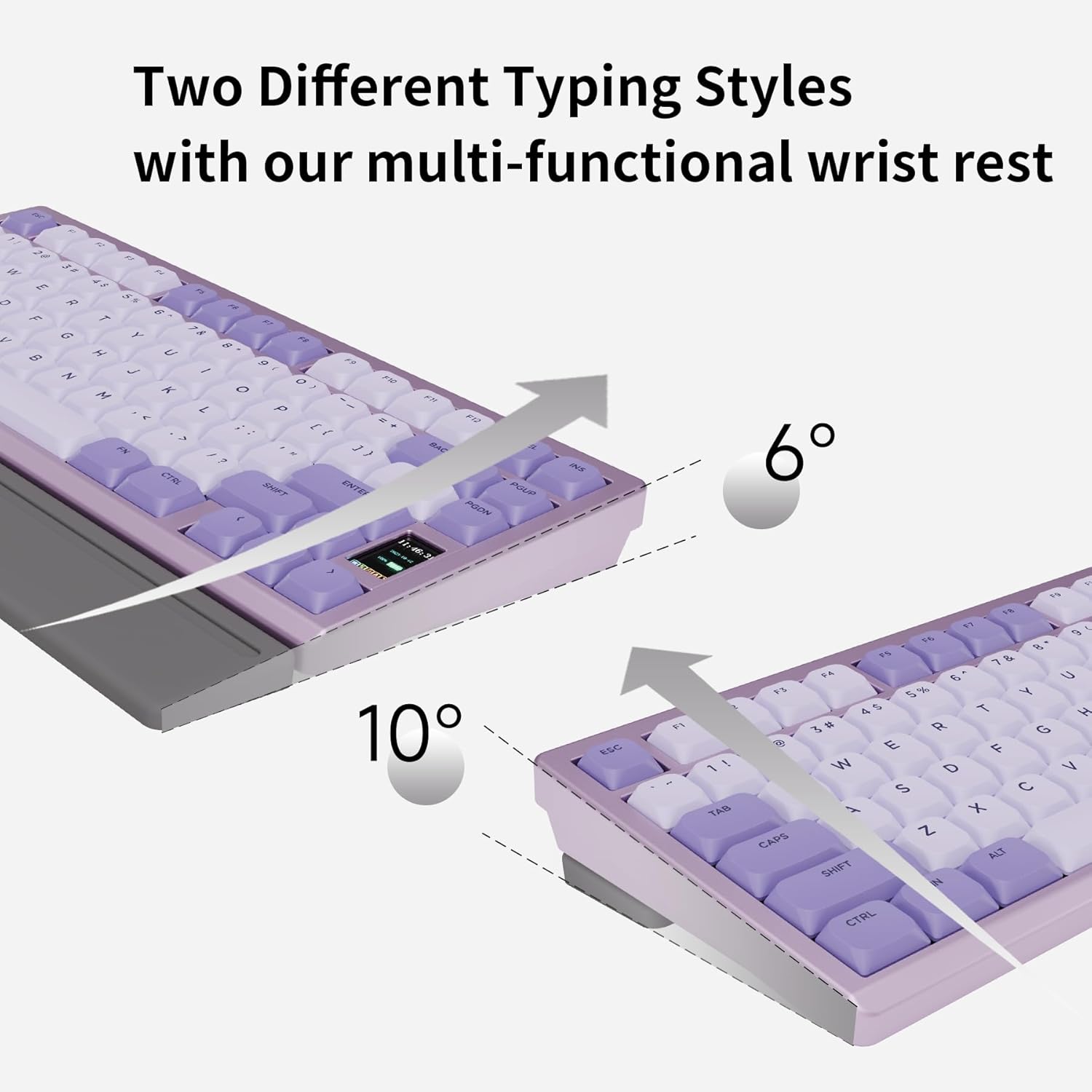
Figure 2.3: Adjustable typing angles with the wrist rest.
- Full POM Switches and Double Shot PBT Keycaps: Features self-developed full POM switches for a smooth typing experience, paired with durable double shot PBT keycaps.

Figure 2.4: Components of the full POM linear switch and keycap.
- การเชื่อมต่อสามโหมด: Supports USB-C wired, 2.4GHz wireless, and Bluetooth 5.3 connections.

รูปที่ 2.5: ตัวเลือกการเชื่อมต่อแบบสามโหมด
- Per-key RGB Backlighting: Customizable RGB lighting with 20 lighting effects.

Figure 2.6: Per-key RGB backlighting and control functions.
- แผงวงจรพิมพ์แบบ Hot-Swappable: Features a 1.2mm non-flex-cut PCB, allowing for switch replacement. Note: Only compatible with specific low-profile สวิตช์

Figure 2.7: Hot-swappable PCB for switch customization.
3. คู่มือการติดตั้ง
3.1. เนื้อหาบรรจุภัณฑ์
ก่อนดำเนินการต่อ โปรดตรวจสอบให้แน่ใจว่ามีรายการทั้งหมดอยู่ในบรรจุภัณฑ์:
- Chilkey ND75 LP Mechanical Keyboard
- สาย USB (USB-C)
- ตัวดึงกุญแจ
- (Optional) Multi-functional Wrist Rest
- (Optional) 2.4GHz Wireless Dongle
3.2. การเชื่อมต่อเริ่มต้น
The ND75 LP keyboard supports three connection modes: wired (USB-C), 2.4GHz wireless, and Bluetooth 5.3.
- โหมดสาย:
Connect the provided USB-C cable to the keyboard's USB-C port and the other end to your computer's USB port. The keyboard will automatically switch to wired mode and begin charging.
- โหมดไร้สาย 2.4GHz:
Insert the 2.4GHz wireless dongle into an available USB port on your computer. On the keyboard, switch to 2.4GHz mode (refer to the keyboard's function keys or LCD screen for mode selection). The keyboard should connect automatically.
- โหมดบลูทู ธ :
Ensure your device's Bluetooth is enabled. On the keyboard, switch to Bluetooth mode (typically by pressing FN + Q/W/E for 3 seconds to pair with up to three devices). The keyboard's LCD screen will indicate pairing status. Select "Chilkey ND75 LP" from your device's Bluetooth settings to connect.
4. คู่มือการใช้งาน
4.1. ฟังก์ชันพื้นฐานของแป้นพิมพ์
The ND75 LP functions as a standard 75% mechanical keyboard. All standard key inputs will work as expected.
4.2. ฟังก์ชั่นหน้าจอ LCD
The integrated LCD screen provides real-time information and customization options. Navigate through the screen's menus using the designated function keys or knob (if present on your model).
- โหมดการเชื่อมต่อ: Displays current connection (Wired, 2.4G, BT1, BT2, BT3).
- สถานะแบตเตอรี่: แสดงเปอร์เซ็นต์แบตเตอรี่ที่เหลืออยู่tage.
- การตั้งค่าแบ็คไลท์: Adjust brightness, effect mode, and speed of the RGB lighting.
- โหมด RGB: Cycle through various pre-set RGB lighting effects.
- การควบคุมระดับเสียง: ปรับระดับเสียงระบบ
- ภาษา: Select display language for the screen.
- GIF แบบกำหนดเอง: Upload and display custom animated GIFs (requires software, see Section 4.4).
4.3. การควบคุมไฟแบ็คไลท์ RGB
Control the per-key RGB backlighting using the following key combinations:
| Function Key Combination | คำอธิบาย |
|---|---|
| FN + PGDN | Cycle through 20 kinds of lighting effects. |
| เอฟเอ็น + เอฟ10 | เปลี่ยนสีไฟแบ็คไลท์ |
| เอฟเอ็น + ↑ | เพิ่มความสว่าง |
| เอฟเอ็น + ↓ | ลดความสว่างลง |
| เอฟเอ็น + → | Increase effect speed. |
| เอฟเอ็น + ← | Decrease effect speed. |
| เอฟเอ็น + เอ็กซ์ | Turn On/Off the light. |
4.4. การสนับสนุนซอฟต์แวร์
The Chilkey ND75 LP supports an independent driver for advanced customization, including custom RGB backlighting, shortcut key remapping, and macro creation. This software is required for uploading custom GIFs to the LCD screen.
- Please run the driver in wired mode for optimal performance.
- Note: Mac system drivers may not support key remapping, GIF upload, or synchronous time functions.

รูปที่ 4.1: อดีตample of the keyboard's customization software interface.
5. การบำรุงรักษา
5.1. การทำความสะอาดคีย์บอร์ด
- ถอดปลั๊กแป้นพิมพ์ออกจากแหล่งจ่ายไฟทั้งหมดก่อนทำความสะอาด
- ใช้ผ้านุ่มไม่เป็นขุยเช็ดเล็กน้อยampened with water or a mild cleaning solution to wipe the aluminum case and keycaps.
- For dust and debris between keycaps, use compressed air or the provided keycap puller to remove keycaps and clean thoroughly.
- Avoid using harsh chemicals, abrasives, or solvents as they may damage the finish.
5.2. การดูแลแบตเตอรี่
- The keyboard is equipped with a built-in 1800 mAh Lithium Polymer battery.
- ชาร์จคีย์บอร์ดโดยใช้สาย USB-C ที่ให้มาเชื่อมต่อกับแหล่งจ่ายไฟ USB มาตรฐาน
- หลีกเลี่ยงการปล่อยแบตเตอรี่จนหมดบ่อยครั้งเพื่อยืดอายุการใช้งาน
- หากจะเก็บคีย์บอร์ดไว้เป็นเวลานาน ควรชาร์จแบตเตอรี่ให้ได้ประมาณ 50% ก่อนเก็บรักษา
6 การแก้ไขปัญหา
| ปัญหา | สาเหตุที่เป็นไปได้ | สารละลาย |
|---|---|---|
| แป้นพิมพ์ไม่ตอบสนอง (มีสาย) | การเชื่อมต่อสายเคเบิลหลวม, พอร์ต USB ชำรุด, มีปัญหากับไดรเวอร์ | Ensure USB-C cable is securely connected. Try a different USB port or cable. Restart your computer. |
| Keyboard not connecting (Wireless/Bluetooth) | Incorrect mode selected, low battery, interference, pairing issue. | Ensure correct mode (2.4GHz/Bluetooth) is selected on the keyboard. Charge the keyboard. Re-pair the Bluetooth connection or re-insert the 2.4GHz dongle. Move closer to the receiver. |
| Keys repeating or not registering | Software glitch, switch issue, low battery. | Restart the keyboard and computer. Ensure the keyboard is fully charged. If a specific key is problematic, consider hot-swapping the switch (refer to Section 2.9). Update keyboard firmware if available. |
| LCD screen not displaying correctly | Software issue, firmware issue. | Ensure the keyboard is in wired mode when using the customization software. Check for firmware updates. |
| ไฟ RGB ไม่ทำงาน | ไฟดับ ความสว่างต่ำเกินไป เกิดความขัดแย้งทางซอฟต์แวร์ | Press FN + X to toggle lighting. Increase brightness using FN + ↑. Check software settings. |
7. ข้อมูลจำเพาะผลิตภัณฑ์
| คุณลักษณะ | รายละเอียด |
|---|---|
| แบบอย่าง | ND75 LP |
| ขนาดสินค้า | 12.67 x 5.51 x 1 นิ้ว (32.18 x 14.00 x 2.54 ซม.) |
| น้ำหนักสินค้า | 2.88 ปอนด์ (1.31 กก.) |
| ผู้ผลิต | OOCTPK |
| แบตเตอรี่ | 2 Lithium Polymer batteries (included), 1800 mAh capacity |
| เทคโนโลยีการเชื่อมต่อ | 2.4GHz ไร้สาย, บลูทูธ 5.3, USB-C แบบมีสาย |
| คำอธิบายแป้นพิมพ์ | เครื่องจักรกล |
| คุณสมบัติพิเศษ | Backlit (RGB), Hot-Swappable, Low-Profile Key, Rechargeable, Wrist Rest |
| สี (ตัวแปร) | สีม่วง |
| วัสดุปุ่มกด | ดับเบิ้ลช็อต PBT |
| ประเภทสวิตซ์ | Full POM Linear Switches (Aster Low-Profile) |
8. การรับประกันและการสนับสนุน
8.1. ข้อมูลการรับประกัน
For specific warranty details, please refer to the warranty card included with your product or visit the official Chilkey webโดยทั่วไปเงื่อนไขการรับประกันจะครอบคลุมถึงข้อบกพร่องจากการผลิตภายใต้การใช้งานปกติ
8.2. การสนับสนุนลูกค้า
If you encounter any issues not covered in this manual or require further assistance, please contact Chilkey customer support through their official website or the retailer where the product was purchased. Provide your product model (ND75 LP) and purchase details for faster service.
คุณสามารถเยี่ยมชม Chilkey Store on Amazon สำหรับข้อมูลเพิ่มเติมและทรัพยากรสนับสนุน


