1. บทนำและเรื่องอื่นๆview
The Fantech MK875 V2 Atom81 Hot Swappable Mechanical Gaming Keyboard is designed for gamers and typists seeking a versatile and high-performance input device. This manual provides detailed instructions for setting up, operating, maintaining, and troubleshooting your keyboard to ensure optimal performance and longevity.
Key features include an 81-key layout for space efficiency, 3-pin hot-swappable switches for customization, 26 anti-ghosting keys for precise input, 17 dynamic RGB lighting modes, a unique three-color keycap combination, and a convenient volume knob for media control. The keyboard utilizes durable double-injection keycaps and offers adjustable feet for ergonomic comfort. It connects via a reliable Type-C wired connection and is compatible with both Windows and Mac operating systems.

Image 1.1: The Fantech MK875 V2 Mechanical Gaming Keyboard, showcasing its compact 81-key layout and vibrant keycap design.
2. คู่มือการติดตั้ง
2.1 เนื้อหาบรรจุภัณฑ์
- Fantech MK875 V2 Mechanical Gaming Keyboard
- สาย USB Type-C
- Keycap Puller (usually included for hot-swappable keyboards)
- Switch Puller (usually included for hot-swappable keyboards)
- คู่มือการใช้งาน (เอกสารนี้)
2.2 การเชื่อมต่อคีย์บอร์ด
- Locate the Type-C port on the back or side of the Fantech MK875 V2 keyboard.
- ต่อปลายด้านหนึ่งของสาย USB Type-C ที่ให้มาเข้ากับพอร์ต Type-C ของคีย์บอร์ด
- Connect the other end of the USB cable to an available USB port on your computer (Windows PC or Mac).
- ระบบปฏิบัติการของคุณจะตรวจจับแป้นพิมพ์โดยอัตโนมัติ โดยปกติแล้วไม่จำเป็นต้องติดตั้งไดรเวอร์เพิ่มเติมสำหรับการใช้งานพื้นฐาน
2.3 การปรับความสูงของแป้นพิมพ์
For optimal ergonomic comfort, the MK875 V2 features adjustable feet. Gently flip out the feet located on the underside of the keyboard to raise the typing angle. Adjust to your preferred height.

ภาพที่ 2.1: ภาพระยะใกล้ view of the adjustable feet on the Fantech MK875 V2 keyboard, allowing users to customize the typing angle for ergonomic comfort.
3. คู่มือการใช้งาน
3.1 สวิตช์แบบ Hot-Swappable
The Fantech MK875 V2 supports 3-pin hot-swappable mechanical switches, allowing you to easily change switches without soldering. This feature enables customization of your typing feel and sound.
- การถอดสวิตช์: Use the provided switch puller. Align the prongs of the puller with the two clips on the top and bottom of the switch. Squeeze the puller gently and pull the switch straight up.
- การติดตั้งสวิตช์: Ensure the new 3-pin switch's pins are straight. Align the pins with the holes on the PCB (Printed Circuit Board). Gently push the switch straight down until it clicks into place. Do not force the switch if it doesn't go in easily, as bent pins can damage the PCB.

Image 3.1: Demonstration of the 3-pin hot-swappable feature, showing switches being removed and installed on the keyboard's PCB.
3.2 ปุ่มป้องกันการกดซ้ำ
The keyboard features 26 anti-ghosting keys, ensuring that multiple simultaneous key presses are registered accurately. This is crucial for fast-paced gaming where complex key combinations are common.

Image 3.2: Visual representation of the 26-key rollover (anti-ghosting) capability, highlighting the keyboard's ability to register multiple simultaneous key presses.
โหมดแสงสว่าง 3.3 โหมด
The MK875 V2 is equipped with 17 dynamic spectrum lighting effects. Specific key combinations (often Fn + a designated key like Fn + Ins, Fn + Home, etc.) are used to cycle through these modes or adjust brightness and speed. Refer to the quick start guide or on-keyboard legends for exact key combinations.

Image 3.3: The Fantech MK875 V2 keyboard displaying one of its 17 vibrant RGB lighting effects, enhancing the aesthetic appeal.
3.4 ปุ่มปรับระดับเสียง
A dedicated volume knob is located on the top right of the keyboard for quick and convenient media control. Rotate the knob clockwise to increase volume, counter-clockwise to decrease volume. Press the knob to mute/unmute audio.
3.5 Keycap Design and Switches
The keyboard features durable double-injection keycaps with a unique three-color combination, ensuring legends remain clear and fade-resistant over time. This model comes with Red Switches, which are linear and provide a smooth keystroke, ideal for fast-paced gaming and comfortable typing.
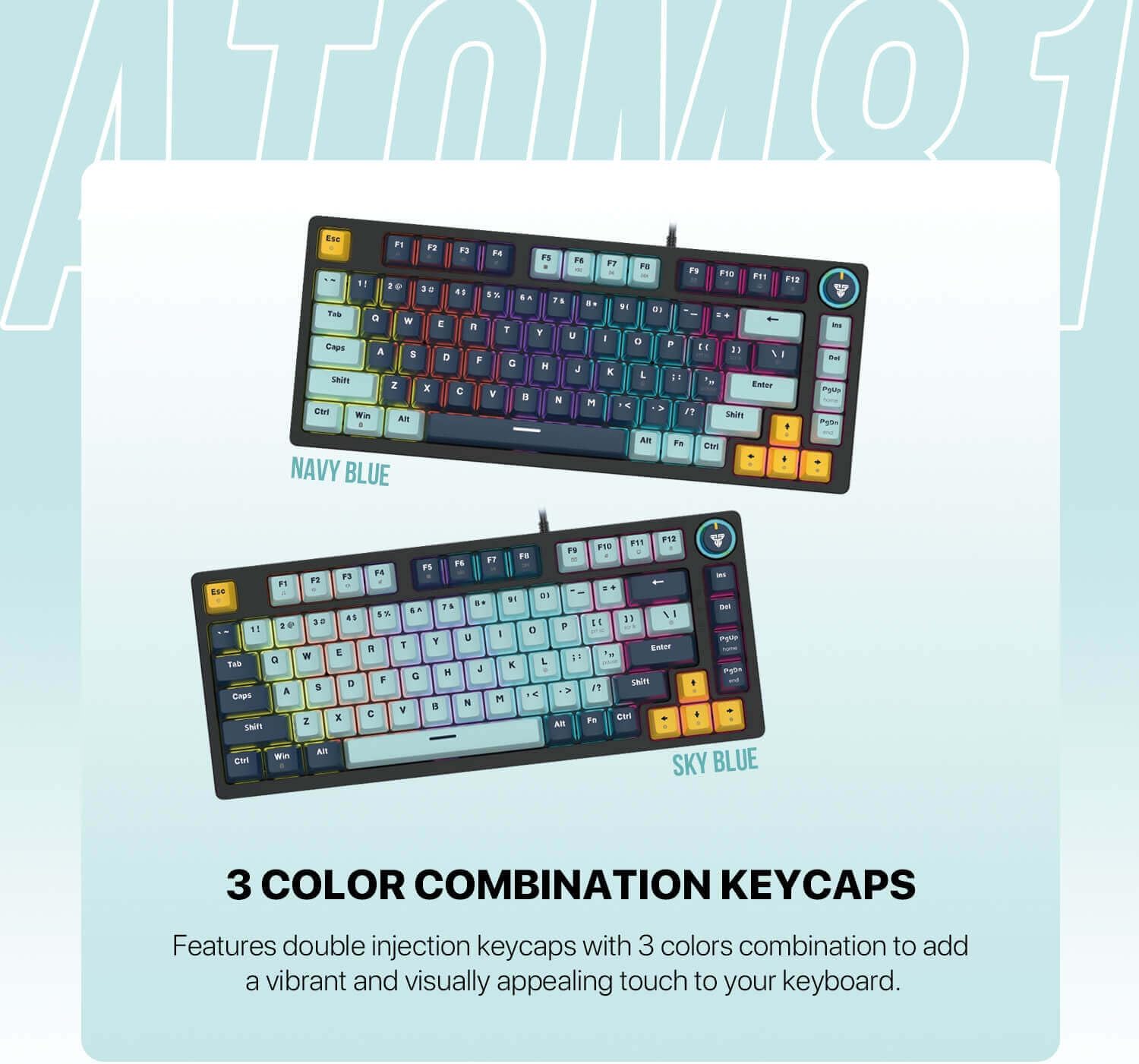
Image 3.4: The Fantech MK875 V2 keyboard showcasing its three-color combination keycaps, available in Navy Blue and Sky Blue variants.

Image 3.5: Comparison of Red (linear) and Blue (clicky) mechanical switches, illustrating the type of switch used in this keyboard model (Red Switch).
4. การบำรุงรักษา
4.1 การทำความสะอาดแป้นพิมพ์
- การทำความสะอาดทั่วไป: ใช้ผ้านุ่มไม่เป็นขุยเช็ดเล็กน้อยampเช็ดทำความสะอาดปุ่มกดและโครงแป้นพิมพ์ด้วยน้ำหรือน้ำยาทำความสะอาดอ่อนๆ หลีกเลี่ยงความชื้นมากเกินไป
- การกำจัดฝุ่น: ใช้ลมอัดเพื่อเป่าฝุ่นละอองและเศษต่างๆ ออกจากระหว่างปุ่มต่างๆ
- การทำความสะอาดอย่างล้ำลึก (คีย์แคป): เพื่อการทำความสะอาดอย่างทั่วถึง คุณสามารถถอดปุ่มกดออกโดยใช้เครื่องมือถอดปุ่มกดที่ให้มา ล้างปุ่มกดด้วยสบู่และน้ำอ่อนๆ ล้างออกให้สะอาด และตรวจสอบให้แน่ใจว่าแห้งสนิทก่อนประกอบกลับเข้าไปใหม่
4.2 การบำรุงรักษาสวิตช์
While hot-swappable switches allow for easy replacement, regular maintenance is generally not required. If a switch feels inconsistent, you may try removing it, inspecting for debris, and reinserting it. If issues persist, consider replacing the switch.
5 การแก้ไขปัญหา
| ปัญหา | สาเหตุที่เป็นไปได้ | สารละลาย |
|---|---|---|
| แป้นพิมพ์ไม่ตอบสนอง | Loose cable connection; USB port issue; Driver conflict |
|
| กุญแจไม่ลงทะเบียนหรือพิมพ์ซ้ำ | Debris under keycap/switch; Faulty switch |
|
| แสงสว่างไม่ทำงานหรือไม่ถูกต้อง | Lighting mode setting; Software conflict |
|
6. ข้อมูลจำเพาะ
| คุณสมบัติ | รายละเอียด |
|---|---|
| แบบอย่าง | Fantech MK875 V2 Atom81 |
| ยี่ห้อ | แฟนเทค |
| เค้าโครงคีย์ | 81 คีย์ |
| ประเภทสวิตซ์ | Mechanical (Red Switch - Linear) |
| Hot-Swapable | Yes, 3-pin compatible |
| ป้องกันการโดนผีหลอก | 26 ปุ่มโรลโอเวอร์ |
| แสงสว่าง | 17 Spectrum Lighting Modes |
| ปุ่มกด | Double-Injection, 3-Color Combination |
| การเชื่อมต่อ | แบบมีสาย Type-C |
| ความเข้ากันได้ | วินโดวส์, แมค |
| คุณสมบัติพิเศษ | Volume Knob, Adjustable Feet |
| ขนาด (โดยประมาณ) | 34.6 x 17.4 x 4.2 ซม. |
| น้ำหนัก (โดยประมาณ) | 760 กรัม |
7. การรับประกันและการสนับสนุน
The Fantech MK875 V2 Mechanical Gaming Keyboard comes with a standard manufacturer's warranty. Please refer to the warranty card included in your product packaging for specific terms and conditions, including warranty period and coverage details.
For technical support, troubleshooting assistance, or warranty claims, please visit the official Fantech webหรือติดต่อฝ่ายบริการลูกค้า โปรดเก็บหลักฐานการซื้อไว้เพื่อใช้ยืนยันการรับประกัน
แฟนเทคอย่างเป็นทางการ Webเว็บไซต์: www.fantechworld.com


