การแนะนำ
Thank you for choosing the Vortex Blast Portable Bluetooth Speaker. This manual provides essential information for setting up, operating, and maintaining your speaker. Designed for home, outdoors, and parties, the Vortex Blast delivers powerful 30W sound with deep bass, features an IPX6 waterproof rating, Bluetooth 5.2 connectivity, TWS functionality for stereo sound, and dynamic LED light effects.
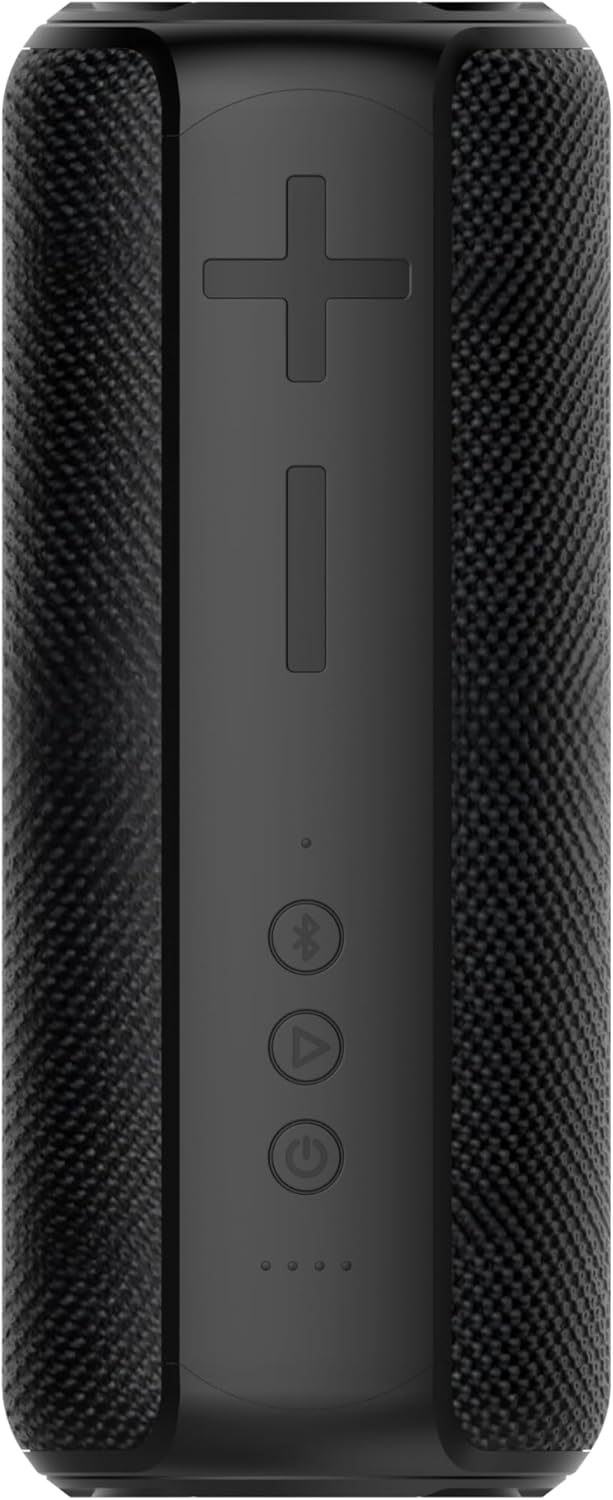
Image: The Vortex Blast Portable Bluetooth Speaker, showcasing its sleek black design and cylindrical shape.
เนื้อหาแพ็คเกจ
กรุณาทำเครื่องหมายในช่องสำหรับรายการต่อไปนี้:
- 1 x Vortex Blast Portable Bluetooth Speaker
- สายชาร์จ 1 x USB-C
- สายสัญญาณเสียง AUX 1 เส้น
- อะแดปเตอร์ไฟฟ้า 1 ตัว
- 1 x คู่มือผู้ใช้ (เอกสารนี้)
สินค้าเกินview
Familiarize yourself with the controls and ports of your Vortex Blast speaker:

ภาพ: จากบนลงล่าง view of the Vortex Blast speaker, highlighting the control panel with power, play/pause, Bluetooth, and volume buttons.
แผงควบคุม:
- ปุ่มเปิด/ปิด (⑂): กดค้างไว้เพื่อเปิด/ปิดเครื่อง กดสั้นๆ เพื่อเล่น/หยุดเพลง
- เพิ่มระดับเสียง (+): กดสั้นๆ เพื่อเพิ่มระดับเสียง กดยาวเพื่อเล่นเพลงถัดไป
- ลดเสียงลง (-): กดสั้นเพื่อลดระดับเสียง กดยาวเพื่อเล่นเพลงก่อนหน้า
- Bluetooth Button (⑃): Short press to enter pairing mode. Double tap to toggle LED lights on/off.
- ไฟ LED แสดงสถานะ: Four small lights indicating battery level and charging status.

ภาพ: ระยะใกล้ view of the back of the Vortex Blast speaker, showing the charging port and auxiliary input port, protected by a rubber flap.
Ports (located under a protective flap):
- พอร์ตชาร์จ USB-C: สำหรับชาร์จลำโพง
- อินพุต AUX: สำหรับเชื่อมต่ออุปกรณ์ผ่านสายสัญญาณเสียงขนาด 3.5 มม.
การตั้งค่า
1. ชาร์จลำโพง
Before first use, fully charge your Vortex Blast speaker. Connect the provided USB-C charging cable to the speaker's charging port and the power adapter to a wall outlet. The LED indicators will show charging progress and turn off when fully charged. A full charge provides approximately 10 hours of playtime.
2. เปิด/ปิดเครื่อง
- To power on: Press and hold the Power button (⑂) for 2-3 seconds until you hear an audible prompt and the LED lights illuminate.
- To power off: Press and hold the Power button (⑂) for 2-3 seconds until you hear an audible prompt and the LED lights turn off.
3. การจับคู่บลูทู ธ
- Ensure the speaker is powered on and the Bluetooth indicator light is blinking, indicating it's in pairing mode.
- บนอุปกรณ์ของคุณ (สมาร์ทโฟน แท็บเล็ต แล็ปท็อป) เปิดใช้งาน Bluetooth และค้นหาอุปกรณ์ที่มีอยู่
- Select "Vortex Blast" from the list.
- เมื่อเชื่อมต่อเสร็จแล้ว คุณจะได้ยินเสียงยืนยัน และไฟแสดงสถานะบลูทูธจะติดสว่างค้าง
หมายเหตุ: ลำโพงจะพยายามเชื่อมต่อกับอุปกรณ์ที่จับคู่ไว้ล่าสุดโดยอัตโนมัติเมื่อเปิดเครื่อง
4. การจับคู่ True Wireless Stereo (TWS)
To achieve a true stereo sound experience, you can pair two Vortex Blast speakers together:
- Ensure both Vortex Blast speakers are powered on and not connected to any other Bluetooth devices.
- On one speaker, short press the Bluetooth button (⑃). It will enter TWS pairing mode.
- The two speakers will automatically search for and connect to each other. You will hear a confirmation sound once paired.
- Once TWS paired, connect your device to one of the speakers via Bluetooth as described in step 3. Both speakers will now play audio in stereo.
คำแนะนำการใช้งาน
การเล่นเพลง:
- เล่น/หยุดชั่วคราว: Short press the Power button (⑂).
- การปรับระดับเสียง: กดปุ่มเพิ่มเสียง (+) หรือปุ่มลดเสียง (-) สั้นๆ
- เพลงถัดไป: กดปุ่มเพิ่มระดับเสียง (+) ค้างไว้
- แทร็กก่อนหน้า: กดปุ่มลดระดับเสียง (-) ค้างไว้
ไฟ LED แสดง:
The Vortex Blast speaker features dynamic LED light effects that enhance your music experience.

Image: The Vortex Blast speaker with its vibrant LED light ring illuminated, showcasing the dynamic light effects.
- To toggle the LED lights on or off: Double tap the Bluetooth button (⑃).
- The lights will cycle through various modes automatically.
โหมด AUX:
Connect an external audio device using the provided 3.5mm AUX audio cable. The speaker will automatically switch to AUX mode. In this mode, volume control can be managed via the speaker or the connected device, but track control must be done on the connected device.
การซ่อมบำรุง
- การทำความสะอาด: ใช้ผ้าแห้งนุ่มๆ เช็ดทำความสะอาดลำโพง ห้ามใช้สารเคมีรุนแรงหรือวัสดุที่มีฤทธิ์กัดกร่อน
- การสัมผัสน้ำ: While IPX6 waterproof, avoid prolonged submersion. Ensure the protective flap over the ports is securely closed before exposure to water.
- พื้นที่จัดเก็บ: เก็บลำโพงไว้ในที่แห้งและเย็น ห่างจากอุณหภูมิที่สูงและแสงแดดโดยตรง
- การดูแลแบตเตอรี่ To prolong battery life, charge the speaker regularly, even if not in frequent use. Avoid completely draining the battery.
การแก้ไขปัญหา
| ปัญหา | สารละลาย |
|---|---|
| ลำโพงไม่เปิดเครื่อง | Ensure the battery is charged. Connect the speaker to a power source using the provided cable and adapter. |
| ไม่สามารถจับคู่กับอุปกรณ์บลูทูธได้ |
|
| ไม่มีเสียงหรือเสียงเบา |
|
| ไฟ LED ไม่ทำงาน. | Double tap the Bluetooth button (⑃) to toggle the LED lights on/off. |
| TWS pairing failed. |
|
ข้อมูลจำเพาะ
| คุณสมบัติ | รายละเอียด |
|---|---|
| ชื่อรุ่น | ระเบิด |
| ยี่ห้อ | กระแสน้ำวน |
| ประเภทลำโพง | ลำโพงแบบพกพา |
| เทคโนโลยีการเชื่อมต่อ | บลูทูธ 5.2 |
| กำลังขับสูงสุดของลำโพง | 30 วัตต์ |
| โหมดเอาต์พุตเสียง | สเตอริโอ (พร้อม TWS) |
| ระดับความต้านทานต่อน้ำ | กันน้ำระดับ IPX6 |
| อายุการใช้งานแบตเตอรี่ | นานถึง 10 ชั่วโมง |
| แหล่งพลังงาน | ใช้พลังงานจากแบตเตอรี่ |
| ขนาดสินค้า | ลึก 3.34 นิ้ว x กว้าง 3.34 นิ้ว x สูง 8.46 นิ้ว |
| น้ำหนักสินค้า | 2.64 ปอนด์ |
| วิธีการควบคุม | สัมผัส |
การรับประกันและการสนับสนุน
The Vortex Blast Portable Bluetooth Speaker comes with a การรับประกันแบบจำกัดโปรดดูเงื่อนไขและข้อกำหนดโดยละเอียดในบัตรรับประกันที่แนบมาในกล่องสินค้า
For technical support, troubleshooting assistance, or warranty claims, please contact Vortex customer service through the retailer's platform or visit the official Vortex webเว็บไซต์.


