1. บทนำ
Thank you for choosing the WOLFANG WB03 Baby Monitor. This device is designed to provide reliable and secure monitoring of your baby, offering peace of mind through advanced features and a clear display. This manual provides essential information for setting up, operating, and maintaining your baby monitor.
The WOLFANG WB03 features a 5-inch HD display, a 1080P camera with 360-degree rotation and zoom, infrared night vision, two-way audio, temperature detection, and cry detection. It operates on a secure, non-Wi-Fi connection, ensuring privacy and stability.
2. เนื้อหาบรรจุภัณฑ์
กรุณาตรวจสอบแพ็คเกจสำหรับรายการต่อไปนี้:
- หน่วยหลัก (จอภาพ)
- หน่วยเด็ก (กล้อง)
- คู่มือการใช้งาน
- 2 x อะแดปเตอร์ไฟฟ้า
- สายเคเบิล 2 x USB
- ขายึดติดผนัง
- สกรูยึดผนัง
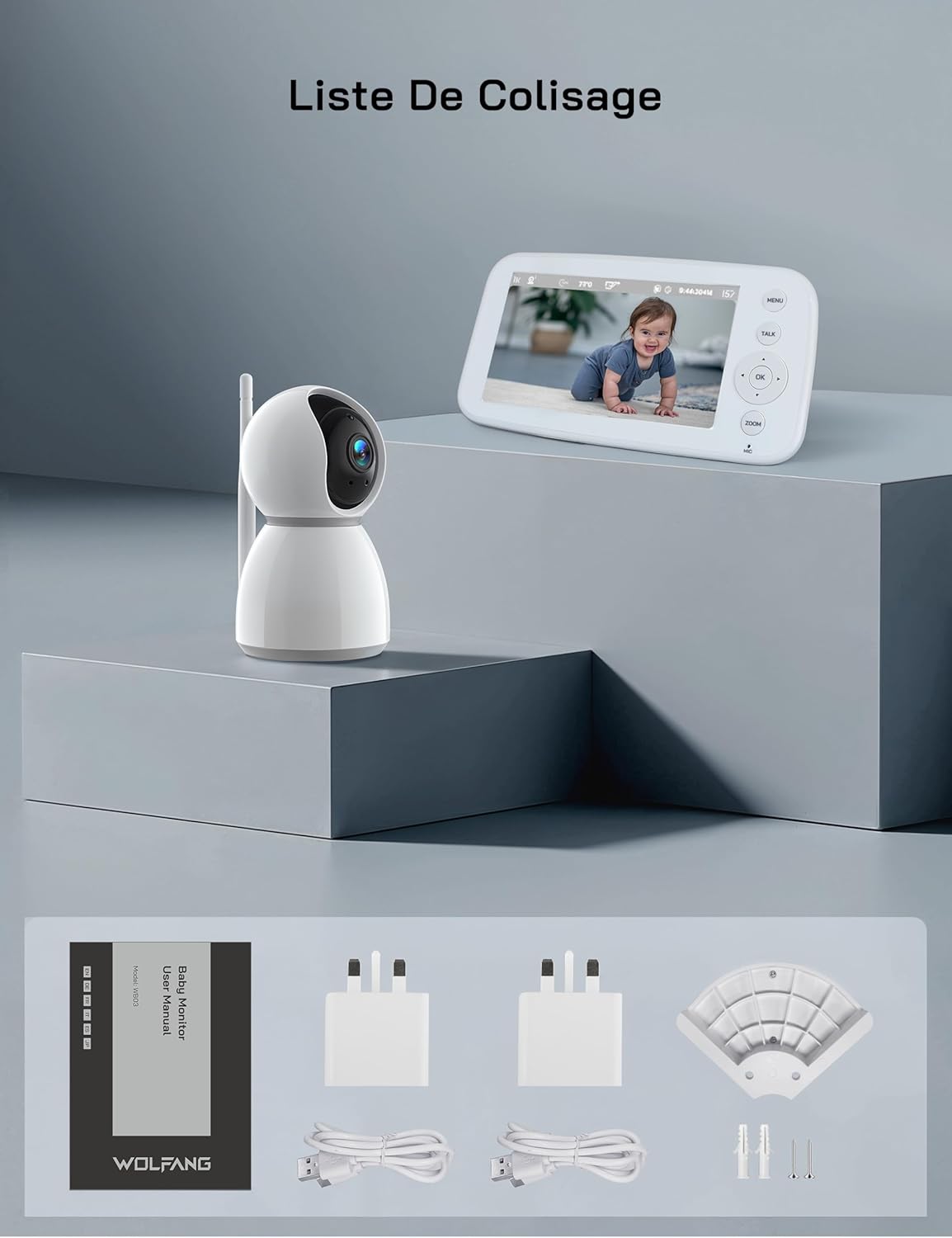
รูปที่ 2.1: Visual representation of the WOLFANG WB03 baby monitor package contents, including the monitor, camera, user manual, two power adapters, two USB cables, and wall mounting hardware.
3. สินค้าหมดview
The WOLFANG WB03 system consists of a Parent Unit (monitor) and a Baby Unit (camera). Familiarize yourself with the components and their functions.

รูปที่ 3.1: The WOLFANG WB03 baby monitor system, featuring a white parent unit with a screen displaying a baby, and a white pan-tilt camera unit.
หน่วยหลัก (จอภาพ)
- จอแสดงผล HD ขนาด 5 นิ้ว: For clear video feed.
- ปุ่มควบคุม: Menu, Talk, OK, Navigation (Up/Down/Left/Right), Zoom.
- ไมโครโฟน: สำหรับการสนทนาสองทาง
- ผู้บรรยาย: For audio from the baby unit and lullabies.
- เสาอากาศ: For wireless connection.
- พอร์ตไฟ: Type-C for charging.
หน่วยเด็ก (กล้อง)
- 1080P Camera Lens: High-resolution video capture.
- ไฟ LED อินฟราเรด: สำหรับใช้งานในเวลากลางคืน
- ไมโครโฟน: To pick up baby's sounds.
- ผู้บรรยาย: สำหรับการสนทนาสองทางและเพลงกล่อมเด็ก
- เซ็นเซอร์อุณหภูมิ: To monitor room temperature.
- เสาอากาศ: For wireless connection.
- พอร์ตไฟ: Type-C for continuous power.

รูปที่ 3.2: An illustration highlighting key features of the WOLFANG WB03 baby monitor, including VOX Mode, Night Vision, 8 Lullabies, Remote Pan/Tilt, Type-C charging, Two-Way Intercom, 2350 mAh Battery, and Temperature Detection.
4. คำแนะนำในการตั้งค่า
4.1 การชาร์จหน่วยหลัก
- Connect one USB cable to a power adapter and plug it into the Parent Unit's Type-C port.
- เสียบอะแดปเตอร์ไฟฟ้าเข้ากับเต้ารับไฟฟ้าที่ผนัง
- Charge the Parent Unit for at least 3 hours before first use. The battery indicator on the screen will show charging status.
4.2 การจ่ายไฟให้กับเครื่อง Baby Unit
- Connect the second USB cable to a power adapter and plug it into the Baby Unit's Type-C port.
- Plug the power adapter into a wall outlet. The Baby Unit requires continuous power to operate.
- The Baby Unit will automatically power on once connected to power.
4.3 Placement of the Baby Unit
วางเครื่องให้นมบุตรในตำแหน่งที่มองเห็นได้ชัดเจน view of your baby. Ensure it is at least 1.5 to 2 meters (5 to 6 feet) away from the Parent Unit to avoid audio feedback (bip sound).
- Place the camera on a flat, stable surface, such as a dresser or shelf.
- Alternatively, use the included wall mount bracket to secure the camera to a wall.
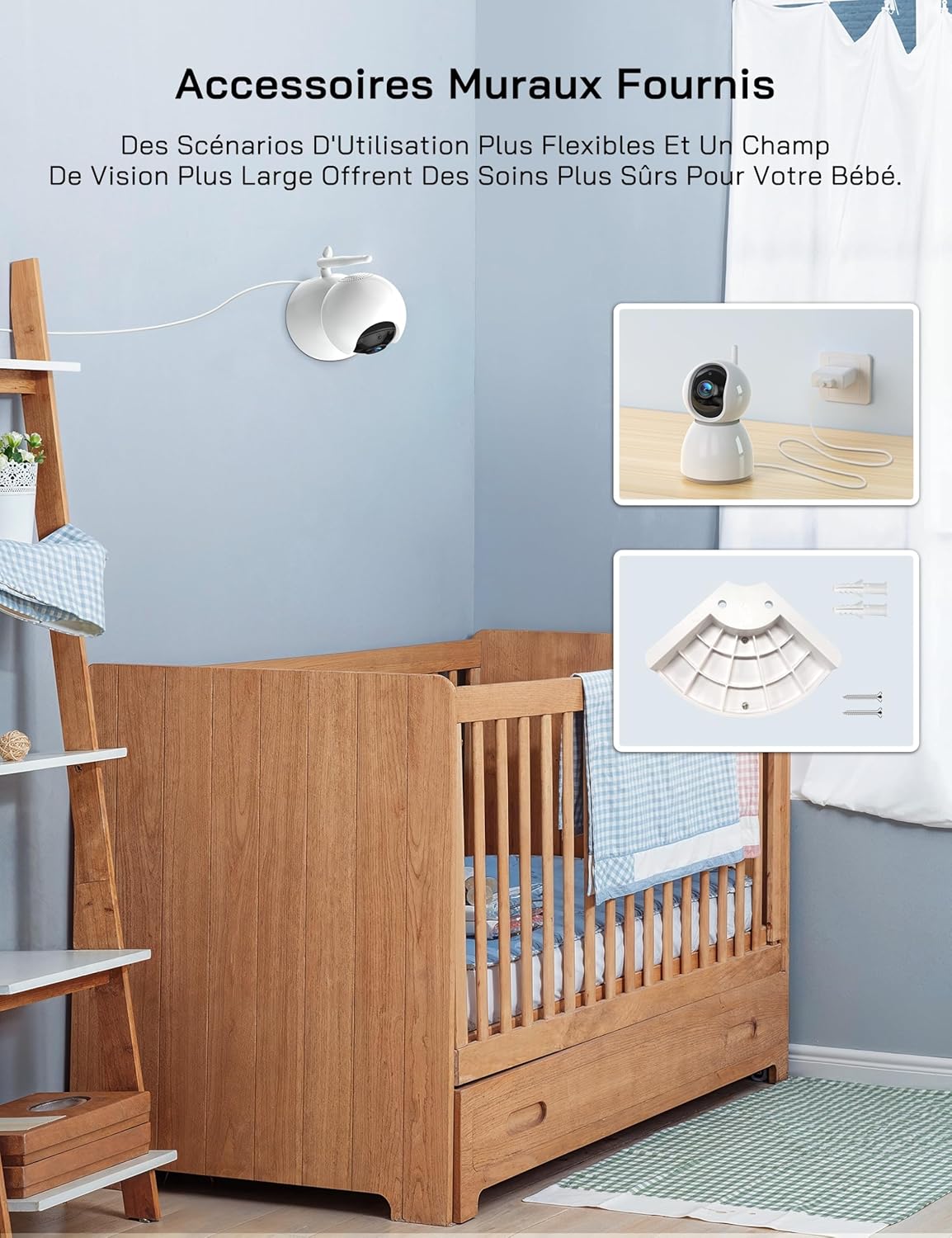
รูปที่ 4.1: An image showing the included wall mount bracket and screws, demonstrating how the camera can be securely mounted to a wall above a crib.
4.4 Pairing (If Necessary)
The Parent Unit and Baby Unit are pre-paired at the factory. If the connection is lost or you are adding additional cameras (up to 4 cameras supported), follow these steps:
- On the Parent Unit, press the เมนู ปุ่ม.
- Navigate to the Camera icon (📷) and select it.
- Choose an empty camera channel (e.g., CAM 2, CAM 3, CAM 4).
- Select the 'Pair' option. The monitor will display 'Pairing...'.
- Within 10 seconds, press the pairing button on the back of the Baby Unit.
- Once paired, the video feed from the Baby Unit will appear on the Parent Unit screen.
5. คู่มือการใช้งาน
5.1 เปิด/ปิดเครื่อง
- หน่วยหลัก: Press and hold the Power button on the side of the monitor to turn it on or off.
- หน่วยทารก: The camera powers on automatically when connected to a power source. Disconnect from power to turn off.
5.2 การตรวจสอบขั้นพื้นฐาน
Once both units are powered on and paired, the Parent Unit will automatically display the live video feed from the Baby Unit.
5.3 Pan, Tilt, and Zoom
The camera offers 360-degree horizontal rotation and 90-degree vertical tilt, along with 2x digital zoom.
- แพน/เอียง: Use the navigation buttons (Up/Down/Left/Right) on the Parent Unit to adjust the camera's viewมุมอิง
- ซูม: กดปุ่ม ซูม button on the Parent Unit to activate 2x digital zoom. Use navigation buttons to move the zoomed area.

รูปที่ 5.1: An image showing the camera's 360-degree rotation and 2x zoom capability, with the monitor displaying the zoomed view of a baby.
5.4 การสนทนาสองทาง
Communicate with your baby remotely using the two-way talk feature.
- กดปุ่มค้างไว้ พูดคุย button on the Parent Unit.
- Speak clearly into the microphone on the Parent Unit. Your voice will be transmitted to the Baby Unit.
- ปล่อยตัว พูดคุย button to hear your baby's sounds again.

รูปที่ 5.2: An image depicting the two-way talk feature, with a mother in the kitchen communicating with her baby in the nursery via the monitor.
5.5 การมองเห็นตอนกลางคืนด้วยอินฟราเรด
The Baby Unit automatically activates infrared night vision in low-light conditions, providing a clear black-and-white video feed.

รูปที่ 5.3: Two images demonstrating the clear infrared night vision feature, showing a sleeping baby in a dimly lit room.
5.6 การตรวจติดตามอุณหภูมิ
The Baby Unit continuously monitors the room temperature and displays it on the Parent Unit screen. An alarm will sound if the temperature exceeds 30°C (86°F) or falls below 14°C (57.2°F).
5.7 Cry Detection (VOX Mode)
The VOX (Voice Operated eXchange) mode conserves battery life by turning off the screen when no sound is detected. The screen will automatically activate when your baby cries or makes significant noise.
- To enable/disable VOX mode or adjust sensitivity (Low/Medium/High), navigate to the VOX settings in the Parent Unit's menu.
- If you wish to keep the screen on continuously, you must disable cry detection and the automatic screen off feature in the settings.
5.8 เพลงกล่อมเด็ก
เครื่องมอนิเตอร์นี้มีเพลงกล่อมเด็ก 8 เพลงที่จะช่วยให้ลูกน้อยของคุณสงบลง
- กดปุ่ม เมนู button on the Parent Unit.
- Navigate to the Music icon (🎵) and select it.
- Choose a lullaby to play or select 'Loop' for continuous playback.
5.9 การแจ้งเตือนการให้อาหาร
Set a timer to remind you of feeding times.
- กดปุ่ม เมนู button on the Parent Unit.
- Navigate to the Timer icon (🕑) and select it.
- Set your desired feeding interval (e.g., 2h, 3h, 4h).
5.10 Multi-Camera Support and Split Screen
The WOLFANG WB03 supports connecting up to 4 cameras simultaneously. The 5-inch screen supports split-screen display for simultaneous viewing or scheduled rotation of camera feeds.
- To switch between cameras or activate split-screen mode, access the camera settings in the Parent Unit's menu.
- คุณสามารถทำได้ view multiple cameras at once in split-screen or set a timed rotation to cycle through each camera's view.
6. การบำรุงรักษา
6.1 การทำความสะอาด
- Wipe the surfaces of the Parent Unit and Baby Unit with a dry, soft cloth.
- ห้ามใช้สเปรย์ทำความสะอาดหรือน้ำยาทำความสะอาด
6.2 การดูแลรักษาแบตเตอรี่ (สำหรับผู้ปกครอง)
- เพื่อยืดอายุการใช้งานแบตเตอรี่ให้สูงสุด ควรหลีกเลี่ยงการปล่อยแบตเตอรี่จนหมดบ่อยครั้ง
- If storing the unit for an extended period, charge the battery to about 50% and store it in a cool, dry place.
7 การแก้ไขปัญหา
| ปัญหา | สารละลาย |
|---|---|
| Monitor beeps or produces feedback noise. | Ensure the Baby Unit and Parent Unit are at least 1.5 to 2 meters (5 to 6 feet) apart. Proximity can cause audio interference. |
| No video/audio on the Parent Unit. |
|
| กล้องไม่สามารถเปิดได้ | The camera must be continuously plugged into a power source. Ensure the power adapter and cable are securely connected and the outlet is functional. |
| Screen turns off automatically. | This is likely due to VOX mode. If you want the screen to stay on, disable cry detection and the automatic screen off feature in the Parent Unit's settings. |
| Temperature alarm sounds frequently. | Check the room temperature displayed on the monitor. Adjust the room's climate control if necessary to keep the temperature within the safe range (14°C to 30°C). |
8. ข้อมูลจำเพาะ
| คุณสมบัติ | รายละเอียด |
|---|---|
| ชื่อรุ่น | WB03 |
| ขนาดหน้าจอของหน่วยหลัก | 5 นิ้ว |
| ความละเอียดของกล้อง | 1080พ |
| ความละเอียดจอภาพ | 720พ |
| เทคโนโลยีการเชื่อมต่อ | ไร้สาย (FHSS) |
| ข้อกำหนด Wi-Fi | ไม่มี |
| Parent Unit Battery Capacity | 2350 มิลลิแอมป์ |
| อายุการใช้งานแบตเตอรี่ (โหมดปกติ) | ประมาณ 8 ชั่วโมง |
| Battery Life (VOX Mode) | ประมาณ 10+ ชั่วโมง |
| มุมแพนกล้อง | 360 องศา |
| มุมเอียงของกล้อง | 90 องศา |
| ซูมดิจิตอล | 2x |
| คุณสมบัติพิเศษ | Two-Way Audio, Infrared Night Vision, Temperature Detection, Cry Detection, Feeding Alarm, 8 Lullabies, Split Screen, Wall Mountable |
| ขนาดสินค้า (กว้าง x ยาว x สูง) | 16 x 8.3 x 1.9 ซม. |
| น้ำหนักสินค้า | 411 กรัม |
| ข้อแนะนำการใช้ | Baby Monitoring (Indoor) |
9. การรับประกันและการสนับสนุน
9.1 ข้อมูลการรับประกัน
WOLFANG ให้บริการ สินค้ารับประกัน 2 ปี and accessory upgrade services. We are committed to delivering high-quality imaging products and support.
9.2 การสนับสนุนลูกค้า
Our customer service team is available 24 hours a day on weekdays to assist you. If you have any questions, require assistance, or need support, please contact us via our official email:
support.vc@wolfang.co
We aim to resolve any issues to your satisfaction as quickly as possible.


