1. บทนำ
This manual provides essential information for the safe and efficient operation of your Xiaomi Toaster BHR8811EU. Please read these instructions carefully before first use and retain them for future reference. This 2-slice toaster features 6 browning settings, a defrost function, and a removable crumb tray for easy cleaning.
2. คำแนะนำด้านความปลอดภัย
- ควรวางเครื่องปิ้งขนมปังบนพื้นผิวที่มั่นคงและทนความร้อนเสมอ และควรวางให้ห่างจากวัสดุที่ติดไฟได้ง่าย
- อย่าสัมผัสพื้นผิวที่ร้อน ใช้ที่จับหรือลูกบิด
- Unplug the toaster from the outlet when not in use and before cleaning. Allow it to cool completely before handling or cleaning.
- เพื่อป้องกันอันตรายจากไฟฟ้า ห้ามจุ่มสายไฟ ปลั๊ก หรือเครื่องปิ้งขนมปังลงในน้ำหรือของเหลวอื่นๆ
- ห้ามใส่ของกินขนาดใหญ่ บรรจุภัณฑ์ฟอยล์โลหะ หรืออุปกรณ์รับประทานอาหารลงในเครื่องปิ้งขนมปัง เพราะอาจก่อให้เกิดอันตรายจากไฟไหม้หรือไฟฟ้าช็อตได้
- Do not operate the toaster if the cord or plug is damaged, or if the appliance malfunctions or has been damaged in any manner.
- อย่าทิ้งเครื่องปิ้งขนมปังไว้โดยไม่มีใครดูแลขณะใช้งาน
- Do not use abrasive cleaners or sharp objects to clean the toaster.
- เครื่องใช้ไฟฟ้าชิ้นนี้มีไว้สำหรับใช้ในครัวเรือนเท่านั้น
3. ส่วนประกอบผลิตภัณฑ์

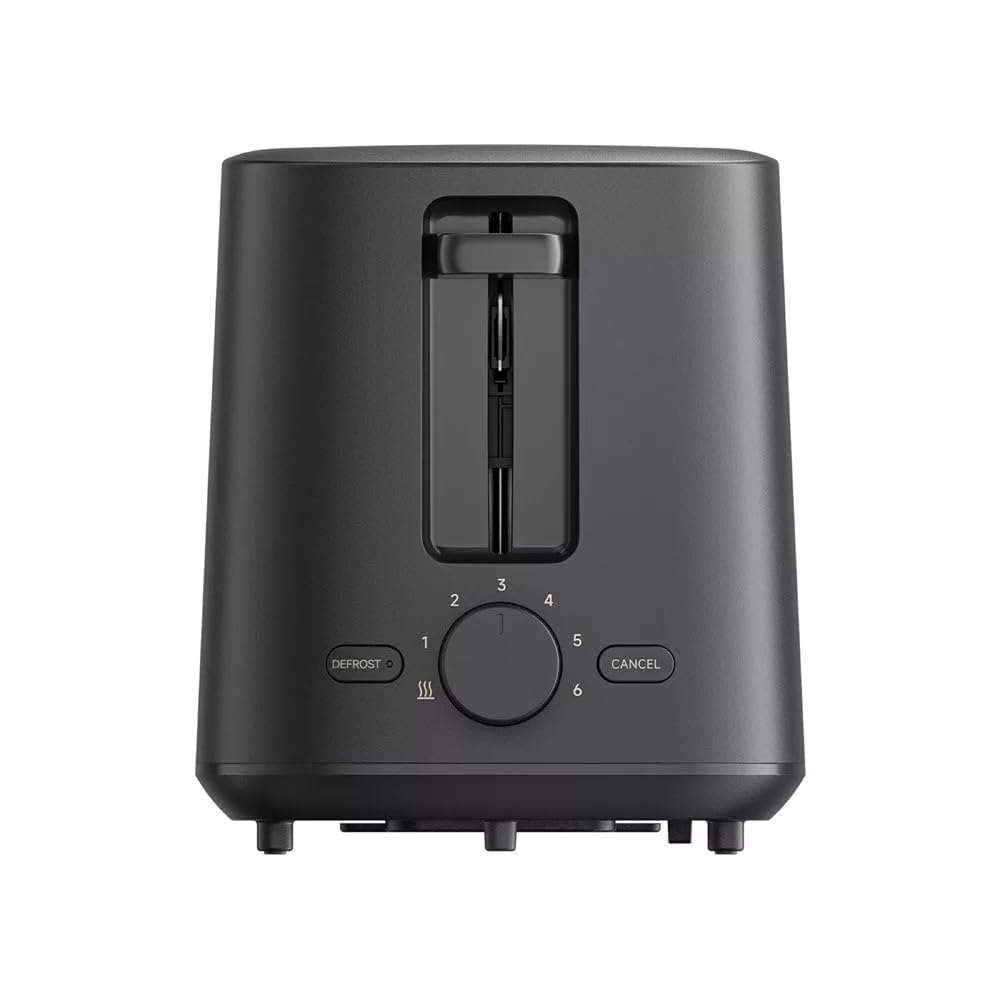
ภาพที่ 1: ด้านหน้า view of the Xiaomi Toaster BHR8811EU. This image displays the control panel with the browning control knob, defrost button, and cancel button, along with the bread slots.
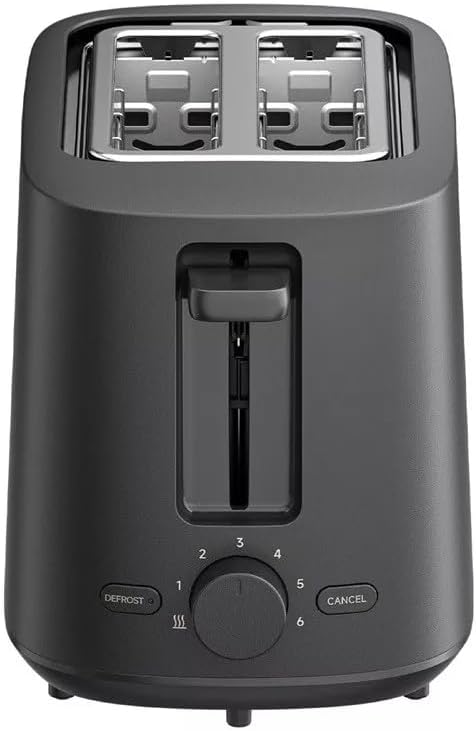
ภาพที่ 2: สูงสุด view of the Xiaomi Toaster BHR8811EU. This image highlights the two wide bread slots designed to accommodate various bread types.

ภาพที่ 3: ด้านข้าง view of the Xiaomi Toaster BHR8811EU. This image shows the side of the toaster, featuring the pull-out handle for the removable crumb tray at the bottom.
ภาพที่ 4: หลัง view of the Xiaomi Toaster BHR8811EU. This image displays the back of the appliance, featuring the Xiaomi brand logo.
- ช่องใส่ขนมปัง: Two wide slots for bread slices.
- คันโยกสำหรับปิ้งขนมปัง: Lowers bread into the slots and initiates the toasting cycle.
- Browning Control Knob: Adjusts the desired level of browning from 1 (lightest) to 6 (darkest).
- ปุ่มละลายน้ำแข็ง: Activates the defrost function for frozen bread.
- ปุ่มยกเลิก: หยุดรอบการปิ้งขนมปังได้ตลอดเวลา
- ถาดรองเศษขนมปังแบบถอดได้: เก็บเศษอาหารเพื่อทำความสะอาดได้ง่าย
4. การตั้งค่า
- การแกะกล่อง: นำเครื่องปิ้งขนมปังและวัสดุบรรจุภัณฑ์ทั้งหมดออกมาอย่างระมัดระวัง ตรวจสอบให้แน่ใจว่าชิ้นส่วนทั้งหมดอยู่ครบและไม่เสียหาย
- การจัดวาง: Place the toaster on a flat, stable, and heat-resistant surface. Ensure there is adequate space around the toaster for ventilation.
- การใช้ครั้งแรก: Before toasting bread for the first time, operate the toaster without bread for a few cycles at the highest browning setting. This will burn off any manufacturing residues and eliminate initial odors. A slight smell or smoke is normal during this process. Ensure the area is well-ventilated.
5. คู่มือการใช้งาน
- เชื่อมต่อพลังงาน: เสียบสายไฟเข้ากับเต้ารับไฟฟ้าที่เหมาะสมขนาด 220-240 โวลต์ 60 เฮิรตซ์
- ใส่ขนมปัง: Place one or two slices of bread into the bread slots. The toaster features automatic bread centering for even toasting.
- เลือก ระดับความเข้มของสีน้ำตาล: Turn the browning control knob to your desired setting, from 1 (lightest) to 6 (darkest).
- เริ่มปิ้งได้เลย: Press the toasting lever down until it locks into place. The indicator light will illuminate, and the toasting cycle will begin.
- Defrost Function (for frozen bread): If toasting frozen bread, insert the bread, select your desired browning level, press the toasting lever down, and then press the ละลายน้ำแข็ง button. The defrost indicator light will illuminate.
- ยกเลิกฟังก์ชัน: หากต้องการหยุดการปิ้งขนมปังเมื่อใดก็ได้ ให้กดปุ่ม ยกเลิก button. The bread will automatically pop up.
- เสร็จสิ้น: Once the selected browning cycle is complete, the bread will automatically pop up, and the toaster will switch off.
6. การบำรุงรักษาและการทำความสะอาด
การทำความสะอาดเป็นประจำจะช่วยให้เครื่องปิ้งขนมปังทำงานได้อย่างเหมาะสมที่สุดและยืดอายุการใช้งานของเครื่องปิ้งขนมปังของคุณ
- ถอดปลั๊กเสมอ: Before cleaning, always unplug the toaster from the power outlet and allow it to cool completely.
- ทำความสะอาดถาดรองเศษขนมปัง: Pull out the removable crumb tray from the bottom of the toaster. Dispose of accumulated crumbs. Wipe the tray with a damp cloth and dry thoroughly before reinserting it. Ensure the crumb tray is fully inserted before using the toaster.
- การทำความสะอาดภายนอก: เช็ดภายนอกเครื่องปิ้งขนมปังด้วยผ้านุ่มๆamp cloth. Do not use abrasive cleaners, metal scouring pads, or harsh chemicals, as these can damage the surface.
- การทำความสะอาดภายใน: Do not attempt to clean the inside of the toaster with any tools or objects. If bread becomes jammed, unplug the toaster and carefully remove the bread after it has cooled.
7 การแก้ไขปัญหา
- เครื่องปิ้งขนมปังไม่ทำงาน: Ensure the power cord is securely plugged into a working outlet. Check if the toasting lever is fully pressed down and locked.
- ขนมปังปิ้งไม่เรียบ: Ensure bread slices are not too thick or irregularly shaped. The automatic centering mechanism works best with standard bread slices.
- กลิ่นควันหรือกลิ่นไหม้: This can occur if crumbs accumulate in the toaster or if food is jammed. Immediately press the ยกเลิก button, unplug the toaster, and allow it to cool. Clean the crumb tray and remove any jammed food.
- Bread does not pop up: กดปุ่ม ยกเลิก button. If the bread still does not pop up, unplug the toaster and carefully remove the bread once it has cooled.
8. ข้อมูลจำเพาะ
| ยี่ห้อ | เสี่ยวหมี่ |
| หมายเลขรุ่น | BHR8811สหภาพยุโรป |
| สี | สีดำ |
| เพาเวอร์/วัตต์tage | 930 วัตต์ |
| เล่มที่tage | 220-240 โวลต์ |
| ความถี่ | 60 เฮิรตซ์ |
| วัสดุ | โลหะอลูมิเนียม |
| จำนวนช่อง | 2 |
| คุณสมบัติพิเศษ | Defrost function, 6 browning settings, Removable crumb tray, Automatic bread centering |
| ขนาดสินค้า (ลึก x กว้าง x สูง) | 15 ซม. x 28 ซม. x 26 ซม. (โดยประมาณ) |
| น้ำหนักสินค้า | 1.7 กิโลกรัม |
9. การรับประกันและการสนับสนุน
Your Xiaomi Toaster BHR8811EU is covered by a manufacturer's warranty. Please refer to the warranty card included with your purchase for specific terms and conditions, including warranty duration and coverage details. For technical support, service, or inquiries, please visit the official Xiaomi webเข้าชมเว็บไซต์หรือติดต่อฝ่ายบริการลูกค้าในภูมิภาคของคุณ เก็บหลักฐานการซื้อไว้เพื่อใช้ในการเคลมประกัน