1. บทนำ
This manual provides essential instructions for the installation, operation, and maintenance of your DALY Smart Active Balance Battery Management System (BMS) model R24TM-150A. This BMS is designed to protect and manage Li-ion, LiFePO4, and LTO battery packs with 4 to 8 series cells (4S-8S) and a continuous current rating of 150A. It features built-in Bluetooth for smart monitoring and communication capabilities including RS485 and CAN.
2. สินค้าหมดview
The DALY Smart Active Balance BMS R24TM-150A is a sophisticated battery protection board that ensures the safety and longevity of your battery pack. It actively balances cell voltages, prevents overcharge, over-discharge, overcurrent, and short circuits, and includes temperature protection. The integrated Bluetooth module allows for real-time monitoring and parameter adjustment via a mobile application.


3. ข้อมูลจำเพาะ
| คุณสมบัติ | ข้อมูลจำเพาะ |
|---|---|
| หมายเลขรุ่น | อาร์24TM-150เอ |
| ประเภทแบตเตอรี่ที่รองรับ | ลิเธียมไอออน, ลิเธียมเฟอร์โรฟอสเฟต, แอลทีโอดี |
| Series Cells (Strings) | 4S-8S |
| ปล่อยอย่างต่อเนื่องในปัจจุบัน | 150เอ |
| กระแสไฟชาร์จต่อเนื่อง | 150เอ |
| ยอดคงเหลือที่ใช้งานอยู่ | 1A |
| อินเทอร์เฟซการสื่อสาร | Built-in Bluetooth, RS485, CAN, UART |
| อินพุต Voltage | 12V-24V |
| ปริมาณการส่งออกtage | 12V (กระแสตรง) |
| ขนาดสินค้า (กว้าง x ยาว x สูง) | 6.97 x 2.6 x 0.63 นิ้ว (177 x 66 x 16 มม.) |
| น้ำหนักสินค้า | 9.7 ออนซ์ (275 กรัม) |

4. เนื้อหาบรรจุภัณฑ์
ตรวจสอบว่ารายการทั้งหมดที่ระบุไว้ด้านล่างนี้รวมอยู่ในแพ็คเกจของคุณ:

- ชุดควบคุมระบบแบตเตอรี่ (BMS) แบบสมาร์ทแอคทีฟบาลานซ์
- พีแอนด์บี-เคเบิล
- สกรู (2 ชิ้น)
- Sampling Cable (Balance Leads)
- สายเคเบิล B+
- NTC Temperature Sensor (One standard, two optional)
- คู่มือการใช้งาน
- กล่องบรรจุภัณฑ์
- สายเคเบิลพอร์ต RS485/CAN
5. การตั้งค่าและการติดตั้ง
Proper installation is crucial for the safe and effective operation of the BMS. Always ensure power is disconnected from the battery pack before beginning installation.
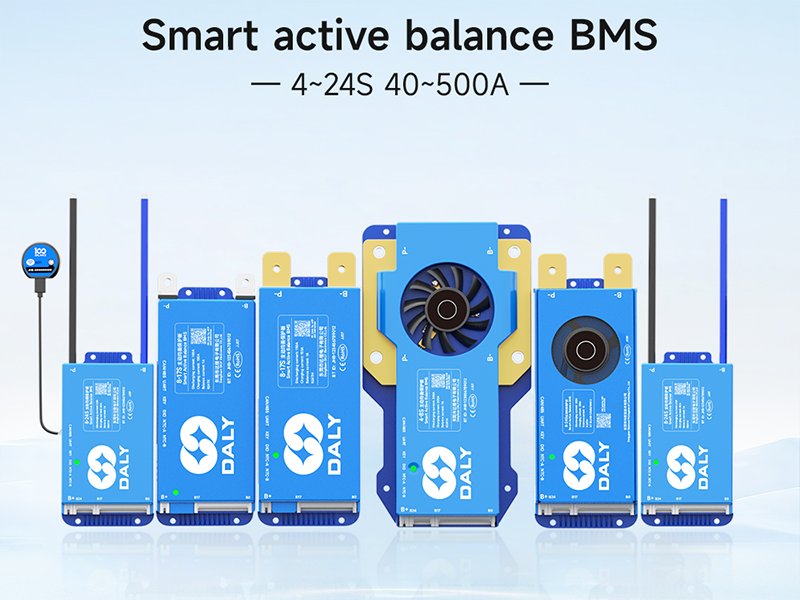
5.1 แผนผังการเดินสายไฟ
Refer to the following diagrams for correct wiring connections. Incorrect wiring can damage the BMS and battery pack.

5.2 ขั้นตอนการเชื่อมต่อ
It is critical to connect all components in the correct sequence to prevent damage to the BMS or battery. Follow these steps carefully:
- เตรียมชุดแบตเตอรี่: Ensure all individual battery cells are at a similar state of charge before connecting the BMS.
- Connect Balance Leads: เชื่อมต่อ sampling cable (balance leads) to each individual cell of your battery pack, starting from B0 (negative terminal of the first cell) and proceeding sequentially to B+ (positive terminal of the last cell). Ensure the order is correct according to your battery configuration (4S-8S).
- Connect B- Terminal: เชื่อมต่อขั้วลบหลักของชุดแบตเตอรี่เข้ากับขั้ว B บน BMS
- Connect P- Terminal: Connect the load/charger negative terminal to the P- terminal on the BMS.
- Connect B+ Terminal: เชื่อมต่อขั้วบวกหลักของชุดแบตเตอรี่เข้ากับขั้ว B+ บน BMS
- เชื่อมต่อสายเคเบิลสื่อสาร: If using, connect the RS485/CAN port cable and NTC temperature sensor.
- ตรวจสอบการเชื่อมต่อ: Double-check all connections for correctness and secure fit before applying power.
Warning: Incorrect connection order can lead to immediate damage to the BMS and potentially the battery pack. Always follow the specified sequence.
6. คู่มือการใช้งาน
6.1 การเชื่อมต่อแอปผ่านบลูทูธ
The DALY Smart BMS features integrated Bluetooth for convenient monitoring and configuration via a mobile application.
- ดาวน์โหลดแอพ: ค้นหา "BalanceBMS" on your iOS or Android device's app store and install it.
- เปิดใช้งานบลูทูธ: ตรวจสอบให้แน่ใจว่าได้เปิดใช้งาน Bluetooth บนอุปกรณ์มือถือของคุณ
- เชื่อมต่อกับระบบจัดการแบตเตอรี่ (BMS): Open the "BalanceBMS" app and follow the on-screen instructions to connect to your DALY Smart BMS. The app will typically detect nearby BMS devices.
6.2 การตรวจสอบและการกำหนดค่า
Once connected, the app provides access to various parameters and settings:
- ข้อมูลเรียลไทม์: ตรวจสอบปริมาตรของเซลล์แต่ละเซลล์tages, total battery voltage, charge/discharge current, temperature, and State of Charge (SOC).
- Active Balance Status: View the status of the active balancing process, which helps equalize cell voltages for optimal performance and extended battery life.
- สถานะการป้องกัน: Check for any active protection warnings or faults (e.g., overcharge, over-discharge, overcurrent, high temperature).
- การปรับพารามิเตอร์: Adjust various protection parameters and operational settings as needed (advanced users only).
- การบันทึกข้อมูล: The BMS may offer data logging capabilities for historical performance analysis.
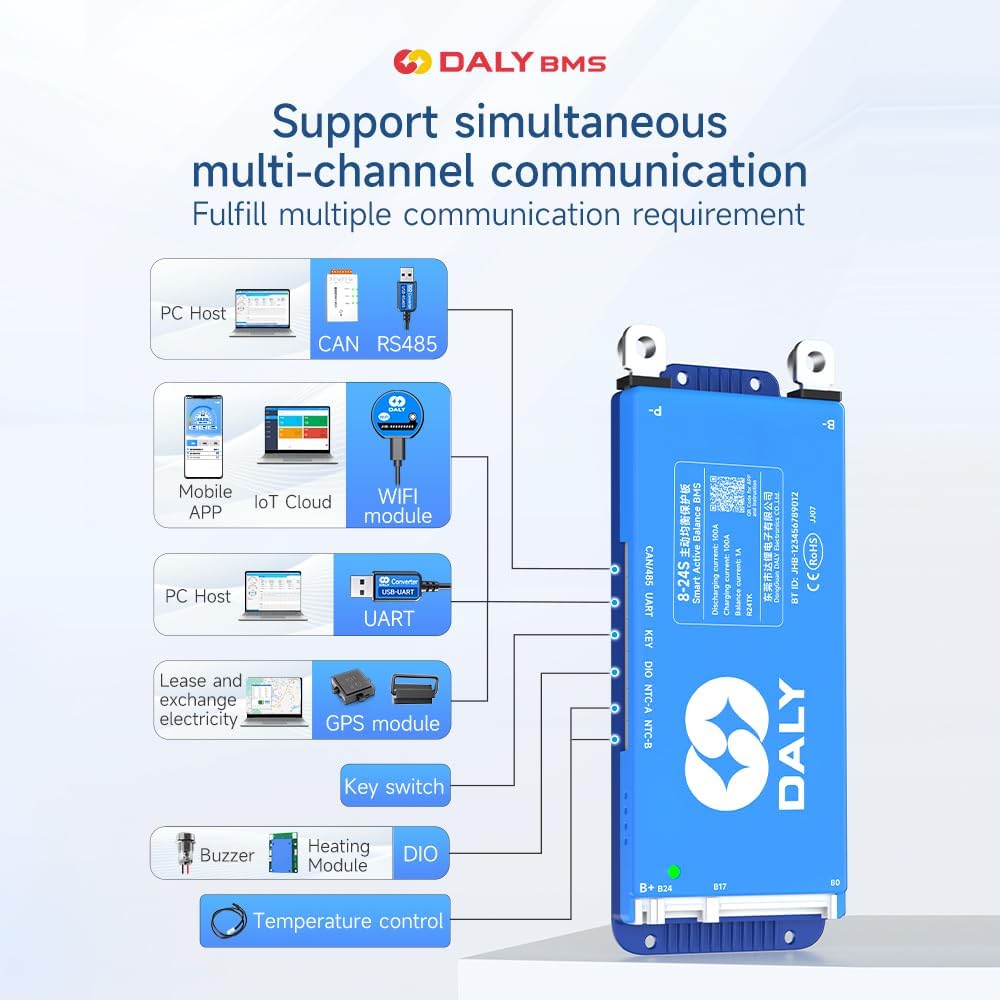
6.3 Communication Interfaces (RS485/CAN/UART)
For advanced integration and monitoring, the BMS supports RS485, CAN, and UART communication protocols. These interfaces allow connection to external devices such as PC hosts, IoT cloud modules (with optional WiFi module), GPS modules, and other control systems.
7. การบำรุงรักษา
The DALY Smart Active Balance BMS is designed for minimal maintenance. However, regular checks can help ensure optimal performance and longevity of your battery system:
- การตรวจสอบภาพ: ตรวจสอบ BMS และสายไฟทั้งหมดเป็นระยะๆ เพื่อหาสัญญาณของความเสียหาย การกัดกร่อน หรือการเชื่อมต่อที่หลวม
- การตรวจสอบแอป: Regularly check the BMS status via the "BalanceBMS" app to monitor cell voltages, temperatures, and overall battery health. Address any warnings or alerts promptly.
- อัพเดตเฟิร์มแวร์: Check for available firmware updates for the BMS through the app or manufacturer's webไซต์เพื่อให้แน่ใจว่าคุณมีคุณลักษณะล่าสุดและการแก้ไขจุดบกพร่อง
- ความสะอาด : Keep the BMS free from dust and debris. Ensure adequate ventilation if installed in an enclosure.
8 การแก้ไขปัญหา
If you encounter issues with your DALY Smart Active Balance BMS, consider the following troubleshooting steps:
8.1 การตรวจสอบความเข้ากันได้
Ensure your BMS is compatible with your battery type and configuration. For example, a BMS designed for LiFePO4 batteries may not function correctly with Li-ion batteries, even if the cell count is similar.

8.2 ปัญหาทั่วไปและแนวทางแก้ไข
- BMS Not Powering On/No Data:
- Verify all wiring connections, especially the main power and balance leads, are secure and in the correct sequence.
- ตรวจสอบก้อนแบตเตอรี่ voltage to ensure it is within the operational range of the BMS.
- Cells Not Balancing:
- Confirm that the balance leads are correctly connected to each cell.
- Check the active balance current setting in the app.
- Ensure the battery pack is not severely out of balance, which may require external balancing before BMS can effectively manage.
- Over-Discharge/Over-Charge Protection Triggered:
- ตรวจสอบปริมาณแบตเตอรี่tage. If over-discharged, charge the battery. If over-charged, stop charging.
- Review the protection parameters in the app to ensure they are set appropriately for your battery type.
- BMS Not Communicating via Bluetooth:
- Ensure Bluetooth is enabled on your mobile device and the BMS is powered on.
- Try restarting the app and your mobile device.
- ตรวจสอบให้แน่ใจว่าไม่มีอุปกรณ์อื่นใดรบกวนสัญญาณบลูทูธ
- Unexpected Behavior/Malfunction:
- Review the installation steps carefully, especially the connection order. Incorrect installation is a common cause of issues.
- หากปัญหายังคงมีอยู่ โปรดติดต่อฝ่ายสนับสนุนลูกค้าเพื่อขอความช่วยเหลือเพิ่มเติม
9. การรับประกันและการสนับสนุน
The DALY Smart Active Balance BMS R24TM-150A comes with an 18-month warranty from the date of purchase, covering manufacturing defects. For warranty claims or technical assistance, please contact DALY customer service. When contacting support, please provide your product model number (R24TM-150A) and a detailed description of the issue.
While DALY strives to provide friendly customer service, it is recommended to thoroughly review this manual and ensure correct installation as per instructions, as improper setup is a frequent cause of operational issues.


