1. สินค้าหมดview และคุณสมบัติ
The DALY 100A 8S-24S 24V-84V Smart BMS is an intelligent Battery Management System designed for Lithium Battery NCM/LFP/LTO Packs. It offers comprehensive protection and monitoring capabilities to ensure the safety and longevity of your battery system.
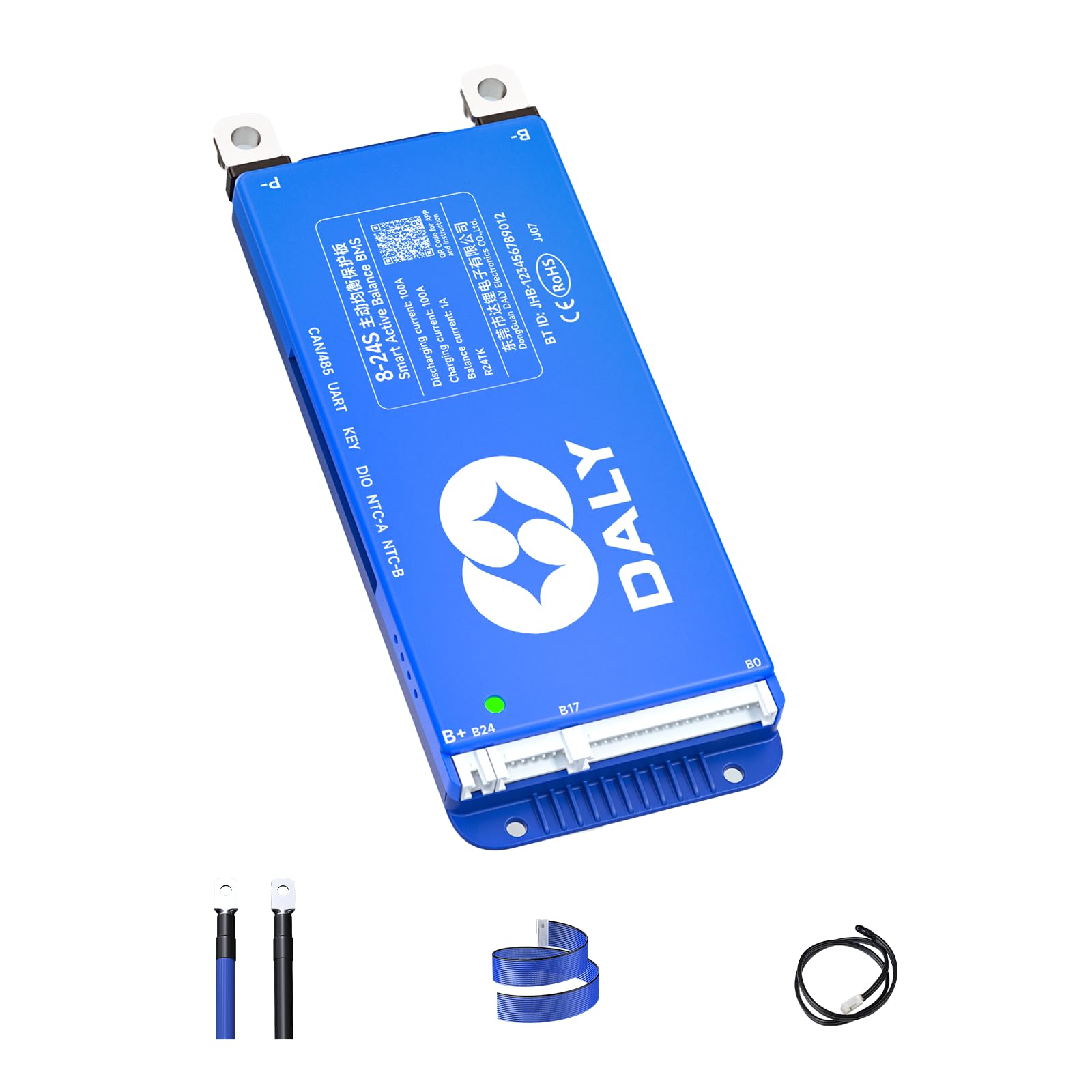
Image 1.1: DALY 100A Smart BMS showing key specifications like 8-24S battery strings, 100A charge/discharge, 1A balance current, built-in Bluetooth, and UART+RS485+CAN communication.
คุณสมบัติหลัก:
- การเชื่อมต่อที่ง่ายดาย: Smart compatible with 4S-24S (12V-84V) battery strings. Supports LiFePO4/Li-ion/LTO battery packs and parallel battery pack configurations.
- Smart 1A Active Balancer: Helps equalize the state of charge/discharge across battery cells for extended battery life.
- การตรวจสอบอัจฉริยะ: Integrated Bluetooth with optional WiFi module for monitoring cell voltages, temperatures, and other parameters. Offers cloud monitoring and data logging capabilities.
- การป้องกันที่ครอบคลุม: Protects batteries from overcharge, overdischarge, overcurrent, short circuits, high temperature shutdown, and other potential issues.
- Multi-channel Communication: Supports UART, RS485, and CAN communication protocols.
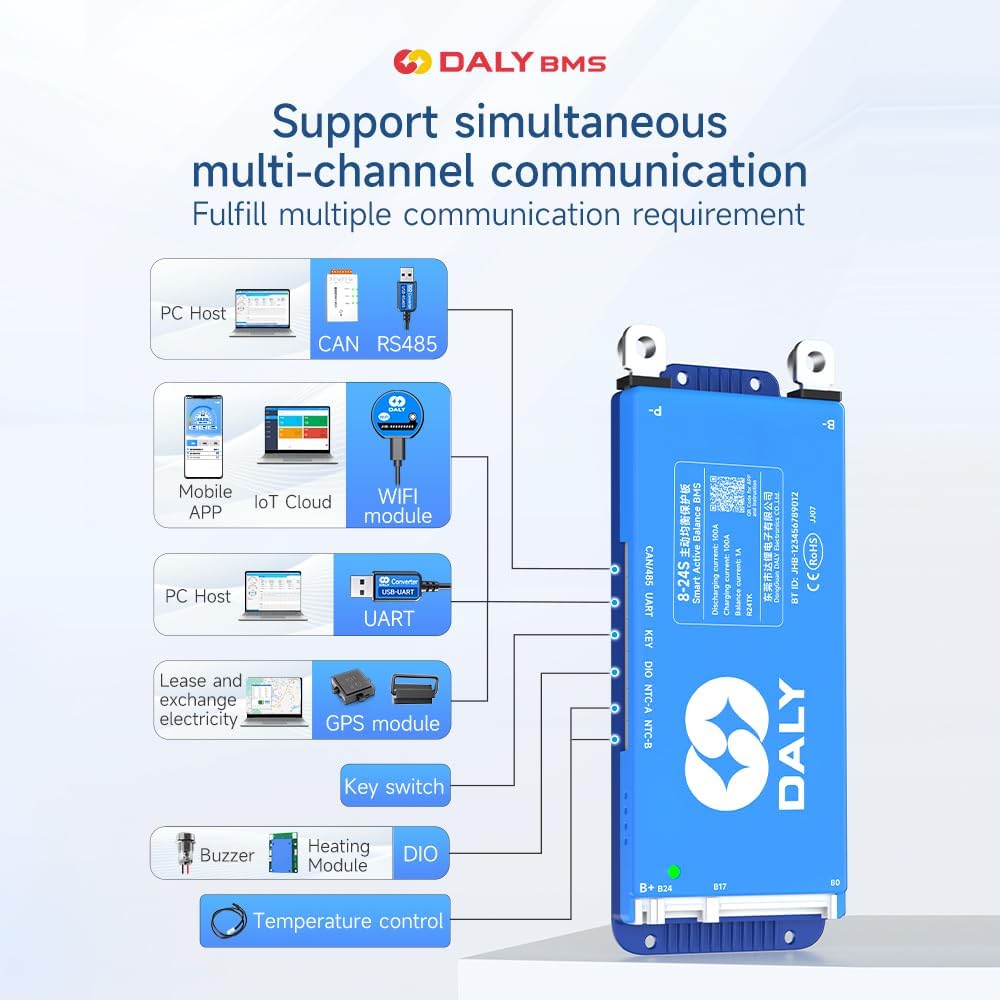
Image 1.2: Diagram illustrating the DALY BMS's support for multi-channel communication including PC Host (CAN, RS485, UART), Mobile APP (Bluetooth, WiFi module, IoT Cloud), GPS module, Key switch, Buzzer, Heating Module, and Temperature control.
2. เนื้อหาบรรจุภัณฑ์
โปรดตรวจสอบว่ารายการทั้งหมดที่ระบุไว้ด้านล่างมีอยู่ในแพ็คเกจของคุณหรือไม่:

Image 2.1: Visual representation of the DALY BMS packing list, showing the main BMS unit and included accessories.
- ชุดควบคุมระบบแบตเตอรี่ (BMS) แบบสมาร์ทแอคทีฟบาลานซ์
- สายเคเบิล P-&-B
- สกรู (2 ชิ้น)
- Sampสายเคเบิล
- สายเคเบิล B+
- NTC (Temperature Sensor) Cable (One standard, two optional)
- คู่มือการใช้งาน
- กล่องบรรจุภัณฑ์
- สายเคเบิลพอร์ต RS485/CAN
3. การตั้งค่าและการติดตั้ง
Proper installation is crucial for the safe and efficient operation of your DALY Smart BMS. Follow these steps carefully.
3.1 Battery Pack Preparation
Before connecting the BMS, ensure your battery pack is correctly assembled. Identify the total positive and total negative terminals of your battery pack. For an 8-string battery pack, ensure all cells are properly connected in series.

Image 3.1: An 8-string battery pack assembled with bus bars connecting the cells in series.
3.2 การติดตั้งสายไฟ
The wiring sequence is critical. Always connect the black wire to the total negative terminal first, then proceed with the red wires to the positive terminals of each string in ascending order (B1, B2, B3, etc.).
Video 3.1: Detailed guide on connecting the DALY 100 Balance Smart BMS, including battery pack assembly and wiring sequence for the sampสายเคเบิล
- Connect B- Wire: เชื่อมต่อสายสีดำของ s เข้าด้วยกันampต่อสายเคเบิลเข้ากับขั้วลบทั้งหมดของชุดแบตเตอรี่
- Connect B+ Wires: Connect the red wires of the sampling cable to the positive terminals of each cell string, starting from B1, B2, and so on, up to the last string.
- Secure Excess Cables: If using fewer strings than the BMS supports (e.g., 8S BMS for an 8S pack, but the cable supports up to 17S), securely seal the remaining unused cables with insulation tape to prevent short circuits.
- สายเคเบิล NTC: Plug the NTC (temperature sensor) cable into the NTC-A port on the BMS.
- B- to BMS: เชื่อมต่อสายไฟหลัก B- จากชุดแบตเตอรี่เข้ากับขั้ว B- บน BMS
- Sampling Cable to BMS: ใส่ sampling cable connector into the designated port on the BMS.
- B+ to BMS: เชื่อมต่อสายไฟหลัก B+ จากชุดแบตเตอรี่เข้ากับขั้ว B+ บน BMS
สำคัญ: Miswiring protection is limited to 6 strings. Connecting more than 6 strings incorrectly will damage your BMS. Always follow the wiring sequence strictly. If the wiring sequence is reversed, it will lead to BMS damage.
3.3 Verification with Multimeter
Before plugging the sampling cable into the BMS, use a multimeter to measure the voltage of each wire in the wiring harness to ensure the sequence and voltages are correct. The voltage should increase incrementally from B0 to B1, B2, and so on.

Image 3.2: A multimeter being used to verify the voltage readings across the sampling cable pins, ensuring correct wiring sequence.
4. คู่มือการใช้งาน
The DALY Smart BMS offers various ways to monitor and manage your battery pack.
4.1 แอปพลิเคชันมือถือและซอฟต์แวร์พีซี
The BMS supports multi-channel communication through a mobile app (BalanceBMS on iOS & Android) and PC software. These platforms allow you to monitor cell voltages, temperatures, current, State of Charge (SOC), and other critical parameters in real-time. You can also adjust various parameters and settings.
Video 4.1: Tutorial on how to connect the 100balance Smart BMS to the PC host software for monitoring and configuration.
วิดีโอ 4.2: จบview of the DALY K series Smart BMS features and capabilities, including app and PC software interaction.
4.2 Accessories and Their Use
- UART Cable: Supports PC connection for monitoring and parameter adjustment. Does not support other equipment connections.
- หน้าจอ LCD: Can be connected to UART and RS485 ports to display real-time battery information and change parameters via a 4.3-inch touch screen.
- สวิตช์กุญแจ: Used to switch the discharge MOSFET on and off. Other functions can be customized.
- โมดูลทำความร้อน: Used in cold environments to start the BMS, ensuring optimal performance.
- สายอินเวอร์เตอร์: Allows direct connection of an inverter to the BMS.
- โมดูล WiFi: Supports remote control and monitoring.
5. Parallel Connection Precautions
When connecting multiple battery packs in parallel, observe the following precautions:
- เล่มที่tagการจับคู่อี: ให้แน่ใจว่าปริมาตรtage of each battery pack is the same before connecting them in parallel. The voltage difference should be less than 1 volt.
- Discharging MOS Disconnection: When paralleling lithium battery packs, manually disconnect the discharging MOS in the Bluetooth APP or PC software. This prevents the battery packs from triggering short circuit protection due to high current during connection.
- การสอบเทียบ SOC: For 100% SOC calibration, when single cell overvoltage protection level 2 is triggered, the BMS will be calibrated to 100% SOC.
Video 5.1: Demonstration of smart active balancing BMS features, including parallel connection and monitoring.
6. การบำรุงรักษา
To ensure optimal performance and longevity of your DALY Smart BMS:
- ตรวจสอบการเชื่อมต่อสายไฟทั้งหมดเป็นประจำเพื่อดูความแน่นหนาและการกัดกร่อน
- รักษาหน่วย BMS ให้สะอาด ปราศจากฝุ่นและความชื้น
- Monitor battery parameters via the mobile app or PC software to identify any anomalies early.
- Ensure proper ventilation around the battery pack and BMS to prevent overheating.
7 การแก้ไขปัญหา
If you encounter issues with your DALY Smart BMS, consider the following:
- ไม่มีไฟ/ไม่มีสัญญาณแสดง: Check all main power connections (B-, P-) and ensure the sampling cable is correctly inserted. Verify battery pack voltage.
- App/PC Software Connection Issues: Ensure Bluetooth is enabled on your device, or that the UART/RS485/CAN cables are securely connected and drivers are installed for PC software.
- สัญญาณเตือนข้อผิดพลาด: Refer to the alarm list in the mobile app or PC software for specific fault codes and recommended actions. Common alarms include overvoltage, อันเดอร์โวลtage, overcurrent, and overtemperature.
- ปัญหาความสมดุล: Check the balance current and voltage difference settings in the app/PC software. Ensure all cell voltages are within the expected range.
- การเดินสายไฟไม่ถูกต้อง: Re-verify all wiring connections, especially the sampling cables, using a multimeter as described in Section 3.3. Incorrect wiring can lead to severe damage.
8. ข้อมูลจำเพาะ
| ข้อมูลจำเพาะ | ค่า |
|---|---|
| ขนาดสินค้า | 6.57 x 2.56 x 0.59 นิ้ว |
| น้ำหนักสินค้า | 7.4 ออนซ์ (210 กรัม) |
| หมายเลขรุ่นสินค้า | อาร์24ทีเค-100เอ |
| อินพุต Voltage | 24 โวลต์ |
| ปริมาณการส่งออกtage | 24 โวลต์ |
| ผู้ผลิต | บริษัท ตงกวน ดาลี่ อิเล็กทรอนิกส์ จำกัด |
Image 8.1: Table showing various DALY BMS models with their current ratings, sizes, and cable specifications.
9. การรับประกันและการสนับสนุน
Your DALY Smart BMS comes with an รับประกัน 18 เดือน. For any questions, technical assistance, or warranty claims, please contact our friendly customer service.
You can also find additional resources and support through the official mobile application, "BalanceBMS", available on both iOS and Android platforms.


