1. สินค้าหมดview
The DALY Smart Active Balance BMS (Battery Management System) is designed to protect and manage Li-ion, LiFePO4, and LTO battery packs. This model supports 4 to 8 series cells (4S-8S) with a voltage range of 12V-24V and a continuous charge/discharge current of 200A. It features an integrated 1A active balancing function and multiple communication interfaces including Bluetooth, RS485, and CAN.

Image 1.1: DALY Smart Active Balance BMS (Model R24TM-200A) and its components.
คุณสมบัติหลัก:
- Cell Compatibility: รองรับแบตเตอรี่ลิเธียมไอออน, ลิเธียมเฟอร์ไรต์ฟอสเฟต (LiFePO4) และแบตเตอรี่ LTO แบบ 4S-8S
- คะแนนปัจจุบัน: กระแสไฟชาร์จและปล่อยประจุต่อเนื่อง 200A
- การปรับสมดุลแบบแอคทีฟ: Integrated 1A active balance for cell voltage การปรับสมดุล
- การตรวจสอบอัจฉริยะ: Built-in Bluetooth for real-time monitoring of cell voltagวัดค่าต่างๆ เช่น อุณหภูมิ และพารามิเตอร์อื่นๆ ผ่านแอปพลิเคชันบนมือถือ
- อินเทอร์เฟซการสื่อสาร: Includes RS485 and CAN for advanced system integration.
- ฟังก์ชันการป้องกัน: Overcharge, over-discharge, overcurrent, short circuit, and high-temperature protection.

Image 1.2: Summary of BMS specifications including battery strings, current, balance current, function, battery type, and communication.
2. การตั้งค่าและการติดตั้ง
Proper installation is critical for the safe and effective operation of the BMS. Ensure all connections are made in the specified order to prevent damage to the BMS or battery pack.
2.1 รายการบรรจุภัณฑ์
ตรวจสอบว่าส่วนประกอบทั้งหมดมีอยู่ก่อนเริ่มการติดตั้ง:
- หน่วย BMS Smart Active Balance
- P-&-B- cable (Power and Battery Negative cables)
- สกรู (2 ชิ้น)
- Sampling cable (Balance wires)
- B+ cable (Battery Positive cable)
- NTC (Temperature sensor, one standard, two optional)
- คู่มือการใช้งาน (เอกสารนี้)
- กล่องบรรจุภัณฑ์
- RS485/CAN port cable (if applicable to your model)

Image 2.1: Illustrated packing list for the DALY BMS.
2.2 คำแนะนำในการเดินสายไฟ
Follow these steps carefully for correct wiring:
- การเชื่อมต่อแบบชาร์จล่วงหน้า: Connect the pre-charge circuit if your system requires it. This helps to limit inrush current when connecting the main battery.
- ปริมาตรเซลล์tage Sensing Wires: Connect the balance wires (sampling cable) to each cell of the battery pack, starting from the lowest voltage cell (B-) to the highest (B+). Ensure the order is correct.
- Main Power Connections: Connect the main B- (battery negative) and P- (load/charge negative) cables to the BMS. Then connect the main B+ (battery positive) cable.
- Parallel Battery Pack Configuration: If using multiple battery packs in parallel, ensure each pack has its own BMS and follow the manufacturer's guidelines for parallel connection.

Image 2.2: Pre-charge connection diagram.

Image 2.3: Cell voltage sensing wire connection.

Image 2.4: Main power connection diagram.

Image 2.5: Parallel battery pack connection exampเล.
A general wiring diagram is provided below for reference. Always consult the specific diagram included with your product for precise connections.
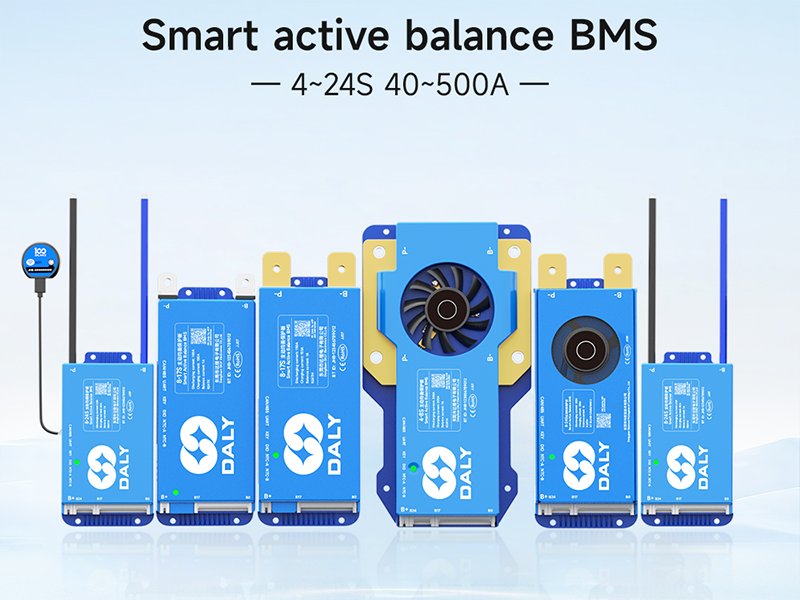
Image 2.6: Comprehensive wiring diagram for the BMS, showing connections for B+, B-, P-, and communication ports.
3. คู่มือการใช้งาน
The DALY Smart Active Balance BMS offers intelligent monitoring and control capabilities through its communication interfaces.
3.1 Mobile Application Monitoring
The BMS features built-in Bluetooth for wireless monitoring via a dedicated mobile application. Download the 'BalanceBMS' app from your device's app store (available on iOS and Android).
- การเชื่อมต่อ: Once the BMS is powered, open the 'BalanceBMS' app and search for available Bluetooth devices. Select your BMS to connect.
- การติดตาม: The app displays real-time data including individual cell voltages, ปริมาณแพ็คทั้งหมดtage, charge/discharge current, temperature, and State of Charge (SOC).
- การตั้งค่า: The app allows for adjustment of various BMS parameters, such as over-voltage, ต่ำกว่า voltagและค่าเกณฑ์กระแสเกิน
3.2 PC Host and Other Communication
For advanced monitoring and configuration, the BMS supports UART, RS485, and CAN communication protocols. These interfaces allow connection to a PC host or other external modules.
- ยูอาร์ท: Connect a USB-UART adapter to the BMS UART port for PC communication. Specific software is required for this interface.
- RS485/สามารถ: These ports enable integration into larger systems, such as industrial controls or vehicle networks. Consult the technical documentation for protocol details.
- โมดูลเสริม: The BMS can be extended with optional modules like WiFi for cloud monitoring, GPS, key switches, buzzers, and heating modules.
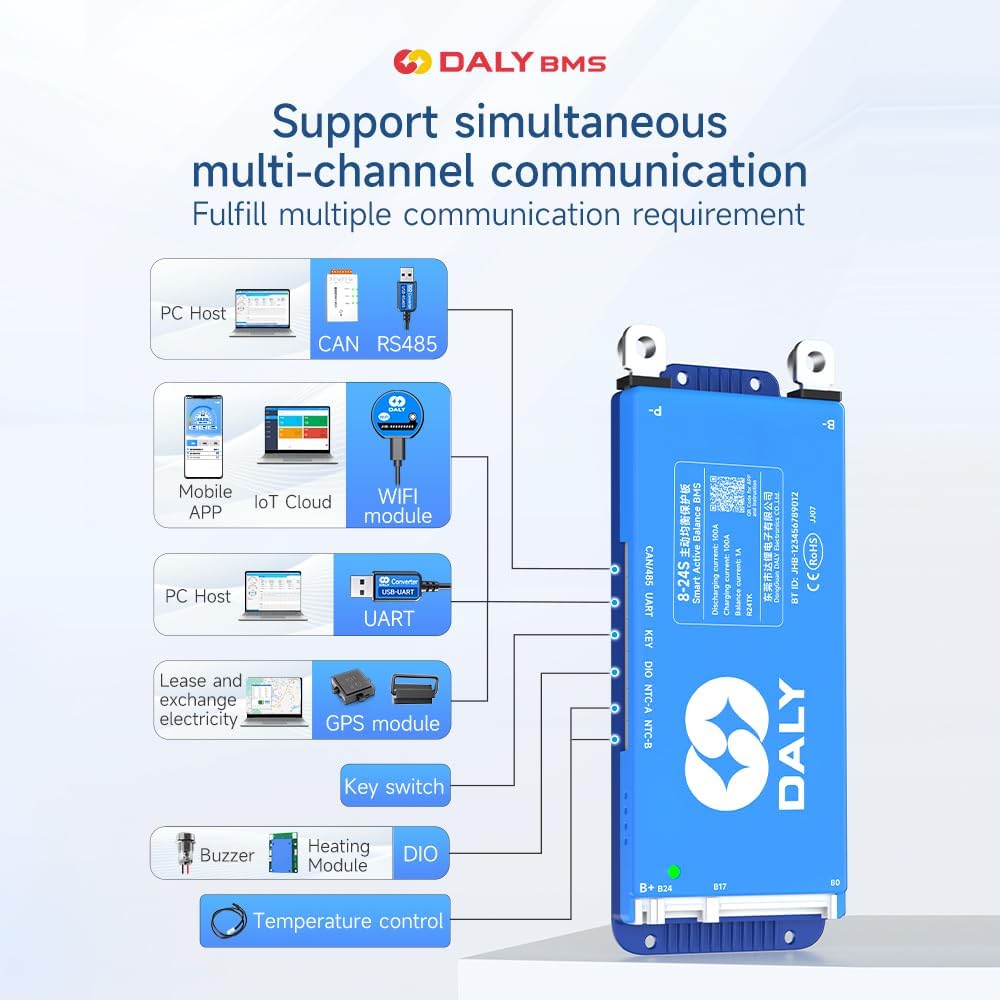
Image 3.1: Multi-channel communication options including PC Host (CAN, RS485, UART), Mobile APP (Bluetooth, WiFi module), GPS module, Key switch, Buzzer, Heating Module, and Temperature control.
4. การบำรุงรักษา
The DALY Smart Active Balance BMS is designed for minimal maintenance. Its active balancing feature helps maintain cell health, and its protection functions safeguard the battery.
- การติดตามอย่างสม่ำเสมอ: Periodically check the battery parameters via the mobile app or PC software to ensure all cells are within healthy voltagและช่วงอุณหภูมิ
- อัพเดตเฟิร์มแวร์: ตรวจสอบของผู้ผลิต webไซต์หรือแอปสำหรับการอัปเดตเฟิร์มแวร์ที่มีอยู่เพื่อให้มั่นใจถึงประสิทธิภาพที่เหมาะสมที่สุดและการเข้าถึงฟีเจอร์ใหม่ๆ
- การตรวจร่างกาย: Occasionally inspect the BMS and wiring for any signs of damage, loose connections, or corrosion. Ensure the cooling fan (if present) is free from obstructions.
- การทำความสะอาด: Keep the BMS unit clean and free from dust and debris. Use a dry, soft cloth for cleaning. Do not use liquids or abrasive cleaners.
5 การแก้ไขปัญหา
ส่วนนี้กล่าวถึงปัญหาทั่วไปและแนวทางแก้ไขที่เป็นไปได้
5.1 ประเด็นทั่วไป
- BMS ไม่เปิดเครื่อง:
- Verify all main power connections (B-, P-, B+) are secure and correctly wired.
- ตรวจสอบก้อนแบตเตอรี่ voltage to ensure it is within the operational range (12V-24V for 4S-8S).
- ไม่มีการเชื่อมต่อบลูทูธ:
- ตรวจสอบให้แน่ใจว่าระบบ BMS เปิดใช้งานอยู่
- โปรดตรวจสอบให้แน่ใจว่าได้เปิดใช้งานบลูทูธบนอุปกรณ์มือถือของคุณแล้ว
- Restart the 'BalanceBMS' app and try reconnecting.
- Ensure your device is within close proximity to the BMS.
- Incorrect Readings in App:
- Double-check all cell voltage sensing wires for correct order and secure connections. A multimeter can be used to verify individual cell voltagใช่
- Ensure the app is configured for the correct number of series cells (S-count).
5.2 Protection Triggers
If the BMS enters a protection state (e.g., no output, no charge), identify the cause:
- ระบบป้องกันการชาร์จไฟเกิน/การคายประจุไฟเกิน: The BMS will cut off charging/discharging if cell voltages exceed or fall below set thresholds. Check charger voltage and battery health.
- การป้องกันกระแสเกิน: Occurs if the load draws too much current. Reduce the load or ensure the BMS current rating matches your application.
- การป้องกันไฟฟ้าลัดวงจร: The BMS will immediately cut off output in case of a short circuit. Identify and remove the short.
- การป้องกันอุณหภูมิสูง: If the BMS or battery temperature exceeds safe limits, the BMS will shut down. Ensure adequate ventilation and cooling.
5.3 Compatibility Warning
คำเตือน: Using a BMS with an incompatible battery type or cell count can lead to severe damage to both the battery and the BMS, potentially causing fire or explosion. Always ensure your BMS matches your battery pack's specifications (e.g., Li-ion, LiFePO4, LTO, and S-count).

Image 5.1: Guide for selecting the appropriate BMS based on battery cell type, series count, and ampเป็นข้อกำหนด
6. ข้อมูลจำเพาะ
| คุณสมบัติ | ข้อมูลจำเพาะ |
|---|---|
| หมายเลขรุ่น | อาร์24TM-200เอ |
| ประเภทแบตเตอรี่ที่รองรับ | ลิเธียมไอออน, ลิเธียมเฟอร์โรฟอสเฟต, แอลทีโอดี |
| Series Cell Count | 4S-8S |
| อินพุต Voltagอี เรนจ์ | 12V-24V (dependent on S-count) |
| กระแสไฟชาร์จต่อเนื่อง | 200เอ |
| ปล่อยอย่างต่อเนื่องในปัจจุบัน | 200เอ |
| ยอดคงเหลือที่ใช้งานอยู่ | 1A |
| อินเทอร์เฟซการสื่อสาร | บลูทูธ, RS485, CAN, UART |
| ขนาดสินค้า (กว้าง x ยาว x สูง) | 6.97 x 2.6 x 0.83 นิ้ว (177 x 66 x 21 มม.) |
| น้ำหนักสินค้า | 9.7 ออนซ์ (275 กรัม) |
| ผู้ผลิต | บริษัท ตงกวน ดาลี่ อิเล็กทรอนิกส์ จำกัด |

ภาพที่ 6.1: จบแล้วview of DALY BMS specifications for various current ratings, including the 200A model.
7. การรับประกันและการสนับสนุน
7.1 ข้อมูลการรับประกัน
This DALY Smart Active Balance BMS comes with an รับประกัน 18 เดือน from the date of purchase. The warranty covers defects in materials and workmanship under normal use. It does not cover damage caused by improper installation, misuse, accidents, unauthorized modifications, or natural disasters.
7.2 การสนับสนุนลูกค้า
For technical assistance, troubleshooting, or warranty claims, please contact DALY customer service. Refer to the product packaging or the official DALY webเว็บไซต์สำหรับข้อมูลการติดต่อล่าสุด
The 'BalanceBMS' mobile application also provides a channel for support and information regarding your BMS.


