การแนะนำ
This manual provides comprehensive instructions for the safe and efficient installation, operation, and maintenance of your HCMOUNTING Full Motion TV Wall Mount, Model HCM6802. This heavy-duty mount is designed to securely hold 60-100 inch televisions, offering versatile viewing angles and space-saving benefits.
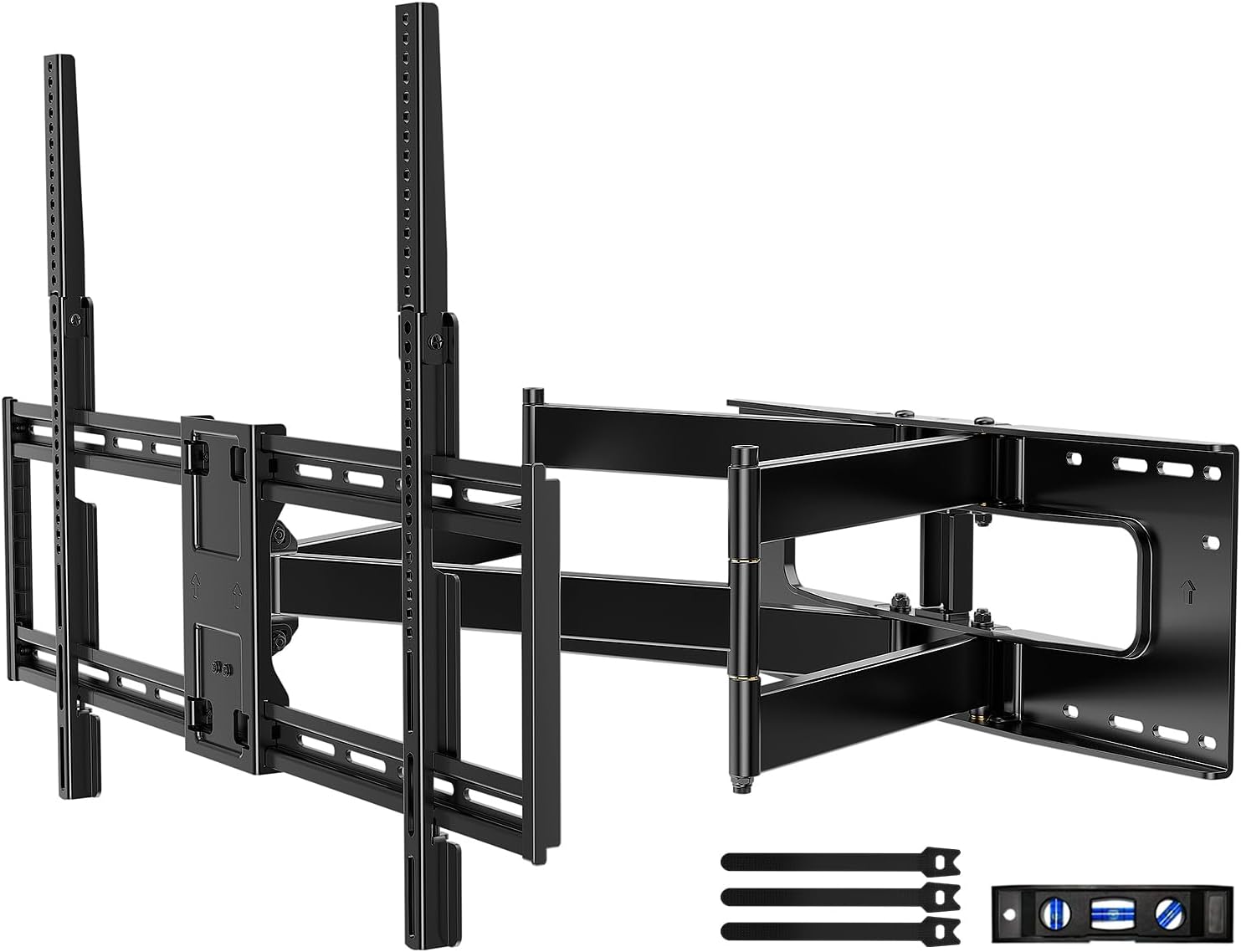
ภาพ: เหนือview of the HCMOUNTING Full Motion TV Wall Mount components.
ข้อมูลด้านความปลอดภัยที่สำคัญ
- ความจุน้ำหนัก: ห้ามเกินขีดจำกัดน้ำหนักสูงสุดที่สามารถรองรับได้ 165 ปอนด์ (75 กก.)
- ขนาดทีวี: ขาตั้งนี้เหมาะสำหรับทีวีขนาด 60 ถึง 100 นิ้ว
- ประเภทผนัง: Install only on wood studs (16-24 inch spacing), solid concrete walls, or masonry walls. ห้ามติดตั้งบนผนัง drywall เพียงอย่างเดียว
- ความช่วยเหลือ: Due to the weight and size of the mount and TV, a minimum of two people are required for safe installation.
- เครื่องมือ: Ensure all necessary tools are available and in good working condition before beginning installation.
- สาย: Ensure all cables are routed safely to prevent pinching or damage during TV movement.
ข้อมูลจำเพาะผลิตภัณฑ์
| คุณสมบัติ | ข้อมูลจำเพาะ |
|---|---|
| ยี่ห้อ | HCMOUNTING |
| หมายเลขรุ่น | HCM6802 |
| ความเข้ากันได้ของขนาดทีวี | 60-100 นิ้ว |
| ความจุในการรับน้ำหนักสูงสุด | 165 ปอนด์ (75 กก.) |
| ความเข้ากันได้ของ VESA | Up to 800x600mm (Min: 200x100mm) |
| ส่วนต่อเติมจากผนัง | สูงถึง 30.3 นิ้ว |
| Retraction to Wall | 2.95 นิ้ว |
| มุมเอียง | +10° ถึง -10° |
| มุมหมุน | ±165° |
| การปรับระดับ | ±3° |
| วัสดุ | เหล็กอัลลอยด์ |
| น้ำหนักสินค้า | 31.3 ปอนด์ |
| ขนาดแพ็คเกจ | 36 x 10.5 x 3.5 นิ้ว |
การตรวจสอบความเข้ากันได้
Before installation, ensure your TV and wall meet the following criteria:
- ขนาดทีวี: Your TV must be between 60 and 100 inches.
- น้ำหนักทีวี: ทีวีของคุณต้องมีน้ำหนักไม่เกิน 165 ปอนด์ (75 กิโลกรัม)
- รูปแบบ VESA: Check the back of your TV for the four mounting holes. Measure the horizontal and vertical distances between these holes. The VESA pattern must be between 200x100mm and 800x600mm. If the vertical VESA is greater than 400mm, the included extension strips will be required.
- ประเภทผนัง: This mount is designed for installation on wood studs (16-24 inch spacing), solid concrete walls, or brick walls. Do not install on drywall alone.
- Cable Outlets: Ensure your TV's cable outlets do not interfere with the mounting brackets.

Image: Illustration of compatible wall types (concrete, wood studs, brick) and various VESA patterns.

Image: Diagram illustrating how to check the VESA pattern on the back of a television.

Image: Diagram illustrating how to check for cable outlet interference on the back of a television.

Image: Diagram illustrating compatible wall types for mounting, including wood studs, solid concrete, and brick walls.
การติดตั้งและการตั้งค่า
Follow these steps carefully for a secure installation. A detailed installation guide and hardware kit are included with your mount. It is highly recommended to have at least two people for this process.
ขั้นตอนที่ 1: ติดขายึดทีวีเข้ากับทีวี
- วางทีวีคว่ำหน้าลงบนพื้นผิวที่นุ่มและสะอาดอย่างระมัดระวังเพื่อป้องกันรอยขีดข่วน
- ตรวจสอบให้แน่ใจว่าได้เลือกสกรูและแหวนรองที่ถูกต้องสำหรับรูยึด VESA ของทีวีของคุณ
- Attach the vertical TV brackets to the back of your TV using the appropriate screws and washers. Ensure they are securely tightened.
- If your TV's vertical VESA is greater than 400mm, attach the included extension strips to the main brackets.

ภาพ: เหนือview of the installation process: Attach brackets to TV, install wall plate, and hang TV.
ขั้นตอนที่ 2: ติดตั้งแผ่นผนัง
- Locate the desired mounting position on your wall. Use a stud finder to identify and mark the center of your wood studs. For concrete/brick walls, mark your desired drilling points.
- Use the provided drilling template to mark the precise locations for drilling holes. Ensure the template is level using the included mini-level.
- Drill pilot holes at the marked locations. For concrete/brick walls, insert the plastic anchors into the drilled holes.
- Attach the wall plate to the wall using the lag bolts and washers. Tighten all bolts securely.
Video: Official HCMOUNTING "How to Install" guide, demonstrating the installation process.
Video: HOME VISION Full Motion TV Wall Mount installation for 65-100" TVs, showing key steps and features.
ขั้นตอนที่ 3: แขวนทีวี
- With assistance, carefully lift the TV and hook the attached TV brackets onto the wall plate.
- ตรวจสอบให้แน่ใจว่าทีวีติดตั้งบนแผ่นยึดผนังอย่างแน่นหนาแล้ว
- Tighten the safety screws located at the bottom of the TV brackets to prevent accidental dislodgement.
คำแนะนำการใช้งาน
Your HCMOUNTING Full Motion TV Wall Mount offers several adjustment options for optimal viewการลง:
- การยืด/หด: Gently pull the TV away from the wall to extend it up to 30.3 inches, or push it back to retract it to 2.95 inches from the wall.
- การปรับเอียง: Use the tilt adjustment mechanism to angle your TV +10° upwards or -10° downwards to reduce glare and achieve the perfect viewมุมอิง
- การปรับหมุน: The mount allows for a wide swivel range of ±165°, enabling you to turn your TV left or right to suit various seating positions.
- การปรับระดับ: After installation, you can make minor horizontal adjustments of ±3° to ensure your TV is perfectly level.
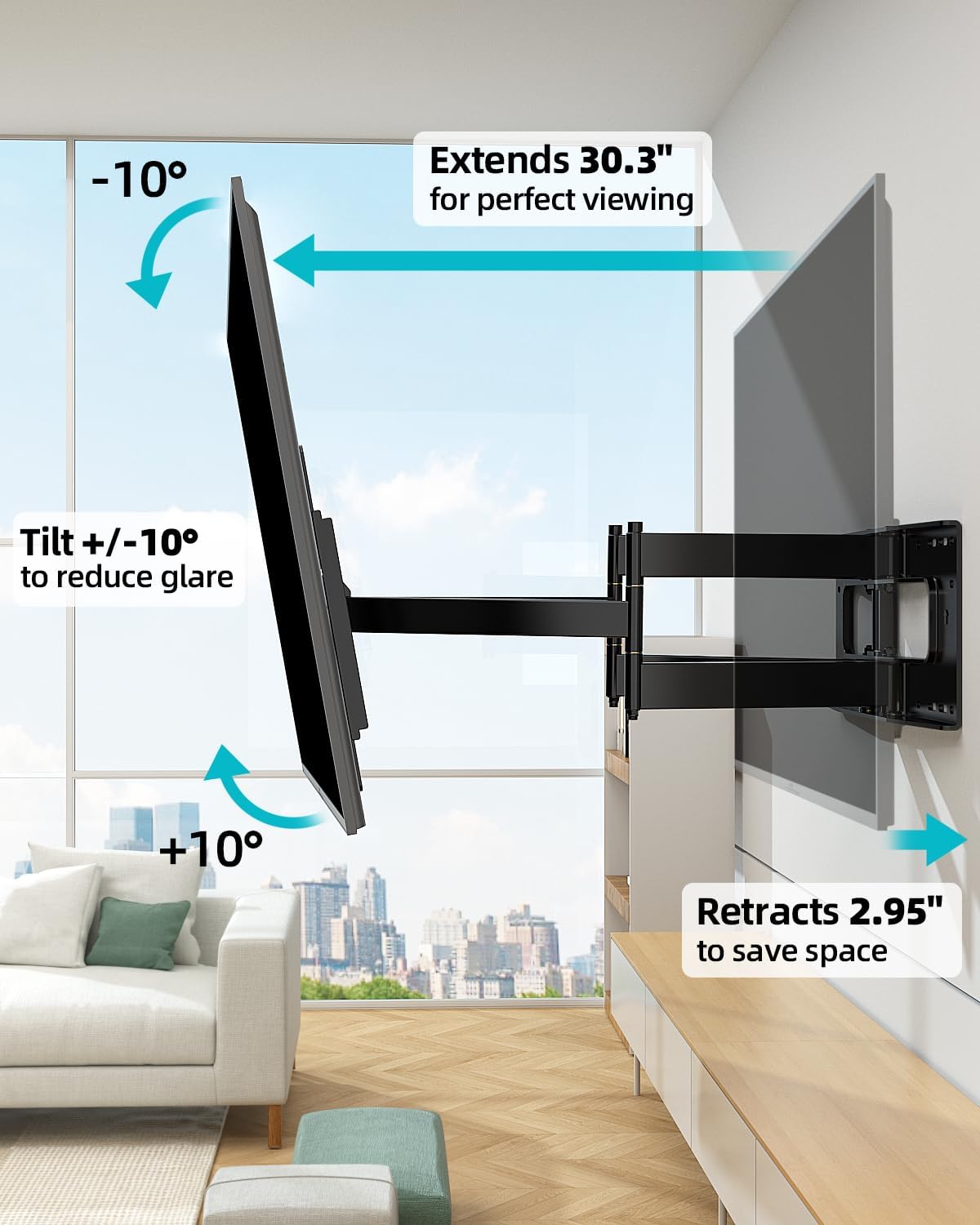
Image: Illustration of the mount's extension, retraction, and tilt features.
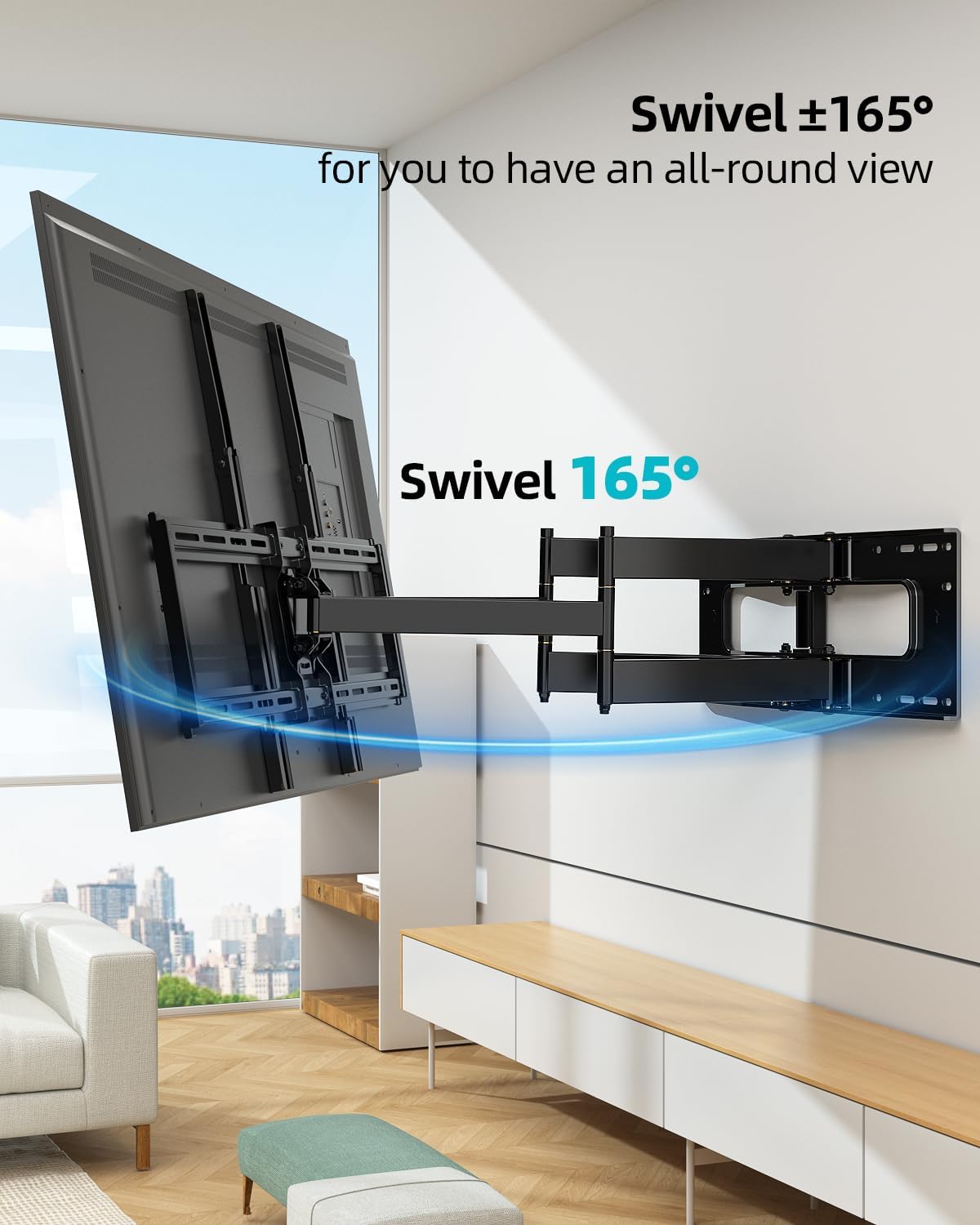
Image: Illustration of the mount's 165° swivel capability.
การซ่อมบำรุง
- การตรวจสอบปกติ: ตรวจสอบสกรูและน็อตทั้งหมดเป็นระยะ เพื่อให้แน่ใจว่ายังแน่นและปลอดภัยดีอยู่
- การทำความสะอาด: เช็ดฐานยึดด้วยผ้าแห้งนุ่มๆ หลีกเลี่ยงการใช้สารทำความสะอาดที่มีฤทธิ์กัดกร่อนหรือตัวทำละลาย
- การหล่อลื่น: Moving parts are designed for smooth operation and generally do not require lubrication. If movement becomes stiff, consult customer support.
การแก้ไขปัญหา
- ทีวีไม่ตั้งตรง: Use the level adjustment feature (±3°) to fine-tune the horizontal position. Ensure the wall plate was installed level initially.
- ฐานยึดดูหลวม: Re-check all lag bolts securing the wall plate to the wall and all screws attaching the TV brackets to the TV. Tighten any loose fasteners.
- ปัญหาในการเคลื่อนย้ายทีวี: Ensure no cables are snagged or pinched. Check for any obstructions. The mount is designed to be sturdy; some resistance is normal, especially with heavier TVs.
- ส่วนที่หายไป: Refer to the package contents list. If any parts are missing, contact HCMOUNTING customer service immediately.
การรับประกันและการสนับสนุน
HCMOUNTING has over 10 years of expertise in designing and manufacturing TV wall mounts. Our professional after-sales team is dedicated to providing comprehensive solutions and ensuring your complete satisfaction. For any assistance, questions, or concerns, please contact our customer service team.
Contact information can typically be found on the product packaging or our official webเว็บไซต์.
เอกสารที่เกี่ยวข้อง - HCM6802
 |
คำแนะนำในการติดตั้งขายึดซาวด์บาร์ HCMOUNTING HCMS5745 เอกสารนี้ให้คำแนะนำในการติดตั้งโดยละเอียดสำหรับ HCMOUNTING HCMS5745 Soundbar Bracket รวมถึงเคล็ดลับด้านความปลอดภัย รายการฮาร์ดแวร์ และคำแนะนำในการประกอบทีละขั้นตอนสำหรับการติดตัวยึดเข้ากับทีวีหรือขาตั้งทีวี |