โคไฟร์ ยูจี-06

คู่มือการใช้งานชุดหูฟังเล่นเกมไร้สาย KOFIRE UG-06

แบบอย่าง: ยูจี-06 | ยี่ห้อ: โคฟีเร

การแนะนำ

Thank you for choosing the KOFIRE UG-06 Wireless Gaming Headset. This manual provides detailed instructions for setup, operation, and maintenance to ensure you get the best experience from your new headset. The UG-06 is designed to deliver superior audio performance and comfort for gaming, work, and entertainment across multiple platforms.

มีอะไรอยู่ในกล่อง

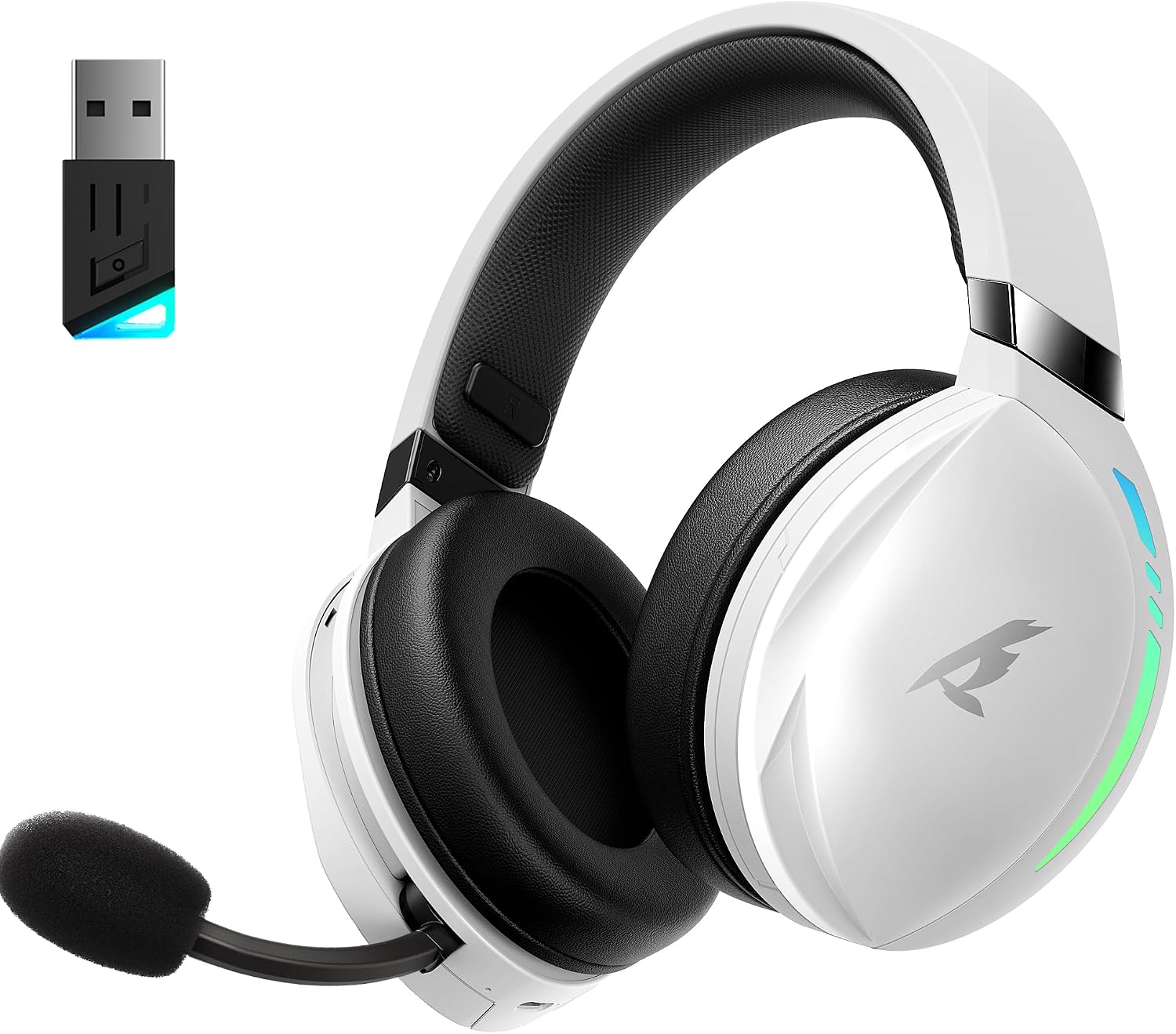
KOFIRE UG-06 Wireless Gaming Headset with USB dongle

The KOFIRE UG-06 Wireless Gaming Headset in white and black, shown with its USB dongle.

สินค้าเกินview และคุณสมบัติที่สำคัญ

Person wearing KOFIRE UG-06 headset experiencing 3D spatial audio

A user wearing the headset, illustrating the immersive 3D spatial audio experience.

Close-up of the hidden noise-canceling microphone on KOFIRE UG-06 headset

ภาพระยะใกล้ view of the retractable, hidden noise-canceling microphone.

KOFIRE UG-06 headset showing multi-platform compatibility with various devices

The headset demonstrating its compatibility with multiple gaming platforms and devices.

คำแนะนำการตั้งค่า

1. การชาร์จครั้งแรก

Before first use, fully charge your headset using the provided USB Type-C charging cable. Connect the Type-C end to the headset's charging port and the USB-A end to a compatible power source (e.g., computer USB port, USB wall adapter). The charging indicator light will show charging status.

2. Connecting via 2.4GHz USB Dongle (Recommended for Gaming)

  1. Insert the 2.4GHz USB dongle into an available USB port on your device (PS4, PS5, PC, Mac, Switch).
  2. Power on the headset by pressing and holding the Power button until you hear a confirmation tone or see the indicator light.
  3. The headset should automatically pair with the dongle. A solid indicator light on both the headset and dongle typically signifies a successful connection.
  4. Ensure the headset is selected as the audio output and input device in your system's sound settings.

3. การเชื่อมต่อผ่านบลูทูธ 5.4

  1. With the headset powered on, triple-click the Power button to switch to Bluetooth mode. The indicator light will flash, indicating pairing mode.
  2. On your device (phone, tablet, PC), go to Bluetooth settings and search for "KOFIRE UG-06" (or similar).
  3. Select the headset to pair. Once connected, the indicator light will become solid.

4. Connecting via 3.5mm Wired Connection

  1. Connect one end of the 3.5mm audio cable to the headset's 3.5mm port.
  2. ต่อปลายอีกด้านหนึ่งเข้ากับแจ็คเสียง 3.5 มม. บนอุปกรณ์ของคุณ
  3. The headset will operate in passive mode, drawing no power from its internal battery.

คำแนะนำการใช้งาน

การควบคุมชุดหูฟัง

Close-up of KOFIRE UG-06 headset controls on earcup

รายละเอียด view of the control buttons and volume wheel on the headset's earcup.

KOFIRE UG-06 headset with dynamic breathing RGB lights

The headset showcasing its dynamic breathing RGB lighting feature.

การซ่อมบำรุง

การแก้ไขปัญหา

ปัญหาสารละลาย
No sound/microphone not working (2.4GHz)
  • Ensure the USB dongle is securely plugged in.
  • Check if the headset is powered on and in 2.4GHz mode (triple-click power button).
  • Verify that the headset is selected as the default audio device in your computer/console settings.
  • Ensure the microphone is not muted on the headset.
ปัญหาการจับคู่บลูทูธ
  • Ensure the headset is in Bluetooth pairing mode (indicator light flashing).
  • ปิดใช้งานและเปิดใช้งานบลูทูธบนอุปกรณ์ของคุณอีกครั้ง
  • ลืมอุปกรณ์จากรายการบลูทูธของคุณและลองจับคู่ใหม่อีกครั้ง
อายุการใช้งานแบตเตอรี่สั้น
  • ตรวจสอบให้แน่ใจว่าชุดหูฟังชาร์จเต็มแล้วก่อนใช้งาน
  • Turn off RGB lighting when not needed, as it consumes more power.
  • ลดระดับเสียง
Sound quality issues (wired mode)
  • Ensure the 3.5mm audio cable is fully inserted into both the headset and the device.
  • Try a different 3.5mm audio cable to rule out cable issues.

ข้อมูลจำเพาะ

คุณสมบัติรายละเอียด
ชื่อรุ่นยูจี-06
เทคโนโลยีการเชื่อมต่อ2.4Ghz Wireless, Bluetooth 5.4, 3.5mm Wired
ขนาดไดร์เวอร์เสียง50 มิลลิเมตร
อายุการใช้งานแบตเตอรี่Up to 65 Hours (music/video, lights off), 40 Hours (2.4Ghz gaming)
เวลาในการชาร์จ3 ชั่วโมง
เวลาแฝงของเสียง15 มิลลิวินาที
การควบคุมเสียงรบกวนSound Isolation, ENC Noise Canceling Mic
อุปกรณ์ที่รองรับPS4, PS5, PC, Switch, Mac, Phone, Tablet
วัสดุLeather, Plastic, Polycarbonate (PC), Soft Memory Sponge Cushions
น้ำหนักสินค้า1.19 ปอนด์
ขนาดสินค้า7.5 x 1 x 7.9 นิ้ว

การรับประกันและการสนับสนุน

KOFIRE provides a reliable 24-hour online service to ensure customer satisfaction. For any issues, questions, or support needs, please contact KOFIRE customer service through the retailer's platform or the official KOFIRE webเว็บไซต์.

Please refer to your purchase documentation for specific warranty details and duration.

เอกสารที่เกี่ยวข้อง - ยูจี-06

พรีview คู่มือผู้ใช้ชุดหูฟังเล่นเกมไร้สาย UG-09
คู่มือผู้ใช้สำหรับ KOFIRE UG-09 Wireless Gaming Headset พร้อมรายละเอียดเกี่ยวกับไฟ LED การทำงานของปุ่ม โหมดการเชื่อมต่อ (2.4G และ Bluetooth) การตั้งค่าเสียงสำหรับพีซีและ PlayStation และข้อมูลจำเพาะทางเทคนิค
พรีview คู่มือผู้ใช้หูฟังไร้สาย UG-05
คู่มือผู้ใช้หูฟังไร้สาย UG-05 พร้อมรายละเอียดการตั้งค่า การใช้งาน คุณสมบัติ และข้อมูลจำเพาะ รวมถึงข้อมูลเกี่ยวกับการจับคู่ การชาร์จ โหมดเสียง และการแก้ไขปัญหา
พรีview คู่มือการแก้ไขปัญหาชุดหูฟังเล่นเกมไร้สาย Kofire XG One
การแก้ไขปัญหาและคู่มือผู้ใช้สำหรับ Kofire XG One Wireless Gaming Headset ครอบคลุมปัญหาทั่วไป วิธีแก้ไข และคำแนะนำการใช้งานสำหรับประเภทการเชื่อมต่อต่างๆ
พรีview คู่มือผู้ใช้และข้อมูลการรับประกันชุดหูฟังเกมมิ่งไร้สาย KOFIRE UT-01
คู่มือผู้ใช้และรายละเอียดการรับประกันที่ครอบคลุมสำหรับชุดหูฟังเล่นเกมไร้สาย KOFIRE UT-01 ครอบคลุมการตั้งค่า การใช้งาน คุณสมบัติ ข้อมูลจำเพาะ และการแก้ไขปัญหาสำหรับพีซี PlayStation และ Nintendo Switch ประกอบด้วยคำอธิบายไฟ LED ฟังก์ชันปุ่ม คู่มือการเชื่อมต่อ และการดูแลผลิตภัณฑ์
พรีview คู่มือผู้ใช้ชุดหูฟังสำหรับเล่นเกมไร้สาย Kofire XG ONE
คู่มือผู้ใช้ที่ครอบคลุมสำหรับ Kofire XG ONE Wireless Gaming Headset ซึ่งมีรายละเอียดเกี่ยวกับคุณลักษณะ การตั้งค่า และการใช้งานเพื่อประสบการณ์การเล่นเกมที่เหมาะสมที่สุด
พรีview คู่มือการแก้ไขปัญหา Kofire XG One เวอร์ชัน 2.0
คู่มือการแก้ไขปัญหาสำหรับหูฟัง Kofire XG One ครอบคลุมปัญหาทั่วไป เช่น การเชื่อมต่อบลูทูธ ปัญหาไมโครโฟน คุณภาพเสียง และปัญหาด้านพลังงาน รวมถึงข้อมูลอ้างอิงสถานะไฟ LED