1. บทนำ
The Andesfit Bluetooth Blood Pressure Monitor is designed for accurate and convenient blood pressure measurement at home. This device combines advanced technology with user-friendly features, allowing you to monitor your health effectively and share data with healthcare professionals. It is FDA Cleared and CE Certified, ensuring high quality and safety standards.

Figure 1: Andesfit Blood Pressure Monitor with included cuffs and companion app.
2. สิ่งที่รวมอยู่
Your Andesfit Blood Pressure Monitor package includes the following components:
- Andesfit Blood Pressure Monitor Unit
- Large Blood Pressure Cuff (9-17 inches arm circumference)
- Extra Large Blood Pressure Cuff (13-21 inches arm circumference)
- แบตเตอรี่ AA 4 ก้อน (รวมอยู่ด้วย)
- USB Type-C Cable (for power, not charging batteries)
- กระเป๋าเก็บของ
- คู่มือการใช้งาน (เอกสารนี้)

Figure 2: All components included in the Andesfit Blood Pressure Monitor package.
3. การตั้งค่า
3.1 การเปิดเครื่องอุปกรณ์
The monitor can be powered using the included AA batteries or via the USB Type-C cable. USB power is prioritized if both are connected.
- การติดตั้งแบตเตอรี่: Open the battery compartment on the back of the monitor. Insert the 4 AA batteries, ensuring correct polarity (+/-). Close the compartment.
- พลังงาน USB: Connect the provided USB Type-C cable to the monitor's USB port and plug the other end into a compatible USB power source (e.g., wall adapter, power bank). Note: The USB port is for power supply only and does not charge the batteries.

Figure 3: Dual power mode options for the monitor.
3.2 การติดปลอกแขน
Select the appropriate cuff size (Large or Extra Large) for your arm. Connect the cuff's air tube securely into the air jack on the side of the monitor unit.

Figure 4: The two included cuff sizes for optimal fit.
3.3 การติดตั้งแอปพลิเคชัน (ไม่บังคับ แต่แนะนำให้ทำ)
For enhanced tracking and data management, download the "ANDESFITBP" app from your smartphone's app store (Apple App Store or Google Play Store). The app allows for unlimited data storage and easy sharing.
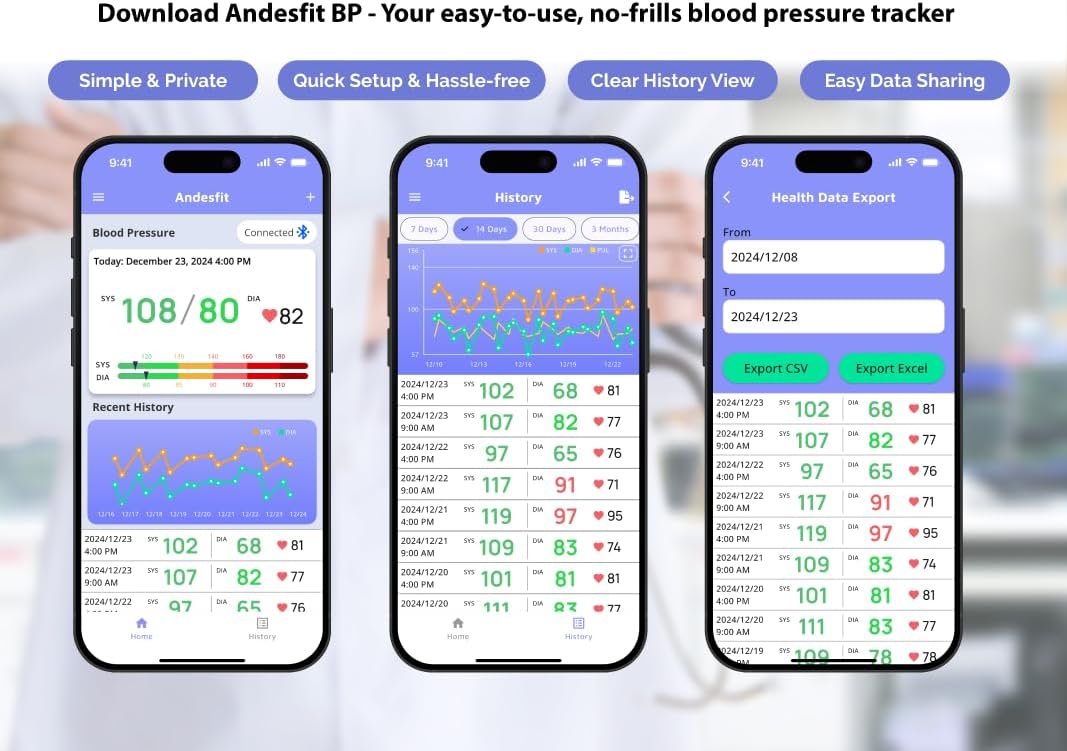
รูปที่ 5: เกินview of the Andesfit BP app features.
บันทึก: The app does not require personal data input or login, ensuring your privacy. Data is stored locally on your device and can be synced with Apple Health or Google Fit.
4. คู่มือการใช้งาน
4.1 การวัดผล
- เตรียมพร้อมสำหรับการวัด: นั่งในท่าที่สบาย โดยให้หลังพิงหมอนและวางเท้าให้ราบกับพื้น วางแขนข้างหนึ่งบนโต๊ะเพื่อให้ปลอกแขนอยู่ในระดับเดียวกับหัวใจ หลีกเลี่ยงการพูดคุยหรือขยับตัวขณะทำการวัด
- สวมปลอกแขน: Wrap the cuff around your bare upper arm, ensuring the air tube is positioned correctly (usually aligned with your middle finger). The cuff should be snug but not too tight.
- เริ่มการวัด: Press the "START/STOP" button on the monitor. The cuff will automatically inflate and then slowly deflate as it measures your blood pressure.
- อ่านผลลัพธ์: Your Systolic (SYS), Diastolic (DIA), and Pulse (PUL) readings will be displayed on the large 6-inch color LED screen. The screen also features a WHO color-coded indicator for easy interpretation of your blood pressure level.
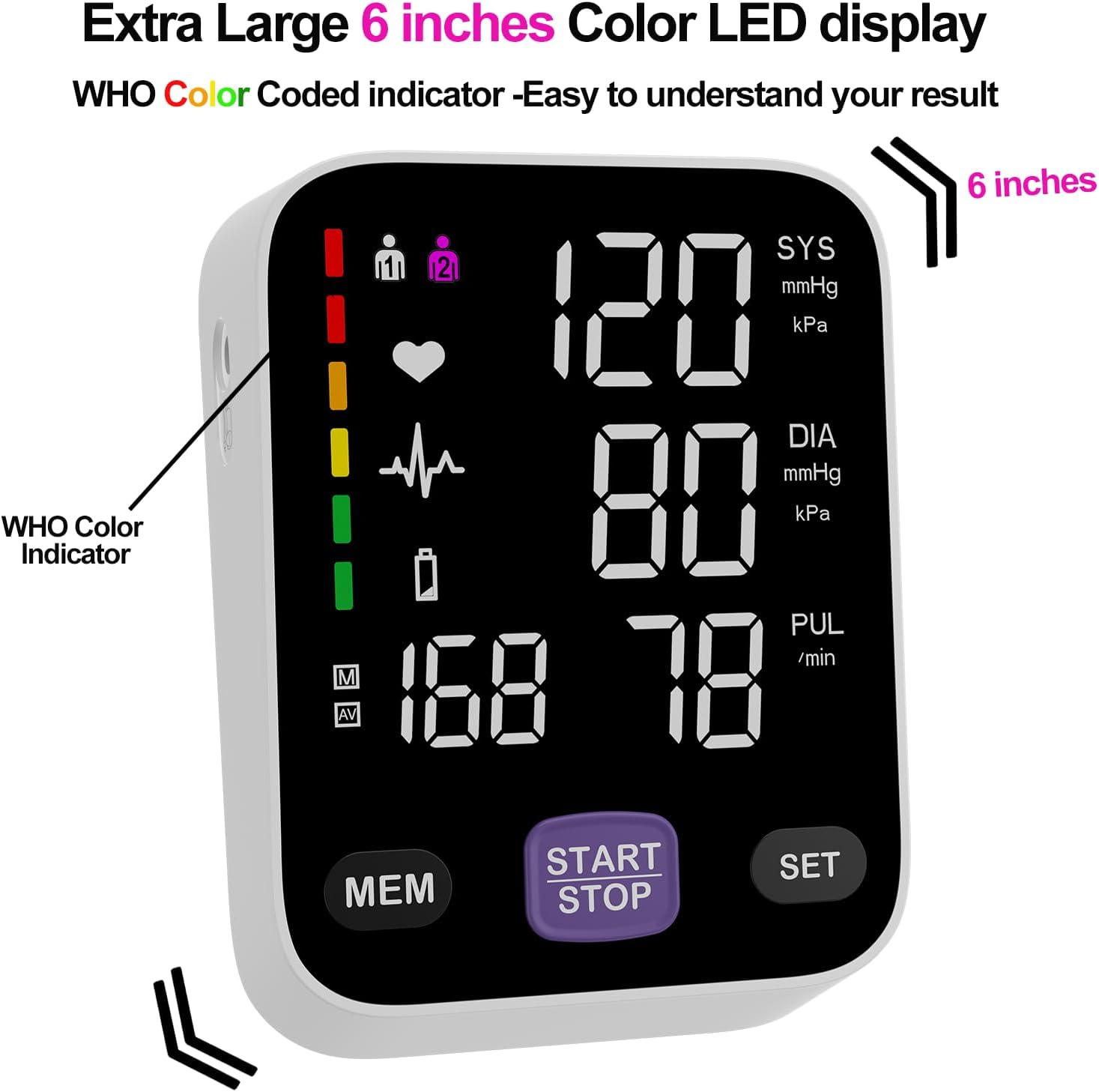
Figure 6: The monitor's large color LED display with WHO color indicator.
4.2 Using the App with the Monitor
Once the app is installed and Bluetooth is enabled on your smartphone, simply switch on your blood pressure monitor and open the app. The app will automatically connect to the device. Your measurement readings will be synced and stored in the app, providing a comprehensive history of your blood pressure trends.
You can export your data as CSV files to share with your doctor or for personal record-keeping.
Video 1: Official Andesfit video demonstrating the Bluetooth blood pressure monitor and app connectivity.
5. การบำรุงรักษา
- การทำความสะอาด: เช็ดจอภาพและสายรัดข้อมือด้วยผ้าแห้งนุ่มๆ ห้ามใช้สารทำความสะอาดที่มีฤทธิ์กัดกร่อนหรือแช่อุปกรณ์ในน้ำ
- พื้นที่จัดเก็บ: เก็บอุปกรณ์ไว้ในถุงเก็บที่ให้มาในที่แห้งและเย็น หลีกเลี่ยงแสงแดดโดยตรงและอุณหภูมิที่สูงหรือต่ำเกินไป
- การเปลี่ยนแบตเตอรี่: Replace all 4 AA batteries when the low battery indicator appears on the display.
6 การแก้ไขปัญหา
If you encounter issues with your Andesfit Blood Pressure Monitor, please refer to the following common solutions:
| ปัญหา | สาเหตุที่เป็นไปได้ | สารละลาย |
|---|---|---|
| ไม่มีจอแสดงผล/อุปกรณ์จะไม่เปิด | Batteries are low or incorrectly installed; USB cable not connected properly. | Replace batteries or ensure correct polarity. Check USB cable connection. |
| การอ่านที่ไม่ถูกต้อง | การสวมปลอกแขนไม่ถูกต้อง การขยับตัวหรือพูดคุยขณะวัด การจัดท่าทางที่ไม่ถูกต้อง | Ensure cuff is correctly applied and snug. Remain still and silent during measurement. Sit upright with feet flat. |
| แอปไม่เชื่อมต่อผ่านบลูทูธ | Bluetooth is off on phone/monitor; app permissions not granted. | Ensure Bluetooth is enabled on both devices. Check app permissions in phone settings. Restart app/monitor. |
7. ข้อมูลจำเพาะ
| คุณสมบัติ | รายละเอียด |
|---|---|
| ขนาดสินค้า | ยาว 4.5 นิ้ว x กว้าง 4.2 นิ้ว x หนา 1.9 นิ้ว |
| หมายเลขรุ่นสินค้า | A02-SEB |
| แบตเตอรี่ | แบตเตอรี่ AA 4 ก้อน (รวมอยู่ด้วย) |
| ผู้ผลิต | Shenzhen GoodlyMed Technology Co., Ltd. |
| แหล่งพลังงาน | Battery Powered / USB Type-C |
| ประเภทจอภาพ | LED Color Display (6 inches) |
| ขนาดข้อมือ | 9-17 inches (Large), 13-21 inches (Extra Large) |
| การจัดเก็บข้อมูล | 2 users * 199 readings (device), Unlimited (app) |
| การรับรอง | FDA Cleared & CE Certified |
8. การรับประกันและการสนับสนุน
Andesfit products are designed for reliability and performance. For information regarding warranty coverage and technical support, please contact Andesfit directly. You can find contact details on the official Andesfit webเว็บไซต์หรือผ่านแพลตฟอร์มการซื้อของคุณ
นโยบายการคืนสินค้า: This product typically has a 30-day return policy for refund or replacement, as per standard retail terms.


