1. บทนำ
This manual provides essential information for the operation and maintenance of your HOTWAV R8 Rugged Tablet. The HOTWAV R8 is designed for durability and performance, featuring a 10.1-inch HD+ display, Android 14 operating system, 12GB RAM, 128GB internal storage (expandable up to 1TB), a 10800mAh battery, and IP68/IP69K ratings for water and dust resistance. It is equipped with a Unisoc T606 Octa-Core processor, 4G Dual SIM support, 5G WiFi, Face ID, and OTG functionality.
โปรดอ่านคู่มือนี้อย่างละเอียดก่อนใช้งานอุปกรณ์เพื่อให้มั่นใจว่าอุปกรณ์จะทำงานได้อย่างถูกต้องและมีอายุการใช้งานยาวนาน

ภาพที่ 1.1: ด้านหน้าและด้านหลัง view of the HOTWAV R8 Rugged Tablet, showcasing its robust design and display.
2. เนื้อหาบรรจุภัณฑ์
ตรวจสอบว่ามีรายการทั้งหมดอยู่ในแพ็คเกจ:
- 1x HOTWAV R8 Rugged Tablet
- 1x User Manual/Warranty Card
- เครื่องชาร์จ 1x
- สาย USB Type-C 1x
- สาย OTG 1 เส้น
- 1x Explosion-proof Film (Screen Protector)

Image 2.1: All items included in the HOTWAV R8 Tablet package, laid out on a wooden surface.
3. การตั้งค่าเริ่มต้น
3.1. การชาร์จแท็บเล็ต
Before first use, fully charge the tablet using the provided charger and USB Type-C cable. Connect the USB cable to the tablet's charging port and the charger to a power outlet. The charging indicator will show the charging status.
3.2. การติดตั้งซิมการ์ดและการ์ด MicroSD
The HOTWAV R8 supports Dual SIM cards and a MicroSD card for expanded storage (up to 1TB). Locate the SIM card tray on the side of the tablet. Use the provided SIM ejector tool (if applicable, otherwise carefully open the tray) to open the tray. Insert your SIM cards and MicroSD card into the designated slots, ensuring correct orientation. Close the tray securely.

Image 3.1: Illustration of inserting SIM cards and a MicroSD card into the tablet's tray.
3.3. การเปิด/ปิดเครื่อง
- การเปิดเครื่อง: กดปุ่มเปิด/ปิดค้างไว้จนกว่าโลโก้ HOTWAV จะปรากฏขึ้น
- วิธีปิดเครื่อง: กดปุ่มเปิด/ปิดค้างไว้ จากนั้นเลือก "ปิดเครื่อง" จากตัวเลือกบนหน้าจอ
- ในการรีสตาร์ท: กดปุ่มเปิด/ปิดค้างไว้ จากนั้นเลือก "รีสตาร์ท" จากตัวเลือก
4. คู่มือการใช้งาน
4.1. การแสดงผลและการนำทาง
The tablet features a 10.1-inch HD+ display with 800 x 1200 pixels resolution. Navigate the Android 14 interface using touch gestures: tap, swipe, pinch-to-zoom. The display supports glove mode for operation in various conditions.

Image 4.1: The HOTWAV R8 tablet displaying the Android 14 operating system interface.
4.2. ประสิทธิภาพและการจัดเก็บ
Powered by a Unisoc T606 Octa-Core processor and 12GB RAM (4GB physical + 8GB virtual), the tablet handles multitasking efficiently. It comes with 128GB of internal storage, expandable up to 1TB via a MicroSD card.

Image 4.2: Diagram illustrating the Unisoc T606 Octa-Core processor, 12GB RAM, and 128GB ROM (expandable to 1TB).
4.3. ฟังก์ชันของกล้อง
The tablet is equipped with a 13MP rear camera and a 5MP front camera. Open the Camera application to capture photos and videos. Various modes and settings are available within the app.

Image 4.3: Visual representation of the 13MP rear camera and 5MP front camera on the HOTWAV R8 tablet.
4.4. การเชื่อมต่อ
- 4G สองซิม: Supports 4G LTE connectivity for mobile data and calls. Note: Not compatible with AT&T.
- อินเตอร์เน็ตไร้สาย 5G: Connect to wireless networks using 2.4GHz and 5GHz Wi-Fi bands.
- Bluetooth 5.1: Pair with Bluetooth accessories such as headphones and speakers.
- จีพีเอส: Integrated Beidou, Galileo, Glonass, and GPS for accurate navigation.

Image 4.4: The HOTWAV R8 tablet displaying a GPS map, highlighting its navigation capabilities.
4.5. Battery and OTG Functionality
The 10800mAh battery provides extended usage time. The tablet also supports OTG (On-The-Go) reverse charging, allowing it to act as a power bank to charge other devices using the provided OTG cable.

Image 4.5: Diagram illustrating the large 10800mAh battery capacity of the HOTWAV R8 tablet.

Image 4.6: The HOTWAV R8 tablet demonstrating its OTG reverse charging capability, charging a smartphone.
5. การบำรุงรักษาและความทนทาน
The HOTWAV R8 is built to withstand challenging environments, featuring IP68/IP69K water and dust resistance and MIL-STD-810H compliance for drop protection.
- ความต้านทานน้ำ: The tablet can be submerged in up to 2 meters of water for at least 30 minutes. Ensure all ports are securely sealed before exposure to water.
- กันฝุ่น: อุปกรณ์ได้รับการป้องกันฝุ่นเข้า
- การป้องกันการตก: ออกแบบมาให้ทนต่อการตกจากความสูงได้ถึง 1.2 เมตร
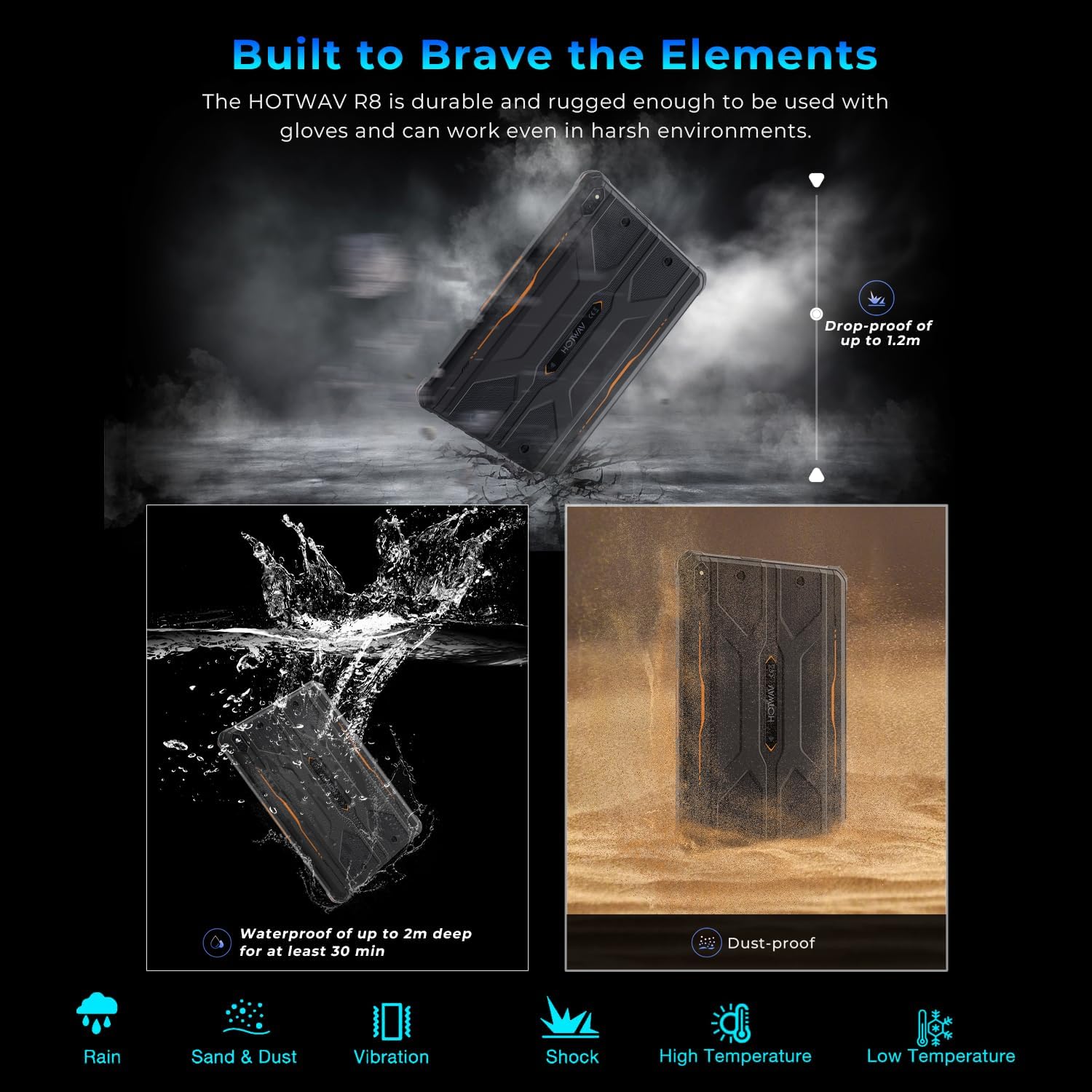
Image 5.1: Visual representation of the HOTWAV R8 tablet's resistance to drops, water immersion, and dust.
5.1. การทำความสะอาด
ใช้แบบนุ่มๆamp cloth to clean the tablet's surface. Avoid harsh chemicals or abrasive materials that could damage the device or its protective coatings.
5.2. การจัดเก็บ
Store the tablet in a cool, dry place away from direct sunlight and extreme temperatures when not in use for extended periods.
6 การแก้ไขปัญหา
6.1. อุปกรณ์ไม่เปิดเครื่อง
- ตรวจสอบให้แน่ใจว่าแบตเตอรี่ชาร์จเต็มแล้ว เสียบแท็บเล็ตเข้ากับเครื่องชาร์จอย่างน้อย 30 นาที
- กดปุ่มเปิด/ปิดค้างไว้ 10-15 วินาทีเพื่อรีสตาร์ทอัตโนมัติ
6.2 การเชื่อมต่อเครือข่ายไม่ดี
- Check if SIM cards are correctly inserted and activated.
- Verify Wi-Fi connection settings and router functionality.
- Restart the tablet and try connecting again.
6.3. หน้าจอสัมผัสไม่ตอบสนอง
- รีสตาร์ทแท็บเล็ต
- Ensure the screen is clean and free of debris or excessive moisture.
6.4. แบตเตอรี่หมดเร็ว
- ลดความสว่างหน้าจอ
- ปิดแอปพลิเคชันที่ไม่ได้ใช้งานซึ่งทำงานอยู่เบื้องหลัง
- ปิดใช้งาน Wi-Fi, Bluetooth หรือ GPS เมื่อไม่ได้ใช้งาน
7. ข้อมูลจำเพาะ
| คุณสมบัติ | รายละเอียด |
|---|---|
| ชื่อรุ่น | R8 |
| ระบบปฏิบัติการ | แอนดรอยด์ 14 |
| ขนาดหน้าจอ | 10.1 นิ้ว |
| ความละเอียดหน้าจอ | 800 x 1200 พิกเซล |
| โปรเซสเซอร์ | Unisoc T606 หน่วยประมวลผลอ็อกตาคอร์ |
| แรม | 12GB (4GB หน่วยความจำจริง + 8GB หน่วยความจำเสมือน) |
| การจัดเก็บข้อมูลภายใน | 128GB |
| พื้นที่เก็บข้อมูลแบบขยายได้ | สูงสุด 1TB ผ่านการ์ด MicroSD |
| กล้องหลัง | 13 MP |
| กล้องหน้า | 5 MP |
| ความจุของแบตเตอรี่ | 10800mAh |
| ประเภทไร้สาย | 802.11ax (5G WiFi), Bluetooth 5.1 |
| การเชื่อมต่อเซลลูล่าร์ | 4G Dual SIM (Note: Not compatible with AT&T) |
| การนำทาง | Beidou, Galileo, Glonass, GPS |
| ระดับความทนทาน | IP68, IP69K, MIL-STD-810H |
| น้ำหนักสินค้า | 2.72 ปอนด์ (ประมาณ 1.23 กก.) |
| ขนาดสินค้า | 9.9 x 6.6 x 0.6 นิ้ว (ประมาณ 25.1 x 16.8 x 1.5 ซม.) |
8. การรับประกันและการสนับสนุน
The HOTWAV R8 Rugged Tablet typically comes with a manufacturer's warranty. Please refer to the included Warranty Card in your package for specific terms and conditions. For technical support or warranty claims, please contact HOTWAV customer service.
- บริการลูกค้า: Refer to the contact information provided on the Warranty Card or the official HOTWAV webเว็บไซต์.
- แผนการคุ้มครอง: แผนการคุ้มครองเพิ่มเติมอาจมีจำหน่ายแยกต่างหาก
- การส่งคืน: Standard return policies apply. Please check with your retailer for details.

Image 8.1: HOTWAV customer support shield logo, indicating 24-hour customer service, 30-day return policy, and 2-year warranty.


