1. บทนำ
Thank you for choosing the EMITEVER WiFi Bluetooth 5-in-1 LED Controller. This advanced controller is designed to provide flexible and intelligent control over various DC12-24V PWM LED strip lights. It supports Single Color, CCT (Correlated Color Temperature), RGB, RGBW, and RGB+CCT LED strips, offering a comprehensive solution for your lighting needs. Control is seamlessly integrated through the Tuya Smart or Smart Life mobile applications, and it is compatible with popular voice assistants like Amazon Alexa and Google Home.

Figure 1.1: EMITEVER 5-in-1 LED Controller and its mobile application interface.
คุณสมบัติหลัก:
- ฟังก์ชั่น 5-in-1: Supports Single Color, CCT, RGB, RGBW, and RGB+CCT LED strips.
- การควบคุมแอป: Cloud-based 2.4GHz WiFi control via Tuya Smart or Smart Life APP.
- การควบคุมด้วยเสียง: Compatible with Amazon Alexa and Google Home Assistant.
- Group & Zonal Control: Manage multiple controllers simultaneously or in tailored zones.
- กลไกการป้องกันหลากหลาย: Includes overcurrent, overheat, short circuit, and reverse polarity protection.
- Auto-Transmitting & Auto-Sync: Extends control distance through signal relay.
NOTE: This controller is APP-controlled and does not work with RF remote controls. Ensure your LED strip is compatible with this controller. For any issues, please contact customer support.
2. การตั้งค่าและการติดตั้ง
2.1 แผนผังการเดินสายไฟ
The EMITEVER 5-in-1 LED Controller supports various LED strip configurations. Ensure correct wiring based on your LED strip type. The input voltage (DC12-24V) depends on your LED strip's requirements. The controller has two power interfaces for multiple power supply options.

รูปที่ 2.1: เกินview of wiring connections for different LED strip types.
Single Color LED Strip Wiring
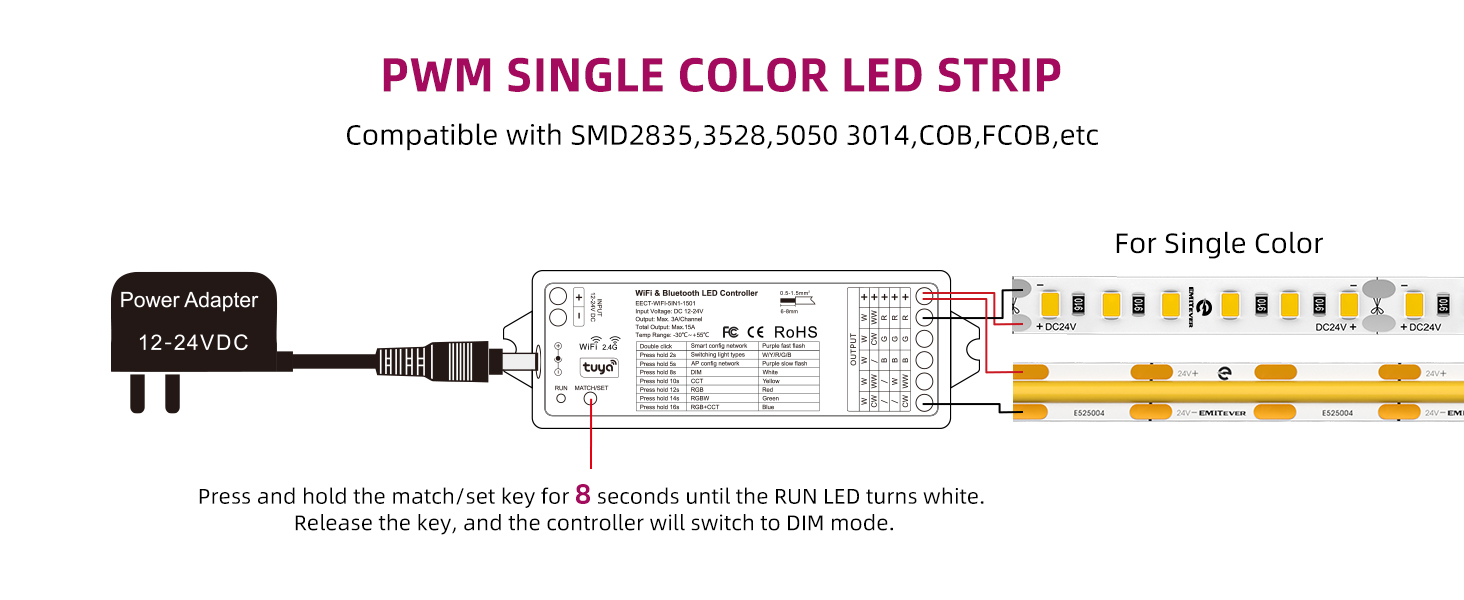
Figure 2.2: Connect the positive (+) and negative (W) terminals for single color strips. To switch to DIM mode, press and hold the match/set key for 8 seconds until the RUN LED turns white.
Dual Color CCT LED Strip Wiring
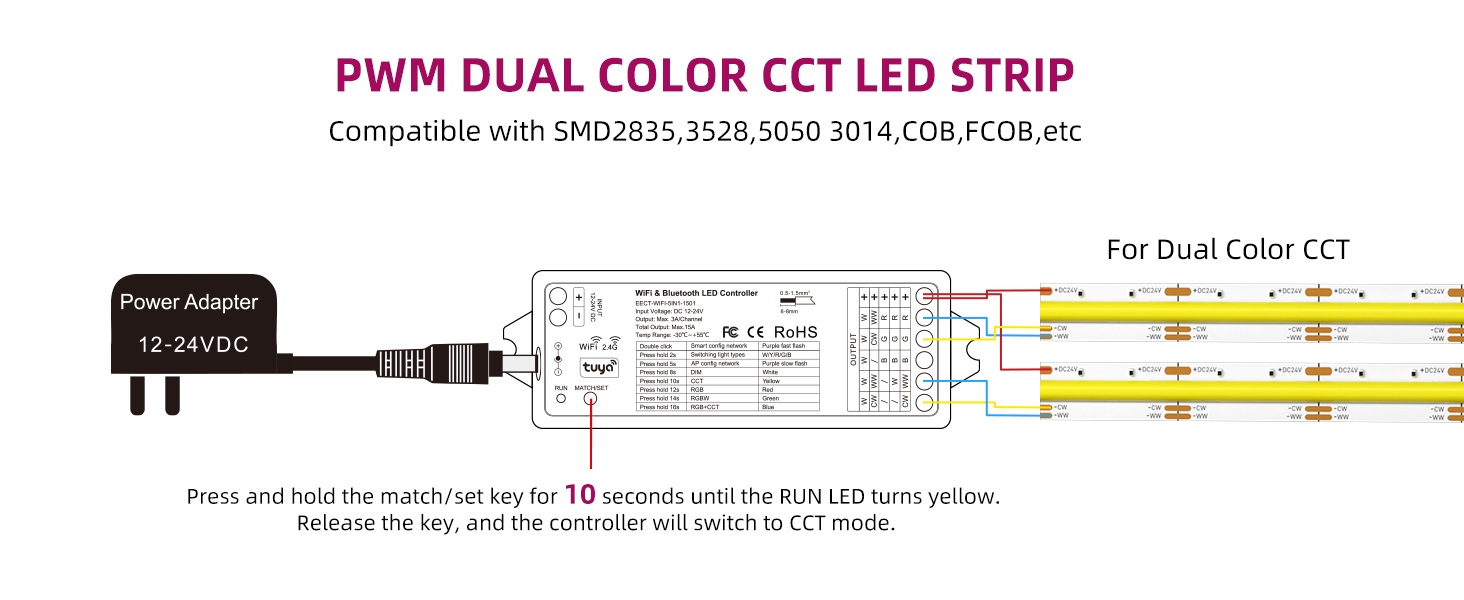
Figure 2.3: Connect the positive (+) and the Warm White (WW) and Cold White (CW) terminals for CCT strips. To switch to CCT mode, press and hold the match/set key for 10 seconds until the RUN LED turns yellow.
RGB LED Strip Wiring
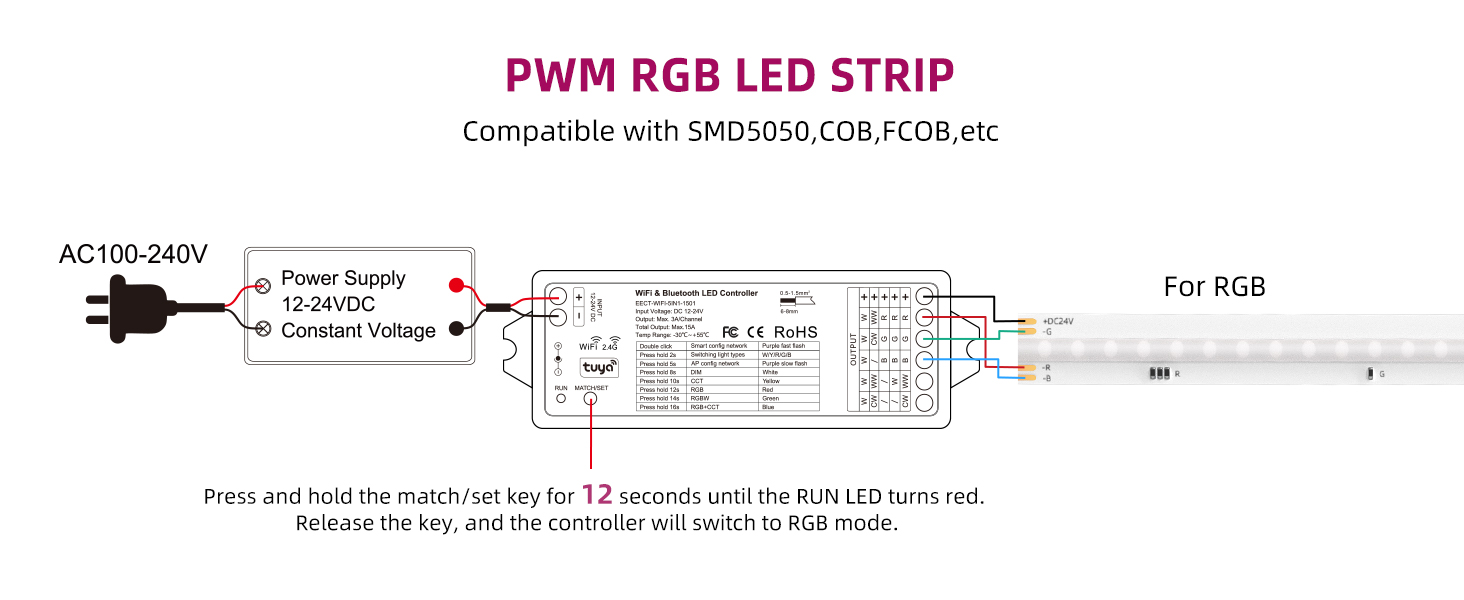
Figure 2.4: Connect the positive (+) and the Red (R), Green (G), and Blue (B) terminals for RGB strips. To switch to RGB mode, press and hold the match/set key for 12 seconds until the RUN LED turns red.
RGBW LED Strip Wiring
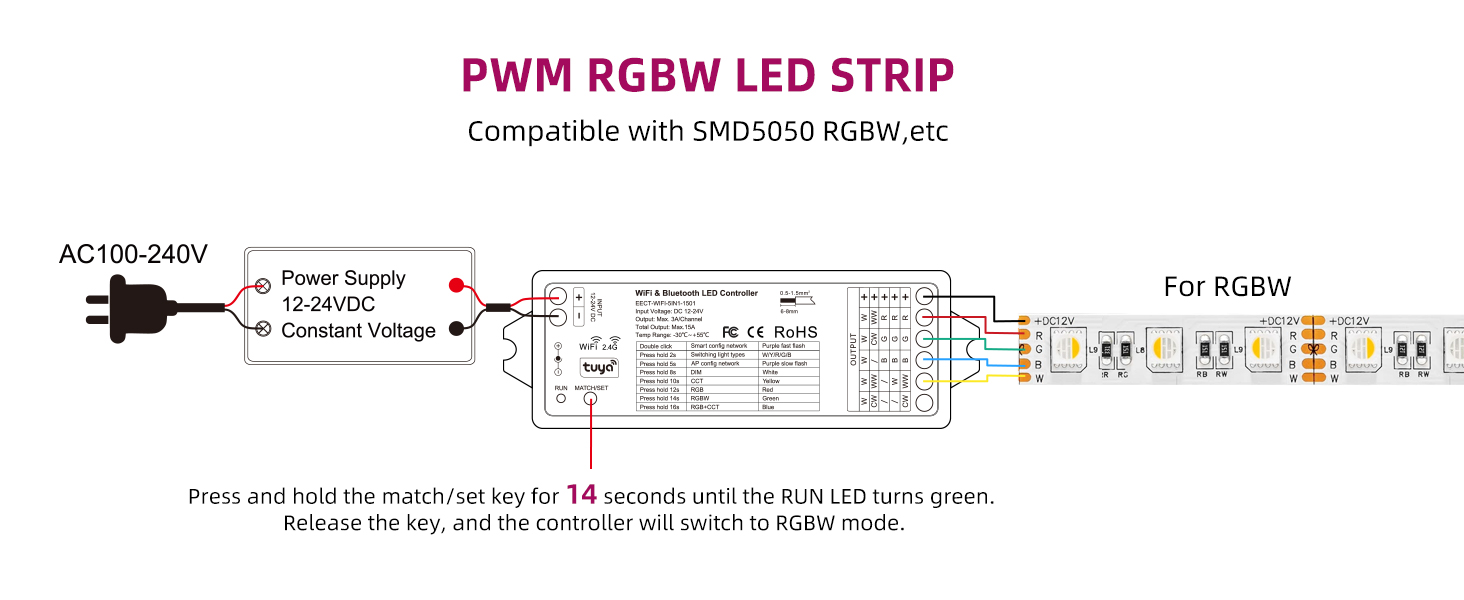
Figure 2.5: Connect the positive (+) and the Red (R), Green (G), Blue (B), and White (W) terminals for RGBW strips. To switch to RGBW mode, press and hold the match/set key for 14 seconds until the RUN LED turns green.
RGB+CCT LED Strip Wiring
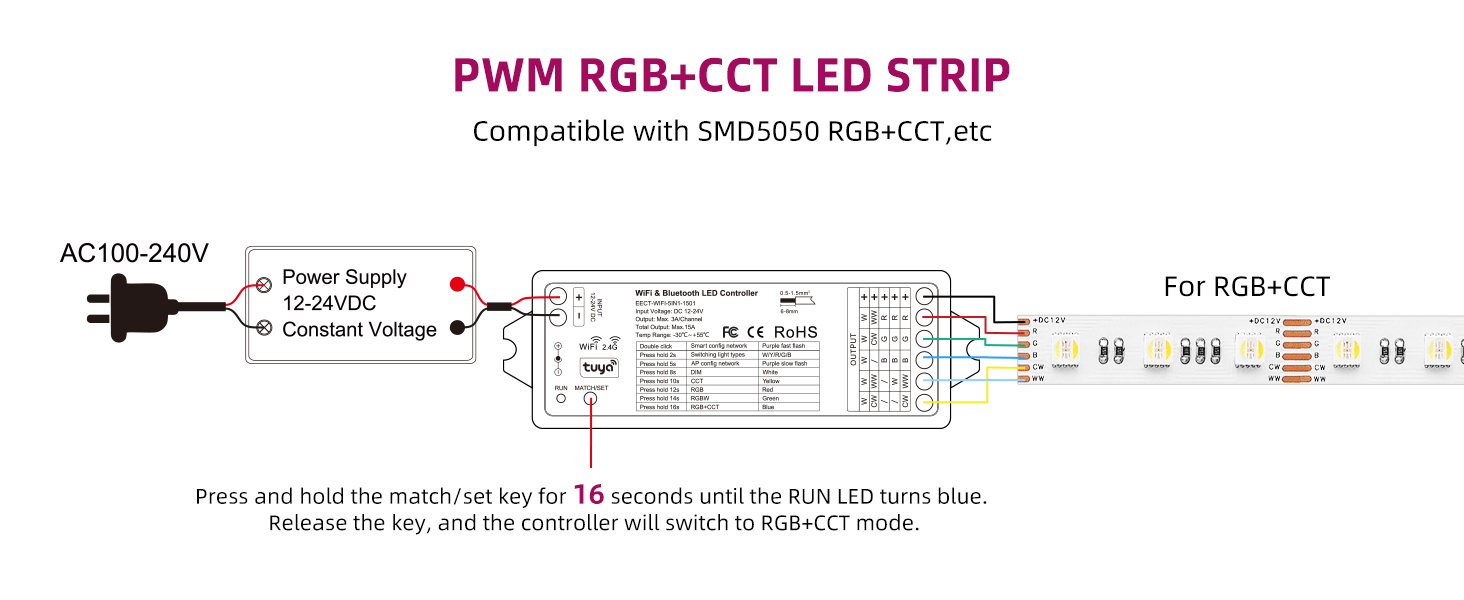
Figure 2.6: Connect the positive (+) and the Red (R), Green (G), Blue (B), Warm White (WW), and Cold White (CW) terminals for RGB+CCT strips. To switch to RGB+CCT mode, press and hold the match/set key for 16 seconds until the RUN LED turns blue.
2.2 การเชื่อมต่อสายไฟ
The controller supports DC12-24V input voltage. Ensure your power supply matches the voltage requirements of your LED strip. The controller features both a 5.5x2.1mm DC Jack Plug and 16-24AWG wire terminals for power input, offering flexibility in connection.
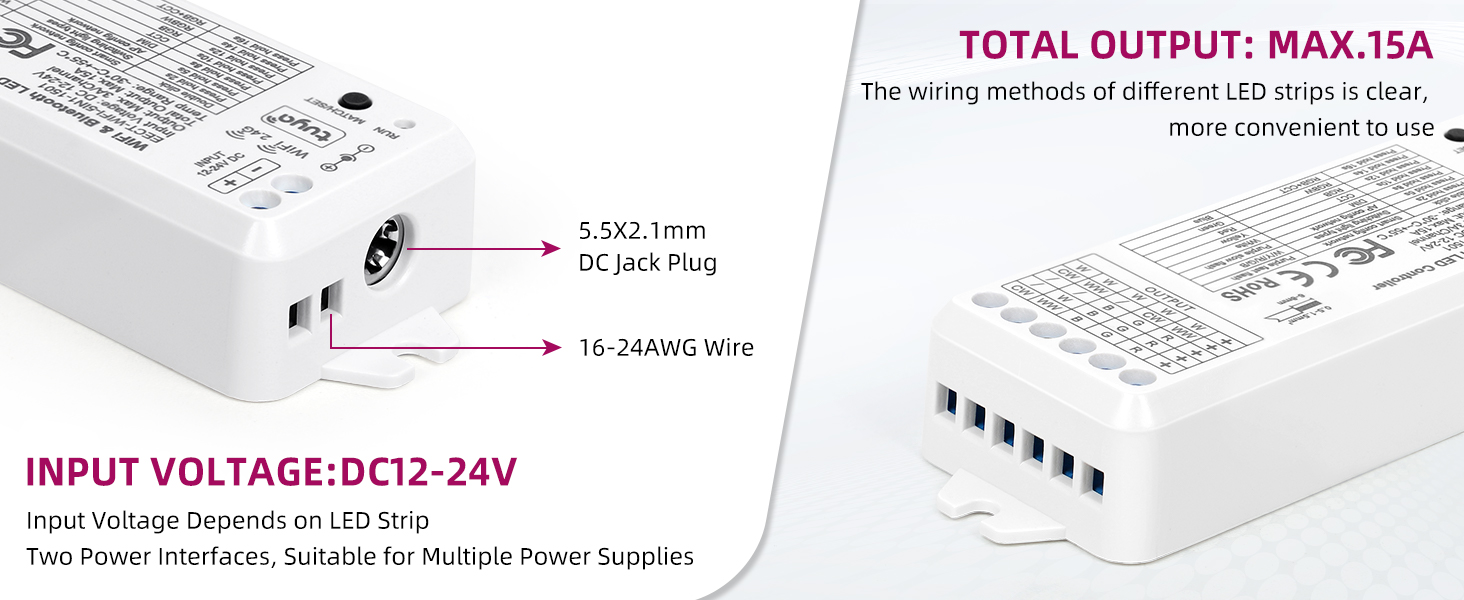
Figure 2.7: Power input options for the EMITEVER LED Controller.
2.3 APP Pairing (Tuya Smart / Smart Life)
- ดาวน์โหลด ตุยย่า สมาร์ท or ชีวิตที่ชาญฉลาด APP from your mobile app store.
- ลงทะเบียนหรือเข้าสู่ระบบบัญชีของคุณ
- เปิดสวิตช์ควบคุม LED
- Open the APP and follow the on-screen instructions to add a new device. The controller uses 2.4GHz WiFi for connection.
- Once connected, you can begin controlling your LED strips.
3. คู่มือการใช้งาน
3.1 การควบคุมแอพ
The Tuya Smart or Smart Life APP provides comprehensive control over your LED lighting. Functions include:
- RGB Color Adjustments: เลือกได้จาก 16 ล้านสี
- Color Temperature & Brightness Control: Adjust white light from warm to cool and dim/brighten as needed.
- Timer & Schedule Settings: Automate lighting on/off times.
- การแก้ไขฉาก: Create and customize lighting scenes for different moods or activities.
- การซิงค์เพลง: Lights can react to music.

Figure 3.1: Multifunctional control options available through the mobile application.
3.2 Third-Party Voice Control
Integrate your EMITEVER controller with Amazon Alexa or Google Home Assistant for convenient hands-free control. Simply link the Tuya Smart or Smart Life account within your voice assistant's app.

Figure 3.2: Voice control compatibility with Amazon Alexa and Google Home.
3.3 Group Setting and Zonal Control
Multiple controllers can be grouped together within the APP for simultaneous control. You can also establish multiple groups to enable zonal control, allowing tailored management of different areas in your space.

รูปที่ 3.3: อดีตample of group setting and zonal control for multiple lighting areas.
3.4 Long Distance Control (Cloud Data)
With cloud data support, you can control your lights from anywhere, as long as you have an internet connection on your smartphone.

Figure 3.4: Cloud-based control allows managing your lights from any location.
3.5 Auto-Transmitting & Auto-Sync Function
Each controller can transmit signals to another within 30 meters. As long as there is a strip controller within 30 meters, the control distance can be limitless, creating a mesh network for extended range.
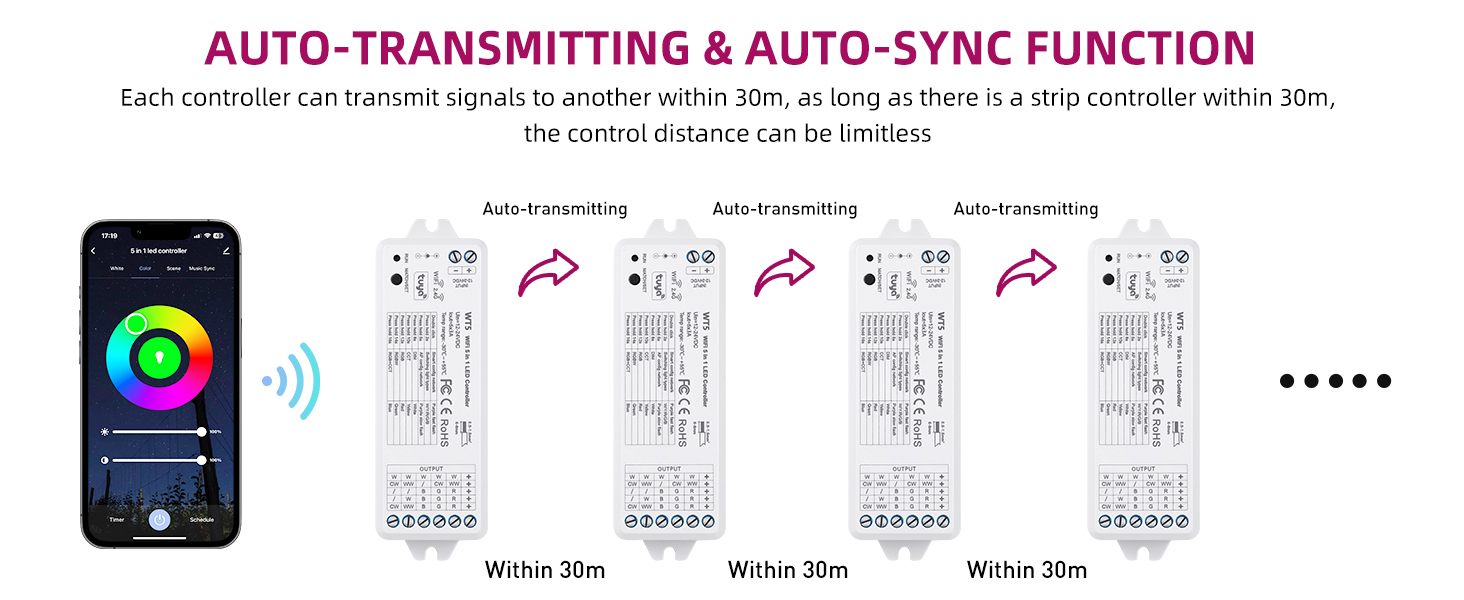
Figure 3.5: The auto-transmitting feature extends the effective control range.
3.6 Timer and Schedule Function
Set up timers and schedules to automatically turn your lights on or off, creating a personalized lighting routine.

Figure 3.6: Automate your lighting with timer and schedule functions.
3.7 การจัดการฉาก
The APP includes multiple default scenes (e.g., Night, Read, Working, Leisure) that you can use or customize to fit your preferences for any special moment.
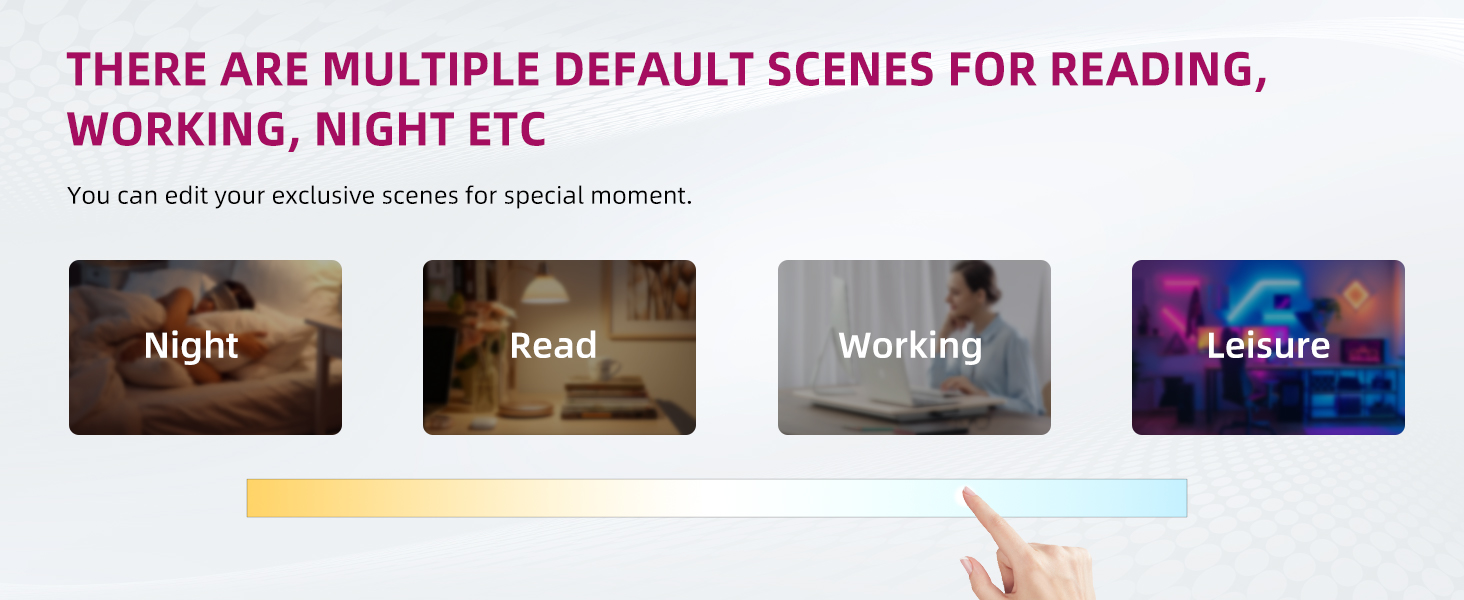
Figure 3.7: Pre-set and customizable lighting scenes.
3.8 การแชร์อุปกรณ์
All members in your family can share control of the devices, allowing multiple users to manage the lighting and perform scenes.

Figure 3.8: Device sharing feature for multi-user control.
4. การบำรุงรักษา
The EMITEVER 5-in-1 LED Controller is designed for long-term, reliable operation and requires no specific user maintenance. Keep the device in a dry environment and avoid exposure to extreme temperatures or direct moisture. Do not attempt to open or repair the device yourself, as this will void the warranty.
5 การแก้ไขปัญหา
If you encounter any issues during use, please consider the following common troubleshooting steps:
- ไม่มีไฟฟ้า: Ensure the power supply is correctly connected and providing the correct DC12-24V voltage. Check all wiring connections.
- ไฟไม่ตอบสนอง: Verify that the controller is properly paired with the Tuya Smart or Smart Life APP. Check your Wi-Fi connection (2.4GHz network required).
- Incorrect Color/Mode: Ensure the controller's mode is correctly set for your LED strip type (DIM, CCT, RGB, RGBW, RGB+CCT) by pressing and holding the match/set key for the specified duration (refer to Section 2.1).
- ปัญหาการควบคุมด้วยเสียง: Confirm that your Tuya Smart/Smart Life account is correctly linked to your Amazon Alexa or Google Home account. Check your internet connection.
- ปัญหาการเชื่อมต่อ: If the controller frequently disconnects, ensure it is within range of your 2.4GHz Wi-Fi router.
If the problem persists after attempting these steps, please contact EMITEVER customer support for further assistance.
6. ข้อมูลจำเพาะ
Detailed technical specifications for the EMITEVER 5-in-1 LED Controller:

Figure 6.1: Product dimensions of the EMITEVER 5-in-1 LED Controller.
| คุณลักษณะ | ค่า |
|---|---|
| ยี่ห้อ | ผู้ปล่อยสาร |
| หมายเลขรุ่น | EECT-WIFI-5IN1-1501 |
| อินพุต Voltage | 12-24 โวลต์ (DC) |
| กระแสไฟขาออกทั้งหมด | สูงสุด 15A |
| ช่วงอุณหภูมิในการทำงาน | -20°C ถึง +55°C |
| การเชื่อมต่อ | ไวไฟ (2.4GHz), บลูทูธ |
| ควบคุมแอป | Tuya สมาร์ท / ชีวิตสมาร์ท |
| ความเข้ากันได้ของผู้ช่วยเสียง | อเมซอน อเล็กซา, กูเกิล โฮม |
| ขนาด | 4.8 x 1.73 x 1.1 นิ้ว (โดยประมาณ) |
| น้ำหนักสินค้า | 2.89 ออนซ์ |
| วัสดุ | พลาสติก |
| การรับรอง | FCC, CE, RED, ROHS |
7. การรับประกันและการสนับสนุน
7.1 ข้อมูลการรับประกัน
The EMITEVER 5-in-1 LED Controller comes with a 5-year after-sale service warrantyการรับประกันนี้ครอบคลุมข้อบกพร่องด้านวัสดุและฝีมือการผลิตภายใต้การใช้งานปกติ โปรดเก็บหลักฐานการซื้อไว้เพื่อขอรับสิทธิ์การรับประกัน
7.2 การสนับสนุนลูกค้า
For technical assistance, troubleshooting, or warranty inquiries, please contact EMITEVER customer support. Refer to the product packaging or the official EMITEVER webเว็บไซต์สำหรับข้อมูลการติดต่อล่าสุด


