1. บทนำ
This manual provides detailed instructions for the installation, operation, and maintenance of your ieGeek S3 2K Wireless Outdoor Security Camera. Please read this manual thoroughly before using the product to ensure proper function and safety. Keep this manual for future reference.
2. สินค้าหมดview
The ieGeek S3 is a 2K battery-powered wireless security camera designed for both indoor and outdoor use. It features 180° pan rotation, smart motion detection, color night vision, and two-way audio communication.
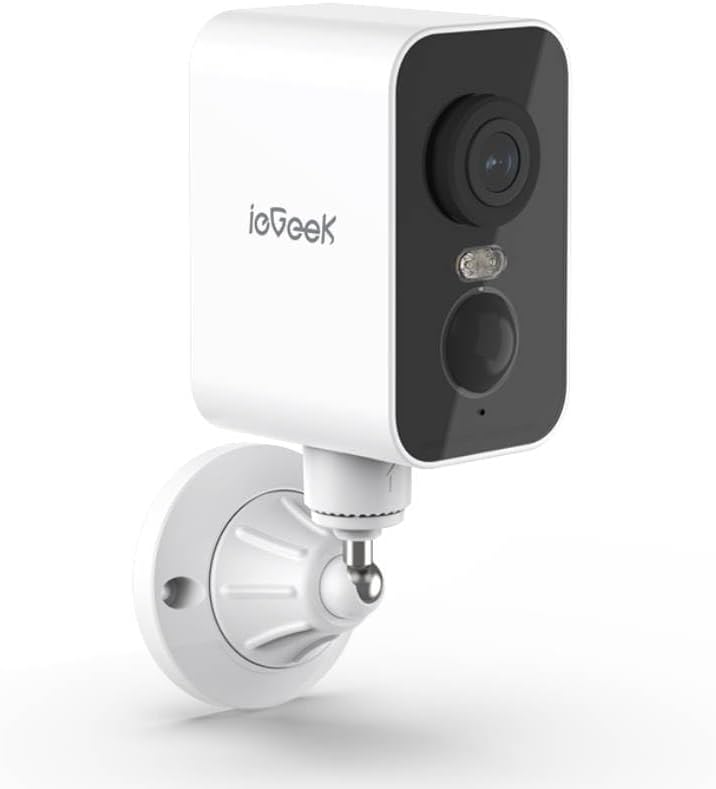
รูปที่ 2.1: ieGeek S3 2K Wireless Outdoor Security Camera. This image displays the white rectangular camera body with a black front panel housing the lens, an LED light, and a motion sensor. The camera is attached to a white wall-mount bracket.
2.1 อะไรอยู่ในกล่อง
- ieGeek S3 Battery Security Camera
- Bracket Screw Pack (for wall mounting)
- สติ๊กเกอร์ติดตั้ง
- สายชาร์จ
- คู่มือการใช้งาน (เอกสารนี้)
3. การตั้งค่า
3.1 การชาร์จกล้อง
Before initial use, fully charge the camera's built-in 5200 mAh lithium-ion battery using the provided charging cable. Connect the cable to the camera's charging port and a standard USB power adapter (not included). The charging indicator light will provide status.
3.2 การดาวน์โหลดแอปและสร้างบัญชี
- Download the 'CloudEdge' or 'ieGeek Cam' app from your smartphone's app store (iOS or Android).
- เปิดแอปและทำตามคำแนะนำบนหน้าจอเพื่อสร้างบัญชีใหม่หรือเข้าสู่ระบบหากคุณมีบัญชีอยู่แล้ว
3.3 Physical Installation (Wall Mount)
The ieGeek S3 camera is designed for wall mounting and has an IP65 waterproof rating, making it suitable for outdoor environments.
- Choose a suitable location for installation. Ensure the camera has a clear field of view and good Wi-Fi signal strength.
- Use the provided installation sticker to mark the drill holes on the wall.
- เจาะรูและติดตั้งพุกยึดผนัง
- Attach the mounting bracket to the wall using the screws from the bracket screw pack.
- Secure the camera to the mounting bracket. Adjust the camera angle as needed.
3.4 Device Pairing with App
- Ensure your smartphone is connected to a 2.4GHz Wi-Fi network. The camera supports 2.4GHz Wi-Fi only.
- Open the 'CloudEdge' or 'ieGeek Cam' app and tap the '+' icon to add a new device.
- เลือกโมเดลกล้องของคุณจากรายการ
- Follow the in-app instructions to power on the camera and reset it if necessary (usually by pressing a reset button until an indicator light flashes).
- Scan the QR code displayed on your phone screen with the camera lens. Hold the phone approximately 4-8 inches (10-20 cm) from the camera.
- Once the camera confirms successful scanning (e.g., with an audible prompt), proceed in the app to complete the connection.
- Name your camera and set its location.
4. การใช้งานกล้อง
4.1 สด View and Pan Rotation
จากหน้าจอหลักของแอป แตะที่กล้องของคุณเพื่อเข้าถึงภาพสด view. You can use the on-screen controls to pan the camera 180° horizontally to adjust the viewมุมอิง
4.2 การตรวจจับการเคลื่อนไหวและการแจ้งเตือน
The camera features AI motion detection. When motion is detected, the camera will record a video clip and send an alert to your smartphone. You can customize motion detection sensitivity and alert settings within the app.
4.3 เสียงสองทาง
ใช้ไมโครโฟนและลำโพงในตัวเพื่อการสื่อสารสองทาง แตะไอคอนไมโครโฟนในระหว่างการถ่ายทอดสด view เพื่อพูดผ่านกล้องและฟังเสียงจากตำแหน่งของกล้อง
4.4 การมองเห็นตอนกลางคืน
The camera automatically switches to color night vision in low-light conditions, providing clear surveillance up to 33 feet (10 meters) using its infrared LEDs.
4.5 ที่จัดเก็บวิดีโอ
วีดิโอที่บันทึกไว้tagสามารถจัดเก็บค่า e ได้สองวิธี:
- การ์ด TF (MicroSD): Insert a TF card (up to 128GB, not included) into the camera's designated slot for local storage.
- การเก็บข้อมูลบนคลาวด์: Optional cloud storage services may be available through the app for remote access and backup of recordings.
4.6 การรวม Alexa
The ieGeek S3 camera is compatible with Amazon Alexa. Follow the instructions in the 'CloudEdge' or 'ieGeek Cam' app to link your camera with your Alexa account for voice control and viewing live feeds on compatible Alexa devices.
5. การบำรุงรักษา
5.1 การชาร์จแบตเตอรี่
The camera is battery-powered. When the battery level is low, you will receive an alert via the app. Recharge the camera using the provided charging cable. Battery life varies based on usage and environmental factors.
5.2 การทำความสะอาด
To maintain optimal performance, periodically clean the camera lens and housing with a soft, dry cloth. Avoid using harsh chemicals or abrasive materials that could damage the camera's surface or lens.
6 การแก้ไขปัญหา
- กล้องไม่เชื่อมต่อกับ Wi-Fi: Ensure your Wi-Fi network is 2.4GHz. Check Wi-Fi signal strength at the camera's location. Try resetting the camera and repeating the pairing process.
- คุณภาพของภาพไม่ดี: ทำความสะอาดเลนส์กล้อง ตรวจสอบให้แน่ใจว่าไม่มีสิ่งกีดขวางใดๆ ในมุมมองของกล้อง viewตรวจสอบความเร็วการเชื่อมต่ออินเทอร์เน็ตของคุณ
- การตรวจจับการเคลื่อนไหวไม่ทำงาน: Verify motion detection is enabled in the app settings. Adjust sensitivity levels. Ensure the camera is positioned correctly to capture motion in the desired area.
- แบตเตอรี่หมดเร็ว: เหตุการณ์ตรวจจับการเคลื่อนไหวที่เกิดขึ้นบ่อยครั้งแบบสด view access, and two-way audio use can consume battery faster. Reduce motion detection sensitivity or frequency if possible. Ensure the camera is fully charged.
- ปัญหาแอป: Ensure the app is updated to the latest version. Try restarting the app or your smartphone.
7. ข้อมูลจำเพาะ
| ชื่อรุ่น | ieGeek Battery Cam S3 |
| ความละเอียดในการจับภาพวิดีโอ | 2K (ความละเอียดภาพนิ่งเทียบเท่า 3 ล้านพิกเซล) |
| การใช้งานภายใน/ภายนอกอาคาร | ในร่ม, กลางแจ้ง |
| แหล่งพลังงาน | Battery Powered (5200 mAh Lithium Ion) |
| เทคโนโลยีการเชื่อมต่อ | 2.4GHz Wi-Fi (Wi-Fi 6 Technology) |
| ประเภทตัวควบคุม | CloudEdge, Amazon Alexa, ieGeek Cam App |
| ประเภทการติดตั้ง | ติดผนัง |
| คุณสมบัติพิเศษ | Pan Rotating 180°, AI Motion Detection, Color Night Vision, 2-Way Audio |
| Viewอิงแองเกิล | 180 องศา (กระทะ) |
| ช่วงการมองเห็นตอนกลางคืน | 33 ฟุต (10 เมตร) |
| อัตราเฟรม | 15 เฟรมต่อวินาที |
| ระดับความต้านทานต่อน้ำ | กันน้ำ (IP65) |
| ตัวเลือกการจัดเก็บข้อมูล | TF Card (MicroSD) up to 128 GB, Cloud Storage (optional) |
| ขนาด (กว้าง x ยาว x สูง) | 3.9 x 1 x 3.9 นิ้ว |
| น้ำหนักสินค้า | 11.2 ออนซ์ |
| อุปกรณ์ที่รองรับ | Alexa, Smartphone, Smartwatch, Tablet |
8. การรับประกันและการสนับสนุน
For warranty information, please refer to the specific terms provided at the time of purchase or contact ieGeek customer support directly. If you encounter any issues or have questions regarding your ieGeek S3 camera, please visit the official ieGeek webเข้าชมเว็บไซต์หรือติดต่อทีมบริการลูกค้าเพื่อขอความช่วยเหลือ
การสนับสนุนทางออนไลน์: Visit the ieGeek Store on Amazon


