1. บทนำ
This manual provides essential instructions for the safe and effective operation of your Boartechs TO1204D Digital Oscilloscope. The TO1204D is a versatile 4-channel touch screen digital oscilloscope featuring a built-in 25MHz signal source and multimeter functions. It is designed for various electrical testing, measurement, and inspection applications.
โปรดอ่านคู่มือนี้อย่างละเอียดก่อนใช้งานอุปกรณ์ และเก็บรักษาไว้เพื่อใช้อ้างอิงในอนาคต
2. ข้อมูลด้านความปลอดภัย
To prevent electric shock or personal injury, and to avoid damage to the oscilloscope or the equipment under test, observe the following safety precautions:
- Use the oscilloscope only as specified in this manual.
- Do not open the oscilloscope casing. มอบหมายงานซ่อมบำรุงให้แก่บุคลากรที่มีคุณสมบัติเหมาะสม
- Do not operate the oscilloscope in wet or damp เงื่อนไข.
- Do not operate the oscilloscope in explosive atmospheres.
- ตรวจสอบให้แน่ใจว่ามีการระบายอากาศที่เหมาะสมเพื่อป้องกันภาวะความร้อนมากเกินไป
- Use only the power adapter and accessories supplied or recommended by the manufacturer.
- Always connect the ground lead of the test probe to the circuit ground before connecting the input lead.
- The device features a built-in high voltage protection module, capable of withstanding up to 400V continuous voltage. However, always exercise caution and avoid exceeding specified input limits.
3. เนื้อหาบรรจุภัณฑ์
Verify that all items are present and in good condition. If any items are missing or damaged, contact your supplier.
- Boartechs TO1204D Digital Oscilloscope
- Oscilloscope Probes (Quantity may vary)
- อะแดปเตอร์แปลงไฟ
- สาย USB
- คู่มือการใช้งาน (เอกสารนี้)
4. สินค้าหมดview
The Boartechs TO1204D is a compact and portable digital oscilloscope with a 7-inch touch screen display. It integrates oscilloscope, signal generator, and multimeter functionalities into a single device.
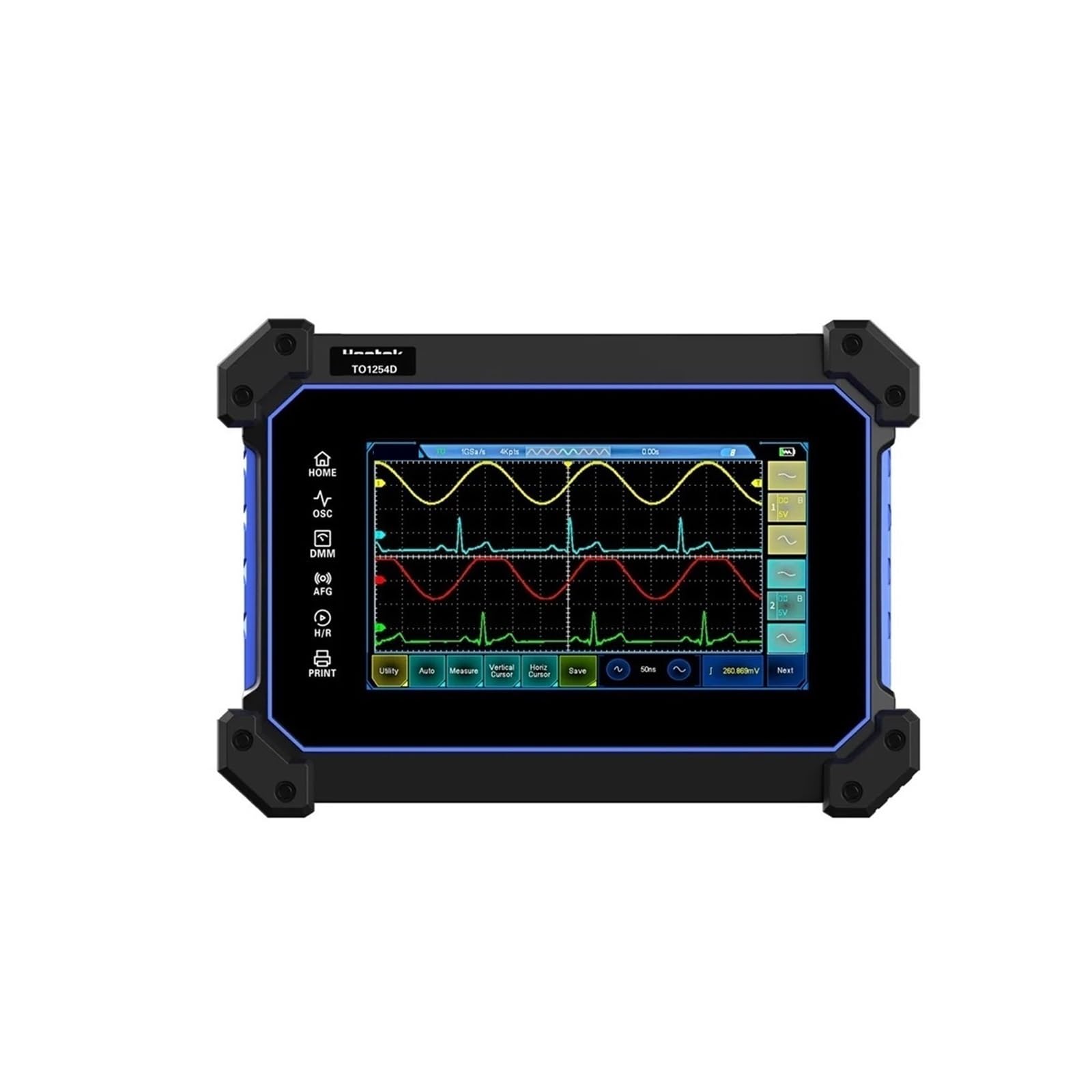
รูปที่ 4.1 : ด้านหน้า view of the Boartechs TO1204D Digital Oscilloscope, showing the screen and side controls.

รูปที่ 4.2: รายละเอียดด้านหน้า view of the oscilloscope, highlighting the 7-inch display with waveform visualization.
4.1 อินเทอร์เฟซหน้าจอสัมผัส
The device features an 800x480 pixel touch screen for intuitive control and waveform analysis. You can adjust screen brightness and background grid brightness to suit your viewการตั้งค่าไอเอ็นจี

Figure 4.3: A hand demonstrating touch screen interaction for waveform manipulation and settings adjustment.
4.2 พอร์ตอินพุต/เอาต์พุต
The rear panel of the oscilloscope provides various input and output ports for connectivity.

รูปที่ 4.4: ด้านหลัง view of the oscilloscope, displaying the AFG (Arbitrary Function Generator) output and four channel inputs (CH1, CH2, CH3, CH4).
พอร์ตสำคัญได้แก่:
- AFG Output: For the built-in DDS signal generator.
- CH1-CH4: Four oscilloscope input channels.
- อินเทอร์เฟซ USB: For connection to a computer for data transfer and secondary analysis.
- กำลังไฟเข้า: สำหรับการเชื่อมต่ออะแดปเตอร์ไฟฟ้า
5. การตั้งค่า
Follow these steps to set up your Boartechs TO1204D Digital Oscilloscope:
- การเชื่อมต่อไฟฟ้า: Connect the provided power adapter to the oscilloscope's power input port and then to a suitable power outlet.
- การเชื่อมต่อโพรบ: Connect the oscilloscope probes to the desired input channels (CH1-CH4) on the rear panel. Ensure a secure connection.
- การต่อลงดิน: Always connect the ground clip of the probe to the ground point of the circuit under test before connecting the probe tip to the signal point.
- เปิดเครื่อง: Press the power button to turn on the oscilloscope. The device will boot up and display the main interface.
6. คู่มือการใช้งาน
The TO1204D offers various functions accessible via its touch screen and dedicated buttons.
6.1 การใช้งานออสซิลโลสโคปขั้นพื้นฐาน
- One-Button Automatic Adjustment: The oscilloscope is equipped with an efficient one-button automatic function. Press the dedicated 'Auto' button or select the 'Auto' option on the screen to automatically adjust vertical, horizontal, and trigger settings to display the measured waveform clearly. This eliminates tedious manual adjustments.
- มาตราส่วนแนวตั้ง (โวลต์/ดิวิชั่น): Adjust the vertical scale to control the amplitude of the displayed waveform. Use the touch screen controls or dedicated knobs (if present) to change the Volts/Div setting for each channel.
- มาตราส่วนแนวนอน (เวลา/ดิวิชั่น): Adjust the horizontal scale to control the time base of the displayed waveform. This changes the time represented by each horizontal division on the grid.
- การตั้งค่าทริกเกอร์: Configure the trigger level, mode (e.g., Edge, Pulse), and source to stabilize repetitive waveforms.
6.2 ฟังก์ชันการวัด
- การวัดเคอร์เซอร์: Utilize the cursor measurement function for convenient manual measurement of waveform parameters such as period, frequency, and voltage. Activate cursors from the measurement menu and drag them on the screen to the desired points.
- การวัดอัตโนมัติ: The oscilloscope can perform various automatic measurements (e.g., Vpp, Vmax, Vmin, Freq, Period, Rise Time, Fall Time). Select these from the measurement menu.
6.3 Signal Generator (DDS)
The built-in DDS signal generator can output various waveforms. Access the signal generator function from the main menu. Configure waveform type (e.g., Sine, Square, Triangle), frequency, and amplitude using the touch screen controls. Connect the AFG output port to your circuit.
6.4 ฟังก์ชันมัลติมิเตอร์
Switch to the multimeter mode to perform basic electrical measurements such as voltage, current, and resistance. Connect test leads to the appropriate multimeter input jacks (V/Ω/C, COM, mA, A) located on the side panel.
6.5 การจัดเก็บข้อมูลและการเชื่อมต่อ
- Waveform Saving: The device includes 1GB of built-in storage space. Use the 'Save' function to store waveforms and screen captures.
- อินเทอร์เฟซ USB: Connect the oscilloscope to a computer using the provided USB cable. This allows for secondary analysis of captured waveforms and data transfer using compatible software.
6.6 FFT Display Function
The FFT (Fast Fourier Transform) display function allows you to analyze the frequency spectrum characteristics of a signal. Activate FFT mode from the display or analysis menu to view the signal in the frequency domain.
7. การบำรุงรักษา
การบำรุงรักษาอย่างถูกต้องจะช่วยให้เครื่องออสซิลโลสโคปของคุณมีอายุการใช้งานยาวนานและมีความแม่นยำ
- การทำความสะอาด: Clean the oscilloscope's exterior with a soft, damp cloth. Do not use abrasive cleaners or solvents. For the screen, use a screen-specific cleaning solution and a microfiber cloth.
- พื้นที่จัดเก็บ: When not in use, store the oscilloscope in a dry, dust-free environment, away from direct sunlight and extreme temperatures.
- การดูแลโพรบ: Handle probes carefully. Avoid bending or stressing the probe cables. Store probes properly to prevent damage.
- การสอบเทียบ: แนะนำให้ทำการสอบเทียบเป็นระยะโดยช่างผู้ชำนาญการ เพื่อรักษาความแม่นยำในการวัด
8 การแก้ไขปัญหา
หากคุณพบปัญหาเกี่ยวกับออสซิลโลสโคป โปรดดูปัญหาและวิธีแก้ไขทั่วไปต่อไปนี้:
- ไม่มีไฟฟ้า:
- Ensure the power adapter is securely connected to both the oscilloscope and a working power outlet.
- ตรวจสอบว่าเต้ารับไฟฟ้าใช้งานได้หรือไม่
- ไม่มีการแสดงรูปคลื่น:
- Verify that the probe is correctly connected to the input channel and the circuit under test.
- Check the probe's attenuation setting (1X, 10X) and ensure it matches the oscilloscope's setting.
- Use the 'Auto' button to automatically adjust settings.
- ปรับมาตราส่วนแนวตั้ง (โวลต์/ดิวิชั่น) และแนวนอน (เวลา/ดิวิชั่น)
- Check trigger settings; ensure the trigger level is within the signal's ampความสูง
- รูปคลื่นไม่เสถียร:
- Adjust the trigger level and trigger mode.
- Ensure the signal is stable and within the oscilloscope's bandwidth.
- หน้าจอสัมผัสไม่ตอบสนอง:
- รีสตาร์ทอุปกรณ์
- ตรวจสอบให้แน่ใจว่าหน้าจอสะอาดและไม่มีเศษขยะ
หากปัญหายังคงอยู่ โปรดติดต่อฝ่ายสนับสนุนลูกค้า
9. ข้อมูลจำเพาะ
| คุณสมบัติ | ข้อมูลจำเพาะ |
|---|---|
| หมายเลขรุ่น | TO1204D (also TO1154D/TO1254D variants) |
| ช่องทางดิจิตอล | 4 |
| แบนด์วิธ | 150MHz / 200MHz / 250MHz (Model dependent) |
| เรียลไทม์ampลิงอัตรา | 1GSa/S |
| อัตราการบันทึกรูปคลื่นสูงสุด | 30,000 วัตต์-ฟุต/วินาที |
| ความยาวบันทึก | 8M |
| ขนาดจอแสดงผล | 7 นิ้วขึ้นไป |
| ความละเอียดการแสดงผล | 800*480 พิกเซล |
| พื้นที่จัดเก็บในตัว | 1GB |
| แหล่งสัญญาณ | 25MHz DDS Signal Generator |
| เล่มสูงtagการป้องกันอี | Up to 400V continuous voltage |
| น้ำหนักสินค้า | 14.1 ออนซ์ |
| ขนาดแพ็คเกจ | 1.18 x 0.79 x 0.39 นิ้ว |
| จำเป็นต้องประกอบ | เลขที่ |
| จำนวนชิ้น | 1 |
10. การรับประกันและการสนับสนุน
Boartechs products are designed for reliability and performance. For warranty information, technical support, or service inquiries, please refer to the warranty card included with your product or contact your point of purchase. Keep your purchase receipt as proof of purchase.


