1. บทนำ
The BOYA BY-V10 is a compact and lightweight wireless lavalier microphone system designed for use with USB-C compatible devices, including Android smartphones, iPhone 15/16, iPads, and laptops. It offers high-quality audio recording with features like one-click noise cancellation and stable wireless transmission, making it suitable for various content creation scenarios.

Image: The BOYA BY-V10 USB-C Wireless Lavalier Microphone system, showing the transmitter and receiver.
วิดีโอ: จบแล้วview of the BOYA BY-V10 Wireless Microphone, highlighting its ease of use for recording.
2. อะไรอยู่ในกล่อง
ตรวจสอบว่ามีส่วนประกอบทั้งหมดอยู่ในแพ็คเกจของคุณ:
- เครื่องส่งสัญญาณ 1 เครื่อง (TX)
- 1 x Receiver (RXU) with USB-C connector
- 1 x สายเคเบิล USB-A ถึง USB-C สำหรับชาร์จ
- 1 x โฟมกระจกหน้ารถ
- 1 x กระเป๋าใส่ของ
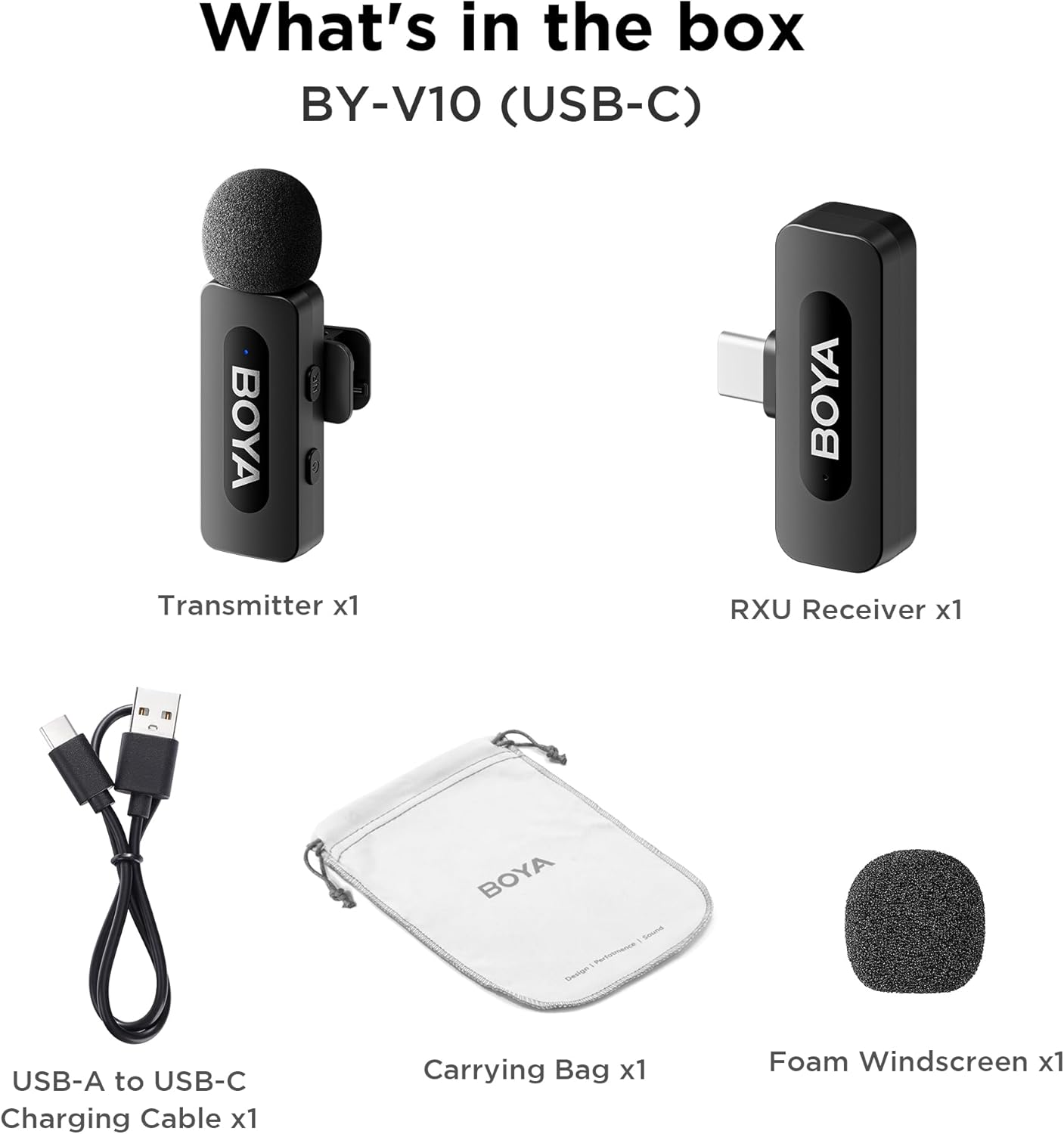
Image: The complete packing list for the BY-V10, showing all included accessories.
Video: An unboxing video demonstrating the contents of the BOYA BY-V Wireless Lavalier Microphone package.
3. คู่มือการติดตั้ง
3.1 การชาร์จเริ่มต้น
Before first use, ensure the transmitter is fully charged using the provided USB-A to USB-C charging cable. The receiver does not require charging as it draws power directly from your connected device.

Image: Battery life and charging details for the BY-V10 transmitter.
3.2 การเชื่อมต่อกับอุปกรณ์ของคุณ
- Press and hold the power button on the Transmitter (TX) for 2 seconds to turn it on. The indicator light will blink.
- Plug the Receiver (RXU) directly into the USB-C port of your smartphone, iPad, or laptop.
- The Transmitter and Receiver will automatically pair within 10 seconds. The indicator light on both units will turn solid blue once successfully paired.
- หมายเหตุสำหรับผู้ใช้ Android: Enable the "OTG" function in your device's settings before connecting the USB Type-C microphone.

Image: Visual instructions for the plug-and-play setup process.
3.3 ความเข้ากันได้ของอุปกรณ์
The BY-V10 is compatible with devices featuring a USB-C port, including:
- สมาร์ทโฟนแอนดรอยด์
- รุ่น iPhone 15/16
- iPads with USB-C
- Laptops with USB-C
Please ensure your device supports external USB-C audio input.

Image: Visual representation of compatible devices for the BY-V10 microphone.
4. คู่มือการใช้งาน
4.1 การสวมไมโครโฟน
The transmitter features a 360° rotatable clip for easy attachment to your clothing. For optimal sound capture, clip the microphone approximately 6-8 inches from your mouth.

Image: The compact size and clip-on design of the BY-V10 transmitter.
4.2 ระบบตัดเสียงรบกวนด้วยการคลิกเพียงครั้งเดียว
To activate or deactivate the noise reduction mode, press the 'NR' button on the side of the transmitter. The indicator light will change to static green when noise reduction is enabled, and blink blue slowly when muted.

Image: Visual comparison of audio with and without noise cancellation enabled.

Image: Detailed explanation of the noise cancellation button and indicator lights.
4.3 ฟังก์ชั่นปิดเสียง
To mute the microphone, briefly press the power button on the transmitter. The indicator light will blink blue slowly. Press again to unmute.
4.4 ระยะการส่งสัญญาณ
The BY-V10 offers a stable audio signal transmission range of up to 100 meters (328 feet) in open environments without obstacles or interference.

Image: Demonstration of the microphone's long-distance transmission capability.

Image: Further illustration of the extended transmission range.
4.5 การชาร์จขณะบันทึก
The receiver allows you to charge your phone or connected device while recording, ensuring uninterrupted long sessions for streaming or course recording.

Image: The receiver connected to a smartphone, illustrating the ability to charge the phone during recording.

Image: Another visual of the 'Support Using While Charging' feature.
5. การบำรุงรักษา
To ensure the longevity and optimal performance of your BOYA BY-V10 microphone, follow these maintenance guidelines:
- การทำความสะอาด: ใช้ผ้าแห้งนุ่มเช็ดทำความสะอาดไมโครโฟนและตัวรับสัญญาณ หลีกเลี่ยงการใช้ของเหลวหรือน้ำยาทำความสะอาดที่มีฤทธิ์กัดกร่อน
- พื้นที่จัดเก็บ: Store the microphone system in its carrying bag when not in use to protect it from dust, moisture, and physical damage.
- การดูแลแบตเตอรี่ Fully charge the transmitter before long periods of storage to maintain battery health.
- จัดการด้วยความระมัดระวัง: Avoid dropping the devices or exposing them to extreme temperatures.
6 การแก้ไขปัญหา
If you encounter problems when using the unit, please refer to the following checklist. If the problem cannot be solved, please contact the seller for after-sales service.
- The unit fails to pair: Make sure to pair the transmitter(s) with one receiver. If paired with more than one receiver, which receiver will be paired with the transmitter(s) cannot be specified.
- No sound from the unit or no sound when connected to an external device:
- ตรวจสอบให้แน่ใจว่าขั้วต่อบนตัวรับสัญญาณเชื่อมต่อกับอุปกรณ์ของคุณดีแล้ว
- ตรวจสอบให้แน่ใจว่าเครื่องส่งสัญญาณไม่ได้ถูกปิดเสียง หากไฟแสดงสถานะกะพริบเป็นสีน้ำเงินช้าๆ ผู้ใช้ต้องกดปุ่มเปิด/ปิดหนึ่งครั้งเพื่อเปิดเสียงเครื่องส่งสัญญาณ
- The operation range of the unit is limited and the sound is frequently intermittent: Make sure there is no interference between the transmitter(s) and receiver. If the intermittent sound still occurs frequently, please contact us for after-sales service.
- The unit shuts off automatically: เมื่อไม่ได้จับคู่ เครื่องส่งสัญญาณจะปิดอัตโนมัติหลังจาก 10 นาที
- The unit fails to be powered on: ตรวจสอบให้แน่ใจว่าอุปกรณ์มีแบตเตอรี่เพียงพอสำหรับเปิดเครื่อง ลองเสียบสายชาร์จเพื่อเปิดใช้งานวงจร
- The charging case fails to charge the unit:
- Make sure the charging case's battery is not depleted. Try charging the case.
- Wipe the charging contacts of the unit and charging pins of the charging case with a clean cloth and to make sure no dust is covering them.
- Try to push down the unit placed in the charging case until the charging contacts are fully connected. After that, if the unit still fails to be charged, the magnetic force may be aging. Please contact us for after-sales service.

Image: A troubleshooting guide with solutions for common operational problems.
7. ข้อมูลจำเพาะ
| คุณสมบัติ | รายละเอียด |
|---|---|
| ยี่ห้อ | บอย่า |
| ชื่อรุ่น | BY-V10 (USB-C) |
| ปัจจัยรูปแบบไมโครโฟน | ปลอกคอ |
| เทคโนโลยีการเชื่อมต่อ | ยูเอสบี |
| ประเภทขั้วต่อ | ยูเอสบี ไทป์ ซี |
| รูปแบบขั้ว | รอบทิศทาง |
| ความไวเสียง | 42 เดซิเบล |
| อัตราส่วนสัญญาณต่อเสียงรบกวน | 80 เดซิเบล |
| น้ำหนักสินค้า | 1.76 ออนซ์ (0.05 กิโลกรัม) |
| ขนาดสินค้า | 3.27 x 4.45 x 1.38 นิ้ว |
| แหล่งพลังงาน | Battery Powered (Transmitter) |
| อายุการใช้งานแบตเตอรี่ (ตัวส่งสัญญาณ) | นานถึง 9 ชั่วโมง |
| เวลาในการชาร์จ (ตัวส่งสัญญาณ) | ประมาณ 2 ชั่วโมง |
| คุณสมบัติพิเศษ | Mute Function, One-Click Noise Cancellation |
| อุปกรณ์ที่รองรับ | Laptop, Smartphone (USB-C) |
8. การรับประกันและการสนับสนุน
For warranty information, technical support, or any inquiries regarding your BOYA BY-V10 microphone, please refer to the official BOYA webตรวจสอบเว็บไซต์หรือติดต่อผู้ขายโดยตรงผ่านแพลตฟอร์มการซื้อของคุณ เก็บหลักฐานการซื้อไว้เพื่อใช้ในการเคลมประกัน


