1. บทนำ
The Aluratek Streamcast Pro Wireless HDMI Transmitter and Receiver Streaming Kit (AWHTR01F) provides a cable-free solution for transmitting video and audio signals. This kit allows you to wirelessly mirror content from an HDMI-enabled laptop, desktop, or other HDMI devices to an HDTV, projector, or monitor. It operates on a plug-and-play basis, requiring no network setup or software installations.
2. เนื้อหาบรรจุภัณฑ์
โปรดตรวจสอบว่าสินค้าทั้งหมดมีอยู่ในแพ็คเกจของคุณ:
- Streamcast Transmitter
- Streamcast Receiver
- สาย USB-C ถึง USB-A

Image: The Aluratek Streamcast Pro Wireless HDMI Transmitter and Receiver Kit, showing both the transmitter and receiver units.
3. คำแนะนำในการตั้งค่า
Follow these steps to set up your Aluratek Streamcast Pro:
- เชื่อมต่อเครื่องส่งสัญญาณ: Plug the Streamcast Transmitter into the HDMI port of your source device (e.g., laptop, desktop, AV source). Ensure the device has a functional HDMI output port.
- เชื่อมต่อเครื่องรับ: Plug the Streamcast Receiver into an available HDMI port on your display device (e.g., HDTV, projector, monitor).
- การเชื่อมต่อไฟฟ้า: Connect the provided USB-C to USB-A cable to the power input on both the Transmitter and Receiver units, and then connect the USB-A end to a USB power source (e.g., a USB port on your device or a USB wall adapter, not included). This ensures stable operation.
- เปิดเครื่อง: เปิดทั้งอุปกรณ์ต้นทางและอุปกรณ์แสดงผลของคุณ
- เลือกอินพุต: On your display device, select the correct HDMI input source to which the Streamcast Receiver is connected.
The system is designed for plug-and-play operation, meaning no Wi-Fi connection, Bluetooth pairing, or software installation is required for basic functionality.
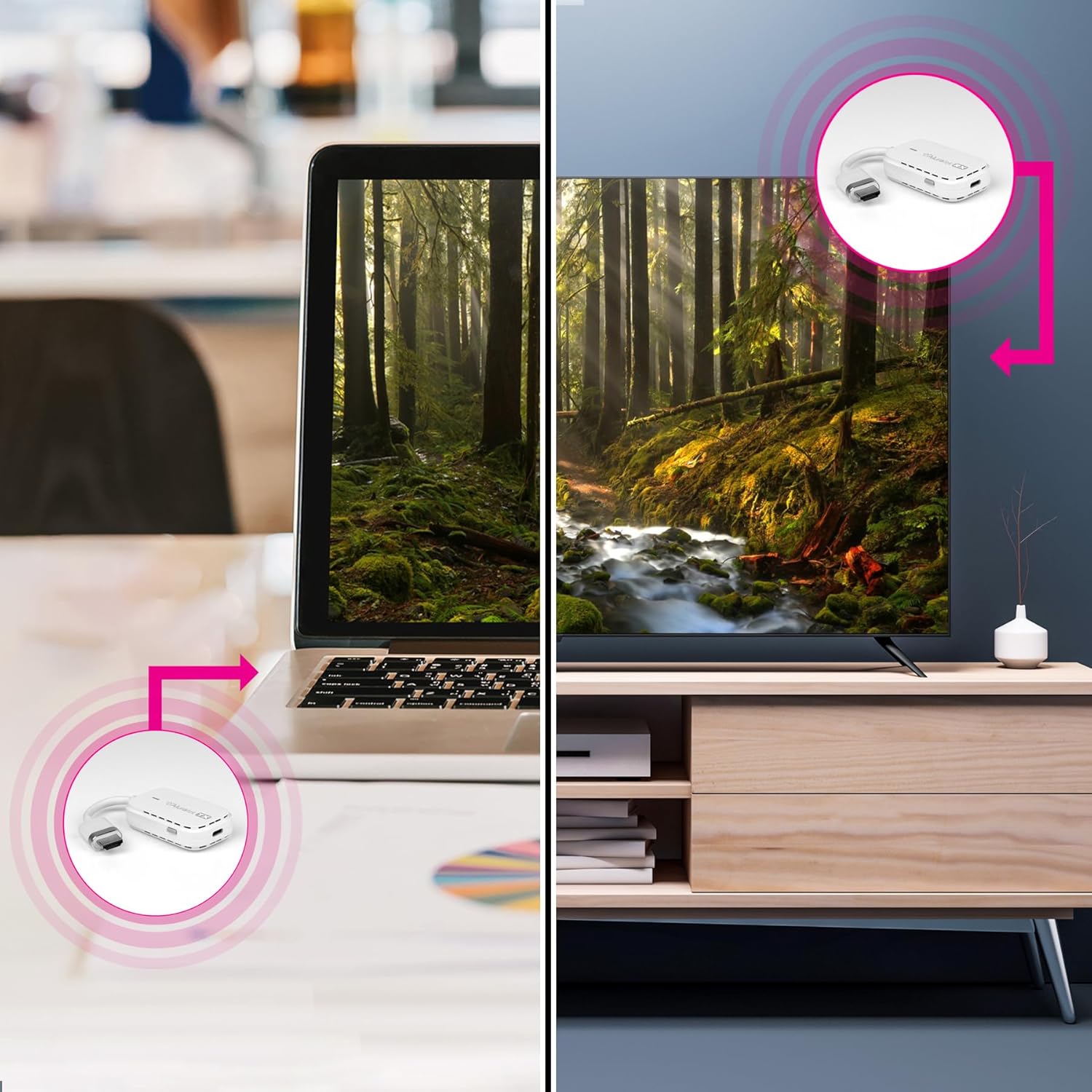
Image: A visual representation of the setup process, illustrating the connection of the transmitter to a laptop and the receiver to a television.
4. คู่มือการใช้งาน
Once the setup is complete, the Streamcast Pro will automatically begin mirroring your source device's display to your connected HDTV, projector, or monitor.
- การเชื่อมต่ออัตโนมัติ: The transmitter and receiver are pre-paired and should connect automatically.
- การสตรีมเนื้อหา: Any content displayed on your source device's screen, including videos, presentations, or applications, will be wirelessly streamed to the connected display.
- ปณิธาน: The system supports streaming in 1080P resolution.
- พิสัย: The wireless transmission distance supports up to 100 feet (30 meters) in an open environment. Performance may vary based on environmental factors such as walls and interference.

Image: A laptop displaying a video, with the Streamcast Pro transmitter connected, wirelessly transmitting the video to a television.
5. การบำรุงรักษา
To ensure the longevity and optimal performance of your Aluratek Streamcast Pro, please observe the following maintenance guidelines:
- การทำความสะอาด: Use a soft, dry cloth to clean the devices. Avoid liquid cleaners or solvents.
- พื้นที่จัดเก็บ: เก็บชุดอุปกรณ์ไว้ในที่แห้งและเย็น หลีกเลี่ยงแสงแดดโดยตรงและอุณหภูมิที่สูงหรือต่ำเกินไป
- การจัดการ: โปรดใช้งานอุปกรณ์ด้วยความระมัดระวังเพื่อป้องกันความเสียหาย หลีกเลี่ยงการทำตกหรือการกระแทกอย่างแรง
- การระบายอากาศ : Ensure the ventilation slots on the units are not obstructed during operation to prevent overheating.
6 การแก้ไขปัญหา
If you encounter issues with your Streamcast Pro, refer to the following common troubleshooting steps:
- ไม่มีสัญญาณบนจอแสดงผล:
- Ensure both the transmitter and receiver are securely connected to their respective HDMI ports.
- Verify that both units are receiving power via the USB-C to USB-A cable.
- Check that your display device is set to the correct HDMI input source.
- ลองรีสตาร์ททั้งอุปกรณ์ต้นทางและอุปกรณ์แสดงผลดู
- คุณภาพวิดีโอ/เสียงไม่ดี หรือการเชื่อมต่อไม่เสถียร:
- Ensure the transmitter and receiver are within the recommended operating range (up to 100ft/30m).
- Minimize obstructions (walls, furniture) between the transmitter and receiver.
- Check for potential sources of wireless interference (e.g., other wireless devices, microwaves).
- Ensure the USB power source provides sufficient power to both units.
- ไม่มีเสียง:
- Verify that the audio output on your source device is not muted or set to a very low volume.
- ตรวจสอบการตั้งค่าเสียงบนอุปกรณ์แสดงผลของคุณ
If problems persist, please contact Aluratek technical support.
7. ข้อมูลจำเพาะ
| คุณสมบัติ | รายละเอียด |
|---|---|
| หมายเลขรุ่น | AWHTR01F |
| เทคโนโลยีการเชื่อมต่อ | HDMI ไร้สาย |
| ประเภทขั้วต่อ | HDMI |
| ปณิธาน | 1080p |
| ช่วงสาย | สูงถึง 100 ฟุต (30 เมตร) |
| ขนาดสินค้า | 4 x 2 x 1.25 นิ้ว |
| น้ำหนักสินค้า | 6 ออนซ์ |
| สี | สีขาว |
| คุณสมบัติพิเศษ | Lightweight, No Programming Required, Plug-N-Play |
8. ข้อมูลการรับประกัน
The Aluratek Streamcast Pro Wireless HDMI Transmitter and Receiver Streaming Kit (AWHTR01F) comes with a รับประกันจำกัด 1 ปี ตั้งแต่วันที่ซื้อ การรับประกันนี้ครอบคลุมถึงข้อบกพร่องในวัสดุและฝีมือการผลิตภายใต้การใช้งานปกติ
For warranty claims or further details, please refer to the official Aluratek webไซต์หรือติดต่อฝ่ายสนับสนุนลูกค้า
9. การสนับสนุนด้านเทคนิค
For technical assistance or inquiries regarding your Aluratek Streamcast Pro, free local technical support is available in the USA.
Please visit the official Aluratek webไซต์สำหรับข้อมูลติดต่อและทรัพยากรการสนับสนุน
ผู้ผลิต: Aluratek


