1. บทนำ
This instruction manual provides essential information for the safe and effective use of your GT POWER AC Adapter, model 602. This power supply is designed to be compatible with the Verizon WNC-CR200A Gateway Router. Please read this manual thoroughly before use and retain it for future reference.
2. ข้อมูลด้านความปลอดภัย
WARNING: To reduce the risk of electric shock, fire, or injury, observe the following safety precautions:
- Ensure the power adapter is used with devices that match its voltage และข้อกำหนดปัจจุบัน
- Do not expose the adapter to water, rain, or excessive moisture.
- Do not disassemble or modify the adapter. Refer all servicing to qualified personnel.
- Avoid placing the adapter in areas with poor ventilation or near heat sources.
- Inspect the adapter and cable for damage before each use. Do not use if damaged.
- เก็บให้พ้นจากมือเด็ก
- ถอดอะแดปเตอร์ออกจากเต้ารับไฟฟ้าเมื่อไม่ได้ใช้งานเป็นเวลานาน
This adapter features Over Voltage Protection (OVP), Over Current Protection (OCP), and Short Circuit Protection (SCP) to ensure safe operation.
3. เนื้อหาบรรจุภัณฑ์
- 1 x GT POWER AC Adapter (Model 602)
4. สินค้าหมดview
The GT POWER AC Adapter is a compact and reliable power supply designed for specific networking equipment. It converts standard AC wall power to the DC power required by your device.

รูปที่ 4.1: ด้านหน้า view of the GT POWER AC Adapter, showing the power prongs and the output cable.

รูปที่ 4.2: ด้านข้าง view of the GT POWER AC Adapter, highlighting the barrel connector at the end of the output cable.
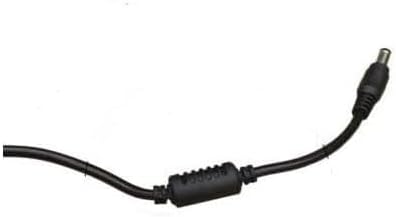
รูปที่ 4.3: ภาพระยะใกล้ view of the barrel connector, which plugs into the compatible device.
5. การตั้งค่า
Follow these steps to properly connect your GT POWER AC Adapter to your Verizon WNC-CR200A Gateway Router.
- ตรวจสอบความเข้ากันได้ของอุปกรณ์: Before connecting, ensure your device is a Verizon WNC-CR200A Gateway Router. The adapter is specifically designed for this model. You can often find the model number on a label at the bottom or back of your router.

รูปที่ 5.1: Example of a Verizon WNC-CR200A Gateway Router's bottom label, indicating the model number for compatibility verification.
- เชื่อมต่อกับอุปกรณ์: Insert the barrel connector of the GT POWER AC Adapter firmly into the power input port of your Verizon WNC-CR200A Gateway Router.
- เชื่อมต่อกับเต้ารับไฟฟ้า: เสียบปลั๊กไฟ AC ของอะแดปเตอร์เข้ากับเต้ารับไฟฟ้า AC 100-240V มาตรฐาน
- เปิดเครื่อง: Once connected, your Verizon WNC-CR200A Gateway Router should power on automatically or can be turned on using its power button, if available.
6. ปฏิบัติการ
The GT POWER AC Adapter operates automatically once connected. It provides a stable power supply to your compatible device. No user interaction is required for its operation beyond initial connection.
- Ensure the adapter is always connected to a functioning power outlet.
- Avoid disconnecting the adapter during critical operations of your router to prevent data loss or system instability.
7. การบำรุงรักษา
Proper maintenance ensures the longevity and safe operation of your AC adapter.
- การทำความสะอาด: Disconnect the adapter from the power outlet and the device before cleaning. Use a soft, dry cloth to wipe the exterior. Do not use liquid cleaners or solvents.
- พื้นที่จัดเก็บ: เมื่อไม่ใช้งาน ควรเก็บอะแดปเตอร์ไว้ในที่แห้งและเย็น หลีกเลี่ยงแสงแดดโดยตรงและอุณหภูมิที่สูงหรือต่ำเกินไป หลีกเลี่ยงการม้วนสายแน่นเกินไปเพื่อป้องกันความเสียหาย
- การดูแลสายเคเบิล: Do not bend, twist, or pull the cable excessively. Avoid placing heavy objects on the cable.
8 การแก้ไขปัญหา
If you encounter issues with your GT POWER AC Adapter, refer to the following common problems and solutions:
| ปัญหา | สาเหตุที่เป็นไปได้ | สารละลาย |
|---|---|---|
| เครื่องเปิดไม่ติด |
|
|
| อะแดปเตอร์ร้อนผิดปกติ |
|
|
9. ข้อมูลจำเพาะ
| คุณสมบัติ | รายละเอียด |
|---|---|
| หมายเลขรุ่น | 602 |
| ยี่ห้อ | จีที พาวเวอร์ |
| อินพุต Voltage | ไฟฟ้ากระแสสลับ 100-240 โวลต์ (50/60 เฮิรตซ์) |
| ปริมาณการส่งออกtage | กระแสตรง 12 โวลต์ |
| กระแสไฟขาออก | 3A |
| วัดtage | 36 วัตต์ |
| ประเภทขั้วต่อ | บาร์เรล |
| ความยาวสายเคเบิล | 59 นิ้ว (ประมาณ 1.5 เมตร) |
| คุณสมบัติการป้องกัน | OVP (มากกว่าVoltage Protection), OCP (Over Current Protection), SCP (Short Circuit Protection) |
| อุปกรณ์ที่รองรับ | Verizon WNC-CR200A Gateway Router CR200A WiFi6 NKR-LV65C-T3 |
10. การรับประกันและการสนับสนุน
This GT POWER AC Adapter comes with a รับประกัน 1 ปี นับจากวันที่ซื้อ นอกจากนี้ ยังมี รับประกันคืนเงินภายใน 30 วัน มีให้บริการ
For technical support, warranty claims, or further assistance, please contact your retailer or the manufacturer directly. Please have your purchase information and product model number (602) available when contacting support.
For more information, you may refer to the seller's contact details provided at the point of purchase.


